
Introduction
This manual provides detailed instructions for the NEEWER Z880-N 2.4G i-TTL Camera Flash Speedlite and the accompanying FC-16 2.4G Wireless Camera Shutter Studio Flash Trigger. Please read this manual thoroughly before use to ensure proper operation and to maximize the performance of your equipment. This system is designed for use with Nikon cameras.
Product Components
The NEEWER Z880-N kit includes:
- NEEWER Z880-N Speedlite
- FC-16 2.4G Wireless Camera Shutter Studio Flash Trigger (1 Transmitter, 2 Receivers)
- Rechargeable 7.4V/2600mAh Lithium Battery
- Battery Charger
- Mini Stand
- Protective Case

Image: Overview of the NEEWER Z880-N Speedlite, FC-16 wireless trigger, and included accessories.
Setup
1. Battery Installation and Charging
- Ensure the flash unit is powered off.
- Open the battery compartment cover on the Z880-N Speedlite.
- Insert the 7.4V/2600mAh lithium battery, ensuring correct polarity.
- Close the battery compartment cover securely.
- To charge the battery, connect it to the provided USB charger. A full charge typically takes approximately 3.5 hours.

Image: The Z880-N Speedlite showing the battery compartment and the battery being charged via a USB connection.
2. Mounting the Speedlite
- Slide the Z880-N Speedlite onto your Nikon camera's hot shoe.
- Secure the flash by rotating the locking ring or lever until it is firmly attached.
3. FC-16 Wireless Trigger Setup
The FC-16 trigger system consists of one transmitter and two receivers.
- Transmitter: Mount the FC-16 transmitter onto your camera's hot shoe.
- Receivers: Attach the FC-16 receivers to compatible studio strobes or speedlites. Ensure the channel and group settings on the transmitter and receivers match for proper communication.
Operating Instructions
1. Power On/Off and User Interface
Press and hold the power button to turn the Z880-N Speedlite on or off. The high-definition LCD screen provides an intuitive user interface for easy navigation and setting adjustments.

Image: The Z880-N Speedlite's enhanced user interface showing key settings and performance indicators.
2. Flash Modes
The Z880-N Speedlite offers multiple flash modes for various shooting scenarios:
- TTL (Through-The-Lens) Auto Mode: Automatically meters flash output for correct exposure. Supports ±3 exposure compensation (19 levels).
- M (Manual) Mode: Allows manual adjustment of flash output from 1/256 to 1/1 (81 levels). Includes S1/S2 optical slave functions.
- RPT (Repetitive Flash/Stroboscopic) Mode: Enables up to 100 stroboscopic flashes at 199Hz for capturing multiple movements in a single frame.

Image: The Z880-N Speedlite's display showing the TCM Quick Switch for transitioning between TTL and Manual modes, along with their respective settings.

Image: The Z880-N Speedlite set to RPT (Repetitive Flash) mode, illustrating its capability to capture multiple exposures of a moving subject.
3. High-Speed Sync (HSS) and Curtain Sync
- 1/8000s HSS: Allows synchronization with shutter speeds up to 1/8000s, useful for shooting with wide apertures in bright conditions.
- Front/Rear Curtain Sync: Provides creative control over motion blur effects by firing the flash at the beginning or end of the exposure.

Image: Visual examples demonstrating the effect of 1/8000s High-Speed Sync and the difference between front and rear curtain synchronization.
4. Built-in 2.4G Wireless Q System
The Z880-N Speedlite features an integrated NEEWER 2.4G Q System for wireless flash control. It supports:
- 4 Master Groups (A/B/C/D)
- 5 Slave Groups (A/B/C/D/E, D/E for QPro triggers)
- 32 Channels (1-32)
- 99 IDs (1-99)
It can function as a master or slave unit with other Q system flashes and allows wireless flash sync within 100m (without obstacles). Compatible with QPRO-C Trigger (sold separately) for advanced wireless control.
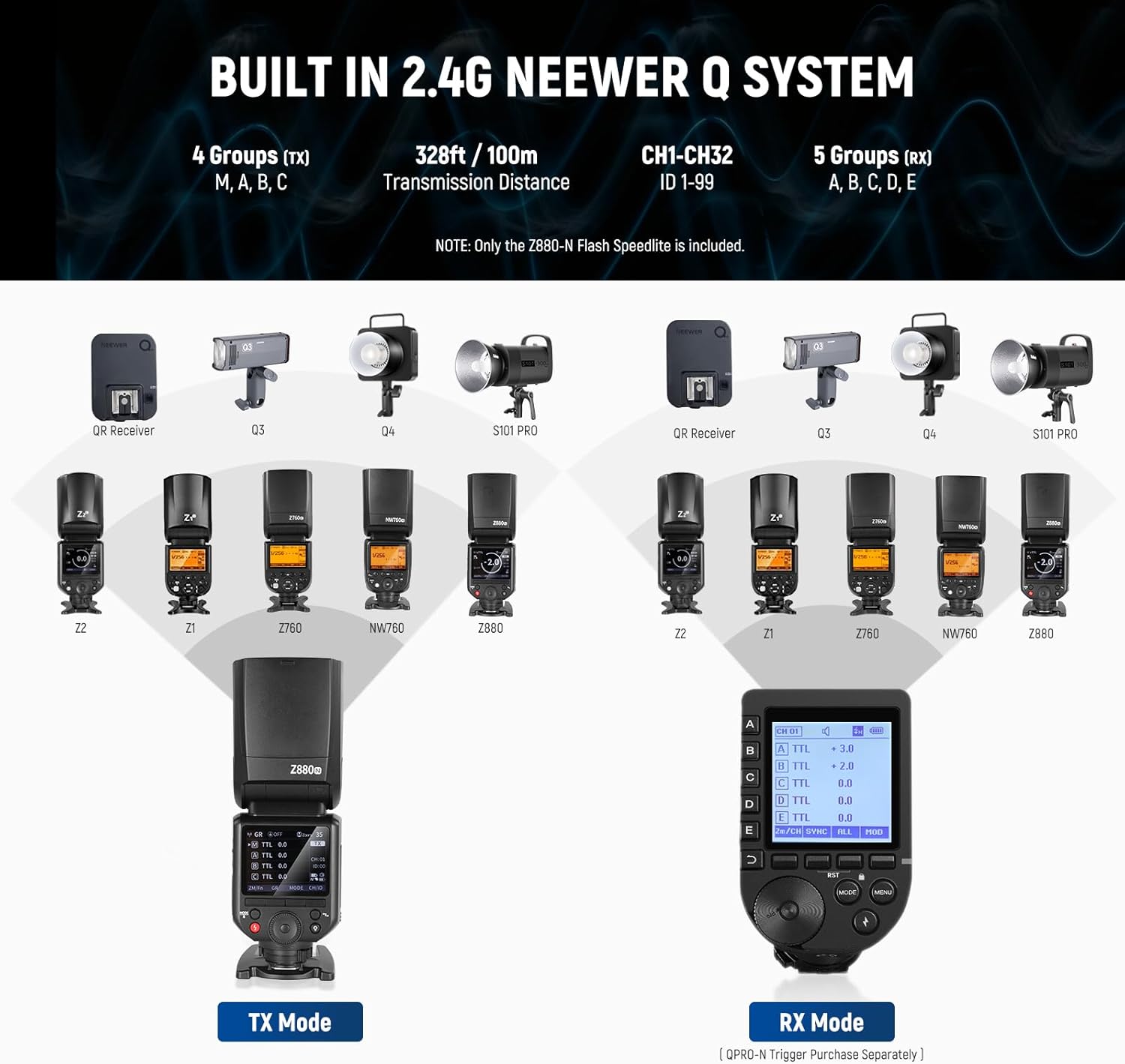
Image: An illustration of the NEEWER 2.4G Q System, detailing its transmitter (TX) and receiver (RX) modes, group and channel settings, and compatibility with various NEEWER flash units.
5. FC-16 Wireless Trigger Functions
The FC-16 remote flash transmitter offers three primary functions:
- Studio Strobe Flash Trigger: Remotely triggers wireless synchronous studio strobe flashes (e.g., NEEWER S101-300W, S101-400W, Q300).
- Speedlite Flash Trigger: Functions as a wireless trigger for speedlite flashes.
- Camera Shutter Release: Can be used as a wireless camera shutter release.
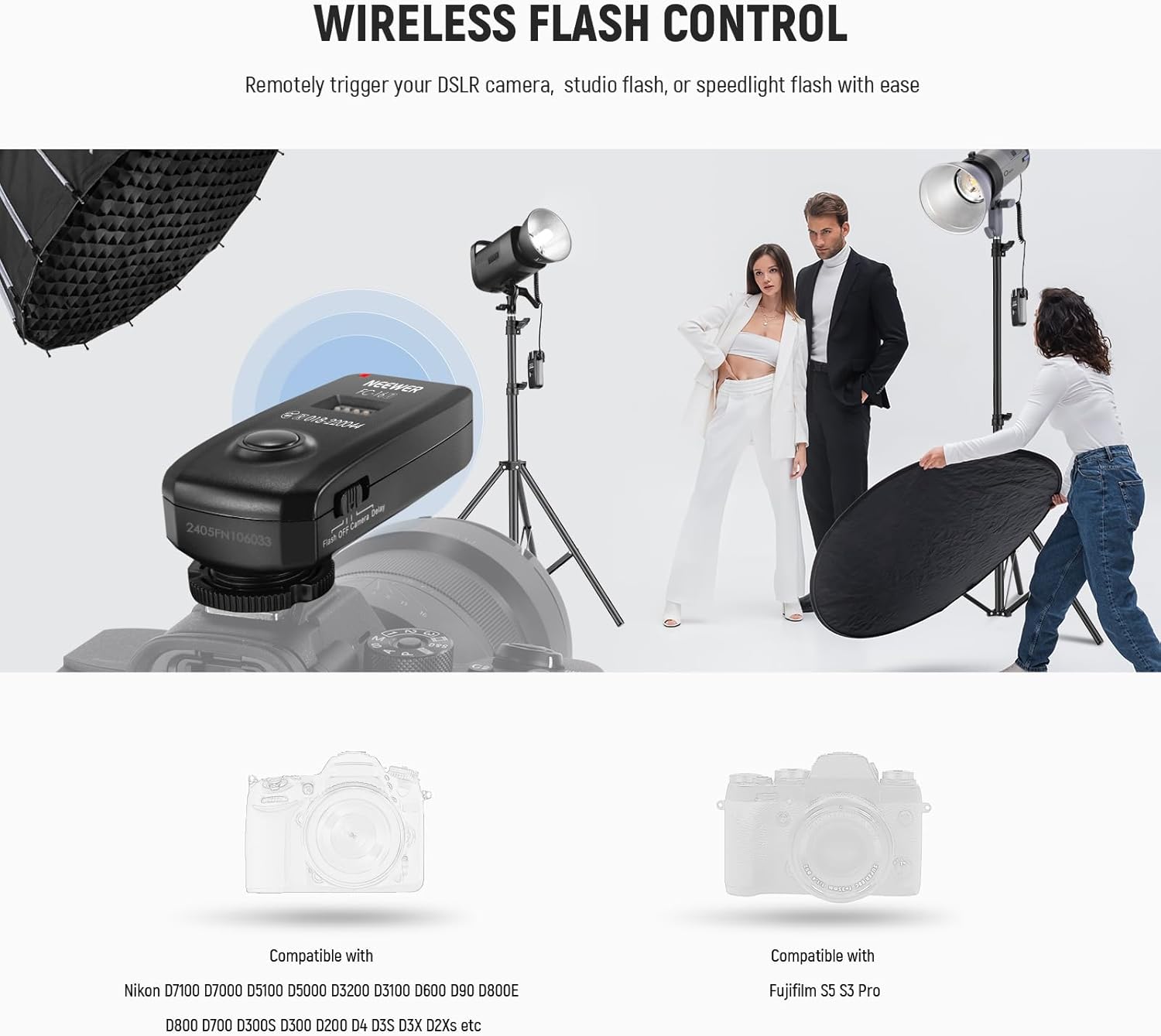
Image: The FC-16 wireless trigger mounted on a camera, demonstrating its ability to remotely control a studio flash and other lighting equipment.

Image: A visual representation of the FC-16 trigger's versatile 3-in-1 functionality, showing its use as a trigger for strobe flashes, speedlites, and as a remote camera shutter release.
6. Modeling Lamp and Flash Head Adjustment
- Modeling Lamp: The powerful LED modeling lamp features 10 dimming levels for accurate flash preview.
- Flash Head: The flash head can tilt from -7° to 120° and rotate from 0° to 330° for flexible light bouncing and positioning.
Maintenance
1. Battery Care
- Always use the provided charger for the 7.4V/2600mAh lithium battery.
- Avoid overcharging or completely draining the battery to prolong its lifespan.
- Store batteries in a cool, dry place when not in use.
2. Cleaning
- Use a soft, dry cloth to clean the exterior of the flash and trigger units.
- For stubborn dirt, a slightly damp cloth with mild soap can be used, followed by a dry cloth.
- Do not use strong solvents or abrasive cleaners.
- Keep the hot shoe contacts clean and free of debris.
3. Storage
- When not in use for extended periods, remove the battery from the flash unit.
- Store the flash and trigger in their protective cases in a dry, dust-free environment.
Troubleshooting
- Flash Not Firing: Check battery level, ensure flash is securely mounted, verify camera flash settings, and confirm wireless trigger connection if applicable.
- Inconsistent Exposure: Review flash mode settings (TTL/Manual), adjust exposure compensation, check for obstructions, and ensure flash head is correctly positioned.
- Wireless Connection Issues: Ensure transmitter and receiver channels/groups match. Check battery levels in both units. Reduce distance between units or clear line of sight.
- Flash Overheating: Allow the flash to cool down if the overheating warning appears. Avoid rapid, consecutive full-power flashes.
Specifications
| Feature | Specification |
|---|---|
| Model Number | Z880-N |
| Brand | NEEWER |
| Compatible Mountings | Nikon |
| Camera Flash Type | Studio / Shoe Mount |
| Maximum Output | 76Ws |
| Guide Number | GN60 (ISO100, 200mm) |
| Color Temperature | 5600K±200K |
| Flash Duration | 1/180s - 1/20000s |
| Recycling Time | 1.5s |
| Focal Length | 20-200mm (Auto/Manual) |
| Battery | 7.4V/2600mAh Rechargeable Lithium |
| Full Power Flashes | Approx. 480 |
| Flash Sync Speed | Up to 1/8000s (HSS) |
| Wireless System | NEEWER 2.4G Q System |
| Wireless Range | 100m / 328' (without obstacles) |
| Included Components | FC-16 2.4G Wireless Camera Shutter Studio Flash Trigger with Two Receivers |
Warranty and Support
For warranty information and technical support, please refer to the official NEEWER website or contact their customer service directly. Keep your purchase receipt as proof of purchase for any warranty claims.


