1. Introduction
This manual provides instructions for the AULCMEET replacement remote control, compatible with various LG Cinema LED LCD 3D Smart TV models. This remote is designed to function without programming, offering direct control over your television.
1.1 Compatible LG TV Models
This remote control is compatible with the following LG TV models:
- 42LM3400, 47LM4600, 47LM4600-UC, 47LM4600UC, 47LM5800, 55LM4600, 55LM4600-UC, 55LM4600UC, 55LM5800, 55LM5800-UC, 55LM5800UC, 55LM5850
- 32LS3500, 32LS3500-UD, 32LS3500UD, 32LS3510, 32LS3510-UA, 32LS3510UA
- 37CS560, 37CS560-UE, 37CS560UE
- 42CS460-UC, 42CS460UC, 42CS530, 42CS530-UB, 42CS530UB, 42CS560, 42CS560-UE, 42CS560UE
- 42LS3400, 42LS3400-UA, 42LS3400UA, 42LS349C
- 32LS5600, 32LS5600UC, 32LS5600-UC, 37LS5600, 37LS5600UC, 37LS5600-UC, 42LS5600, 42LS5600UC, 42LS5600-UC, 42LS5650, 42LS5650UD, 42LS5650-UD
- 42PA4900, 42PA4900UD, 42PA4900-UD, 42PA4900UF, 42PA4900-UF
- 47LS4600, 47LS4600UA, 47LS4600-UA, 47LS5600, 47LS5600UC, 47LS5600-UC, 47LS5650
- 42LM3700, 42LM3400, 32LM5800, 42LM5800
- 47CM565, 47CM565-UB, 47CM565UB
2. Product Overview
The AULCMEET replacement remote control features a standard layout for LG TVs, providing access to essential functions.

Figure 2.1: Front view of the AULCMEET replacement remote control, showing all buttons.
2.1 Button Functions
- Power (Red Button): Turns the TV on or off.
- TV: Switches to TV mode.
- RATIO: Adjusts the screen aspect ratio.
- INPUT: Selects input sources (HDMI, AV, etc.).
- ENERGY SAVING: Activates or deactivates energy-saving modes.
- Number Buttons (0-9): Direct channel selection.
- LIST: Displays the channel list.
- FLASHBK: Returns to the previous channel.
- VOL (+/-): Adjusts volume up or down.
- MUTE: Mutes or unmutes the sound.
- CH (Page Up/Down): Changes channels up or down.
- FAV: Accesses favorite channels.
- 3D: Activates or deactivates 3D mode (for compatible TVs).
- SETTINGS: Opens the TV settings menu.
- INFO: Displays program information.
- Q.MENU: Opens the Quick Menu.
- Navigation Pad (Up/Down/Left/Right) & OK: Navigates menus and confirms selections.
- Back (Curved Arrow): Returns to the previous screen or menu.
- AV MODE: Selects AV modes.
- EXIT: Exits the current menu or function.
- Color Buttons (Red, Green, Yellow, Blue): Access specific functions depending on the TV menu or application.
- Playback Controls (Rewind, Play, Fast Forward, Pause, Stop): Controls media playback.
3. Setup
This AULCMEET replacement remote control is designed for immediate use with compatible LG TVs without requiring any programming.
3.1 Battery Installation
- Locate the battery compartment on the back of the remote control.
- Slide the battery cover downwards or press the latch and lift to open.
- Insert two (2) AAA batteries, ensuring the positive (+) and negative (-) terminals match the diagrams inside the compartment.
- Close the battery cover by sliding it back into place until it clicks securely.

Figure 3.1: Illustration of battery installation and the remote's direct usability.
3.2 Initial Use
Once batteries are installed, the remote control is ready to operate your compatible LG TV. Point the remote directly at the TV's infrared receiver.
4. Operating Instructions
To operate your LG TV with this remote control, ensure there are no obstructions between the remote and the TV's infrared sensor.
- Power On/Off: Press the Power button once.
- Channel Selection: Use the number buttons for direct channel input or the CH buttons to cycle through channels.
- Volume Adjustment: Use the VOL buttons to increase or decrease the volume.
- Input Source: Press the INPUT button to cycle through available input sources (e.g., HDMI 1, AV, Component).
- Menu Navigation: Use the SETTINGS or Q.MENU buttons to access TV menus. Navigate using the directional pad and confirm selections with the OK button.

Figure 4.1: Remote control in use with a compatible LG TV.
5. Maintenance
Proper maintenance ensures the longevity and optimal performance of your remote control.
5.1 Cleaning
- Wipe the remote control with a soft, dry cloth.
- For stubborn dirt, slightly dampen the cloth with water or a mild, non-abrasive cleaner.
- Avoid using harsh chemicals, solvents, or abrasive cleaning pads, as these can damage the remote's surface and buttons.
5.2 Battery Replacement
- Replace batteries when the remote's response becomes sluggish or it stops functioning.
- Always replace both AAA batteries at the same time with new ones.
- Do not mix old and new batteries, or different types of batteries.
- Remove batteries if the remote will not be used for an extended period to prevent leakage.
5.3 Storage
- Store the remote control in a cool, dry place away from direct sunlight and extreme temperatures.
- Avoid dropping the remote or exposing it to excessive moisture.
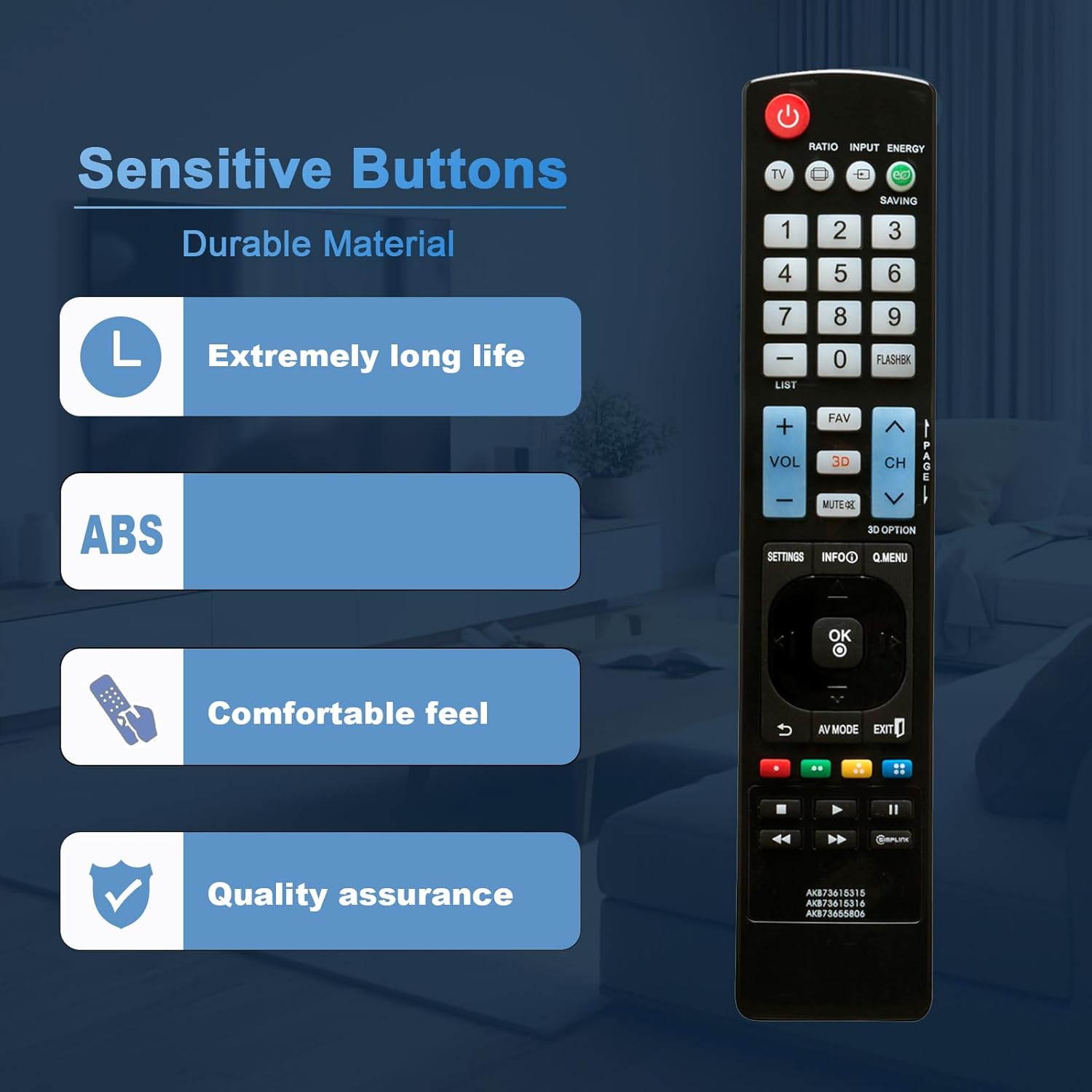
Figure 5.1: The remote control is constructed from durable ABS material for long-lasting use.
6. Troubleshooting
If you experience issues with your remote control, refer to the following common solutions:
| Problem | Possible Cause | Solution |
|---|---|---|
| Remote not responding. | Dead or incorrectly inserted batteries. | Replace batteries with new AAA batteries, ensuring correct polarity (+/-). |
| Remote range is poor. | Low batteries; Obstruction between remote and TV; Interference. | Replace batteries. Ensure a clear line of sight to the TV's IR sensor. Move away from strong light sources or other electronic devices. |
| Specific buttons not working. | Dirt or debris under the button; Button malfunction. | Clean the remote control. If the issue persists, the button may be faulty. |
| TV not responding to any remote commands. | TV's IR sensor is blocked or faulty; TV is off or unplugged. | Check if the TV is powered on. Ensure nothing is blocking the TV's IR sensor. Try using the TV's physical buttons. |
7. Specifications
| Feature | Detail |
|---|---|
| Brand | AULCMEET |
| Model Numbers | AKB73615315, AKB73615316, AKB73655806 |
| Compatible Devices | LG Cinema LED LCD 3D Smart TVs (various models) |
| Power Source | 2 x AAA Batteries (not included) |
| Dimensions (L x W x H) | 6 x 2 x 0.5 inches (approximately 15.24 x 5.08 x 1.27 cm) |
| Item Weight | 1.9 ounces (approximately 53.86 grams) |
| Color | Black |
| Special Feature | Ergonomic design, Advanced Infrared Technology (up to 30ft range, 0-30 degree angle) |

Figure 7.1: Physical dimensions of the remote control.
8. Support
For further assistance or inquiries regarding your AULCMEET replacement remote control, please refer to the retailer or manufacturer's support channels where the product was purchased.