
1. Introduction
This manual provides essential information for the safe and efficient operation of your Cantonape 1500W/3000W (Peak) DC 24V to 110V/120V AC Power Inverter. Please read all instructions carefully before use and retain this manual for future reference.
Important Safety Information:
- Ensure proper ventilation around the inverter.
- Do not expose the inverter to water or excessive moisture.
- Avoid operating the inverter near flammable materials.
- Always connect the inverter to a 24V DC power source.
- Disconnect the inverter from the power source when not in use.
2. Product Features
- Powerful Output: Converts DC 24V to AC 110V/120V 60Hz. Provides 1500 Watts continuous modified sine wave power and 3000 Watts peak power.
- Versatile Charging: Features 2 AC outlets and 2 USB ports (Dual 3.1A) for multi-purpose charging.
- High Efficiency: Conversion efficiency greater than 90%.
- Smart LED Display: Displays input/output voltage and output power in normal operation. Shows error codes during abnormal states.
- Multi-Protection: Includes 6 types of protection: Overload, Short Circuit, Overheat, Reverse Polarity, Under Voltage, and Over Voltage.
- Durable Design: Features a durable aluminum body for advanced protection and efficient cooling. Built-in temperature control cooling fan. Isolated Ground Neutral.
- Wide Application: Ideal for charging laptops, fans, refrigerators, game consoles, Kindles, TVs, Christmas lights, breast pumps. Suitable for vacations, work trips, home use, outdoor activities, and camping.
3. Package Contents
- Cantonape 1500W/3000W (Peak) DC 24V to 110V/120V AC Power Inverter
- Battery Cables (Red and Black)
- Instruction Manual
4. Setup
Follow these steps to properly set up your power inverter:
- Prepare the Inverter: Place the inverter on a stable, dry, and well-ventilated surface. Ensure there is sufficient space around it for proper airflow to the cooling fan.
- Connect Battery Cables:
- Identify the positive (+) and negative (-) terminals on the inverter and your 24V DC battery.
- Connect the red battery cable to the positive (+) terminal of the inverter and then to the positive (+) terminal of the battery.
- Connect the black battery cable to the negative (-) terminal of the inverter and then to the negative (-) terminal of the battery.
- Ensure all connections are tight and secure to prevent arcing or overheating.
- Power On: Once the battery cables are securely connected, switch the inverter's power button to the 'ON' position. The LED display should illuminate, showing the input voltage and output status.

Image: Detailed view of the Cantonape 1500W Power Inverter, highlighting the positive and negative ports, cooling fan, AC sockets, power switch, LED indicator, and dual USB ports.
Video: This video demonstrates the process of installing alligator clips to a battery, which is a common method for connecting power inverters to a 12V battery source. While this inverter is 24V, the principle of secure terminal connection is similar.
5. Operating Instructions
Once the inverter is powered on, you can begin connecting your AC and USB devices.
- Connect AC Devices: Plug your 110V/120V AC appliances into the dual AC outlets on the inverter. Ensure the total wattage of your devices does not exceed the inverter's continuous power rating of 1500W.
- Connect USB Devices: Plug your USB-powered devices into the dual 3.1A USB ports for charging.
- Monitor the LED Display: The smart LED display provides real-time information:
- Battery Voltage: Shows the current DC input voltage from your battery.
- Output Voltage: Displays the AC output voltage provided by the inverter.
- Output Power: Indicates the current power consumption of connected devices.
- Shut Down: To turn off the inverter, first disconnect all connected devices, then switch the power button to the 'OFF' position. Finally, disconnect the battery cables from the battery terminals.
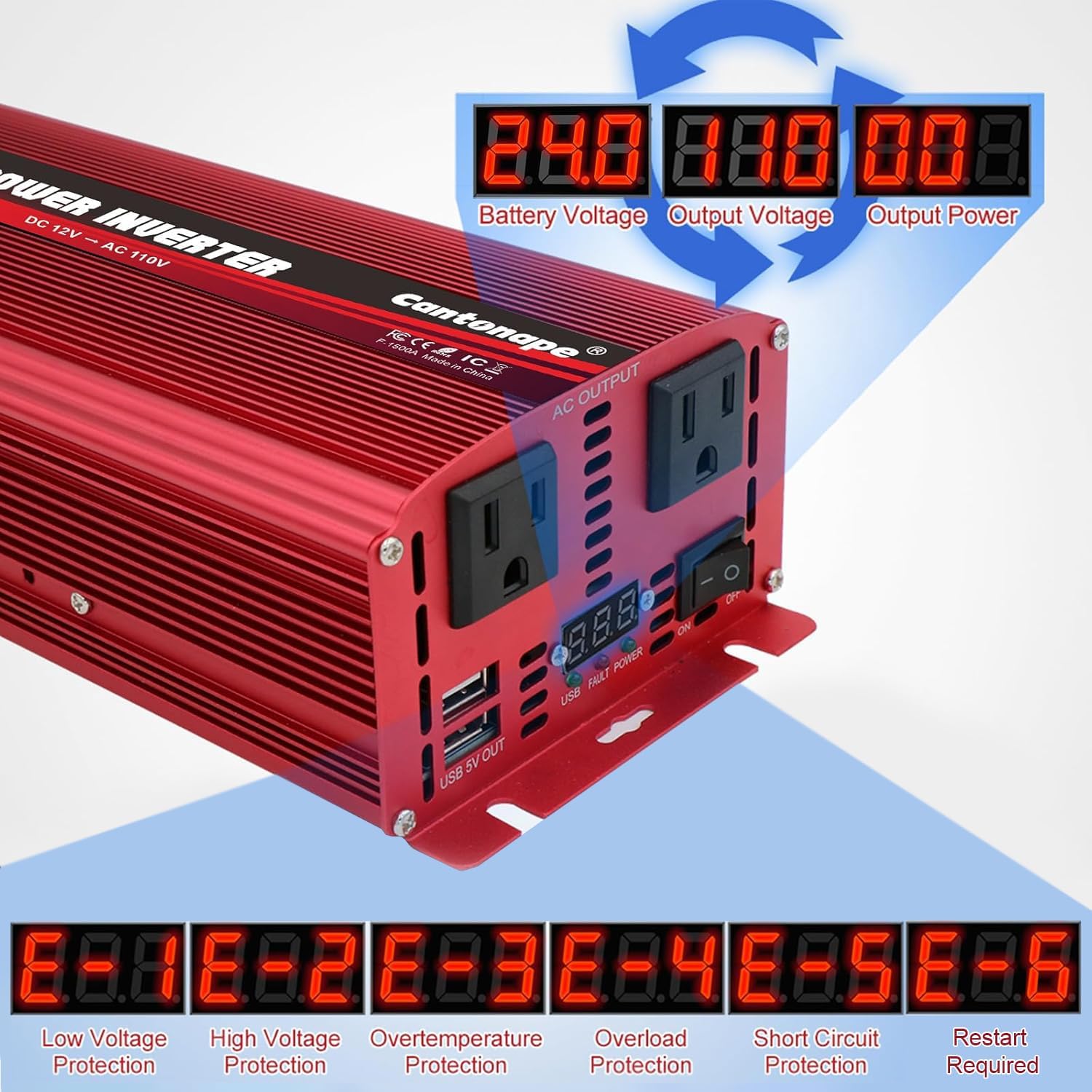
Image: The LED display of the Cantonape 1500W Power Inverter, illustrating how it shows battery voltage, output voltage, and output power during operation.

Image: A diagram illustrating three ways to connect the power inverter: with a solar panel and 24V battery, directly with a 24V battery, and with a cigarette lighter plug (for lower wattage models or specific applications).
6. Maintenance
Regular maintenance ensures the longevity and optimal performance of your inverter.
- Keep Clean: Periodically clean the exterior of the inverter with a dry cloth. Ensure the cooling fan vents are free from dust and debris.
- Check Connections: Regularly inspect battery cable connections for tightness and corrosion. Loose connections can lead to power loss or overheating.
- Ventilation: Always ensure the inverter is placed in a well-ventilated area to prevent overheating. The built-in cooling fan will activate automatically when needed.
- Storage: When storing the inverter for extended periods, disconnect it from the battery and store it in a cool, dry place.

Image: An exploded view of the Cantonape 1500W Power Inverter, highlighting its durable construction, temperature control, and smart, quiet cooling fan designed to prevent overheating.
7. Troubleshooting
The smart LED display provides error codes to help diagnose issues:
| Error Code | Description | Possible Solution |
|---|---|---|
| E-1 | Low Voltage Protection | Recharge or replace the battery. Check battery connections. |
| E-2 | High Voltage Protection | Check battery voltage; ensure it's within the specified range (24V). |
| E-3 | Overtemperature Protection | Allow the inverter to cool down. Ensure proper ventilation and clear any obstructions from the fan. |
| E-4 | Overload Protection | Reduce the total load connected to the inverter. Disconnect high-power devices. |
| E-5 | Short Circuit Protection | Check connected devices and cables for any short circuits. Disconnect faulty devices. |
| E-6 | Repeated Faults Shutdown, Restart Required | Address the underlying fault (E-1 to E-5), then turn the inverter off and on again. |

Image: The LED display of the Cantonape 1500W Power Inverter, illustrating how it shows various error codes (E-1 to E-6) and their corresponding protection types, such as low voltage, high voltage, overtemperature, overload, short circuit, and repeated faults.
8. Specifications
| Feature | Detail |
|---|---|
| Model Name | 1500W-24V |
| Continuous Wattage | 1500 Watts |
| Peak Wattage | 3000 Watts |
| Input Voltage | DC 24V |
| Output Voltage | AC 110V/120V |
| Output Frequency | 60Hz |
| USB Ports | Dual 3.1A |
| Conversion Efficiency | > 90% |
| Item Weight | 3.94 pounds |
| Package Dimensions | 12.28 x 6.77 x 2.91 inches |

Image: The Cantonape 1500W Power Inverter with its physical dimensions (length, width, height) and the length of the included battery cables clearly labeled.
9. Warranty & Support
Your Cantonape 1500W/3000W (Peak) DC 24V to 110V/120V AC Power Inverter comes with a 12-month warranty, ensuring peace of mind regarding product quality and performance.
For any questions, troubleshooting assistance, or warranty claims, please contact Cantonape customer support. Our dedicated team is committed to providing reliable and trustworthy after-sales service to ensure your satisfaction.
You can find more information and contact details by visiting the official Cantonape store: Cantonape Store on Amazon.