
1. Introduction
Thank you for choosing the Korfile 3-Tier Rolling Printer Stand with Storage Drawer. This versatile unit is designed to provide organized storage and mobility for your home office or living space. This manual contains important information regarding the assembly, operation, and maintenance of your new printer stand. Please read these instructions carefully before beginning assembly and retain them for future reference.

Image 1.1: The Korfile 3-Tier Rolling Printer Stand in a home office setting, featuring a printer on the top surface, a fabric drawer, and two open shelves for storage. The stand is equipped with wheels for mobility.
2. Product Overview
The Korfile Rolling Printer Stand is a compact and functional storage solution. It features a robust metal frame and engineered wood top, designed for durability and stability. Key features include:
- 3-Tier Design: Provides ample storage space with a top surface, a fabric drawer, and two open shelves.
- Spacious Desktop: Accommodates various printer sizes, or can be used for other office equipment or decorative items.
- Fabric Storage Drawer: Ideal for organizing small office supplies such as staplers, pens, and paper.
- Adjustable Middle Shelf: The height of the middle shelf can be adjusted to accommodate items of different sizes.
- Mobility Options: Equipped with four 360° swivel casters, two of which are lockable, for easy movement and secure placement. Four adjustable feet are also included for stationary use.
- Versatile Use: Functions as a printer stand, bedside table, sofa side table, nightstand, or general storage shelf.

Image 2.1: Detail of the top surface and fabric drawer. The top surface measures 14.96 inches deep by 11.02 inches wide, suitable for various printers. The drawer provides enclosed storage.

Image 2.2: The middle shelf can be adjusted to two different heights, allowing for flexible storage of various items.
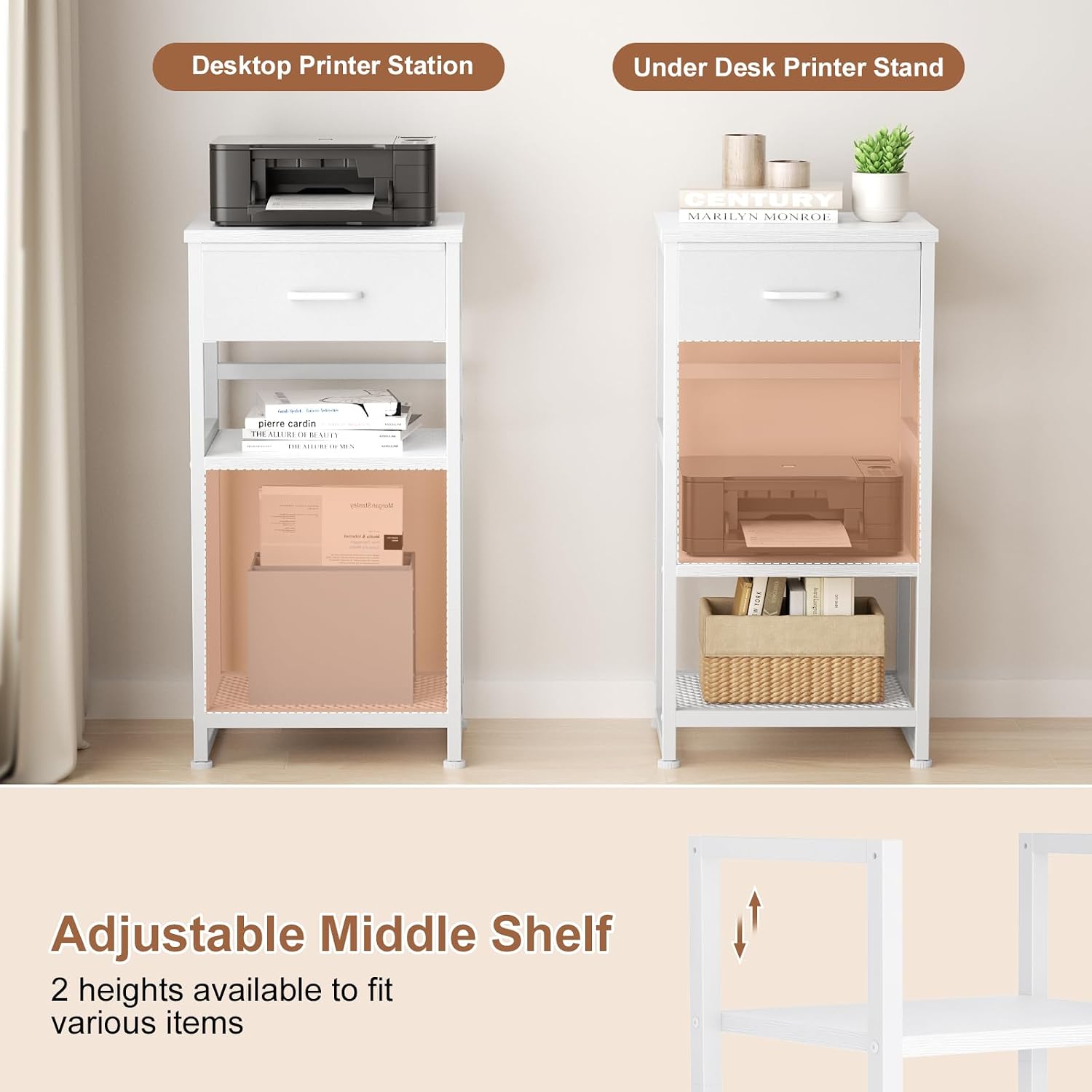
Image 2.3: The stand offers both lockable swivel wheels for mobility and adjustable leveling feet for stationary use on uneven surfaces.
3. Package Contents
Before beginning assembly, please verify that all parts and hardware are present and undamaged. Refer to the included assembly manual for a detailed list of components. If any parts are missing or damaged, please contact customer service immediately.
4. Assembly Instructions
Assembly is required for this product. Please follow the step-by-step instructions provided in the separate assembly manual included in your package. All accessories are digitally tagged for easier identification during setup. An assembly video may also be available on the product page for additional visual guidance.
General Assembly Tips:
- Lay out all components on a clean, soft surface to prevent scratches.
- Identify each part using the provided labels (e.g., Part A, Part B).
- Do not overtighten screws during initial assembly; tighten fully once the unit is stable.
- Ensure all connections are secure before use.
- The stand can be configured in various ways; consult the manual for different setup options.
5. Operating Instructions
Once assembled, the Korfile Printer Stand is ready for use. Its design allows for flexible placement and organization.
Placement and Mobility:
- Rolling Function: To move the stand, ensure the lockable casters are disengaged. Push or pull the stand gently to its desired location.
- Secure Placement: Once positioned, engage the brakes on the lockable casters to prevent unintended movement. If using the adjustable feet, ensure they are level and stable.
Storage and Organization:
- Top Surface: Place your printer, scanner, or other office equipment on the top surface. Ensure the weight does not exceed the stand's capacity.
- Fabric Drawer: Utilize the drawer for small items that require discreet storage.
- Open Shelves: Arrange books, folders, paper, or decorative items on the open shelves. Adjust the middle shelf height as needed to accommodate taller items.

Image 5.1: The stand can be used as a multifunctional table, such as a sofa side table or a bedside table, adapting to various room settings.

Image 5.2: The stand offers multiple configuration options, allowing it to function as a complete printer stand, a desktop bookshelf, or a two-tier organizer.
6. Care and Maintenance
To ensure the longevity and appearance of your Korfile Printer Stand, follow these care guidelines:
- Cleaning: Wipe surfaces with a soft, damp cloth. Avoid harsh chemicals or abrasive cleaners, which can damage the finish.
- Dusting: Regularly dust the stand with a dry, soft cloth.
- Spills: Clean up spills immediately to prevent staining or damage to the engineered wood.
- Hardware: Periodically check and tighten all screws and fasteners to maintain stability.
- Drawer Care: The fabric drawer can be spot cleaned with a mild detergent if necessary. Allow to air dry completely.
7. Troubleshooting
If you encounter any issues with your printer stand, please refer to the following common solutions:
Issue: Stand is wobbly or unstable.
- Solution: Ensure all screws and fasteners are securely tightened. If using adjustable feet, verify they are properly leveled on the floor. If using wheels, ensure the brakes are engaged when stationary.
Issue: Parts do not fit together during assembly.
- Solution: Double-check the assembly manual to ensure you are using the correct parts for each step and that they are oriented correctly. Some parts may appear similar but have subtle differences. If a part appears to be manufactured incorrectly or is missing, contact customer service for assistance.
Issue: Wheels do not roll smoothly or lock properly.
- Solution: Check for any debris or obstructions in the wheel mechanism. Ensure the wheels are securely attached to the stand. Verify that the locking mechanism is fully engaged or disengaged as intended.
8. Specifications
| Brand | Korfile |
| Model Number | Rolling Printer Stand |
| Product Dimensions (L x W x H) | 14.9 x 11.4 x 27.9 inches |
| Item Weight | 12.43 pounds |
| Material | Engineered Wood, Metal |
| Color | White |
| Assembly Required | Yes |
| Special Feature | Adjustable Shelf, Rolling Casters |

Image 8.1: Detailed product dimensions for the Korfile Rolling Printer Stand.
9. Customer Support
For any questions, concerns, or assistance with your Korfile Printer Stand, please do not hesitate to reach out to our customer service team. We are committed to providing efficient support and will endeavor to answer your questions within 24 hours.
Please refer to your purchase documentation or the retailer's website for specific contact information.