
Product Overview
The FLIPSKY FT60BD is a high-performance dual Electronic Speed Controller (ESC) designed for various electric vehicle applications such as e-boards, scooters, e-bikes, go-karts, and robotics. It features a robust design with an integrated heatsink, supporting a wide voltage range and high continuous current. This manual provides essential information for the proper setup, operation, and maintenance of your FT60BD ESC.
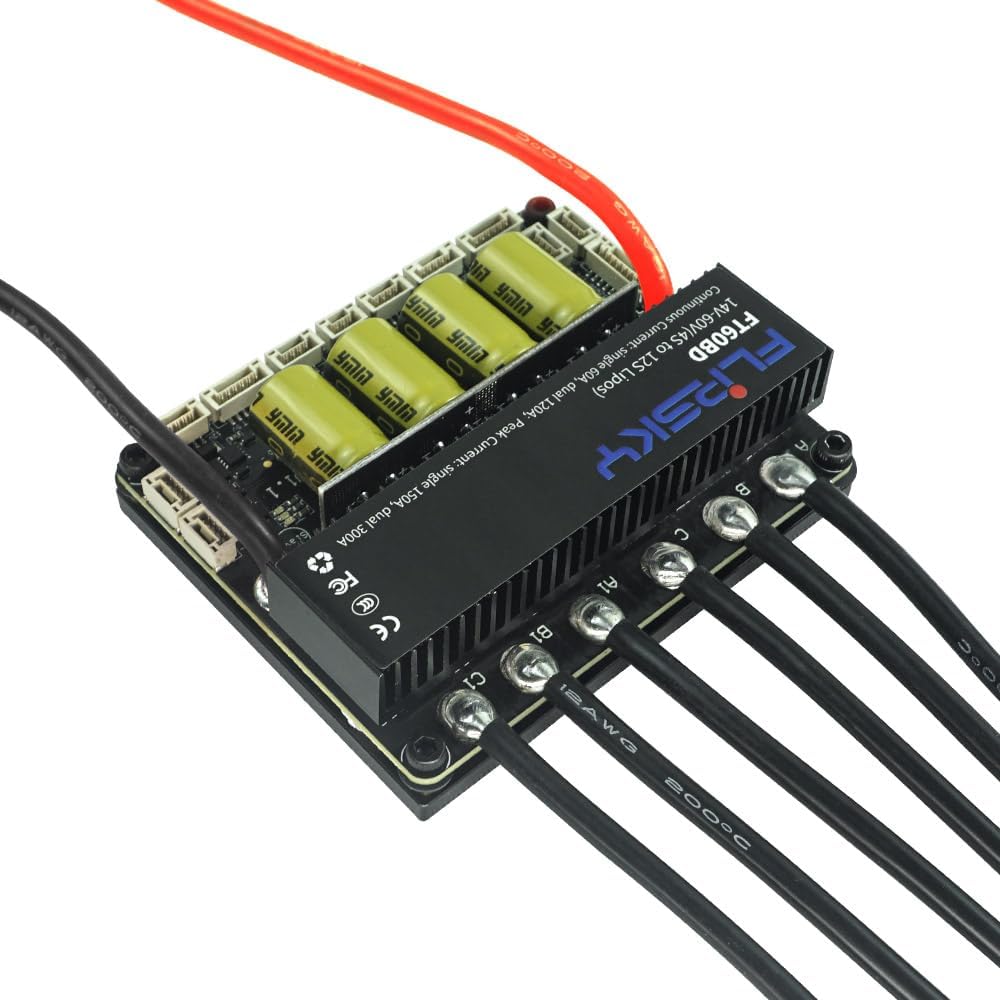
Image: Top view of the FLIPSKY FT60BD Dual ESC, showing the heatsink, capacitors, and connected motor phase wires.
Key Features
- Firmware: V1.4 or above, with support for firmware updates via Flipsky ESC Tool.
- Voltage Range: 14V-60V (compatible with 4S-12S LiPo batteries).
- Continuous Current: 60A per single motor; 120A for dual motors (values depend on mounting and ambient temperature).
- Peak Current: 150A per single motor; 300A for dual motors.
- Communication Ports: USB, CAN, UART, PPM, ADC.
- Input Signals Support: PPM, ADC, UART (compatible with FLIPSKY remote VX4 and VX3Pro), PAS.
- Startup Modes: IPDS (sensorless), HFPI (sensorless), HALL (sensored), Encoder (ABI, AS5047 SPI interface).
- Integrated BEC: 5V@1A output.
- Speed Control: Multiple speed gear levels (Low, Medium, High, Reverse).
- External Light & Horn Support: Dedicated interfaces for front lights, rear brake lights, and horn (12V 4A).
- Programmability: Configurable via Flipsky ESC Tool and Flipsky remote controller VX4 (firmware V1.4.0 or above).
- Motor Control: FOC (Field-Oriented Control) for low working noise and smooth starting.
- Monitoring: Real-time data and fault alerts.
- Adaptive Control: Adaptive variable PWM frequency control.
- Protection Functions: Includes low/high voltage, over-current, temperature abnormality, MOSFET over-temperature/over-current, battery over-discharge, and motor over-temperature protection.
- Smart Switch: Supports sliding power-on and automatic shutdown functions; auto-power-off time is customizable via Flipsky ESC Tool.
- Motor Temperature Sensor Support: Compatible with NTC-10K-25℃, NTC-10K-100℃, PT1000, PTC-1K-100℃, KTY, and similar sensors.
Specifications
| Parameter | Value |
|---|---|
| Voltage Range | 14V-60V (4S-12S LiPo) |
| Continuous Current (Single/Dual) | 60A / 120A |
| Peak Current (Single/Dual) | 150A / 300A |
| BEC Output | 5V@1A |
| Communication Ports | USB, CAN, UART, PPM, ADC |
| ESC Dimensions (L x W x H) | 85mm x 70mm x 25mm (including heatsink) |
| Power Wire Size | 12 AWG |
| Motor Wire Size | 12 AWG |
| Material | Aluminum (Heatsink) |
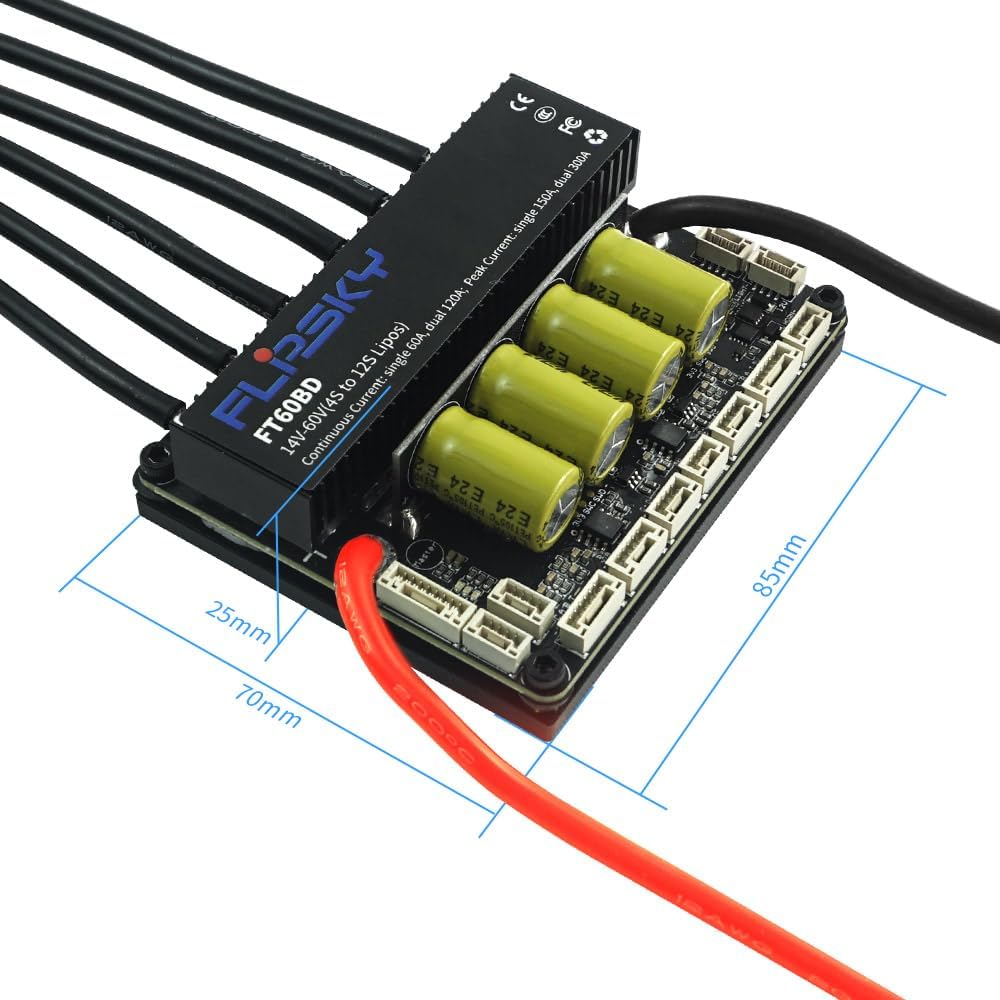
Image: The FLIPSKY FT60BD Dual ESC with key dimensions labeled. The unit measures 85mm in length, 70mm in width, and 25mm in height (including the heatsink).
Package Contents
- 1x FLIPSKY FT60BD Dual ESC
The package typically includes the ESC unit. Additional cables and accessories may be sold separately or as part of a kit.

Image: The FLIPSKY FT60BD Dual ESC unit shown with various connecting wires and a power switch, illustrating typical components included or compatible with the system.
Setup and Installation
Proper installation is crucial for the safe and efficient operation of your ESC. Refer to the connection diagrams below for guidance.
Connection Diagram
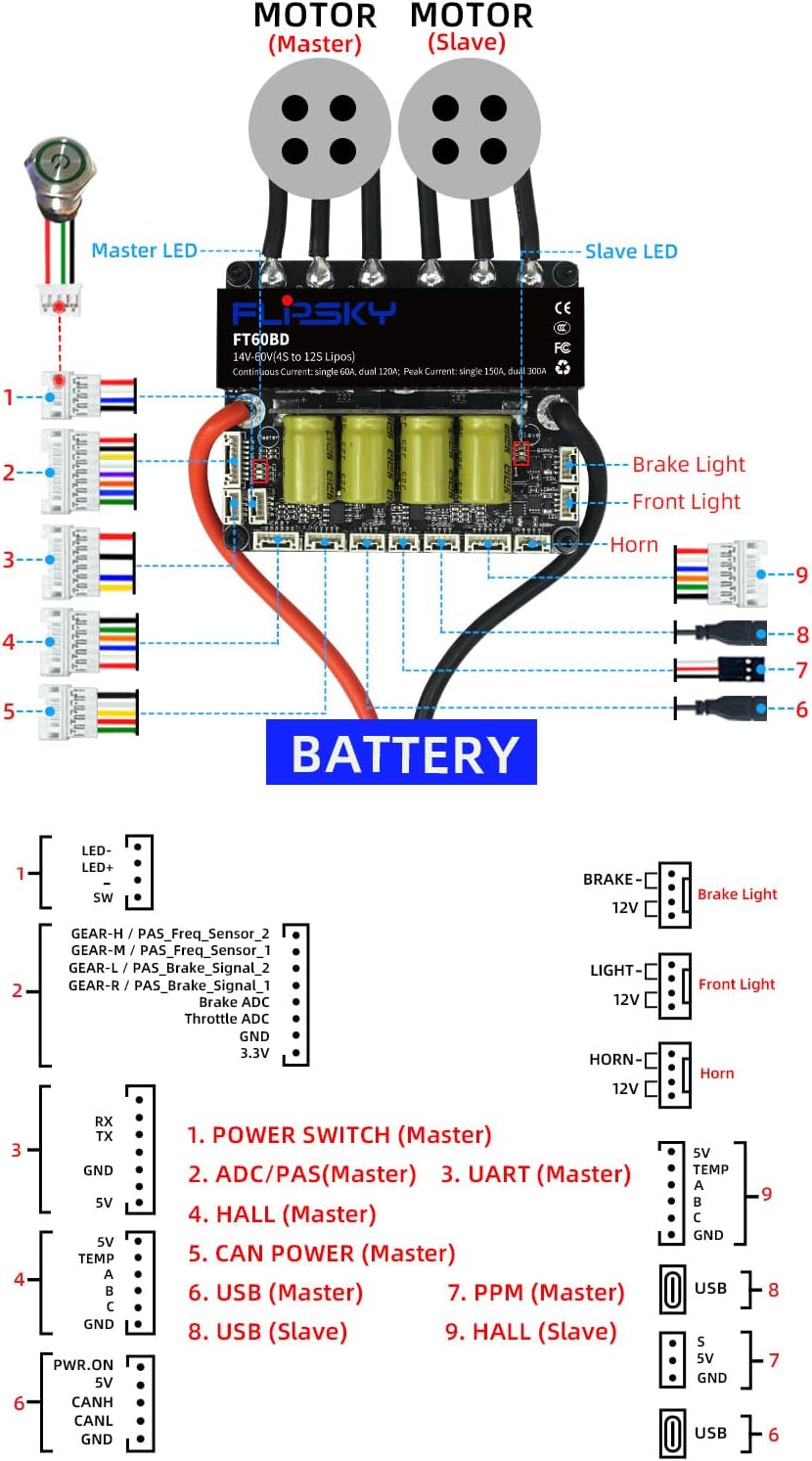
Image: A detailed diagram illustrating the connections for the FLIPSKY FT60BD Dual ESC. It shows connections for two motors (Master and Slave), battery input, power switch, ADC/PAS, UART, HALL sensors, CAN bus, USB, PPM, brake light, front light, and horn. Each port is numbered for easy identification.
Pinout Details

Image: A close-up diagram detailing the pin assignments for each connector on the FLIPSKY FT60BD Dual ESC. It labels pins for LED, switch, gear/PAS sensors, throttle ADC, RX/TX, GND, 5V, temperature sensors, CAN, USB, PPM, brake light, front light, and horn connections.
Wiring Steps
- Connect the battery to the main power input (red for positive, black for negative). Ensure correct polarity to prevent damage.
- Connect the brushless motors to the motor phase wires (A, B, C for Master and A1, B1, C1 for Slave).
- If using sensored motors, connect the HALL sensor cables to the respective HALL ports (Master and Slave).
- Connect the power switch to the designated port.
- Connect your remote receiver (PPM, UART, or CAN) to the corresponding communication port.
- If using external accessories, connect front lights, brake lights, and horn to their dedicated 12V ports.
- For advanced configuration and monitoring, connect the ESC to a computer via the USB port and use the Flipsky ESC Tool software.
Operating Instructions
Initial Configuration
Before first use, it is recommended to configure the ESC using the Flipsky ESC Tool software. This allows you to set motor parameters, battery type, current limits, and other operational settings specific to your application.
Power On/Off
- The ESC supports a sliding power-on function for convenience.
- An automatic shutdown function is integrated; the shutdown time is adjustable via the Flipsky ESC Tool.
- Use the self-resetting switch with the green LED button (16mm diameter) to manually control power.
Speed Control
The ESC supports multiple speed gear levels (Low, Medium, High) and a reverse function, which can be configured through a compatible remote controller (e.g., FLIPSKY VX4/VX3Pro) or the ESC Tool.
Motor Control Modes
The ESC supports both sensored (HALL) and sensorless (IPDS, HFPI) motor control modes, providing options for smooth starting and efficient operation depending on your motor type.
Maintenance
- Keep the ESC clean and free from dust, dirt, and debris.
- Ensure adequate airflow around the heatsink to prevent overheating, especially during high-current or prolonged operation.
- Regularly check all electrical connections for secure fit and signs of wear, corrosion, or damage.
- Avoid exposing the ESC to moisture, water, or extreme temperatures outside its operating range.
- Periodically check for firmware updates using the Flipsky ESC Tool to ensure optimal performance and access to the latest features and improvements.
Troubleshooting
- No Power: Check battery connections, power switch functionality, and ensure the battery is adequately charged.
- Motor Not Spinning: Verify motor phase wire connections, HALL sensor connections (if using sensored motors), and perform motor detection in the Flipsky ESC Tool. Confirm the remote control is paired and functioning correctly.
- Intermittent Operation: Inspect all wiring for loose connections or damaged insulation. Check for signs of overheating on the ESC or motor.
- Overheating: Ensure proper ventilation and consider reducing current limits or operating duration if the ESC consistently overheats.
- Error Codes/Alerts: If the ESC provides error codes or alerts, refer to the Flipsky ESC Tool documentation for detailed explanations and corrective actions.
- Unresponsive Controls: Check the remote control's battery, pairing status, and the integrity of the communication port connections (PPM, UART, CAN).
Warranty Information
The FLIPSKY FT60BD Dual ESC comes with a 2-month warranty from the date of purchase. Please retain your proof of purchase for any warranty claims. The warranty covers manufacturing defects under normal use. It does not cover damage caused by improper installation, misuse, unauthorized modification, or external factors such as water damage or impact.
Support
For technical assistance, advanced troubleshooting, or further product information, please visit the official FLIPSKY website or contact their customer support team.

