
Introduction
This manual provides essential information for the safe and efficient operation of your MARBERO M82MAX Portable Power Station and 30W Solar Panel. Please read all instructions carefully before use and retain this manual for future reference.
Package Contents
- 1 x MARBERO Portable Power Station M82MAX
- 1 x 30W Foldable Solar Panel
- 1 x MARBERO Power Adapter
- 1 x Cigarette Lighter Output Cable
- 1 x User Manual
Product Overview
Key Features
The MARBERO M82MAX Portable Power Station and 30W Solar Panel offer a reliable power solution for various applications, from outdoor adventures to home emergencies. This system is designed for portability, versatility, and safety.
Portable Power Station M82MAX
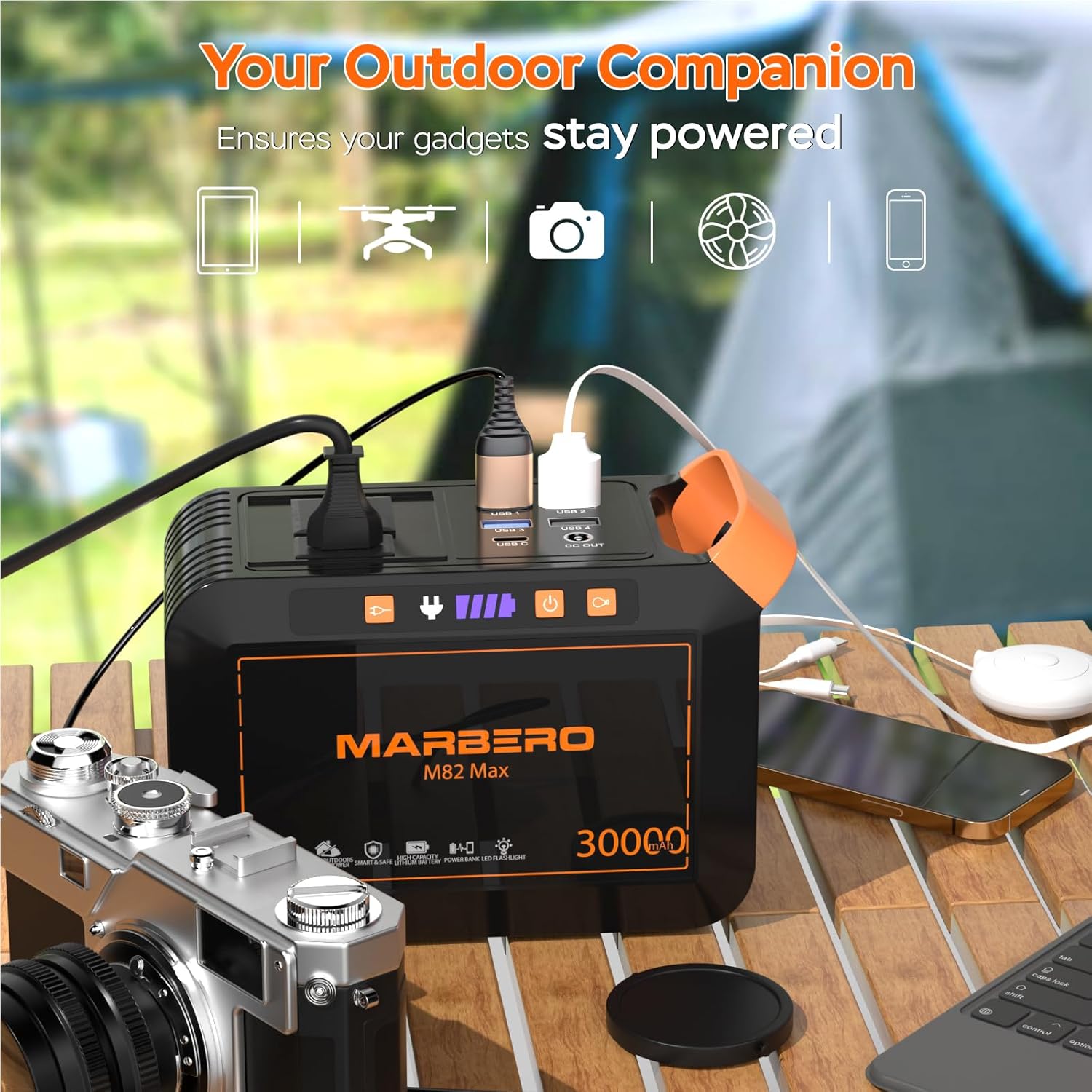
Image showing the MARBERO M82MAX Portable Power Station connected to various devices like a phone, drone, camera, and fan, highlighting its versatility for outdoor use.
The M82MAX features a 111Wh lithium battery (30,000mAh) and multiple output options to charge a wide range of devices. It is designed to be your outdoor companion, ensuring your gadgets stay powered.
Versatile Output Ports

Image detailing the various output ports on the MARBERO M82MAX Portable Power Station, including AC outlets, USB-A, USB-C, and DC output, with icons representing devices it can power.
- AC Outlets: Two 110V/60Hz AC ports (80W continuous, 120W peak) for small appliances.
- USB Ports: Four USB-A ports and one USB-C port for fast charging of mobile devices.
- DC Output: One DC port delivering up to 120W.
Compact and Lightweight Design

Image showing a person placing the compact MARBERO M82MAX Portable Power Station and its foldable solar panel into a backpack, illustrating its portability and dimensions.
The power station weighs approximately 2.3 lbs (1.04 kg) and measures 6.5 x 3.2 x 4.6 inches. The foldable solar panel weighs 1.8 lbs (0.82 kg) and has dimensions of 8.3 x 12 x 1.18 inches (folded) and 25.4 x 12 x 0.78 inches (unfolded), making both components highly portable.
30W Foldable Solar Panel

Image displaying the MARBERO M82MAX Portable Power Station and its 30W foldable solar panel set up on a wooden table outdoors, with a laptop connected, emphasizing its solar charging capability.
The included 30W foldable solar panel features advanced solar arrays with a high conversion rate of 21.5-23.5%. A built-in smart chip optimizes charging speed and protects against overcharging and overloads.
Battery Management System (BMS)

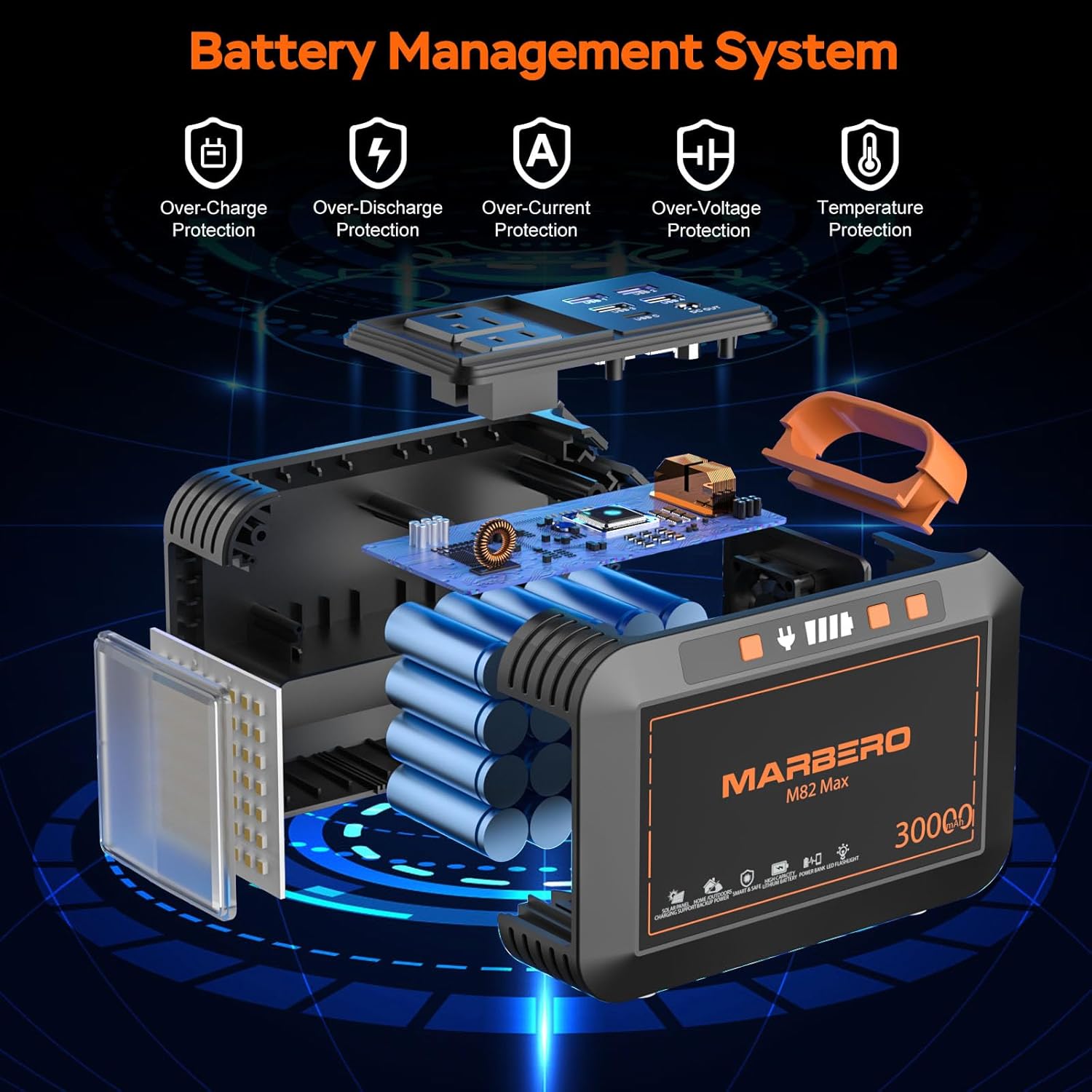
Diagram illustrating the internal components and safety features of the MARBERO M82MAX Portable Power Station's Battery Management System, including protections against over-charge, over-discharge, over-current, over-voltage, and temperature.
The M82MAX is equipped with a comprehensive Battery Management System (BMS) that provides multiple layers of protection, including:
- Over-Charge Protection
- Over-Discharge Protection
- Over-Current Protection
- Over-Voltage Protection
- Temperature Protection
- Short Circuit Protection
Setup
Initial Setup
- Unpack: Carefully remove all components from the packaging.
- Inspect: Check for any visible damage to the power station or solar panel.
- Initial Charge: It is recommended to fully charge the power station using the AC wall adapter before first use.
Operating Your Power Station
Powering On/Off
- To power on the unit, press and hold the main power button until the display illuminates.
- To power off, press and hold the main power button again.
Using AC Outlets
- Press the AC power button to activate the AC outlets. The AC indicator light will turn on.
- Plug your device into one of the AC outlets.
- Ensure your device's power consumption does not exceed 80W (120W peak).
- Press the AC power button again to turn off the AC outlets when not in use.
Using USB Ports
- The USB ports are typically active when the unit is powered on.
- Connect your USB-powered devices (phones, tablets, etc.) to the appropriate USB-A or USB-C ports.
Using DC Output
- Press the DC power button to activate the DC output. The DC indicator light will turn on.
- Connect your 12V DC devices to the DC output port.
- Press the DC power button again to turn off the DC output when not in use.
Using the LED Light
- Press the light button once to turn on the LED light.
- Press repeatedly to cycle through different brightness levels or modes (e.g., SOS mode).
- Press and hold the light button to turn off the LED light.
Charging the Power Station
AC Wall Charging
Collage image showing the MARBERO M82MAX Portable Power Station being charged via a wall outlet, a solar panel, and a car outlet, demonstrating multiple charging options.
- Connect the provided AC power adapter to the DC input port on the power station.
- Plug the adapter into a standard wall outlet.
- The battery indicator on the display will show charging progress. A full charge from 0% takes approximately 2.5 hours to reach 80%.
Solar Panel Charging
- Unfold the 30W solar panel and place it in direct sunlight.
- Connect the solar panel to the DC input port on the power station.
- Ensure the solar panel is positioned for maximum sun exposure. The power station will automatically begin charging.
Car Charging
- Connect the provided cigarette lighter output cable to the DC input port on the power station.
- Plug the other end into your vehicle's 12V cigarette lighter socket.
- The power station will begin charging from your vehicle's power supply.
Maintenance
- Store the power station in a cool, dry place away from direct sunlight and extreme temperatures.
- Charge the unit at least once every 3-6 months to maintain battery health if not in regular use.
- Clean the exterior with a soft, dry cloth. Do not use harsh chemicals or abrasive materials.
- Keep the solar panel clean to ensure optimal charging efficiency.
Troubleshooting
Common Issues and Solutions
- Unit not turning on: Ensure the battery is charged. If not, connect to an AC power source.
- Devices not charging: Check if the specific output (AC, DC, USB) is activated. Verify cables are securely connected. Ensure device power consumption is within the unit's limits.
- Slow solar charging: Ensure the solar panel is in direct sunlight and free from obstructions. Clean the panel surface.
- Overload protection activated: If the unit shuts down, disconnect some devices and restart. Reduce the total load to below the maximum output.
If issues persist, please refer to the warranty and support section for assistance.
Specifications
| Feature | Detail |
|---|---|
| Brand | MARBERO |
| Model Name | M82MAX |
| Battery Capacity | 111Wh (30,000mAh) |
| AC Output | 110V/60Hz, 80W (120W Peak) |
| USB-A Ports | 4 |
| USB-C Port | 1 |
| DC Output | Up to 120W |
| Solar Panel Power | 30W |
| Solar Panel Conversion Rate | 21.5-23.5% |
| Power Station Dimensions (L x W x H) | 6.5" x 3.2" x 4.6" |
| Power Station Weight | 2.3 lbs (1.04 kg) |
| Solar Panel Dimensions (Folded) | 8.3" x 12" x 1.18" |
| Solar Panel Dimensions (Unfolded) | 25.4" x 12" x 0.78" |
| Solar Panel Weight | 1.8 lbs (0.82 kg) |
| Material Type | ABS |
Warranty and Support
MARBERO offers a 12-month warranty for the M82MAX Portable Power Station and 30W Solar Panel. For any product-related issues or inquiries, please contact MARBERO customer service via Amazon message. Our support team is available 7 days a week, 24 hours a day, to assist you.