
1. Product Overview
The INIU 140W 25000mAh Power Bank (Model P64) is a high-capacity portable charger designed to provide fast and efficient power to a wide range of devices, including laptops, smartphones, tablets, and other USB-powered gadgets. Its advanced features ensure safe and reliable charging on the go.
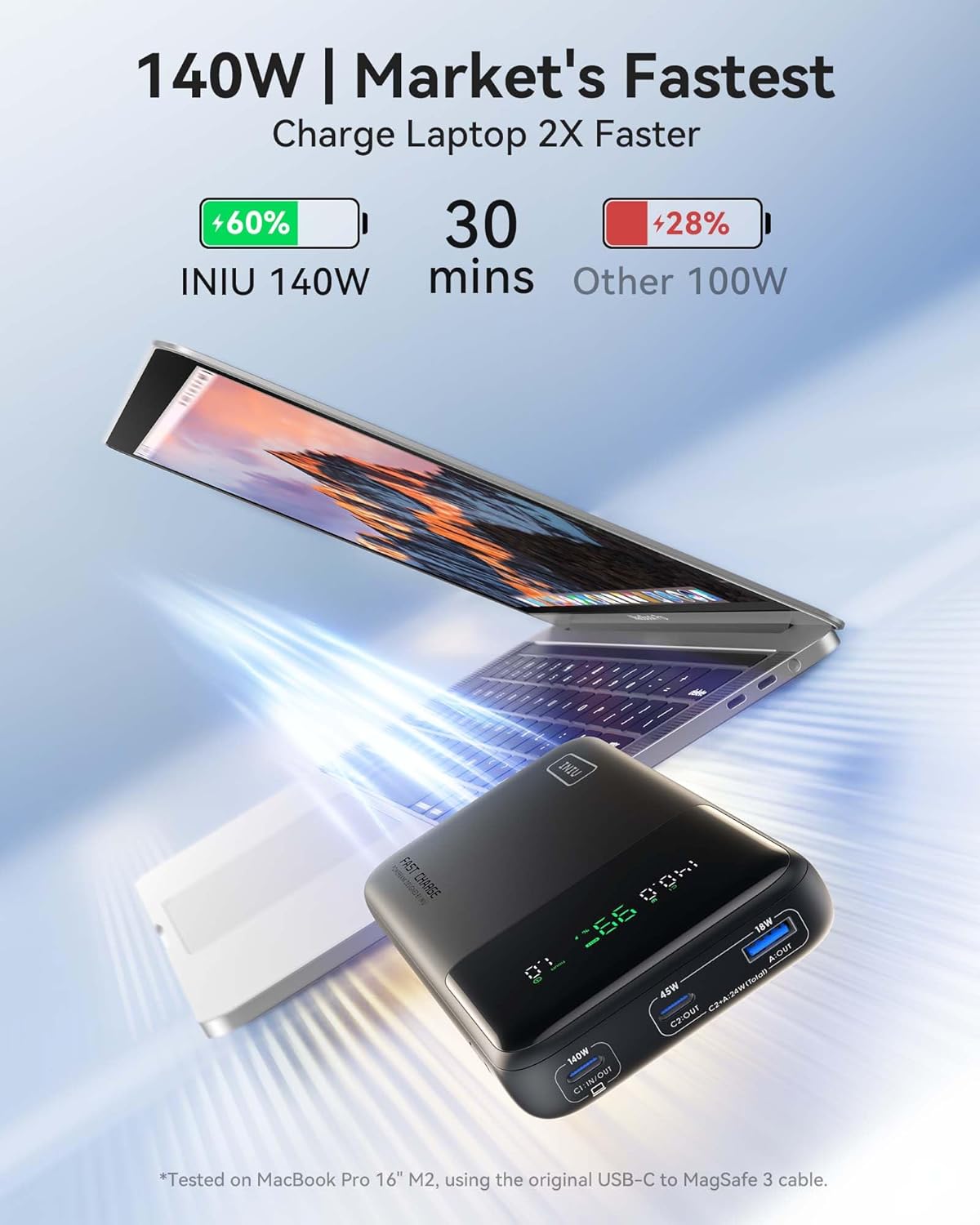
Image: The INIU 140W Power Bank demonstrating its ability to charge a laptop and a smartphone rapidly, highlighting its 140W output.
2. Package Contents
- INIU 25000mAh Power Bank (Model P64)
- 240W USB-C to USB-C Cable (2ft)
- Welcome Guide
- Mesh Carrying Pouch
3. Device Layout and Display
The power bank features a clear digital display and multiple ports for versatile charging.

Image: The digital display of the power bank, indicating current output wattage, battery percentage, and estimated remaining usage time.
Ports:
- USB-C1 (In/Out): Up to 140W for charging the power bank or outputting power to devices.
- USB-C2 (Out): Up to 45W output for charging devices.
- USB-A (Out): Up to 18W output for charging devices.
The digital display provides real-time information on the power bank's status, including:
- Output Power (W)
- USB Port in use (C1, C2, A)
- Remaining Power Percentage (%)
- Remaining Battery in Hours (h)
4. Setup and Initial Use
4.1 Charging the Power Bank
- Connect the provided 240W USB-C to USB-C cable to the USB-C1 (In/Out) port on the power bank.
- Connect the other end of the cable to a compatible USB-C wall charger (not included). For fastest charging, use a 100W or higher power adapter.
- The digital display will show the input wattage and the battery percentage increasing.
A full recharge of the power bank can take approximately 1.8 hours when using a 100W adapter.

Image: The power bank being recharged, indicating an 80W input and an estimated 1.8 hours for a full charge.
4.2 Checking Battery Level
Press the power button on the side of the power bank once to activate the digital display and view the current battery percentage and estimated remaining hours.
Video: Demonstrating the INIU Power Bank's digital display and port functionality, including how to check the remaining battery life and connect devices.
5. Operating Instructions
5.1 Charging Devices
- Connect your device's charging cable to the appropriate output port on the power bank (USB-C1, USB-C2, or USB-A).
- Connect the other end of the cable to your device.
- The power bank will automatically begin charging your device. The digital display will show the output wattage and remaining battery life.
The INIU 140W Power Bank supports simultaneous charging of up to three devices. The power distribution will adjust based on the connected devices' requirements.

Image: The power bank charging a Samsung S24 Ultra to 75% in 30 minutes and two devices (MacBook Pro 14" and iPhone 15 Pro Max) to 60% and 74% respectively in 30 minutes.
5.2 Compatibility
This power bank is compatible with a wide range of devices, including:
- Laptops: MacBook Pro 16", Dell XPS 17, Surface Go, Vision Pro, MacBook Air, ThinkPad X1, Razer Blade, HP Spectre, etc. (Up to 140W via USB-C1)
- Smartphones: iPhone series, Samsung, Google, LG, Huawei, and other Android phones. (Up to 45W via USB-C2, 18W via USB-A)
- Tablets: iPad, iPad Pro.
- Other Devices: Drones, cameras, Steam Deck, projectors, earbuds, smartwatches, handheld fans.
Note: MacBook Pro 16" M2 can only achieve 140W fast charging with the original USB-C to MagSafe 3 cable.

Image: A visual guide to the power bank's compatibility with different devices and their maximum charging wattages.
Video: A user demonstrating charging a laptop with the INIU Power Bank, highlighting its versatility and display features.
6. Safety and Maintenance
6.1 Safety Precautions
- Do not open, crush, or incinerate the power bank.
- Avoid exposing the device to temperatures above 65°C (149°F).
- Keep out of reach of children.
- Use only original or certified cables for optimal performance and safety.
- Avoid dropping or subjecting the power bank to strong impacts.
6.2 Maintenance
- Clean the power bank with a soft, dry cloth. Do not use harsh chemicals or abrasive materials.
- Store in a cool, dry place away from direct sunlight and extreme temperatures.
- If not used for extended periods, recharge the power bank every 3-6 months to maintain battery health.

Image: An internal view graphic highlighting the 15-layer SmartProtect safety features of the INIU Power Bank.
7. Troubleshooting
- Device not charging: Ensure the power bank is sufficiently charged. Check that the charging cable is securely connected to both the power bank and your device. Try a different cable or port.
- Slow charging: Verify that your device and cable support fast charging. Some devices may limit charging speed to protect battery health. Ensure you are using the appropriate port for your device's power requirements (e.g., USB-C1 for laptops).
- Power bank not recharging: Confirm that the wall adapter is functioning correctly and the USB-C cable is properly connected to the power bank's C1 In/Out port and the adapter. Try a different wall adapter or cable.
- Digital display not working: Press the power button once to activate the display. If it remains off, the power bank may be completely depleted or require service.
8. Specifications
| Feature | Detail |
|---|---|
| Model Number | P64 |
| Battery Capacity | 25000 mAh (99.9 Wh) |
| Product Dimensions | 6.3 x 3.2 x 1 inches |
| Item Weight | 1.09 pounds |
| Input (USB-C1) | 5V=3A, 9V=3A, 12V=3A, 15V=3A, 20V=5A (100W Max) |
| Output (USB-C1) | 5V=3A, 9V=3A, 12V=3A, 15V=3A, 20V=5A, 28V=5A (140W Max) |
| Output (USB-C2) | 5V=3A, 9V=3A, 12V=3A, 15V=3A (45W Max) |
| Output (USB-A) | 5V=3A, 9V=2A, 12V=1.5A (18W Max) |
| Total Output (C1+C2) | 100W (Max) + 45W (Max) = 145W (Total) |
| Total Output (C1+A) | 100W (Max) + 18W (Max) = 118W (Total) |
| Total Output (C2+A) | 24W (Total) |
| Total Output (C1+C2+A) | 124W (C1:100W Max) |
| Special Features | Fast Charging, Digital Display |
| Manufacturer | Shenzhen Topstar Industry Co.,Ltd. |
The 25000mAh capacity is airline-approved for carry-on luggage.

Image: The power bank is shown to be TSA-compliant with its 25,000mAh capacity, suitable for air travel.
9. Warranty and Support
INIU provides an industry-leading 3-year warranty for this product, ensuring peace of mind and reliable performance. Lifetime technical support is also available.

Image: The INIU Power Bank, its included cable, and user manual, emphasizing the 3-year INIU Care warranty.
For technical support or warranty claims, please contact INIU customer service via the contact information provided in your Welcome Guide or visit the official INIU website.
Manufacturer: Shenzhen Topstar Industry Co.,Ltd.
Support: support@iniu.shop
