
1. Introduction
Thank you for choosing the INIU 10000mAh 22.5W Portable Power Bank. This compact and powerful device is designed to provide reliable and fast charging for your mobile devices on the go. Featuring a high-capacity 10000mAh battery, 22.5W fast charging capabilities with PD and QC support, a precise LED digital display, multiple input/output ports, and convenient additional features like a built-in phone stand and LED flashlight, it is an essential companion for daily use, outdoor activities, and emergencies.
2. Safety Information
Please read and understand all safety instructions before using this product. Failure to follow these instructions may result in fire, electric shock, damage to the product, or property damage.
- Do not expose the power bank to extreme temperatures (above 60°C/140°F or below 0°C/32°F), direct sunlight, or high humidity.
- Avoid dropping, hitting, or disassembling the device. Any physical damage may compromise its safety and functionality.
- Keep the power bank away from water and other liquids.
- Do not use the power bank if it is damaged, swollen, or leaking.
- Keep out of reach of children.
- Use only certified charging cables and adapters.
- Dispose of the power bank responsibly according to local regulations. Do not dispose of it in household waste.
3. Package Contents
Verify that all items are present in your package:
- INIU 10000mAh 22.5W Portable Power Bank (Model P61)
- USB-C to USB-C Charging Cable
- User Manual
- Mesh Pouch

Image: The INIU Power Bank, its included USB-C cable, and the user manual, laid out next to the product packaging.
4. Product Overview
The INIU P61 Power Bank is designed for portability and efficiency. Familiarize yourself with its components:
- LED Digital Display: Shows the remaining battery percentage.
- USB-C Ports (x2): Used for both input (charging the power bank) and output (charging devices).
- USB-A Port (x1): Used for output (charging devices).
- Power Button: Activates the display, initiates charging, and controls the flashlight.
- Built-in Stand: A retractable kickstand for propping up your phone.
- LED Flashlight: Provides illumination in low-light conditions.

Image: A person's hand holding the INIU P61 power bank, highlighting its small form factor and the clear digital battery percentage display.
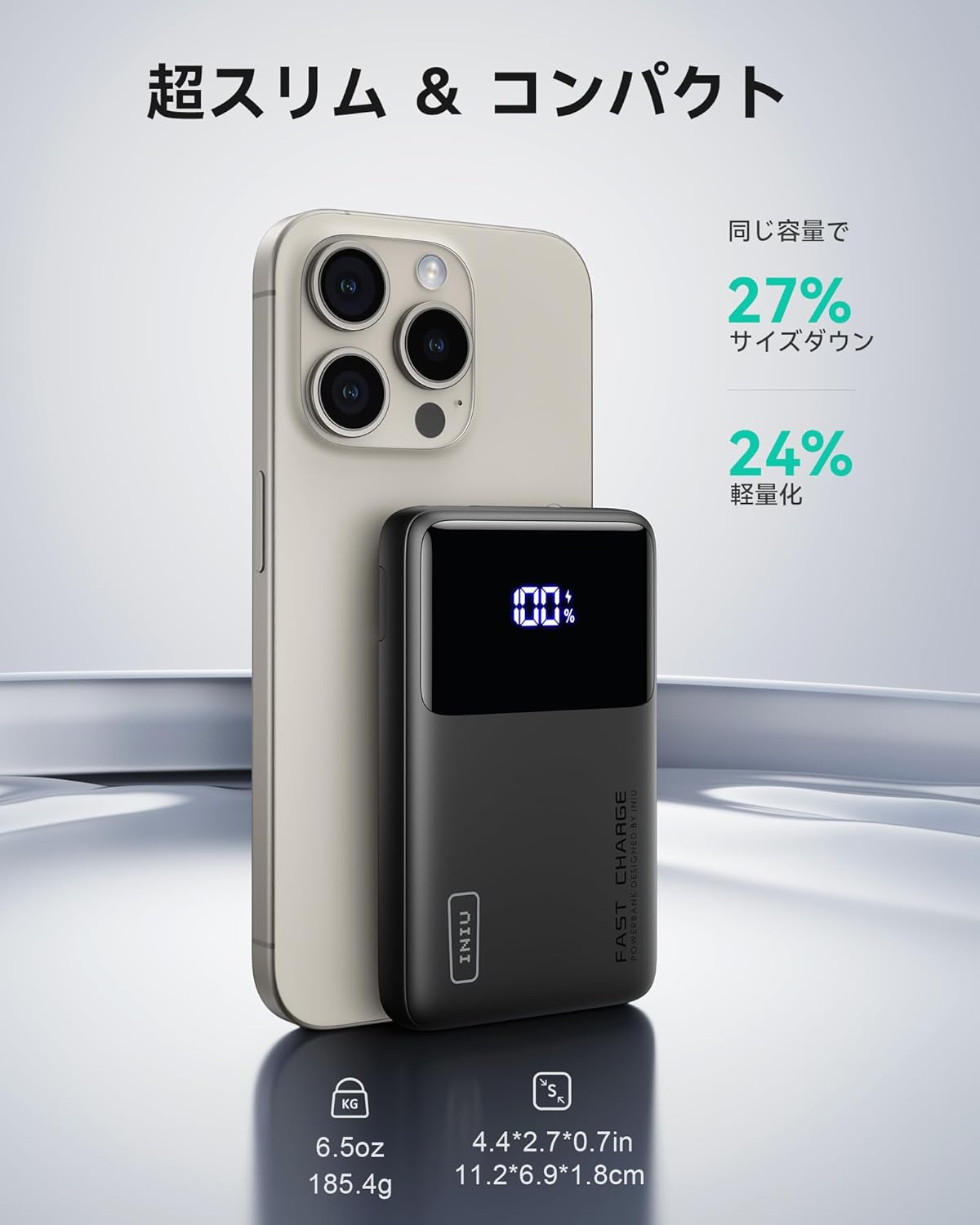
Image: The INIU power bank positioned next to a smartphone, demonstrating its significantly smaller and lighter profile compared to other products of similar capacity.
5. Setup
5.1 Initial Charging of the Power Bank
Before first use, fully charge your INIU Portable Power Bank. This ensures optimal battery performance and longevity.
- Connect the included USB-C to USB-C cable to one of the USB-C input/output ports on the power bank.
- Connect the other end of the cable to a compatible USB wall charger (not included). For fastest charging, use a PD (Power Delivery) or QC (Quick Charge) compatible charger.
- The LED digital display will show the charging percentage, indicating the power bank is charging.
- Once the display shows "100%", the power bank is fully charged and ready for use.
6. Operating Instructions
6.1 Charging Your Devices
The INIU P61 Power Bank can charge up to three devices simultaneously.
- Connect your device's charging cable to one of the output ports on the power bank (USB-C or USB-A).
- Connect the other end of the cable to your device.
- The power bank will automatically begin charging your device. If it doesn't, press the power button once to activate charging.
- The LED display will show the power bank's remaining charge.
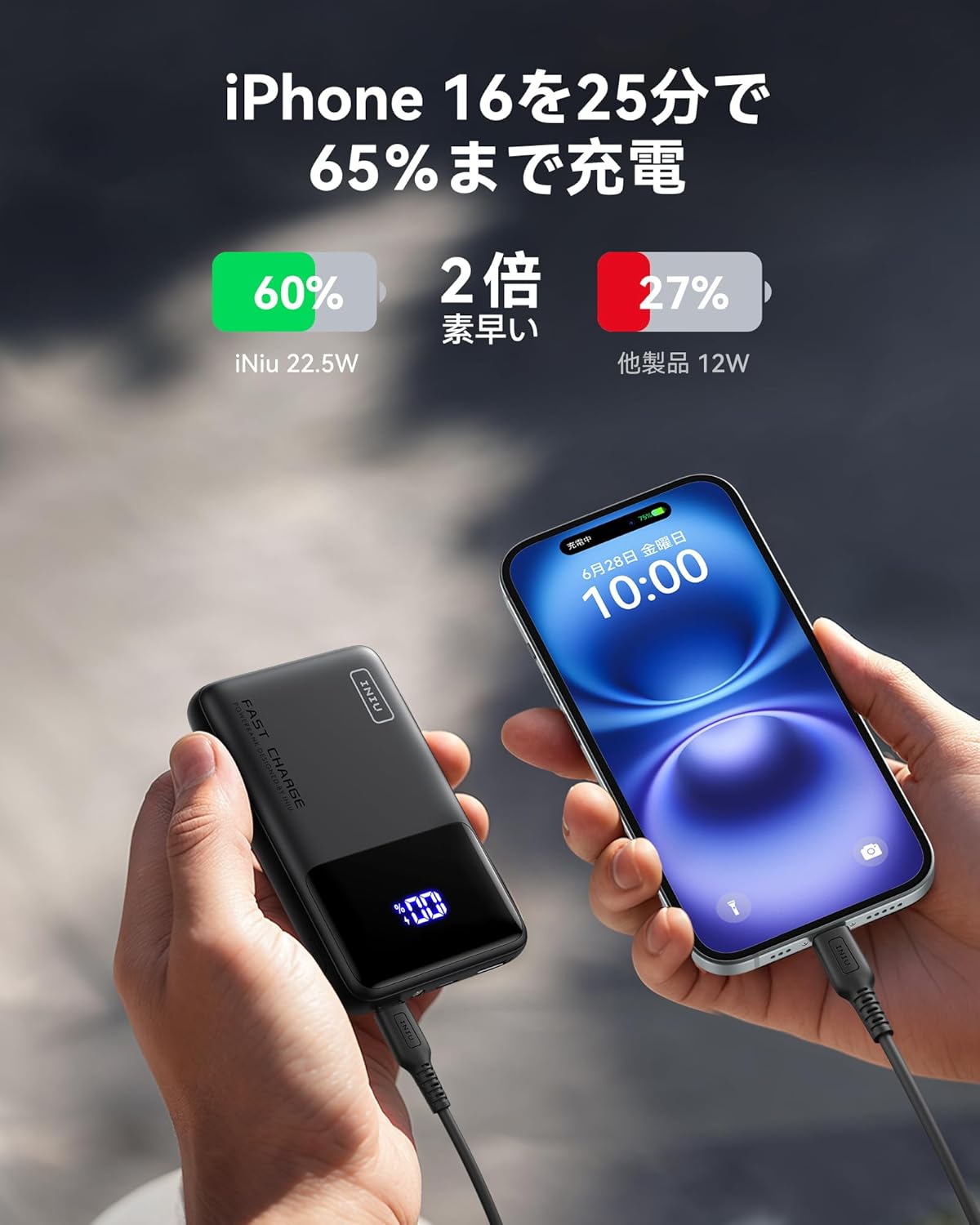
Image: Two hands holding the INIU power bank and an iPhone, connected by a charging cable, illustrating the rapid charging capability for smartphones.

Image: The INIU power bank connected to and charging three different devices: a tablet, a smartphone, and a pair of wireless earbuds, demonstrating its ability to charge multiple devices at once.
6.2 LED Digital Display
The clear LED display shows the exact percentage of remaining battery power, so you always know how much charge is left.
- Press the power button once to check the battery level.
- The display will light up and show the percentage.
6.3 Pass-Through Charging
The power bank supports pass-through charging, allowing it to be recharged while simultaneously charging other devices.
- Connect the power bank to a wall charger.
- Connect your devices to the power bank's output ports.
- Both the power bank and your connected devices will charge.
6.4 LED Flashlight Function
The built-in LED flashlight is useful for emergencies or in dark environments.
- To turn on: Double-press the power button quickly.
- To turn off: Double-press the power button quickly again.
6.5 Built-in Phone Stand
The retractable stand allows you to prop up your smartphone for hands-free viewing.
- Gently pull out the small kickstand located on the side of the power bank.
- Place your smartphone horizontally or vertically into the groove of the stand.

Image: A composite image showing the INIU power bank's integrated phone stand supporting a smartphone, and the bright beam of its emergency LED flashlight.
7. Maintenance
Proper care will extend the life of your power bank.
- Cleaning: Use a soft, dry cloth to clean the surface of the power bank. Do not use harsh chemicals or abrasive materials.
- Storage: Store the power bank in a cool, dry place away from direct sunlight and extreme temperatures. If storing for a long period, charge it to about 50-70% every 3 months to maintain battery health.
- Avoid Drops: Protect the device from impacts and drops, which can damage internal components.
8. Troubleshooting
If you encounter issues with your INIU Power Bank, try the following solutions:
| Problem | Possible Cause | Solution |
|---|---|---|
| Power bank not charging | Loose cable connection, faulty cable/adapter, power bank fully charged. | Ensure cables are securely connected. Try a different cable or wall adapter. Check if the display shows 100%. |
| Device not charging from power bank | Power bank battery empty, loose cable connection, incompatible cable, device not properly connected. | Check power bank's battery level. Ensure cables are securely connected. Try a different cable or port. Press the power button to initiate charging. |
| Slow charging | Non-fast charging cable/adapter, device not supporting fast charging. | Use a fast-charging compatible cable and wall adapter. Ensure your device supports PD or QC fast charging. |
| LED display not working | Power bank is off, internal issue. | Press the power button once. If the issue persists, contact customer support. |
| Power bank overheating | Overload, environmental factors. | Disconnect all devices and the charger. Allow the power bank to cool down in a well-ventilated area. If overheating persists, discontinue use and contact support. |
9. Specifications
| Feature | Detail |
|---|---|
| Model | P61 |
| Battery Capacity | 10000mAh |
| Battery Type | Lithium Polymer |
| Input (USB-C) | PD/QC compatible (details not specified, typically up to 18W or 22.5W) |
| Output (USB-C) | Max 22.5W (PD 3.0, QC 3.0) |
| Output (USB-A) | Max 22.5W (QC 3.0) |
| Dimensions | 11.18 x 6.86 x 1.78 cm (4.4 x 2.7 x 0.7 inches) |
| Weight | 185g (6.5 oz) |
| Special Features | LED Digital Display, Built-in Phone Stand, LED Flashlight, Pass-through Charging |
10. Warranty and Support
INIU stands by the quality of its products. This power bank comes with an industry-leading 3-year quality guarantee service.
- If you experience any quality issues within 3 years of purchase, INIU will exchange your product for a new one.
- For warranty claims, technical support, or any questions regarding your product, please refer to the contact information provided on the product packaging or visit the official INIU website.

Image: A customer service representative holding an INIU product box, symbolizing the 3-year INIU Care warranty and exchange policy for quality issues.
Note: No official product videos were available for embedding based on the provided data.


