
Introduction
Thank you for choosing the CORO HM-30 Bluetooth 5.3 Wireless Earphones. This manual provides essential information for the proper use, setup, and maintenance of your new earphones. Please read it carefully before use and keep it for future reference.
Product Overview
Package Contents
- Earphone units (Left and Right)
- Charging Case
- Type-C Charging Cable
- User Manual (Japanese)
Key Features
- Bluetooth 5.3: Enhanced connection range, stability, and data transmission speed, reducing audio skips, disconnections, and delays.
- Ear Cuff Design: Open-ear audio experience without blocking the ear canal, reducing pressure and allowing awareness of surroundings.
- Automatic Pairing: Earphones automatically pair when removed from the charging case (manual pairing required for first use).
- Touch Control: High-sensitivity touch area for music playback/pause, call answering/ending/rejecting.
- Hi-Fi Audio Quality: Delivers high-fidelity sound while minimizing sound leakage through directional audio transmission technology.
- Waterproof: Designed with daily life waterproofing to prevent sweat and splashes, suitable for sports.
- Compact and Lightweight: Improved portability and wearability with a smaller and lighter design for both the case and earphones.

Image: Comparison of HM-20 (in-ear) and HM-30 (open-ear bone conduction) models, highlighting features like long-lasting battery, high sound quality, low latency, waterproof, and comfortable wear.
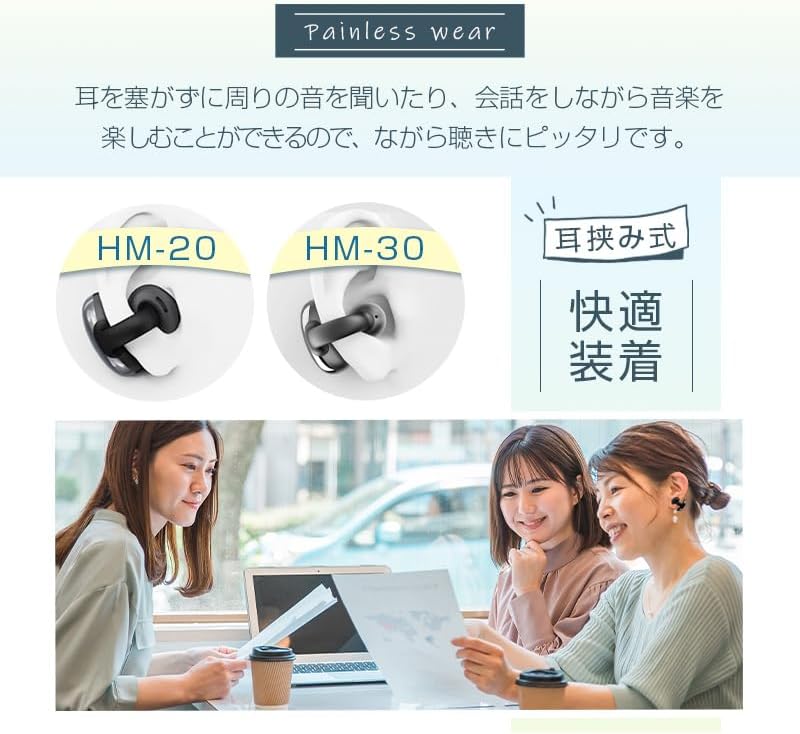
Image: Illustration of the ear-clip style (ear cuff) design for painless and comfortable wear, showing individuals using the earphones while engaging in conversation.
Setup
Charging the Earphones and Case
Before first use, fully charge the earphones and the charging case. Connect the provided Type-C charging cable to the charging case and a USB power source. The charging time is approximately 1.5 hours.

Image: Depicts the charging case and earphones, highlighting the large capacity battery, long endurance, and Type-C charging with a 1.5-hour charging time.
Initial Pairing
- Ensure the earphones are charged.
- Open the charging case. The earphones will automatically power on and enter pairing mode.
- On your device (smartphone, tablet, etc.), go to Bluetooth settings and search for available devices.
- Select "HM-30" from the list of devices to connect.
- Once connected, the earphones are ready for use. For subsequent uses, the earphones will automatically connect to the last paired device when taken out of the case.
Operating Instructions
The HM-30 earphones feature high-sensitivity touch controls on each earbud for various functions.
Music Playback
- Play/Pause: Single tap on either earbud.
- Next Track: Double tap on the right earbud.
- Previous Track: Double tap on the left earbud.
Call Management
- Answer Call: Single tap on either earbud when a call comes in.
- End Call: Single tap on either earbud during a call.
- Reject Call: Press and hold either earbud for 2 seconds when a call comes in.
Voice Assistant
- Activate Voice Assistant: Triple tap on either earbud.
Maintenance
Cleaning
Regularly clean your earphones and charging case with a soft, dry, lint-free cloth. Do not use harsh chemicals or abrasive materials. Avoid getting moisture into any openings.
Storage
When not in use, store the earphones in their charging case to protect them from dust and damage. Store in a cool, dry place away from extreme temperatures.
Water Resistance
The HM-30 earphones feature daily life waterproofing, protecting them from sweat and light splashes. They are not designed for submersion in water. Do not use them while swimming or showering.

Image: Illustrates the waterproof design, showing a person running in the rain with the earphones, indicating protection against sweat and splashes.
Troubleshooting
| Problem | Solution |
|---|---|
| Earphones do not power on. | Ensure the earphones and charging case are fully charged. Place earphones back into the case and remove them again. |
| Cannot pair with device. | Make sure Bluetooth is enabled on your device. Ensure earphones are in pairing mode (first time use). Turn off Bluetooth on other nearby devices. Try resetting the earphones (refer to manufacturer's website for specific reset instructions if needed). |
| No sound or intermittent sound. | Check the volume level on both your device and the earphones. Ensure earphones are within the 10m communication range of your device. Re-pair the earphones with your device. |
| Microphone not working. | Ensure the earphones are properly connected and selected as the audio input device on your phone. Clean the microphone opening if necessary. |
Specifications
| Feature | Detail |
|---|---|
| Bluetooth Version | 5.3 |
| Input Terminal | Type-C |
| Communication Distance | Up to 10 meters (33 feet) |
| Charging Time | Approximately 1.5 hours |
| Headphone Type | Ear Cuff (Open-ear) |
| Connectivity Technology | Wireless (Bluetooth) |
| Model Number | HM-30 (Product Size), YYK-Q35 (Manufacturer Model) |
| Brand | CORO |
| Color | White (This variant) |

Image: Visual representation of the main specifications including Bluetooth version, input terminal, communication distance, charging time, and product models.
Warranty and Support
Quality Assurance
We are committed to continuously improving product quality and minimizing defect rates. However, if you encounter any product defects or issues, please contact us immediately. We offer free exchanges or refunds to ensure your satisfaction.
Customer Support
For any questions, concerns, or technical assistance, please contact our customer support team. Refer to your purchase documentation or the seller's contact information for details on how to reach us.