
Introduction
Thank you for choosing the Housolution Wireless Meat Thermometer FM2201. This device is designed to provide accurate temperature monitoring for various cooking methods, ensuring perfectly cooked meals every time. Featuring wireless connectivity, dual probes, and a smart app, it simplifies the cooking process for both indoor and outdoor culinary enthusiasts.
Product Features
- Stable Wireless Connection: Connects the wireless meat thermometer to the smart base with a transmission distance of up to 180 meters (600 feet) for stable and fast data transmission, even through obstacles.
- Guided Cooking System: Utilizes a smart app to select preferred cooking settings and achieve ideal food results. Customize menus to set personalized temperatures or times for alarms and app notifications.
- Extended Battery Life: Offers up to 30 days of standby time for the charging case when fully charged. Probes provide 16 hours of continuous operation, and the base unit lasts over 8 days on a full charge.
- Multifunctional Smart Base: Serves as a charging case, displays current temperature, allows setting of target temperatures, includes an alarm prompt, offers probe protection, features magnetic suction, and has a clear display.
- Accurate Data Synchronization: Provides temperature accuracy of ±0.15°C (±0.5°F) with synchronized response. Integrated precision sensors ensure optimal cooking.
- High Temperature Resistance: Probe can withstand up to 100°C (212°F), and the probe handle up to 300°C (572°F).
Safety Information
- Do not expose the probe tip or handle directly to open flames or surfaces exceeding the maximum temperature limits (probe 100°C, handle 300°C) to prevent damage.
- Ensure the probe is fully inserted into the meat past the marking line to protect internal components from excessive heat.
- Keep the device and its components out of reach of children.
- The base unit is not waterproof. Do not immerse it in water or expose it to excessive moisture. Clean with a damp cloth only.
- Use only the provided charging cable or a compatible Type-C cable for charging.
Setup
1. Unpacking and Initial Charge
Carefully remove all components from the packaging. Before first use, fully charge the probes and the smart base unit.
- Insert the probes into the charging slots on the smart base.
- Connect the Type-C charging cable to the smart base and a suitable USB power adapter.
- Charging time for probes: Approximately 20 minutes for 16 hours of use.
- Charging time for smart base: Approximately 3 hours for 8+ days of use.

Image: The Housolution smart base unit with two probes inserted, connected via a Type-C cable for charging. The image highlights the charging times and battery capacity.
2. App Installation
Download the companion app, "PROBE PLUS," from your device's app store:
- For Android devices, search on Google Play Store.
- For iOS devices, search on Apple App Store.
3. Bluetooth Pairing
Ensure Bluetooth is enabled on your smartphone. Open the "PROBE PLUS" app and follow the on-screen instructions to pair with your Housolution Wireless Meat Thermometer. The app will guide you through the connection process.

Image: Illustration demonstrating the wireless range of the Housolution thermometer, showing connectivity between the probe, base unit, and a smartphone app over distances up to 600 feet.
Operating Instructions
1. Probe Insertion
Insert the probe into the thickest part of the meat, avoiding bones. Ensure the probe is inserted past the 'safe cooking line' (usually indicated by a notch or a specific depth on the probe) to ensure accurate internal temperature readings and protect the probe's electronics.

Image: Detailed view of the Housolution meat probe, highlighting its 5mm ultra-thin design, food-grade 304 stainless steel, heat-resistant handle, internal temperature sensor range (14°F-212°F), and the safe cooking line for proper insertion.
2. Using the Smart Base Unit
The smart base unit provides real-time temperature display and control:
- Temperature Display: The Ultra-HD display monitor shows the current temperature for each probe.
- Temperature Setting: Use the control buttons on the base to set your desired target temperature.
- Temperature Alarm: The base unit will sound an alarm when the target temperature is reached.

Image: A person grilling meat while monitoring temperatures on the Housolution standalone base unit. The display shows current temperatures and target settings, with icons for temperature setting, display monitor, temperature alarm, and Bluetooth connection.
3. Using the Smart App
The "PROBE PLUS" app offers advanced control and monitoring features:
- Guided Cooking: Select from pre-set cooking options based on meat type (beef, poultry, pork, lamb, seafood) and desired doneness (rare, medium-rare, medium, medium-well, well-done). The app provides USDA recommended temperatures.
- Custom Temperature: Set your own target temperatures for specific recipes or preferences.
- Timed Cooking: Set a timer for your cooking process.
- Alarms and Notifications: Receive alerts on your smartphone when the target temperature is reached or when the timer expires.
- Cooking Progress Monitoring: View real-time temperature graphs and estimated cooking times.
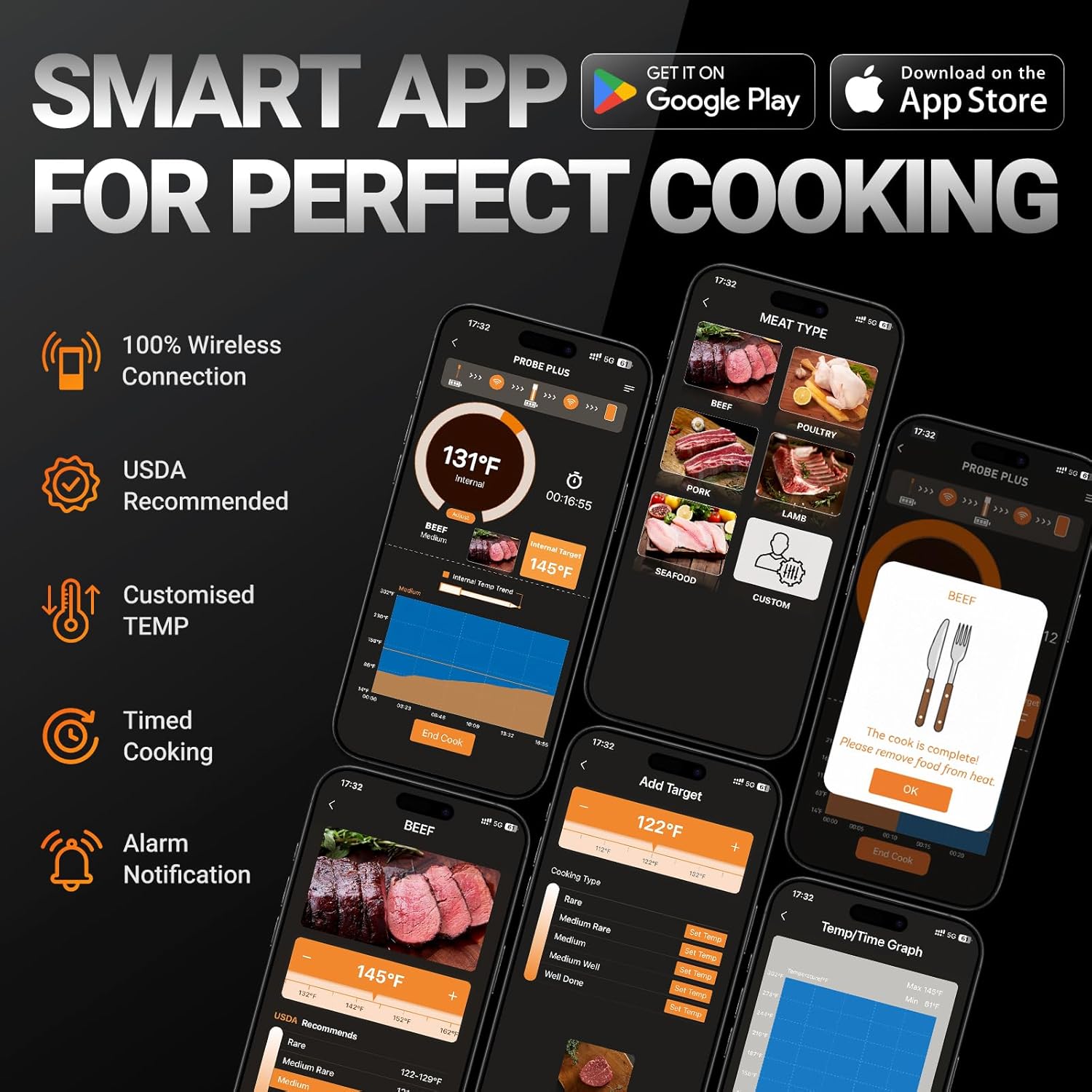
Image: Screenshots of the Housolution Smart App interface, demonstrating features like 100% wireless connection, USDA recommendations, customized temperature settings, timed cooking, and alarm notifications. Various screens show meat type selection, target temperature adjustments, and temperature/time graphs.
4. Versatile Cooking Applications
The Housolution Wireless Meat Thermometer is suitable for a wide range of cooking environments:
- Indoor Cooking: Ideal for ovens, pans, and air fryers.
- Outdoor Cooking: Perfect for smokers, rotisseries, and grills.

Image: A collage showing the Housolution thermometer being used in various cooking scenarios, including an oven, pan, air fryer for indoor cooking, and a smoker, rotisserie, and grill for outdoor cooking.

Image: The Housolution smart base displaying a temperature alongside a visual guide for USDA recommended doneness levels (Rare, Medium Rare, Medium, Medium Well, Well) for various meats, also showing the app interface for setting these preferences.
Maintenance
1. Cleaning
- Probes: After each use, clean the stainless steel probes with a damp cloth and mild detergent. Do not immerse the entire probe in water, especially the handle part.
- Smart Base: Wipe the smart base unit with a soft, dry or slightly damp cloth. Do not use abrasive cleaners or immerse in water.
2. Storage
Store the probes in their designated slots within the smart base unit when not in use. This protects the probes and keeps them charged. Store the entire unit in a cool, dry place.
3. Battery Care
To prolong battery life, avoid fully discharging the device frequently. Charge the unit regularly, even if not in constant use, to maintain battery health.
Troubleshooting
- No Probe Detected / Connection Issues:
- Ensure probes are fully charged and correctly inserted into the smart base.
- Check that the smart base and your smartphone's Bluetooth are enabled.
- Make sure the probes and base are within the specified 180m (600ft) range, and minimize physical obstructions.
- Restart the app and/or your smartphone's Bluetooth.
- Inaccurate Temperature Readings:
- Verify the probe is inserted correctly into the thickest part of the meat, avoiding bones.
- Ensure the probe is inserted past the 'safe cooking line'.
- Check for any visible damage to the probe or its cable.
- App Not Connecting:
- Close and reopen the "PROBE PLUS" app.
- Check your phone's app permissions for Bluetooth access.
- Ensure your phone's operating system is up to date.
- Alarm Not Sounding:
- Check alarm settings within the app and on the smart base.
- Ensure your phone's volume is up and not on silent mode.
Specifications
| Model Name | FM2201 |
| Dimensions (L x W x H) | 8.79 x 15.8 x 3.81 cm (3.46 x 6.22 x 1.5 inches) |
| Item Weight | 280.66 grams (9.9 ounces) |
| Connectivity Technology | Bluetooth |
| Power Source | Battery Powered (1 Lithium-ion battery included) |
| Reusability | Rechargeable |
| Display Type | Digital |
| Temperature Accuracy | ±0.15°C (±0.5°F) |
| Probe Temperature Resistance | Max 100°C (212°F) |
| Probe Handle Temperature Resistance | Max 300°C (572°F) |
| Material | Plastic (exterior) |
| Certifications | CE, FCC, FDA, RoHS |

Image: Documents displaying professional certifications for the Housolution product, including FCC, FDA, CE, and RoHS approvals, indicating compliance with various quality and safety standards.
Warranty and Support
Specific warranty details and direct support contact information are not provided in the product data. For warranty claims or technical assistance, please refer to the product packaging or contact Housolution customer service through their official website or the retailer where the product was purchased.
