
Introduction
The RadioShack Dual-Mode Wireless Bluetooth Mouse offers versatile connectivity and ergonomic comfort for various computing needs. This manual provides instructions for setting up, operating, and maintaining your mouse to ensure optimal performance.

Figure 1: Front-side view of the RadioShack Dual-Mode Wireless Bluetooth Mouse.
Package Contents
- RadioShack Dual-Mode Wireless Bluetooth Mouse
- USB Receiver (stored in the mouse)
- USB Charging Cable
- User Manual (this document)
Setup
1. Charging the Mouse
The mouse features a built-in rechargeable battery. Before first use, or when the battery is low, connect the mouse to a USB power source using the provided USB charging cable. The charging port is located on the front side of the mouse.

Figure 2: Side view of the mouse highlighting the USB charging port.

Figure 3: The mouse being charged via a USB connection to a laptop.
2. Connecting the Mouse
The mouse supports dual-mode connectivity: 2.4G Wireless (via USB receiver) and Bluetooth 3.0. You can switch between these modes using the switch on the bottom of the mouse.
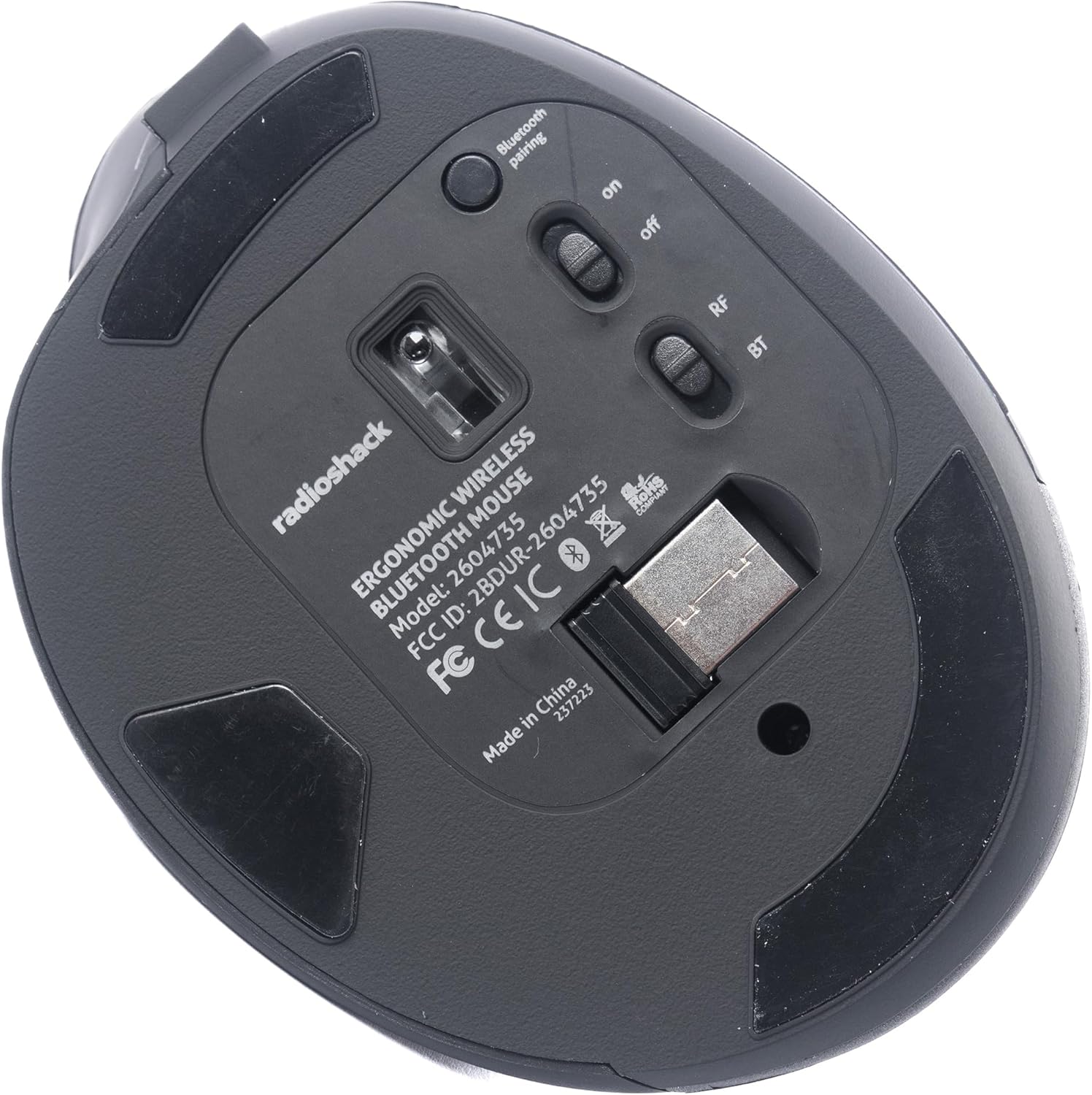
Figure 4: Bottom view of the mouse, indicating the power switch, mode switch (RF/BT), and USB receiver compartment.
2.1. 2.4G Wireless Mode (USB Receiver)
- Locate the USB receiver stored in the compartment on the bottom of the mouse.
- Insert the USB receiver into an available USB port on your computer.
- Slide the mode switch on the bottom of the mouse to the "RF" position.
- Turn on the mouse using the ON/OFF switch. The mouse should connect automatically.
2.2. Bluetooth Mode
- Slide the mode switch on the bottom of the mouse to the "BT" position.
- Turn on the mouse using the ON/OFF switch.
- Press and hold the Bluetooth pairing button (usually located near the mode switch) for 3-5 seconds until the indicator light flashes, indicating it is in pairing mode.
- On your computer or device, go to Bluetooth settings and search for new devices.
- Select "RadioShack Mouse" (or similar name) from the list of available devices to pair.
- Once paired, the indicator light will stop flashing.

Figure 5: The mouse positioned wirelessly next to a laptop, ready for use.
Operating the Mouse
Basic Functions
- Left Button: Primary click function.
- Right Button: Secondary click function (context menu).
- Scroll Wheel: Scroll up/down, and can also function as a middle click button.
- Forward/Backward Buttons: Located on the side, these buttons allow for quick navigation in web browsers and file explorers.
Switching Between Modes
To switch between 2.4G Wireless and Bluetooth modes, simply slide the mode switch on the bottom of the mouse to the desired position (RF for 2.4G, BT for Bluetooth).
Ergonomic Design
The mouse is designed with a contoured shape and rubber grips to provide comfortable support for your hand and wrist, reducing strain during extended use.

Figure 6: A hand demonstrating the ergonomic grip on the mouse.
Maintenance
Cleaning
- Turn off the mouse before cleaning.
- Use a soft, dry cloth to wipe the surface of the mouse.
- For stubborn dirt, slightly dampen the cloth with water or a mild cleaning solution, then wipe dry immediately.
- Avoid using harsh chemicals or abrasive materials.
Battery Care
- Charge the mouse regularly to maintain battery health.
- Avoid fully discharging the battery frequently.
- If storing the mouse for an extended period, charge it to about 50% capacity.
Troubleshooting
- Mouse not responding:
- Ensure the mouse is turned on.
- Check the battery level and charge if necessary.
- For 2.4G mode, ensure the USB receiver is securely plugged into the computer and the mode switch is set to "RF".
- For Bluetooth mode, ensure Bluetooth is enabled on your device, the mouse is in "BT" mode, and it is properly paired. Try re-pairing if necessary.
- Try connecting the mouse to a different USB port or a different device to rule out port or device issues.
- Cursor movement is erratic or slow:
- Ensure the mouse sensor is clean and free from obstructions.
- Use the mouse on a clean, non-reflective surface.
- Check for interference from other wireless devices.
- Mouse not charging:
- Ensure the charging cable is securely connected to both the mouse and the power source.
- Try a different USB charging cable or power adapter.
- Ensure the power source is active.
Specifications
| Feature | Detail |
|---|---|
| Model Number | 2604735 |
| Connectivity Technology | 2.4G Wireless, Bluetooth 3.0 (Dual-Mode) |
| Movement Detection Technology | Optical |
| Color | Black & Gray |
| Power Source | Rechargeable Lithium Ion Battery (included) |
| Item Weight | 9.1 ounces |
| Package Dimensions | 8.66 x 6.3 x 2.95 inches |
| Manufacturer | RadioShack |
Warranty and Support
For warranty information and customer support, please refer to the official RadioShack website or contact their customer service directly. Details regarding product registration, warranty claims, and technical assistance can typically be found on the manufacturer's support pages.