1. Introduction
The Yealink SkySound CM20 is a state-of-the-art ceiling microphone engineered to deliver superior audio performance in professional conference settings. This manual provides essential information for setting up, operating, and maintaining your CM20 microphone, ensuring you achieve the best possible audio clarity and coverage for your meetings.
2. Product Overview
The CM20 features an advanced array of 16 omnidirectional microphones, designed to capture sound in 360 degrees, ensuring comprehensive coverage and inclusivity in every discussion. It integrates a Digital Signal Processor (DSP) for plug-and-play functionality with Yealink MVC systems, eliminating the need for external audio processing. The design is optimized for medium to large conference rooms, blending advanced technology with a discreet, elegant aesthetic.

Figure 2.1: The Yealink SkySound CM20 microphone unit with its removable magnetic mesh cover. The main unit features a central LED indicator.

Figure 2.2: The Yealink SkySound CM20 microphone with its magnetic mesh cover securely attached, as it would appear when installed.
3. Key Features
- Advanced Microphone Array: Equipped with 16 omnidirectional units for unparalleled audio clarity across 8 independent pickup zones.
- Superior Coverage: Offers premium quality 30 full-duplex audio capture (STIPA 0.78 at pick-up radius 3.2 meters) and effective coverage up to 60 square meters (STIPA 0.72 at pick-up radius 4.5 meters) in typical conference room environments.
- Intelligent Sound Processing: Integrates Yealink's advanced noise reduction, echo cancellation, and reverberation cancellation technologies for crystal-clear audio.
- Intelligent Tracking: Features 8 beam outputs for precise speaker tracking and integrates with room cameras for enhanced camera tracking.
- In-built DSP: Provides plug-and-play functionality with Yealink MVC systems, simplifying setup.
- Network and Deployment Efficiency: Supports AES67 for easy integration into audio networks and is Power over Ethernet (PoE) enabled, requiring only one Ethernet cable for power and audio.
- Versatile Ceiling Integration: Offers multiple installation options including in-ceiling, pendant, and on-ceiling.
- Removable Magnetic Suction Mesh Cover: For easy maintenance and a sophisticated, unobtrusive design.
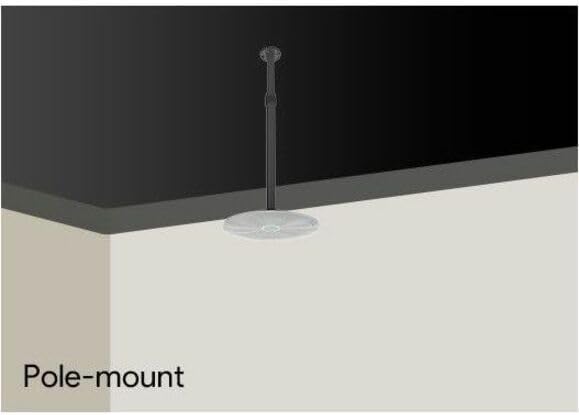
Figure 3.1: Illustration of the CM20's intelligent sound processing, demonstrating the reduction of unwanted noise and reverberation for clearer audio.
4. Setup and Installation
The Yealink CM20 offers flexible installation options to suit various conference room designs. Ensure proper power and network connectivity via a single Ethernet cable (PoE).
4.1 Installation Options
- In-ceiling: For a flush, discreet appearance.
- On-ceiling: Mounted directly onto the ceiling surface.
- Pendant (Pole-mount): Suspended from the ceiling, ideal for rooms with high ceilings or specific acoustic requirements.

Figure 4.1: In-ceiling installation method, where the microphone is recessed into the ceiling for a seamless look.

Figure 4.2: On-ceiling installation method, where the microphone is mounted directly onto the ceiling surface.

Figure 4.3: Pole-mount (pendant) installation method, where the microphone is suspended from the ceiling using a pole.
4.2 Connectivity
Connect the CM20 to your network using an RJ-45 Ethernet cable. The device supports Power over Ethernet (PoE), which means it receives both power and data through this single cable. Ensure your network switch or injector provides PoE.
5. Operating the CM20
Once installed and connected, the Yealink CM20 operates largely automatically, leveraging its integrated DSP and intelligent algorithms. It is designed for seamless integration with Yealink MVC systems, where audio processing and beamforming are managed internally.
- Automatic Beamforming: The microphone automatically identifies and focuses on active speakers within its coverage area.
- Noise and Echo Cancellation: Continuously works to eliminate background noise and acoustic echo for clear communication.
- System Integration: For optimal performance, ensure the CM20 is properly configured within your Yealink MVC system or other compatible audio conferencing platform. Refer to your system's documentation for specific integration steps.
6. Maintenance
To ensure the longevity and optimal performance of your Yealink CM20 microphone, follow these general maintenance guidelines:
- Cleaning: Gently wipe the exterior surfaces, including the magnetic mesh cover, with a soft, dry, lint-free cloth. Do not use liquid cleaners, aerosols, or solvents.
- Ventilation: Ensure that the microphone unit has adequate ventilation, especially if installed in an enclosed space, to prevent overheating.
- Handling: Avoid dropping or subjecting the microphone to strong impacts.
- Firmware Updates: Periodically check the Yealink official website for any available firmware updates for the CM20. Firmware updates can improve performance, add features, or resolve issues.
7. Troubleshooting
If you encounter issues with your Yealink CM20 microphone, consider the following troubleshooting steps:
- No Audio Output:
- Verify that the Ethernet cable is securely connected to both the CM20 and the PoE-enabled network switch/injector.
- Check the status indicator light on the CM20 (if applicable) to ensure it is powered on.
- Confirm that the network switch/injector is providing power (PoE).
- Ensure the CM20 is correctly selected as the audio input device in your conferencing software or system settings.
- Poor Audio Quality (Echo, Noise):
- Ensure the microphone is installed in an optimal location, away from direct noise sources like air conditioning vents.
- Verify that the room acoustics are suitable for conferencing. Excessive reverberation can impact performance.
- Check for any conflicting audio processing settings in your conferencing system that might interfere with the CM20's internal DSP.
- Microphone Not Detected:
- Restart the network switch and the connected conferencing system.
- Ensure network settings (e.g., VLANs, firewall rules) are not blocking communication with the CM20.
- Confirm that the CM20's firmware is up to date.
If issues persist, consult the Yealink support website or contact their technical support for further assistance.
8. Specifications
| Specification | Value |
|---|---|
| Brand | Yealink |
| Model Name | SkySound |
| Item Model Number | CM20 |
| Microphone Form Factor | Ceiling Mount |
| Number of Channels | 16 (Omnidirectional units) |
| Polar Pattern | Omnidirectional |
| Frequency Response | 120 Hz - 16 kHz |
| Connectivity Technology | RJ-45 (PoE) |
| Special Feature | In-built DSP |
| Recommended Uses | Conference Room |
| Material | Acrylonitrile Butadiene Styrene, Iron, Polycarbonate |
| Product Dimensions (L x W x H) | 16.2 x 12.7 x 5.8 inches |
| Item Weight | 6.66 pounds |
| UPC | 841885120786 |
9. Warranty and Support
For detailed warranty information regarding your Yealink SkySound CM20 Microphone, please refer to the warranty card included with your purchase or visit the official Yealink website. Warranty terms and conditions may vary by region and retailer.
For technical support, product inquiries, or service requests, please contact Yealink customer support through their official channels. You can typically find contact information on the Yealink website (www.yealink.com).