
prunus J-618
PRUNUS J-618 Portable AM/FM Radio User Manual
Your guide to operating and maintaining your PRUNUS J-618 radio.
Introduction
The PRUNUS J-618 is a versatile and compact portable radio designed for an enhanced listening experience. It combines traditional AM/FM radio functionality with modern features like Bluetooth connectivity for headphones and speaker mode, an MP3 player via TF card, and a convenient sleep timer. Its robust design and long-lasting battery make it ideal for both indoor and outdoor use.
Key features include:
- Bluetooth Headphone Connectivity: Enjoy wireless audio freedom.
- Bluetooth Speaker & MP3 Player: Clear sound output and versatile playback options from TF/SD card.
- Exceptional AM/FM Reception: Advanced DSP chip and telescopic antenna ensure strong signal reception and up to 99 station presets.
- Long-Lasting 2000mAh Battery: Provides 6-10 hours of operation with convenient USB-C charging.
- Portable & Compact Design: Lightweight (148g) and pocket-sized for easy carrying, includes a lock button.
- Convenient Sleep Timer: Automatic shut-off options (10-90 minutes) for comfortable listening before sleep.
Package Contents
Please check the box for the following items:
- 1 x PRUNUS J-618 Radio
- 1 x Lanyard
- 1 x USB-C Charging Cable
- 1 x User Manual (this document)
Product Overview
Familiarize yourself with the various parts and controls of your PRUNUS J-618 radio.

Figure 1: Front view of the PRUNUS J-618 Radio.
This image displays the PRUNUS J-618 portable radio in black, highlighting its digital display, volume controls, tuning buttons, and mode selection buttons. The front also features the speaker grille and the PRUNUS brand logo. The telescopic antenna is visible at the top.
Controls and Ports:
- Digital Display: Shows frequency, volume, battery level, and mode.
- Volume Up/Down Buttons: Adjust audio output level.
- Tuning/Navigation Buttons: For station tuning or track navigation.
- Power/Mode Button: Turns the radio on/off and switches between modes (FM/AM/Bluetooth/MP3).
- Scan Button: Automatically scans and saves radio stations.
- Preset Buttons (M-/M+): Access and save favorite radio stations.
- Sleep Button: Activates the sleep timer function.
- Lock Button: Prevents accidental button presses.
- Telescopic Antenna: For improved radio signal reception.
- USB-C Charging Port: For recharging the internal battery.
- 3.5mm Headphone Jack: For connecting wired headphones.
- TF Card Slot: For inserting a MicroSD card to play MP3 files.
Setup
1. Charging the Battery
Before first use, fully charge the radio's internal 2000mAh rechargeable battery. A full charge provides approximately 6-10 hours of operation.
- Connect the provided USB-C charging cable to the radio's USB-C port.
- Connect the other end of the cable to a standard USB power adapter (not included) or a computer's USB port.
- The charging indicator on the display will show charging status. It will indicate full charge when complete.

Figure 2: Charging the PRUNUS J-618 via USB-C.
This image shows the PRUNUS J-618 radio connected to a wall outlet via its USB-C charging cable, illustrating the charging process. The radio is placed on a wooden nightstand next to a bed.
2. Inserting a TF Card (Optional)
To use the MP3 player function, insert a TF (MicroSD) card into the designated slot on the radio.
- Locate the TF card slot on the side of the radio.
- Gently insert the TF card with the metal contacts facing down until it clicks into place.
- To remove, push the card in slightly until it springs out.
Operating Instructions
1. Power On/Off
Press and hold the Power/Mode button to turn the radio on or off.
2. Switching Modes
Short press the Power/Mode button to cycle through available modes: FM Radio, AM Radio, Bluetooth Speaker, and TF Card MP3 Player.
3. Radio Mode (AM/FM)
In FM or AM mode:
- Tuning: Use the Up/Down arrow buttons to manually tune to a specific frequency.
- Automatic Scan: Press the SCAN button to automatically scan for available stations. The radio will save up to 99 stations.
- Accessing Presets: Use the M- and M+ buttons to navigate through saved preset stations.
- Antenna: Extend the telescopic antenna for optimal signal reception, especially in FM mode.

Figure 3: Excellent Signal Reception with Extended Antenna.
This image illustrates the PRUNUS J-618 radio in an outdoor environment, with its telescopic antenna extended, symbolizing its excellent signal reception capabilities. A graphic of a DSP chip highlights its advanced technology.
4. Bluetooth Speaker Mode
To use the radio as a Bluetooth speaker:
- Switch the radio to Bluetooth mode (display will show "BT").
- On your smartphone or other Bluetooth device, search for "J-618" in the Bluetooth settings.
- Select "J-618" to pair. Once paired, you can play audio from your device through the radio's speaker.
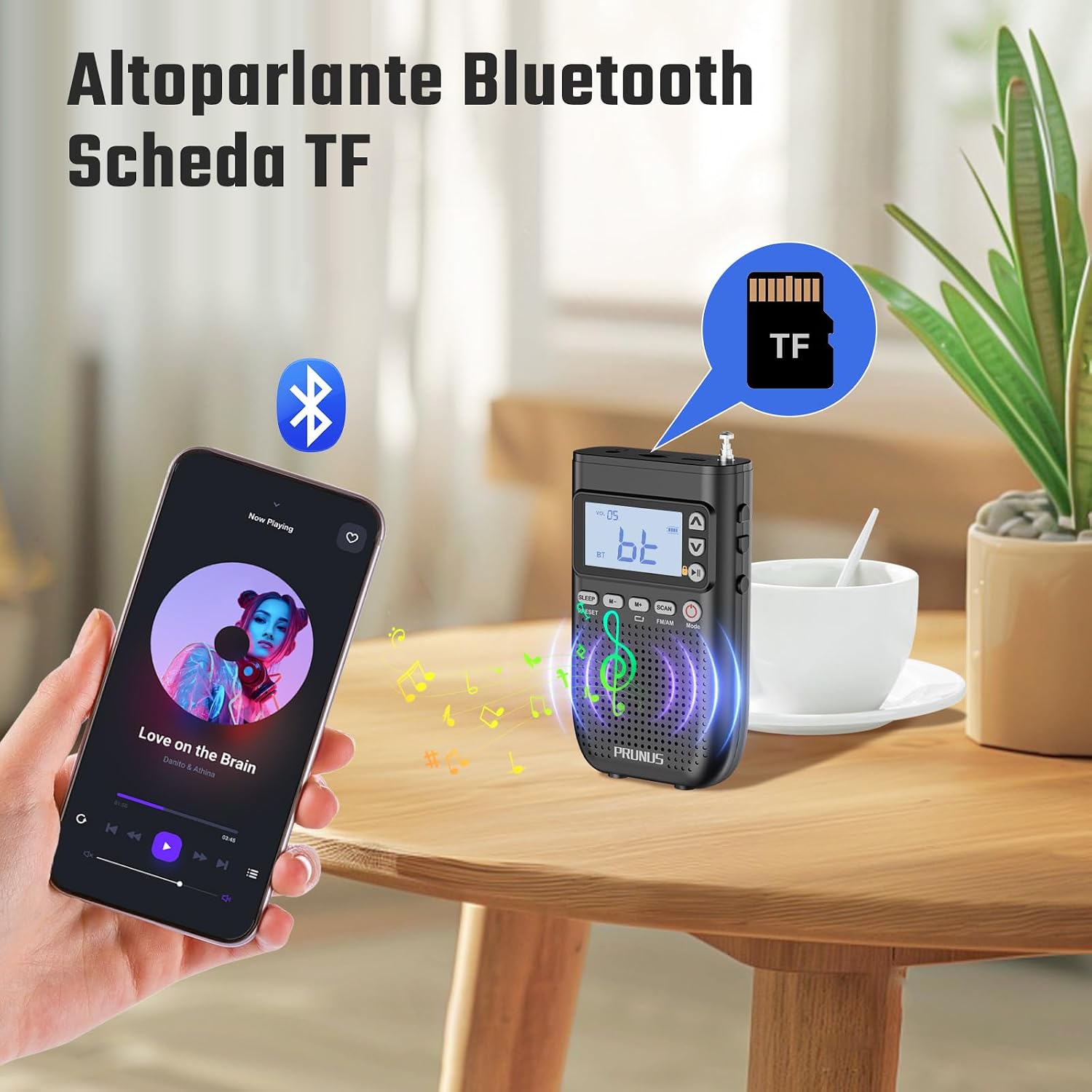
Figure 4: Bluetooth Speaker and TF Card Playback.
This image shows the PRUNUS J-618 radio on a table, wirelessly connected to a smartphone via Bluetooth, indicating its capability to function as a Bluetooth speaker. A TF card icon also suggests its MP3 playback feature.
5. MP3 Player Mode (TF Card)
If a TF card with MP3 files is inserted, the radio will automatically switch to MP3 mode or you can select it using the Mode button.
- Use the Up/Down arrow buttons to skip tracks.
- The radio supports playback modes such as repeat and shuffle. Refer to the display for options.
6. Headphone Connection
The PRUNUS J-618 offers both wireless and wired headphone options.
- Bluetooth Headphones: Follow the Bluetooth pairing steps (Section 4) to connect your Bluetooth headphones. This allows for tangle-free listening.
- Wired Headphones: Plug any standard 3.5mm wired headphones (not included) into the headphone jack on the radio.

Figure 5: Bluetooth Headphone Connectivity.
This image depicts two individuals enjoying music outdoors, with one person using the PRUNUS J-618 radio connected wirelessly to Bluetooth earbuds, emphasizing the radio's Bluetooth headphone connectivity feature.
7. Sleep Timer Function
The sleep timer allows the radio to automatically turn off after a set period.
- Press the SLEEP button.
- Repeatedly press the SLEEP button to cycle through the available timer options: 10, 15, 30, 45, 60, or 90 minutes.
- The radio will automatically power off after the selected time.

Figure 6: Convenient Sleep Timer Function.
This image shows the PRUNUS J-618 radio on a nightstand next to a sleeping person, visually representing the sleep timer feature with options for 10, 15, 30, 45, 60, and 90 minutes, allowing users to fall asleep to their favorite audio.
8. Lock Button
To prevent accidental button presses, especially when carrying the radio in a pocket or bag, use the lock button. Locate the small lock switch on the side of the radio and slide it to the locked position. Slide it back to unlock.
Maintenance
- Cleaning: Use a soft, dry cloth to clean the radio's exterior. Do not use abrasive cleaners or solvents.
- Battery Care: To prolong battery life, avoid fully discharging the battery frequently. If storing for a long period, charge the battery to about 50% and recharge every few months.
- Storage: Store the radio in a cool, dry place away from direct sunlight and extreme temperatures.
- Water Exposure: The radio is not waterproof. Avoid exposure to water or high humidity.
Troubleshooting
| Problem | Possible Cause | Solution |
|---|---|---|
| Radio does not turn on. | Battery is depleted. | Charge the radio using the USB-C cable. |
| Poor radio reception. | Weak signal area; Antenna not extended. | Extend the telescopic antenna fully. Try moving to a different location. |
| Bluetooth device won't pair. | Radio not in Bluetooth mode; Device too far; Already paired with another device. | Ensure radio is in Bluetooth mode. Bring devices closer. Disconnect from other devices. |
| No sound from speaker/headphones. | Volume too low; Muted; Incorrect mode. | Increase volume. Check if radio is in the correct mode (FM/AM/BT/MP3). |
| TF card not recognized. | Card inserted incorrectly; Corrupted card; Unsupported file format. | Reinsert the TF card correctly. Try a different TF card. Ensure files are MP3 format. |
Specifications
| Feature | Detail |
|---|---|
| Brand | PRUNUS |
| Model | J-618 |
| Dimensions | 7 x 2.7 x 11.6 cm |
| Weight | 148 grams |
| Battery Capacity | 2000mAh Lithium-ion (rechargeable) |
| Charging Port | USB-C |
| Radio Bands | FM: 87-108MHz, AM: 520-1710KHz |
| Tuner Technology | DAB/DAB+ & FM/AM |
| Connectivity | Bluetooth, 3.5mm Headphone Jack, TF Card Slot |
| Display | LCD |
| Material | Acrylonitrile Butadiene Styrene (ABS) |
Warranty and Support
PRUNUS products are designed for reliability and performance. For any questions, technical support, or warranty claims, please contact PRUNUS customer service through the retailer where you purchased the product or visit the official PRUNUS website for contact information.
Please retain your proof of purchase for warranty purposes.
Related documentsJ-618


Ask a question about this manual
Ask about setup, troubleshooting, compatibility, parts, safety, or missing instructions. Manuals+ will review the question and use this page’s manual context to help answer it.