
Introduction
Thank you for purchasing the SIMREX 1/16 Scale High-Speed RC Car. This remote control vehicle is designed for thrilling off-road performance, featuring 4WD, a powerful motor, and durable components. Please read this manual thoroughly before operation to ensure proper use, maintenance, and safety.

Figure 1: SIMREX 1/16 Scale High-Speed RC Car, remote control, and included accessories.
Safety Information
For safe operation and to prevent damage to the product or injury, please adhere to the following safety guidelines:
- This product contains small parts and is not suitable for children under three years old due to choking hazards.
- Always operate the RC car in open areas, away from people, pets, and obstacles.
- Do not operate near public roads, power lines, or bodies of water.
- Ensure the battery is fully charged before each use.
- Do not attempt to modify or disassemble the RC car or its components.
- Avoid prolonged exposure to direct sunlight or extreme temperatures.
- While the car is splash-proof, it is not recommended to submerge it in water.

Figure 2: The RC car is designed to be splash-proof for wet conditions but should not be submerged.
What's in the Box
Verify that all components are present upon unboxing:
- RC Car Body
- Remote Control Transmitter
- 7.4V 1500mAh Li-ion Battery (1 included)
- USB Charging Cable
- Wrench
- 4+ Body Clips
- User Manual

Figure 3: Contents of the SIMREX 1/16 Scale 4WD RC Truck package.
Setup
- Charge the Battery:
Connect the 7.4V 1500mAh Li-ion battery to the USB charging cable. Plug the USB cable into a compatible USB power adapter (not included). The charging indicator will show the charging status. Ensure the battery is fully charged before first use. Charging time may vary.
- Install Car Battery:
Carefully remove the body clips and lift the car body. Insert the charged battery into the designated battery compartment within the chassis. Securely connect the battery connector to the car's power port. Replace the car body and secure it with the body clips.
- Install Remote Control Batteries:
Open the battery compartment on the back of the remote control. Insert the required LR44 batteries (1 included) according to the polarity markings. Close the battery compartment.
Operating Instructions
Remote Control Overview

Figure 4: Components of the 2.4GHz Remote Control Transmitter.
- Steering Wheel: Controls left and right turning.
- Trigger: Pull to accelerate forward, push to brake/reverse.
- Throttle Trim: Adjusts the neutral point of the throttle.
- Steering Trim: Adjusts the neutral point of the steering to ensure the car drives straight.
- Power Switch: Turns the remote control ON/OFF.
First Time Operation
- Power On: Turn on the RC car first, then turn on the remote control. The indicator lights will confirm successful pairing.
- Steering Adjustment: Use the Steering Trim dial on the remote control to ensure the car's wheels are straight when the steering wheel is centered.
- Driving:
- Pull the trigger gently to move forward. Pull further for higher speed (up to 36 KPH).
- Push the trigger forward to brake. Push again to reverse.
- Turn the steering wheel left or right to steer the car.
- Low Voltage Protection: The car is equipped with low-voltage protection. If the battery voltage drops too low, the car's speed will decrease, indicating it's time to recharge the battery.
- Power Off: Always turn off the RC car first, then the remote control after use. Disconnect the battery from the car.

Figure 5: The 4WD system and independent suspension allow for excellent all-terrain performance.
Maintenance
- Cleaning: After each use, especially in dusty or muddy conditions, clean the car with a soft brush or cloth. Do not use water directly on electronic components.
- Battery Care:
- Always disconnect the battery from the car when not in use.
- Store batteries in a cool, dry place.
- Do not overcharge or over-discharge the battery.
- Inspection: Regularly inspect the wheels, suspension, and drive shafts for any damage or debris. Ensure all screws are tight.
- Lubrication: Periodically lubricate moving parts like gears and bearings with RC-specific lubricant to ensure smooth operation and longevity.
Troubleshooting
| Problem | Possible Cause | Solution |
|---|---|---|
| Car does not respond to remote. |
|
|
| Car drives crooked. | Steering trim needs adjustment. | Adjust the Steering Trim dial on the remote control until the car drives straight. |
| Reduced speed or power. |
|
|
| Unusual noises during operation. | Debris in gears or damaged components. | Inspect gears and moving parts for debris. Clean or replace damaged parts if necessary. |
Specifications
- Model Number: TOY2413
- Scale: 1:16
- Drive System: 4-Wheel Drive (4WD)
- Max Speed: Up to 36 KPH (22 MPH)
- Control Frequency: 2.4 GHz
- Battery (Car): 7.4V 1500mAh Li-ion (included)
- Battery (Remote): 1 x LR44 (included)
- Play Time: Approximately 30 minutes per charge
- Motor: High Torque 390 Motor with Heatsink
- Suspension: Independent Suspension with Metal Shock Absorbers
- Chassis: Ultra-Durable Metal 4-wheel drive chassis
- Tires: Inflated Rubber Tires
- Dimensions: 10.62 x 9.25 x 5.11 inches (27 x 23.5 x 13 cm)
- Weight: 1.8 pounds (0.82 kg)

Figure 6: Product dimensions and a visual representation of included accessories.
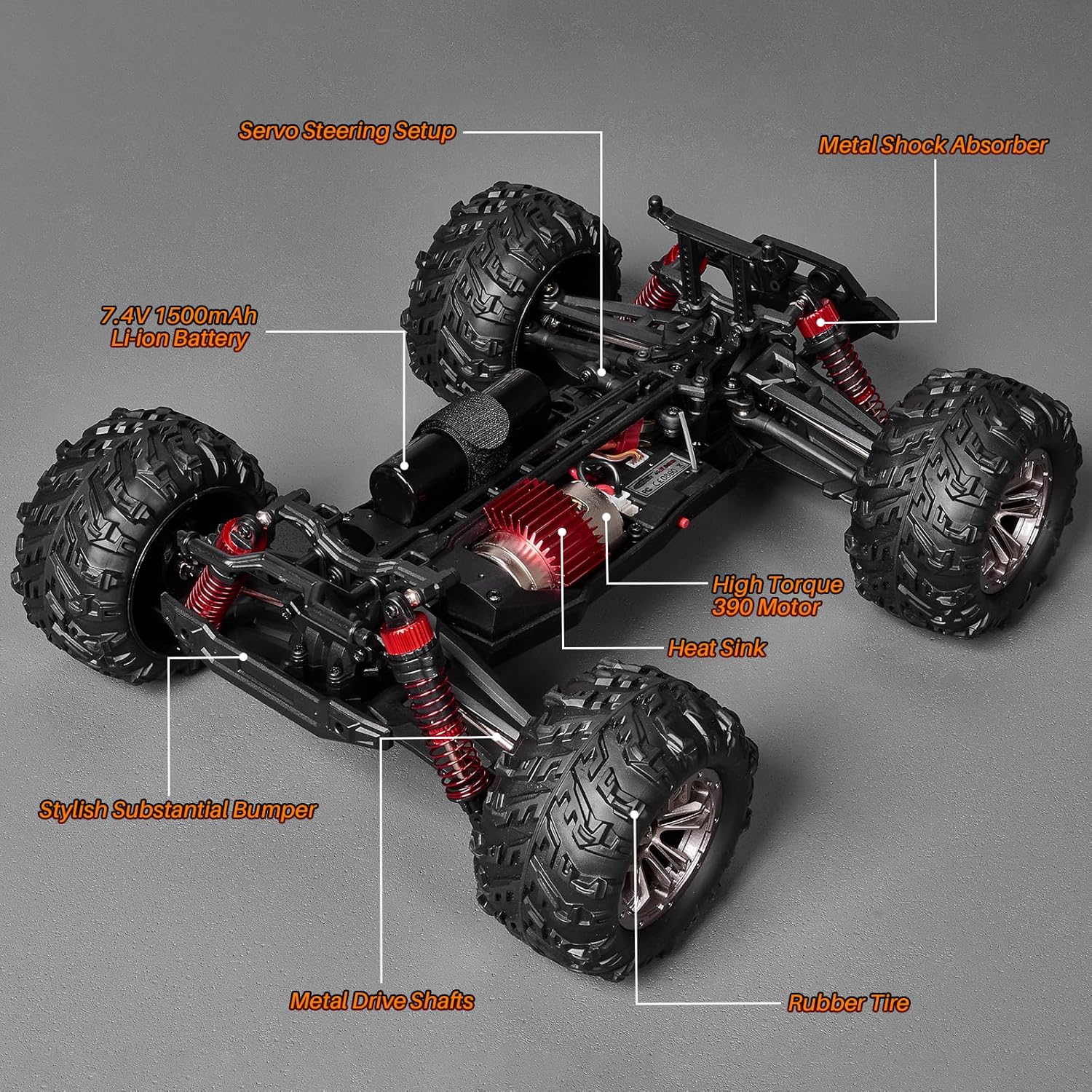
Figure 7: Key internal and external components of the RC car.
Warranty and Support
SIMREX products are manufactured to high-quality standards. For warranty information, technical support, or replacement parts, please contact SIMREX customer service through the retailer's platform or visit the official SIMREX website. Please retain your proof of purchase for warranty claims.
For further assistance, you may visit the SIMREX Store on Amazon.
Official Product Videos
No official product videos from the seller with relevant instructional content were found for embedding in this manual.