
Introduction
Thank you for choosing the Zevemomo Portable Folding Table Tennis Table. This manual provides essential information for the safe and efficient setup, operation, and maintenance of your new table. Please read it thoroughly before use and retain it for future reference.
Safety Instructions
- Ensure all parts are securely fastened before use.
- Keep hands and fingers clear of folding mechanisms to prevent pinching.
- Do not climb or sit on the table.
- Use on a flat, stable surface to prevent tipping.
- Supervise children during play.
- Store in a dry place away from extreme temperatures.
Package Contents
Verify that all items listed below are included in your package:
- 1 x Zevemomo Portable Folding Table Tennis Table
- 1 x Table Tennis Net
- 2 x Table Tennis Paddles
- 3 x Table Tennis Balls

Figure 1: Complete set including table tennis paddles and balls.
Setup Instructions
The Zevemomo Table Tennis Table is designed for quick and easy setup. No tools are required for assembly.
- Unfold the Table: Place the folded table on a flat surface. Carefully unlock the safety latches and unfold the table halves.
- Extend the Legs: Extend the support legs on both halves of the table until they lock into place. Ensure all legs are fully extended and stable.
- Connect Table Halves: Push the two table halves together firmly.
- Install the Net: Attach the table tennis net to the center of the table. The net features a detachable design for quick installation. Secure the net posts to the table edges as shown in the diagram.
- Adjust Leg Levelers: If the playing surface is uneven, adjust the leg levelers at the bottom of each leg to achieve a perfectly flat and stable table.

Figure 2: Step-by-step unfolding process of the table.
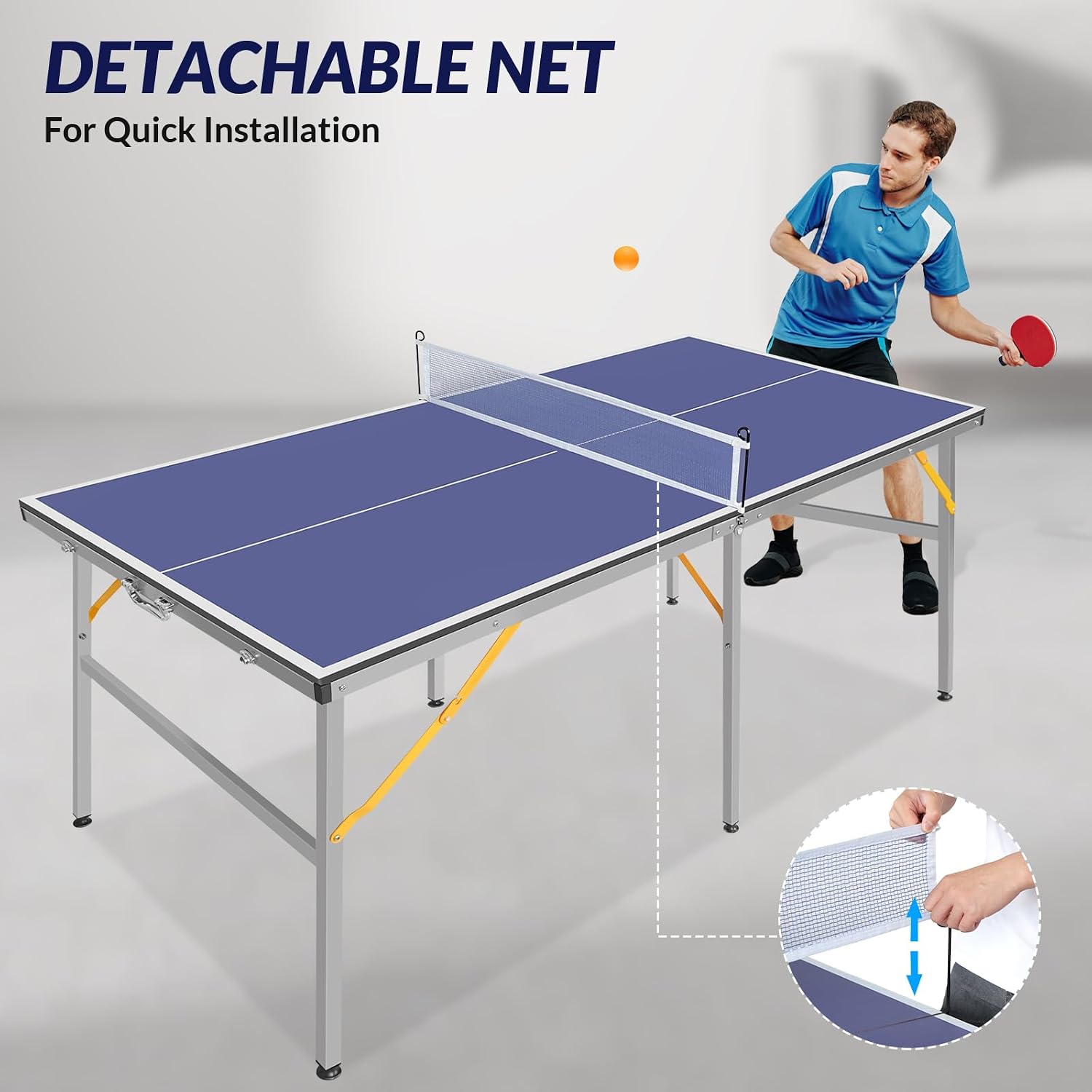
Figure 3: Detachable net installation.
Operating Instructions
Playing Table Tennis
Once assembled, the table is ready for play. Use the provided paddles and balls for a standard game of table tennis. The MDF surface provides a consistent ball bounce.

Figure 4: Table in use for playing table tennis.
Folding and Storage
To fold the table for storage or transport:
- Remove the net from the table.
- Retract the support legs on both table halves.
- Carefully fold each table half inward. Ensure the safety locks engage to secure the folded position.
- Use the integrated handle for easy transport. The compact design allows for storage in tight spaces.

Figure 5: Folded table with handle and safety lock details.
Multi-functional Use
Beyond table tennis, this table can serve as a versatile surface. Remove the net to use it as a general utility table, a workspace, or an outdoor picnic table.
Maintenance
- Cleaning: Wipe the table surface with a damp cloth to remove dust and dirt. Avoid abrasive cleaners that could damage the MDF surface.
- Storage: Store the table in a dry, cool place when not in use. Protect it from direct sunlight and moisture to prevent warping or damage to the materials.
- Inspection: Periodically check all bolts, screws, and folding mechanisms to ensure they are secure and functioning correctly. Tighten any loose fasteners.
Troubleshooting
- Table is wobbly: Ensure all legs are fully extended and locked. Adjust the leg levelers on uneven surfaces.
- Table halves do not align: Check for any obstructions between the two halves. Ensure the table is on a flat surface.
- Net is loose: Re-attach the net clips firmly to the table edges.
Specifications
| Feature | Detail |
|---|---|
| Model Number | B0DFH5GX4G |
| Assembled Dimensions (L x W x H) | 182.9 cm x 91.4 cm x 76.2 cm (72 in x 36 in x 30 in) |
| Folded Dimensions (L x W x H) | 91.4 cm x 91.4 cm x 10.2 cm (36 in x 36 in x 4 in) |
| Weight | 15.4 kg (34 lbs) |
| Main Material | MDF (Tabletop), Aluminum (Frame) |
| Color | Blue |
| Assembly Required | No (Tool-free setup) |

Figure 6: Zevemomo Table Tennis Table Dimensions.
Warranty and Support
For warranty information or technical support, please contact Zevemomo customer service through the retailer where the product was purchased. Please have your model number (B0DFH5GX4G) and purchase date available when contacting support.

