
Amazboost A1 Plus
Amazboost A1 Plus Cell Phone Booster User Manual
Model: A1 Plus
Introduction
The Amazboost A1 Plus Cell Phone Booster is designed to enhance cellular signal strength within your home or office, covering up to 5,000 square feet. It is compatible with all major U.S. and Canadian carriers, supporting 3G, 4G, and 5G signals across bands 2, 4, 5, 12, 13, 17, and 25. Featuring a smart LCD display for real-time monitoring and an upgraded log periodic outdoor antenna, this booster aims to provide reliable connectivity in areas with weak signal.

The Amazboost A1 Plus Cell Phone Booster kit, including the booster unit, outdoor antenna, and indoor antenna.
Package Contents
Verify that all components are present in your package:
- 1 x Signal Booster (Main Unit)
- 1 x Long Log Periodic Outdoor Antenna
- 1 x Indoor Antenna
- 1 x 60ft Coaxial Cable
- 1 x 15ft Coaxial Cable
- 1 x F-Female to F-Female Adapter
- 1 x Roof/Pole Mount Bracket
- 1 x Power Supply
- 1 x Installation Kit (screws, anchors)

Visual representation of all items included in the Amazboost A1 Plus booster kit.
Setup and Installation
Proper installation is crucial for optimal performance. Follow these steps carefully.
1. Outdoor Antenna Installation
Install the outdoor antenna in a location with the strongest possible signal, typically on the roof or an exterior wall. Ensure it is pointed towards the nearest cell tower. Use the provided mounting bracket to secure it firmly.

The outdoor antenna should be mounted in an elevated position, such as a roof, for best signal reception.
2. Indoor Unit (Booster) Placement
The main booster unit can be placed on a desktop or mounted on a wall. Choose a central location within the area where you need improved signal.
3. Connecting Components
- Connect the outdoor antenna to the 'OUTDOOR' port on the booster unit using the 60ft coaxial cable.
- Connect the indoor antenna to the 'INDOOR' port on the booster unit using the 15ft coaxial cable.
- Connect the power supply to the booster unit and then plug it into a power outlet.
4. Ensuring Antenna Isolation
Maintain sufficient separation between the outdoor and indoor antennas to prevent oscillation (feedback). A minimum vertical separation of 20 feet and a horizontal separation of 30 feet is recommended. Walls and floors can help with isolation.

Diagram showing recommended separation distances between indoor and outdoor antennas for optimal performance.
Installation Video Guide
Official video demonstrating the quick installation process for the Amazboost A1 Plus Cell Phone Booster. This video covers connecting components and initial setup steps.
Operation
LCD Display Overview
The smart LCD display provides real-time information about the booster's performance. It shows the signal strength (dBm), gain (dB), and operating status (NOR for normal, OSC for oscillation) for each supported frequency band.

The LCD display provides real-time data on signal strength, gain, and operational status for each frequency band.
Testing Signal Strength
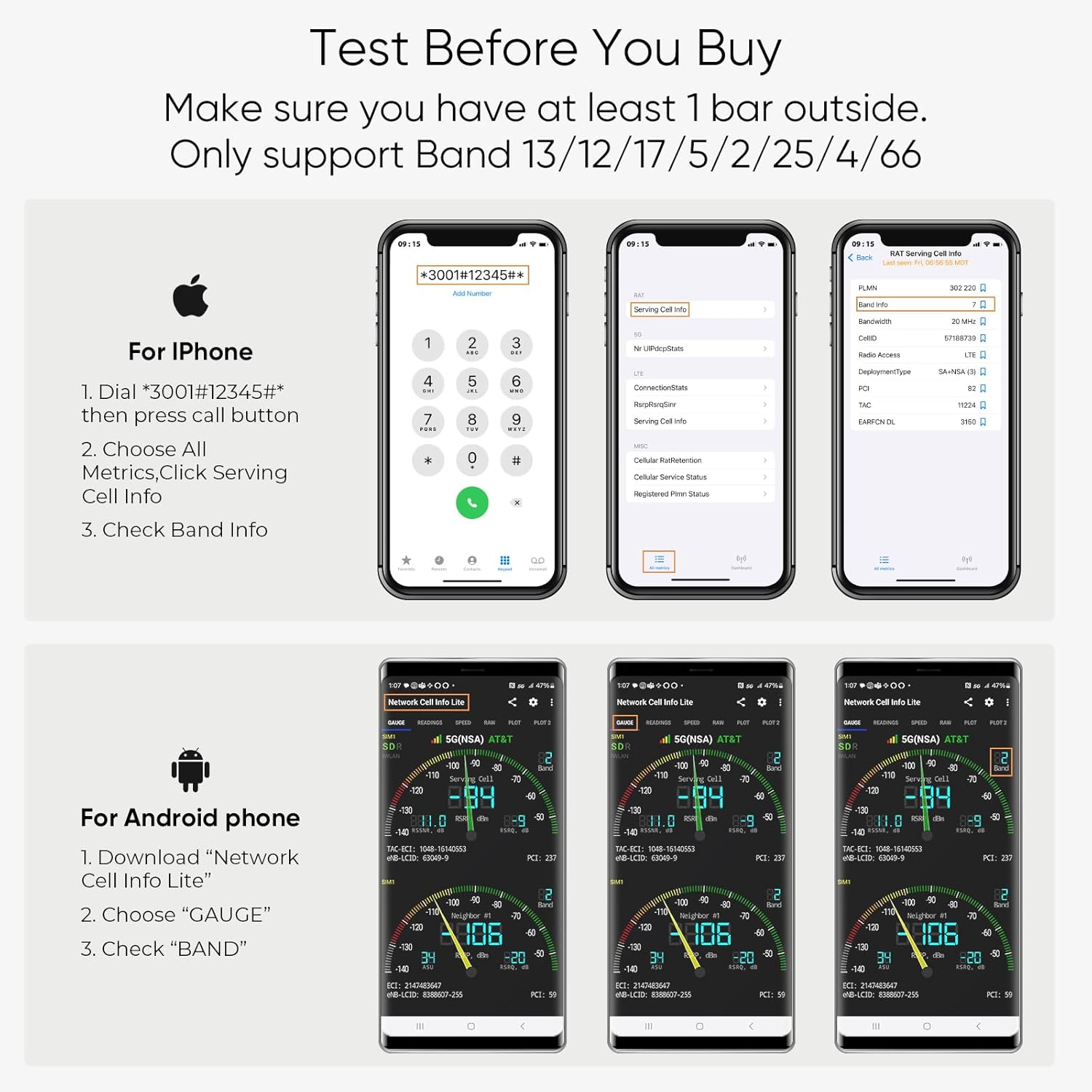
Before and after installation, it is recommended to test the outdoor signal strength to ensure optimal placement and performance. You need at least 1 bar of signal outside your home for the booster to function effectively.
- For iPhone:
- Dial *3001#12345#* then press the call button.
- Choose 'All Metrics', then 'Serving Cell Info'.
- Check 'Band Info' for details.
- For Android Phone:
- Download "Network Cell Info Lite" app.
- Choose "GAUGE".
- Check "BAND" for details.

Instructions and visual examples for checking cellular band information on both iPhone and Android devices.
Troubleshooting
If you experience issues with your Amazboost A1 Plus booster, consider the following common solutions:
- No Signal Improvement: Ensure the outdoor antenna is pointed towards the strongest signal source (nearest cell tower). Verify all cable connections are secure. Check the LCD display for any error indicators.
- Oscillation (OSC) Indicator: If the LCD shows 'OSC', it indicates feedback between the indoor and outdoor antennas. Increase the separation distance between the antennas, both vertically and horizontally. Ensure there are physical barriers (walls, floors) between them.
- Weak Signal Improvement: The coverage area depends on the initial outdoor signal strength. If the outdoor signal is very weak (1-2 bars), the boosted area will be smaller (approx. 700 sq ft). For larger coverage (up to 5000 sq ft), a stronger outdoor signal (5 bars) is needed. Try repositioning the outdoor antenna for better reception.
- Power Issue: Ensure the power adapter is correctly connected to the booster and plugged into a working electrical outlet.
Specifications
| Brand | Amazboost |
| Model | A1 Plus |
| Supported Bands | 2/4/5/12/13/17/25 |
| Max Gain | 72dB |
| Coverage Area | Up to 5,000 sq ft (dependent on outdoor signal) |
| FCC ID | A7V-SR75702002 |
| HVIN | SR75702002D |
| Item Weight | 7.09 pounds |
| Package Dimensions | 22 x 9.25 x 4.9 inches |
The booster unit displays its FCC and IC approval information, ensuring compliance with regulatory standards.
Warranty and Support
Amazboost products are designed for reliability and performance. For any questions, technical assistance, or warranty claims, please contact Amazboost customer support. Refer to the product packaging or the official Amazboost website for the most current contact information.
This device complies with Part 15 of the FCC Rules. Operation is subject to the following two conditions: (1) this device may not cause harmful interference, and (2) this device must accept any interference received, including interference that may cause undesired operation.