1. Introduction
Thank you for choosing the HOMCOM Executive Office Chair Model 921-763V00BK. This manual provides detailed instructions for the safe assembly, proper operation, and effective maintenance of your new office chair. Please read this manual thoroughly before assembly and use to ensure optimal performance and longevity of the product.

Image 1.1: The HOMCOM Executive Office Chair Model 921-763V00BK, featuring a black microfiber finish and ergonomic design, positioned in a modern office environment.

Image 1.2: This chair is designed to accommodate individuals up to 396 lbs, offering a big chair size, extra-wide seat area, and a heavy-duty base for enhanced support.
2. Safety Information
Please observe the following safety guidelines to prevent injury or damage to the product:
- Always follow the assembly instructions carefully.
- Do not exceed the maximum weight capacity of 396 lbs (180 kg).
- Be cautious when adjusting the seat height and reclining back to prevent injury.
- Keep the chair away from heat sources to prevent fire hazards.
- Ensure all screws and bolts are securely tightened before use and periodically check for looseness.
- Do not stand on the chair or use it as a step stool.
- Avoid placing heavy objects on the chair's backrest or armrests.
3. Package Contents
Before beginning assembly, verify that all components are present and undamaged. If any parts are missing or damaged, please contact customer support.
- Backrest
- Seat Cushion with Armrests
- Base (5-star)
- Casters (5 pieces)
- Gas Lift Cylinder
- Gas Lift Cover
- Mechanism Plate
- Lumbar Support Pillow (detachable)
- Retractable Footrest Assembly
- Hardware Pack (screws, washers, Allen wrench)
4. Assembly Instructions
Assembly is required. Follow the instructions provided in the package. It is recommended to have assistance during certain steps, especially when attaching the seat and backrest.
- Attach Casters to Base: Insert each of the five casters into the holes at the end of each leg of the 5-star base until they click securely into place.
- Install Gas Lift: Place the gas lift cylinder into the center hole of the assembled base. Cover the gas lift with the telescopic plastic cover.
- Attach Mechanism Plate to Seat: Align the mechanism plate with the pre-drilled holes on the underside of the seat cushion. Secure it using the provided screws and Allen wrench. Ensure the front of the mechanism faces the front of the seat.
- Connect Seat to Gas Lift: Carefully place the assembled seat onto the gas lift cylinder, ensuring the tapered end of the gas lift fits snugly into the mechanism plate.
- Attach Backrest to Seat: Align the backrest with the mounting brackets on the seat. Secure it using the provided screws. It may be helpful to have a second person hold the backrest in place during this step.
- Install Lumbar Pillow and Footrest: Attach the detachable lumbar support pillow as desired. Ensure the retractable footrest assembly is correctly installed and slides smoothly.
- Final Check: Verify that all connections are tight and secure. Test all adjustment functions before regular use.

Image 4.1: Detailed dimensions of the HOMCOM Executive Office Chair, including seat height, width, and backrest height, to assist with assembly and placement.
5. Operating Instructions
Your HOMCOM Executive Office Chair offers several adjustable features for personalized comfort:
- Seat Height Adjustment: To adjust the seat height (20.1" - 23.2"), pull the lever located under the seat upwards while applying or releasing body weight. Release the lever at the desired height.
- Reclining Function: The backrest can recline up to 140°. Pull the reclining lever (typically on the side) to adjust the backrest angle. Release the lever to lock it in position.
- Retractable Footrest: Pull the footrest out from under the seat when desired. Push it back in when not in use.
- Lumbar Support Pillow: The detachable lumbar support pillow can be positioned to provide additional support to your lower back.
- 360° Swivel and Casters: The chair features a 360° swivel seat and five smooth-rolling casters for easy movement around your workspace.
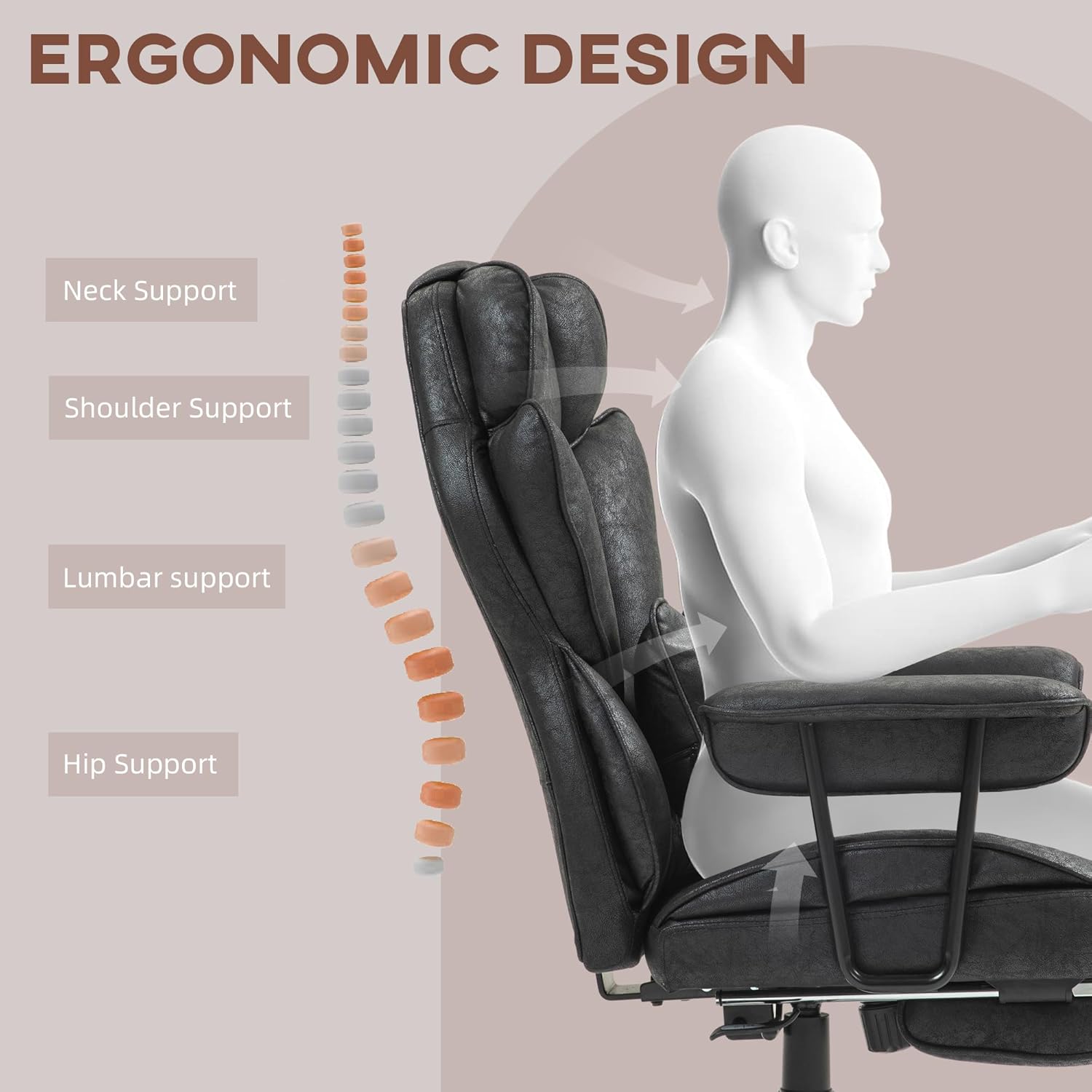
Image 5.1: The ergonomic design of the chair provides targeted support for the neck, shoulders, lumbar region, and hips, promoting proper posture and comfort.

Image 5.2: Visual representation of the chair's 140-degree reclining capability and the retractable footrest in use, highlighting comfort features.

Image 5.3: Illustration of the adjustable seat height feature, demonstrating the range from 45.3" to 48.4" and the pneumatic gas lift control.

Image 5.4: The chair's 360-degree swivel seat and five smooth-rolling casters, designed for convenient movement without needing to stand up.
Video 5.1: Official product video demonstrating the various features and adjustments of the HOMCOM Executive Office Chair, including reclining, footrest, and height adjustment.
6. Maintenance
Proper maintenance ensures the longevity and appearance of your chair:
- Cleaning: Wipe clean with a damp cloth. For stubborn stains on the microfiber fabric, use a mild fabric cleaner and follow the product instructions. Avoid harsh chemicals.
- Hardware Check: Periodically check all screws and bolts to ensure they are tight. Re-tighten if necessary to maintain stability and safety.
- Caster Care: Keep casters free of hair and debris to ensure smooth rolling. Clean them regularly.
- Avoid Direct Sunlight: Prolonged exposure to direct sunlight can cause the fabric to fade.
- Weight Capacity: Adhere strictly to the maximum weight capacity of 396 lbs to prevent structural damage.
7. Troubleshooting
| Problem | Possible Cause | Solution |
|---|---|---|
| Chair does not adjust height. | Gas lift cylinder malfunction or lever not engaged. | Ensure the height adjustment lever is fully pulled. If the issue persists, the gas lift may need replacement. Contact customer support. |
| Chair wobbles or feels unstable. | Loose screws or uneven floor. | Check and tighten all assembly screws. Ensure the chair is on a flat, even surface. |
| Casters do not roll smoothly. | Debris caught in casters. | Remove any hair, dust, or debris from the caster wheels. |
| Backrest does not recline or lock. | Reclining mechanism issue or lever not engaged. | Ensure the reclining lever is fully engaged. Check for any obstructions in the mechanism. |
| Footrest is difficult to extend or retract. | Mechanism obstruction or misalignment. | Check for any objects blocking the footrest mechanism. Ensure it is properly aligned in its tracks. |
8. Specifications
| Feature | Detail |
|---|---|
| Brand | HOMCOM |
| Model Number | 921-763V00BK |
| Overall Dimensions | 29.9" W x 30.3" D x 45.3"-48.4" H |
| Seat Height Range | 20.1" - 23.2" |
| Seat Dimensions | 22.4" W x 20.5" D |
| Backrest Height | 28.7" |
| Reclining Angle | Up to 140° |
| Maximum Weight Capacity | 396 lbs (180 kg) |
| Material | Microfiber Cloth (100% Polyester), Steel |
| Color | Black |
| Assembly Required | Yes |
9. Warranty and Support
For warranty information, replacement parts, or technical support, please contact HOMCOM customer service. Refer to your purchase documentation for specific warranty terms and contact details.
You can typically find support information on the manufacturer's official website or through the retailer where the product was purchased.


