
1. Introduction
The ZOYI N1 Smart Electric Soldering Iron is engineered for both professionals and hobbyists, offering precision and convenience for various soldering tasks. This 96W soldering iron features rapid heating capabilities, advanced PID temperature control, and an intuitive OLED display for accurate temperature settings. Its compatibility with PD and QC protocol charging provides versatile power options, making it suitable for fieldwork. The lightweight and portable design, combined with intelligent features like auto sleep, ensures both safety and durability for efficient and reliable performance.
2. Key Features
- Lightning-fast Heating: Heats to 450°C (842°F) in just 5 seconds with advanced PID temperature control.
- Precise Temperature Control: OLED screen allows precise temperature adjustment from 100°C to 450°C (212°F to 842°F).
- Portable Power: Universal USB-C interface supporting PD and QC fast charging for versatile power options (power banks, laptop chargers, car USB ports, phone adapters).
- Compact Design: Lightweight and pocket-sized for easy portability.
- Smart Automatic Sleep Mode: Conserves energy, prevents overheating, and extends lifespan.
- Durable Construction: Made of aerospace-grade aluminum alloy, durable ABS plastic, and anti-slip silicone rubber.
- Intelligent Safety Features: Equipped with automatic shutdown, sleep mode, and button lock functions.
3. Package Contents
Upon unboxing your ZOYI N1 Smart Electric Soldering Iron, please ensure all the following items are present:
- ZOYI N1 Smart Electric Soldering Iron Unit
- Soldering Iron Tips (includes a spare tip)
- USB-C Cable (approximately 3-ft)
- Tiny Tool Rest with Cleaning Sponge
- User Manual (this document)
4. Product Overview
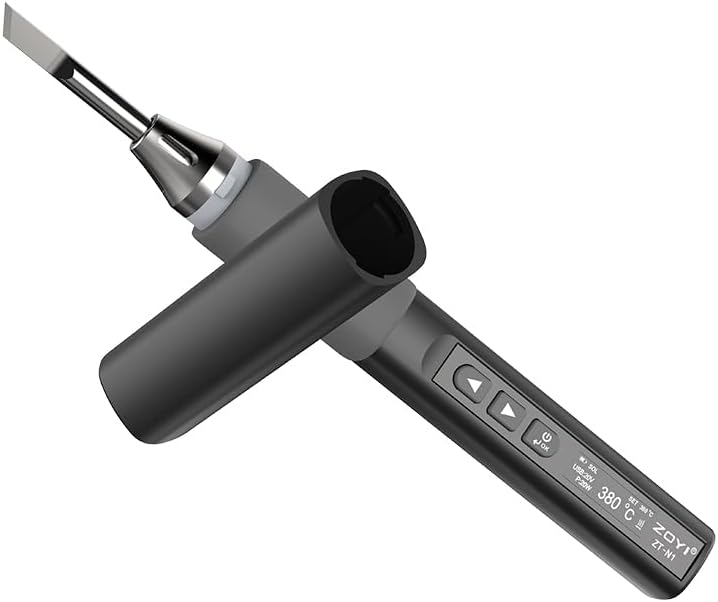
Figure 4.1: ZOYI N1 Smart Electric Soldering Iron with protective cap.

Figure 4.2: Dimensions of the ZOYI N1 Smart Electric Soldering Iron, showing its compact size.

Figure 4.3: Illustration of the internal heating mechanism, highlighting rapid heat transfer to the soldering tip.

Figure 4.4: The USB-C port and various compatible power sources, including Type-C, plug-in, and power bank charging.

Figure 4.5: Demonstrates the adjustable heating feature, crucial for precision repair and stable soldering.
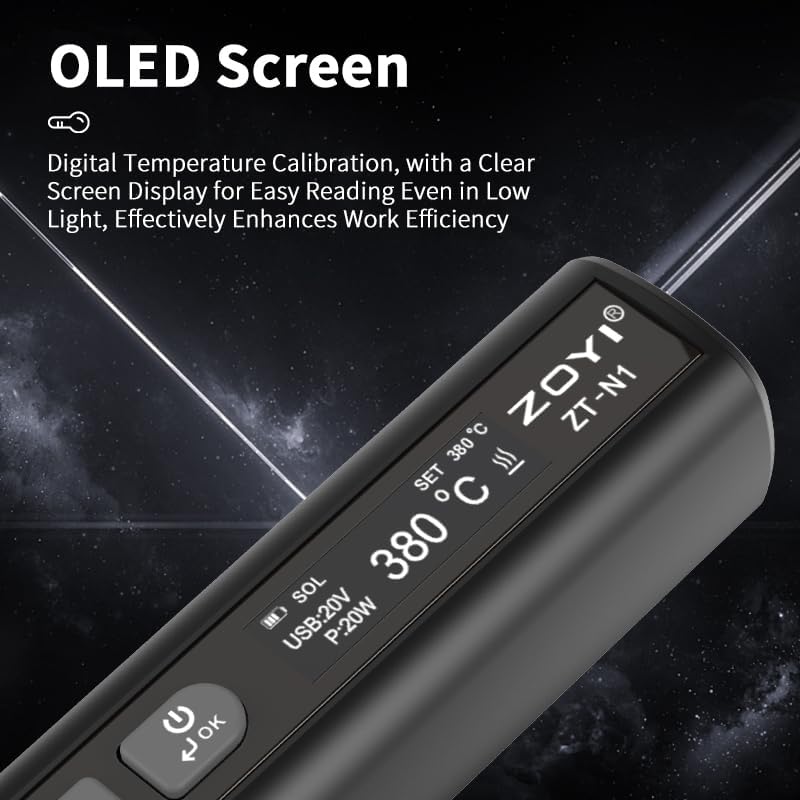
Figure 4.6: Close-up of the OLED screen, providing a clear digital temperature display for enhanced work efficiency.

Figure 4.7: Illustrates the compact and elegant design, making the soldering iron easy to carry in a toolkit or pocket.

Figure 4.8: A visual summary of the ZOYI N1's core features, emphasizing its rapid heating and smart capabilities.
5. Setup
- Unpack: Carefully remove all components from the packaging.
- Connect Power: Connect the provided USB-C cable to the soldering iron's USB-C port.
- Power Source: Plug the other end of the USB-C cable into a compatible PD/QC fast charging power source (e.g., power adapter, power bank, laptop USB-C port). The device requires external power to operate as it does not contain an internal battery.
- Insert Tip: Ensure a soldering tip is securely inserted into the heating element.
6. Operating Instructions
- Power On: Once connected to a power source, the OLED display will illuminate. Press the power/OK button to activate the soldering function.
- Temperature Adjustment: Use the Up (▲) and Down (▼) arrow buttons to adjust the desired temperature. The OLED display will show the current and set temperatures.
- Rapid Heating: The iron will quickly reach the set temperature, typically within 5 seconds.
- Auto Sleep/Shutdown: The soldering iron features an intelligent auto sleep/shutdown function. If idle for a set period, it will enter sleep mode to conserve energy and prevent overheating. It will automatically shut down after a longer period of inactivity.
- Button Lock: Utilize the button lock function to prevent accidental temperature changes during operation or storage. Refer to the device's on-screen menu for activation.
- Power Off: Press and hold the power/OK button to turn off the soldering function. Disconnect from the power source when not in use.
7. Maintenance
- Tip Cleaning: Regularly clean the soldering tip using the provided cleaning sponge (dampen slightly before use) or a brass wire cleaner. This helps maintain optimal heat transfer and extends tip life.
- Tip Replacement: If the soldering tip becomes worn or damaged, replace it with a compatible T12-style soldering tip. Ensure the iron is cool and disconnected from power before replacing.
- General Cleaning: Wipe the body of the soldering iron with a soft, dry cloth to remove dust or residue. Do not use abrasive cleaners or solvents.
- Storage: Store the soldering iron in its protective case when not in use to prevent damage to the tip and unit.
8. Troubleshooting
| Problem | Possible Cause | Solution |
|---|---|---|
| Soldering iron does not heat up. | Not connected to power, insufficient power supply, or tip not properly inserted. | Ensure the USB-C cable is securely connected to a compatible PD/QC power source. Verify the power source provides adequate wattage (e.g., 96W for full performance). Re-insert the soldering tip firmly. |
| Temperature display is inaccurate. | Calibration needed. | Access the settings menu via the OLED display to perform temperature calibration if you have a reliable temperature reference. |
| Iron enters sleep mode too quickly. | Sleep timer set too short. | Adjust the sleep timer settings in the device's menu to a longer duration. |
| Buttons are unresponsive. | Button lock function is active. | Deactivate the button lock function through the device's menu. |
9. Specifications
| Attribute | Detail |
|---|---|
| Brand | ZOYI |
| Model | N1 |
| Power Source | Corded Electric (USB-C PD/QC) |
| Wattage | 96 watts (peak) |
| Temperature Range | 100°C to 450°C (212°F to 842°F) |
| Heating Time | Approx. 5 seconds to 450°C |
| Display | OLED Screen |
| Material | Aerospace-grade aluminum alloy, ABS plastic, silicone rubber |
| Item Weight | 0.6 Kilograms (1.32 pounds) |
| Special Features | Heat Resistance Handles, Auto Sleep, Automatic Shutdown, Button Lock |
| Included Components | Soldering Iron Tips |
10. Warranty and Support
The ZOYI N1 Smart Electric Soldering Iron typically comes with a 1-year warranty. For specific warranty details, claims, or technical support, please contact the seller or manufacturer directly. Information may also be available on the official ZOYI website.
For further assistance, you may visit the ZOYI Store on Amazon.