
Introduction
This manual provides instructions for the Effireli Replacement Remote Control, model YK-RC1994710/01. This remote is designed to operate compatible AOC Smart TVs without the need for programming or complex setup. Please read this manual thoroughly before use to ensure proper functionality and a seamless user experience.
The Effireli remote control offers a direct replacement solution, allowing immediate control over your television's functions.
Product Overview
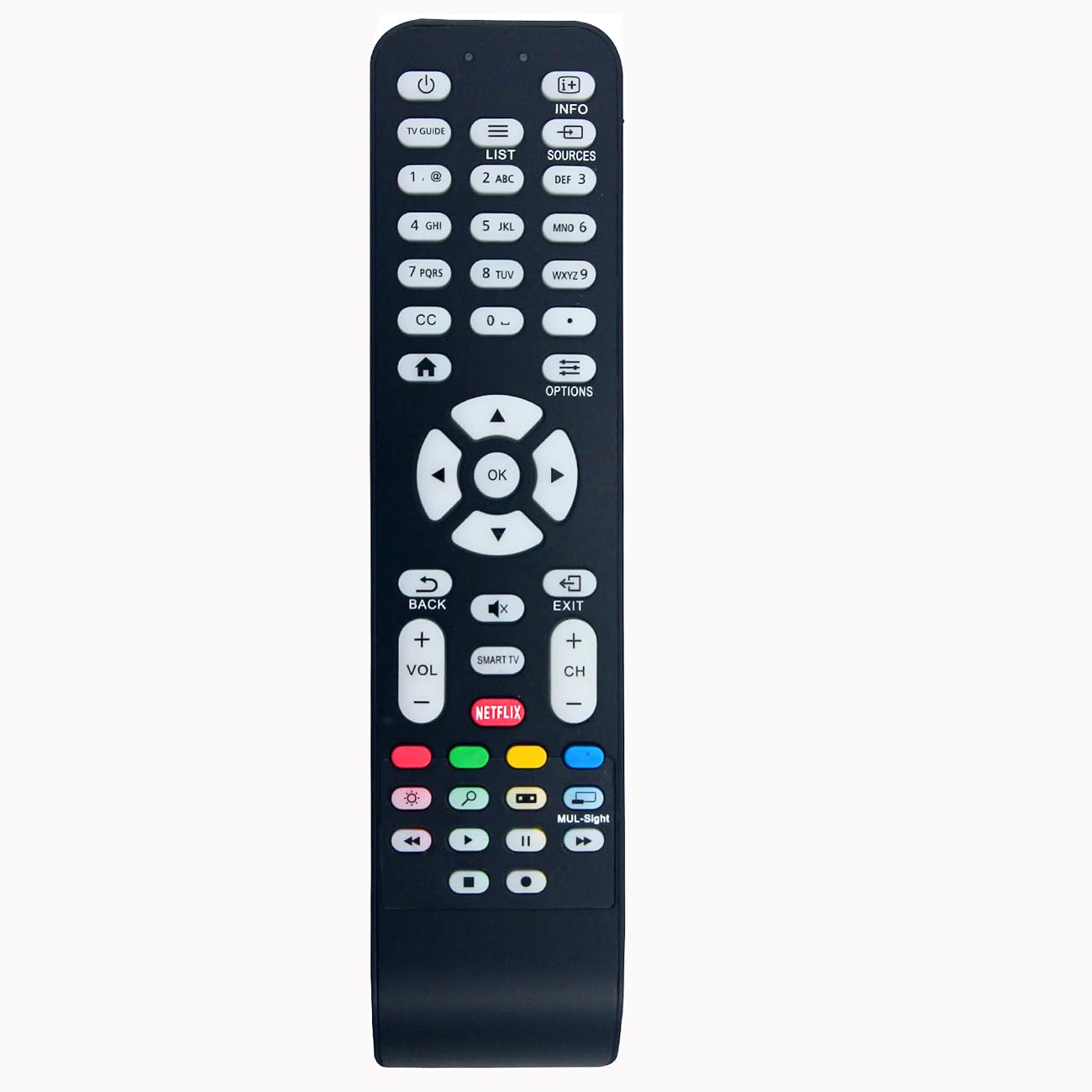
Image: Front view of the Effireli Replacement Remote Control, model YK-RC1994710/01. This image displays the button layout and overall design of the remote.
The Effireli YK-RC1994710/01 is a dedicated replacement remote control. It features a standard button layout for easy navigation and control of your television. Its ergonomic design ensures comfortable handling during use.
Setup
Battery Installation
The remote control requires two AAA batteries (not included) for operation. Follow these steps to install the batteries:
- Locate the battery compartment cover on the back of the remote control.
- Press down on the tab and slide the cover off in the direction indicated by the arrow (if present).
- Insert two new AAA batteries, ensuring the positive (+) and negative (-) terminals align correctly with the markings inside the compartment. Incorrect insertion can prevent the remote from functioning.
- Slide the battery compartment cover back into place until it clicks securely, indicating it is properly closed.
Important: Always replace both batteries at the same time. Do not mix old and new batteries, or different types of batteries (e.g., alkaline and rechargeable). Remove batteries if the remote will not be used for an extended period to prevent leakage.
Operating Instructions
Basic Operation
This replacement remote control is pre-programmed and ready for immediate use with compatible AOC Smart TVs. No additional programming or setup is required. Simply point the remote control towards your television's infrared sensor and press the desired function button.
- Power Button: Turns the television on or off.
- Number Buttons (0-9): Used to select channels directly or input numerical values.
- Channel Up/Down: Navigates through television channels sequentially.
- Volume Up/Down: Adjusts the television's sound level.
- Mute Button: Silences or restores the television's audio.
- Input/Source Button: Cycles through available input sources (e.g., HDMI 1, HDMI 2, AV, Component).
- Navigation Buttons (Up, Down, Left, Right, OK/Enter): Used for menu navigation, selecting options, and confirming choices within the TV's interface.
- Menu/Home Button: Accesses the TV's main menu or smart TV home screen.
- Back/Exit Button: Returns to the previous screen or exits the current menu.
Special Features
The primary special feature of this remote control is its "No Programming Required" functionality, ensuring ease of use right out of the box.
Compatible Models
This Effireli Replacement Remote Control (YK-RC1994710/01) is designed to be compatible with the following AOC Smart TV models:
- LE49S5970
- 398GR08BEAC01R
- RC1994713/01
- LE32S5970
- 55LE55U7970
- LE32D3350
- LE40D3350
- LE43S5970
Note: If your specific TV model is not listed above, or if your original remote control has a significantly different button layout or model number, please contact customer support directly to confirm compatibility before purchase or use.
Maintenance
Cleaning
To maintain the remote control's appearance and functionality, gently wipe it with a soft, dry, lint-free cloth. Do not use liquid cleaners, abrasive chemicals, or spray directly onto the remote, as these can damage the surface, buttons, or internal electronic components.
Storage
Store the remote control in a cool, dry place, away from direct sunlight, high humidity, and extreme temperatures. Avoid placing heavy objects on the remote. If the remote control will not be used for an extended period (e.g., several weeks or months), it is recommended to remove the batteries to prevent potential battery leakage and damage to the device.
Troubleshooting
If you experience issues with your Effireli Replacement Remote Control, please refer to the following troubleshooting steps:
Remote Control Not Responding
- Check Batteries: Ensure that the batteries are inserted correctly, matching the positive (+) and negative (-) terminals. Replace old or weak batteries with a fresh pair of AAA batteries.
- Line of Sight: Verify that there are no physical obstructions (e.g., furniture, plants) between the remote control and the television's infrared (IR) sensor. The remote requires a clear line of sight to the TV.
- Distance: Operate the remote control within a reasonable range of the television, typically within 15-20 feet (4.5-6 meters).
- TV Sensor: Confirm that the television's IR sensor is not blocked, dirty, or damaged.
- Interference: Ensure there are no strong light sources (like direct sunlight or certain types of fluorescent lights) or other electronic devices emitting IR signals that might interfere with the remote's operation.
Specific Buttons Not Working
- If only certain buttons are unresponsive, try pressing them firmly. If the issue persists after checking batteries and line of sight, it may indicate a faulty button or internal component.
If these troubleshooting steps do not resolve the issue, please contact customer support for further assistance.
Specifications
| Feature | Detail |
|---|---|
| Model Number | YK-RC1994710/01 |
| Brand | Effireli |
| Product Dimensions | 8.07 x 1.97 x 0.71 inches (20.5 x 5.0 x 1.8 cm) |
| Item Weight | 2.65 ounces (75 grams) |
| Color | Black |
| Power Source | 2 x AAA Batteries (not included) |
| Special Feature | No Programming Required |
| Compatible Devices | AOC Smart Televisions (specific models listed above) |
Warranty and Support
Warranty Information
This Effireli remote control comes with a 12-month warranty covering manufacturing defects from the date of purchase. Additionally, a 30-day money-back guarantee is offered, allowing for returns or exchanges within this period if you are not satisfied with the product. Returns and exchanges are accepted within the warranty period for eligible issues related to manufacturing defects.
Customer Support
For technical assistance, warranty claims, or compatibility inquiries, please contact Effireli customer support. Refer to your purchase documentation or the retailer's website for specific contact details. When contacting support, please have your product model number (YK-RC1994710/01) and purchase date readily available to expedite the process.