1. Introduction
This manual provides comprehensive instructions for the NIZUUONE Ethernet Control Module, designed for remote management of various devices in office or home environments. This module integrates a web server and an RJ45 interface, allowing seamless control of up to 16 devices when paired with a 16-channel relay.
The module facilitates remote operation of appliances such as lights, air conditioning, or refrigerators via a computer, tablet, or smartphone connected to a LAN or WAN network. Its unique TCP connect control offers flexible server and client control options.

Figure 1.1: Overview of the NIZUUONE Ethernet Control Module with integrated 16-channel relay board. This image displays the full assembly, highlighting the Ethernet port and the multiple relay switches.
2. Setup
Before operating the Ethernet Control Module, ensure proper connections are made. This module requires a power supply (not included) and an Ethernet connection.
2.1. Physical Connections
- Power Connection: Connect a compatible DC power supply to the module's power input terminals. Ensure the voltage matches the module's requirements (typically 12V DC, refer to specifications).
- Ethernet Connection: Connect a standard RJ45 Ethernet cable from your network router or switch to the RJ45 port on the control module.
- Relay Connections: Connect your devices (e.g., lights, appliances) to the appropriate terminals of the 16-channel relay board. Each relay channel can control one device. Refer to the relay board's specific wiring diagram for safe and correct connections.

Figure 2.1: Detailed view of the RJ45 Ethernet port and surrounding components on the control module. This highlights the primary network connection point.
2.2. Network Configuration
The module comes with a default IP address and port for initial access:
- Default IP Address:
192.168.1.4 - Default Port:
30000
To access the web server, open a web browser on a device connected to the same network and navigate to http://192.168.1.4:30000. You may need to configure your network settings to be within the same subnet as the module's default IP if your network uses a different range.
Note: The default IP address can be changed through the web interface once access is established.
3. Operating Instructions
The NIZUUONE Ethernet Control Module features an integrated web server for easy control of connected devices.
3.1. Accessing the Web Interface
- Ensure the module is powered on and connected to your network.
- Open a web browser (e.g., Chrome, Firefox, Edge) on your computer, tablet, or smartphone.
- Enter the module's IP address and port in the address bar (e.g.,
http://192.168.1.4:30000). - The web interface will load, displaying controls for the 16 relay channels.
3.2. Controlling Devices
Within the web interface, you will find controls (e.g., buttons, toggles) corresponding to each of the 16 relay channels. Clicking or tapping these controls will activate or deactivate the connected device. The interface typically provides visual feedback on the current state of each relay (on/off).
3.3. Remote Control (WAN)
For remote control over a Wide Area Network (WAN), you will need to configure port forwarding on your network router. Forward the module's port (default 30000) to its internal IP address (e.g., 192.168.1.4). Once configured, you can access the web interface using your public IP address or a dynamic DNS service.
3.4. TCP Connect Control
The module supports unique TCP connect control. It can function as a TCP server, accepting connections from clients, or as a TCP client, connecting to a remote server. This feature allows for advanced integration with custom software or automation systems. Refer to the module's specific API documentation (if available) for details on TCP communication protocols.
4. Maintenance
To ensure the longevity and reliable operation of your NIZUUONE Ethernet Control Module, follow these general maintenance guidelines:
- Keep Dry: Protect the module from moisture and humidity. Do not expose it to water or other liquids.
- Clean Gently: Use a soft, dry cloth to clean the exterior of the module. Avoid using harsh chemicals, solvents, or abrasive cleaners.
- Ventilation: Ensure the module is placed in a well-ventilated area to prevent overheating. Do not obstruct any ventilation openings.
- Power Off Before Servicing: Always disconnect power to the module before performing any maintenance or making changes to wiring.
- Inspect Connections: Periodically check all cable connections (power, Ethernet, relay) to ensure they are secure and free from damage.
5. Troubleshooting
If you encounter issues with your Ethernet Control Module, refer to the following common troubleshooting steps:
5.1. Module Not Accessible via Web Interface
- Check Power: Ensure the module is powered on and the power indicator light (if present) is illuminated.
- Check Ethernet Cable: Verify that the Ethernet cable is securely connected to both the module and your network router/switch. Check for link activity lights on the RJ45 port.
- Network Connectivity: Confirm that the device you are using to access the web interface is on the same local network as the module.
- IP Address and Port: Double-check that you are entering the correct IP address and port (e.g.,
http://192.168.1.4:30000). - IP Conflict: Ensure there is no IP address conflict on your network. If the default IP has been changed, use the new IP.
- Firewall: Temporarily disable any firewall software on your computer to rule out interference.
5.2. Devices Not Responding to Control
- Relay Connections: Verify that your devices are correctly wired to the relay terminals.
- Relay Status: Check the web interface to see if the relay status changes when you attempt to control it. Listen for an audible click from the relay.
- Device Power: Ensure the devices connected to the relays have their own power supply and are in working order.
- Load Capacity: Confirm that the current and voltage requirements of your connected devices do not exceed the maximum ratings of the relays.
6. Specifications
Detailed specifications for the NIZUUONE Ethernet Control Module:
| Feature | Detail |
|---|---|
| Product Name | Ethernet Control Module LAN WAN Network Web Server RJ45 Port 16Channel Relay Control |
| Brand | NIZUUONE |
| Model Number | NIZUUONEg3a249gpw8 |
| Relay Channels | 16-channel compatible |
| Network Interface | RJ45 Ethernet Port |
| Integrated Features | Web Server, TCP Connect Control (Server/Client) |
| Default IP Address | 192.168.1.4 |
| Default Port | 30000 |
| Relay Size (approx.) | 18 x 10 x 2 cm (7.08 x 3.93 x 0.79 inches) |
| Package Dimensions | 7.87 x 5.12 x 2.36 inches |
| Item Weight | 11.15 ounces |
| Manufacturer | NIZUUONE |
| Country of Origin | China |
| First Available Date | December 13, 2024 |
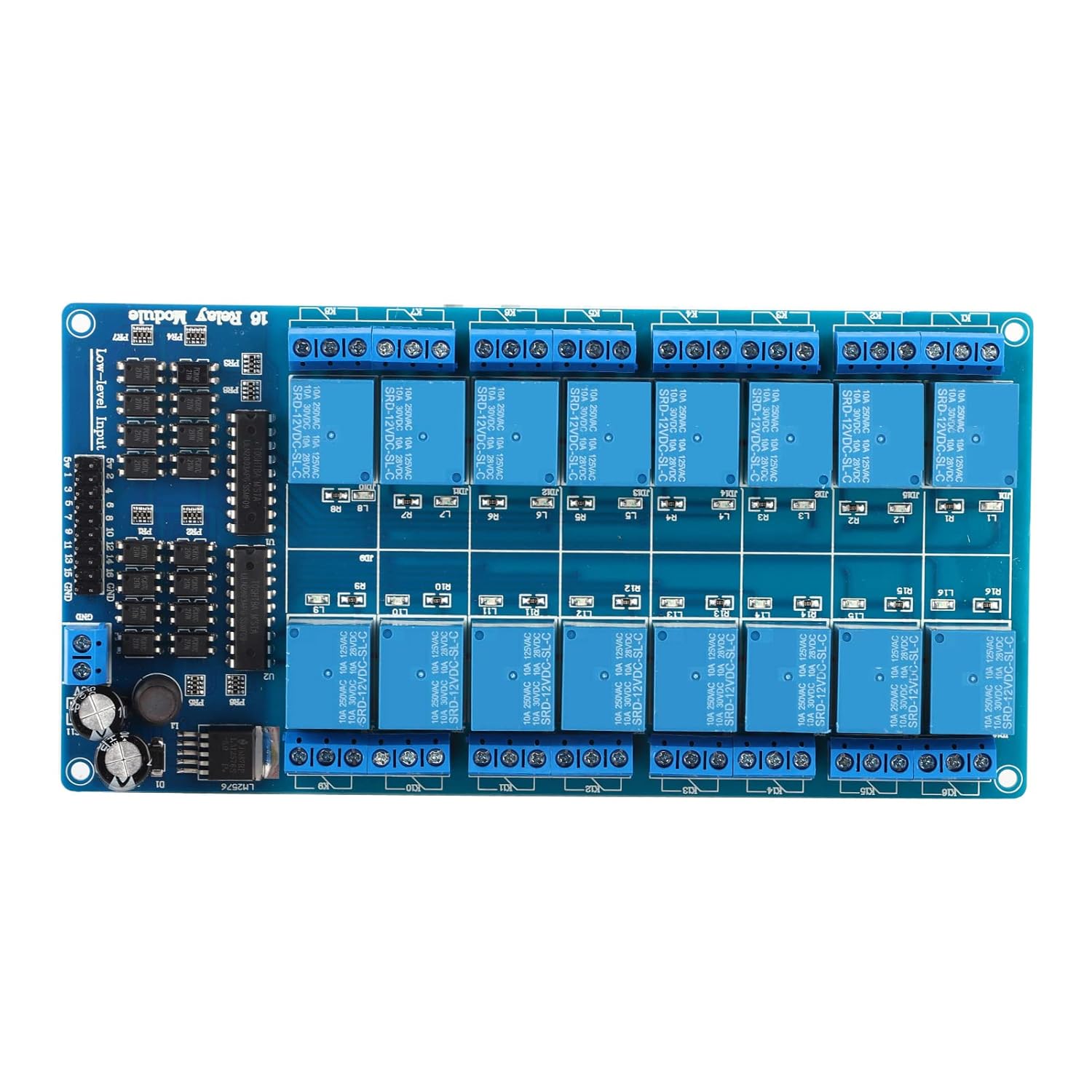
Figure 6.1: Top-down view of the 16-channel relay module, showing the individual relays and connection terminals.
7. Warranty and Support
Information regarding product warranty and customer support for the NIZUUONE Ethernet Control Module was not available in the provided product data. Please refer to the seller's or manufacturer's official website for the most up-to-date warranty terms and support contact information.