
1. Product Overview
The ANENG BT189 is a compact and versatile battery tester designed to quickly assess the charge level of various common battery types. It features a clear LCD digital display for easy reading of voltage levels, indicating whether a battery is depleted, weak, or in good condition. This device operates without its own power source, drawing minimal power directly from the battery being tested, which contributes to its long service life.
Key Features:
- Wide Compatibility: Tests AA, AAA, C, D, N, 9V, 1.5V/3.7V lithium batteries, and button cells (CR2032, LR44, L736).
- Digital LCD Display: Provides clear and accurate voltage readings.
- Battery-Free Operation: Powered by the battery under test, eliminating the need for internal batteries.
- Compact and Portable: Lightweight design for convenient use and storage.

Figure 1: Front view of the ANENG BT189 Battery Tester, showing its LCD screen and various battery testing slots.
2. Device Layout and Setup
The ANENG BT189 battery tester is designed for intuitive use. Familiarize yourself with its components before operation.

Figure 2: Labeled diagram of the ANENG BT189, indicating the LCD display, positive and negative electrodes, and specific slots for D-type, C-type/AA, AAA, N-type, 1.5V/3V button, and 9V batteries.
Components:
- LCD Display Screen: Shows the battery voltage.
- Positive Electrode (+): Contact point for the positive terminal of the battery.
- Negative Electrode (-): Contact point for the negative terminal of the battery.
- Battery Slots: Dedicated areas for different battery sizes (D, C/AA, AAA, N, 1.5V/3V Button, 9V).
No external power source or battery installation is required for the tester itself.
3. Operating Instructions
To test a battery, follow these simple steps:
- Identify Battery Type: Determine the type and size of the battery you wish to test (e.g., AA, 9V, button cell).
- Locate Corresponding Slot: Find the appropriate testing slot on the ANENG BT189 tester for your battery type.
- Insert Battery: Carefully insert the battery into the designated slot, ensuring the positive (+) and negative (-) terminals of the battery align with the corresponding contacts on the tester. For cylindrical batteries, place the positive end against the fixed contact and the negative end against the movable arm, then gently push the arm to secure the battery. For 9V batteries, align the terminals with the dedicated 9V contacts. For button cells, place the cell in the designated area.
- Read Display: The LCD screen will immediately display the battery's voltage.
- Interpret Results: The displayed voltage indicates the battery's condition. Generally, a higher voltage indicates a healthier battery. The tester helps determine if a battery is good, weak, or needs replacement.

Figure 3: Demonstrating the testing of an AA battery. The LCD shows a voltage reading of 1.5V.

Figure 4: Demonstrating the testing of a 9V battery. The LCD shows a voltage reading of 7.54V.
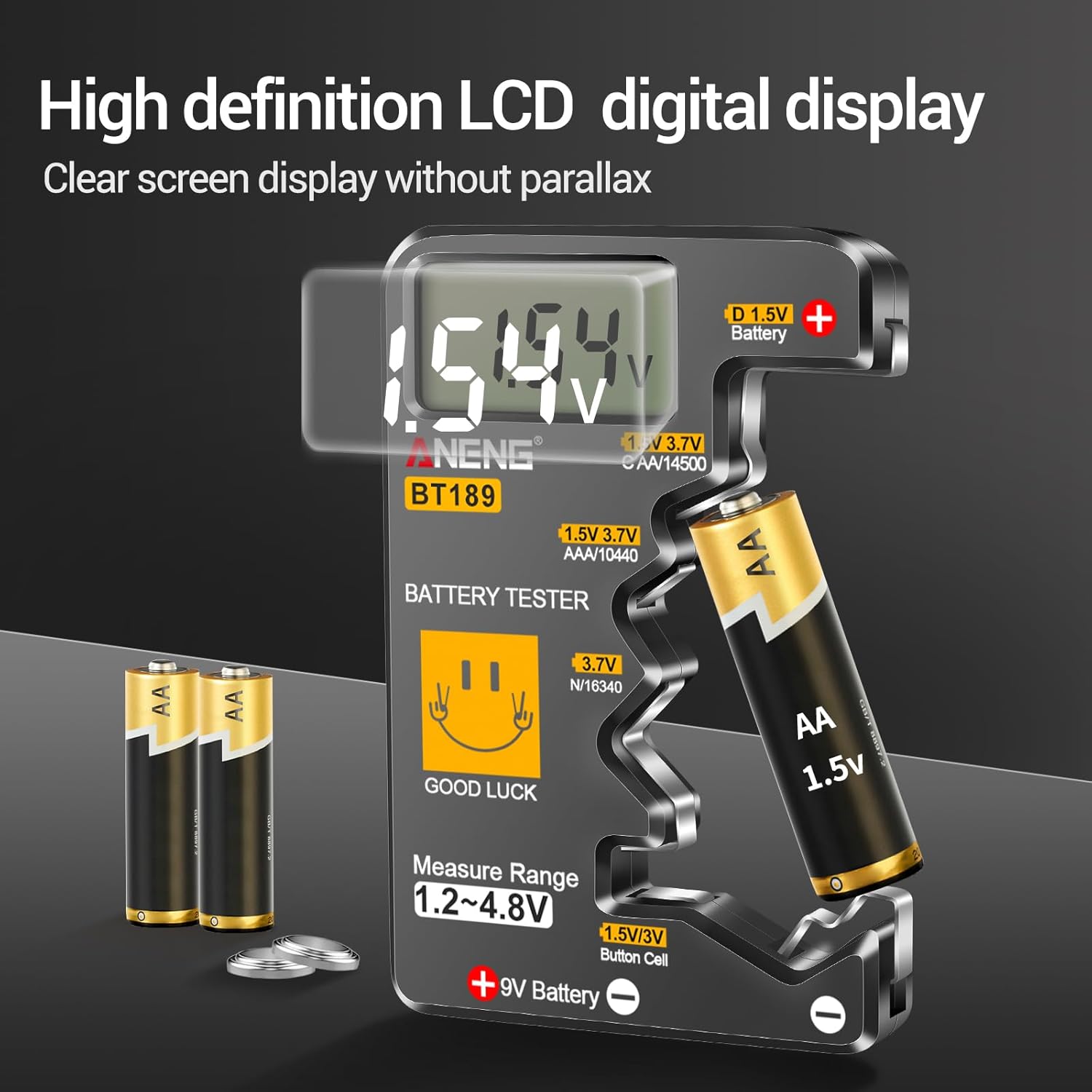
Figure 5: Demonstrating the testing of a button cell battery. The LCD shows a voltage reading of 3.2V.

Figure 6: A visual guide to testing various battery types, illustrating the versatility of the ANENG BT189.
Note: This tester is not designed for rechargeable batteries. Do not attempt to test rechargeable batteries with this device.
4. Maintenance
To ensure the longevity and accuracy of your ANENG BT189 battery tester, follow these maintenance guidelines:
- Cleaning: Wipe the device with a soft, dry cloth. Do not use abrasive cleaners or solvents. Ensure no liquids enter the device.
- Storage: Store the tester in a cool, dry place away from direct sunlight and extreme temperatures.
- Handling: Avoid dropping the device or subjecting it to strong impacts, as this may damage the internal components or the LCD screen.
5. Troubleshooting
If you encounter issues with your ANENG BT189 battery tester, consider the following:
- No Display Reading: If the LCD does not show a reading after inserting a battery, ensure the battery is correctly seated with proper contact to both positive and negative terminals. If the battery is extremely low or completely dead, the tester may not be able to draw enough power to activate its display. In such cases, the battery is likely depleted.
- Inaccurate Readings: Ensure the battery terminals are clean and free of corrosion. Poor contact can lead to inaccurate readings. If readings consistently appear inaccurate compared to a known good battery or another measurement device, the tester may be faulty.
- Battery Type Mismatch: Confirm you are using the correct slot for the battery type being tested. Using an incorrect slot may prevent a reading or provide an incorrect one.
6. Specifications
| Brand | ANENG |
| Model Number | BT189 |
| Compatible Battery Types | AA, AAA, C, D, N, 9V, 1.5V/3.7V Lithium (e.g., 14500, 10440, 16340), Button Cells (CR2032, LR44, L736) |
| Power Source | Battery Powered (from battery under test) |
| Minimum Operating Voltage | 1.5 Volts |
| Color | Black |
| Package Dimensions | 5.71 x 3.5 x 0.67 inches |
| Item Weight | 1.45 ounces |

Figure 7: Physical dimensions of the ANENG BT189 Battery Tester.
7. Warranty and Support
For warranty information or technical support regarding your ANENG BT189 Universal Battery Tester, please contact the manufacturer directly. Refer to the product packaging or the official ANENG website for the most current contact details.
Manufacturer: ANENG
For additional information, you may visit the ANENG Store.


