
Introduction
Welcome to the instruction manual for your new Ice-Watch ICE Digit Explorer digital watch. This watch is designed for children, featuring a durable silicone strap, a lightweight plastic case, and a clear digital display. This guide will help you understand the watch's functions, set the time, and maintain it for long-lasting use. Please read these instructions carefully before using your watch.
Product Overview
Familiarize yourself with the components and controls of your Ice-Watch ICE Digit Explorer.
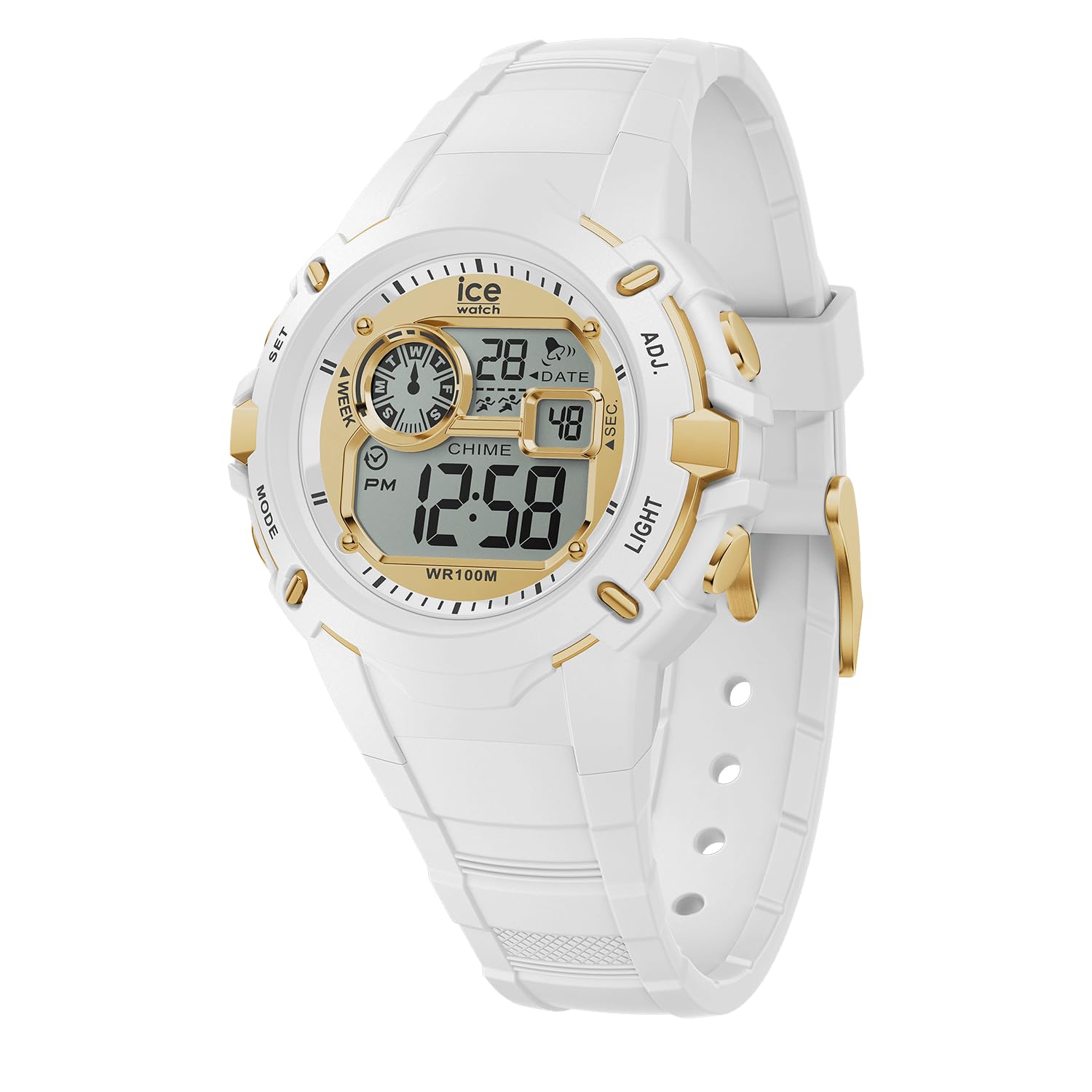
Figure 1: Front View of the Watch. This image displays the watch face, showing the digital display with time, date, day of the week, and various indicators. The four control buttons are visible on the sides of the watch case.
- Display: Shows time, date, day, and other indicators.
- Buttons: Four buttons located on the sides of the watch case for various functions.
- SET (Top Left): Used to enter and confirm setting modes.
- MODE (Bottom Left): Used to cycle through different display modes (Time, Alarm, Stopwatch).
- ADJ (Top Right): Used to adjust values during setting.
- LIGHT (Bottom Right): Activates the backlight for visibility in low light conditions.
- Silicone Strap: Comfortable and durable for daily wear.
- Buckle Clasp: Securely fastens the watch to the wrist.
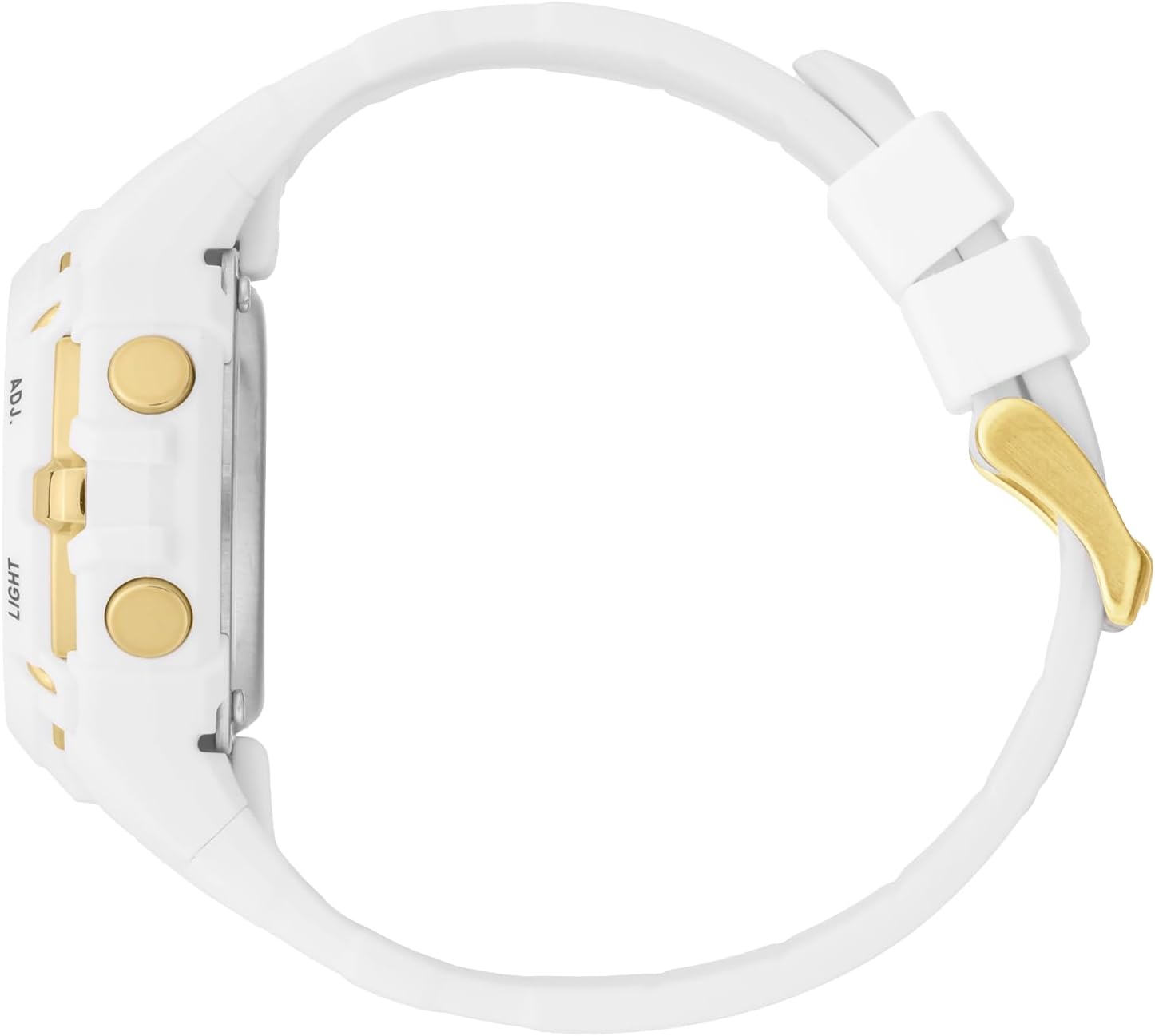
Figure 2: Side View. This image highlights the ADJ (Adjust) and LIGHT buttons on the right side of the watch case.

Figure 3: Back View. This image shows the stainless steel caseback, which includes the Ice-Watch logo, model number, and water resistance rating (100M).
Setup
Setting Time and Date
- In normal time display mode, press and hold the SET button until the seconds digits begin to flash. This indicates you are in setting mode.
- Press the MODE button to cycle through the settings: Seconds → Hours → Minutes → Month → Date → Day of the Week.
- While a digit or setting is flashing, use the ADJ button to increase the value or change the setting.
- Repeat step 3 for each setting (Hours, Minutes, Month, Date, Day).
- Once all settings are adjusted, press the SET button again to exit the setting mode and save your changes.
12/24 Hour Format
While setting the hours, pressing the ADJ button will cycle between 12-hour (with PM indicator) and 24-hour formats.
Operating the Watch
Display Modes
Press the MODE button to cycle through the different display modes:
- Normal Time Display: Shows current time, date, and day of the week.
- Alarm Mode: Allows setting and activating an alarm.
- Stopwatch Mode: Used for timing events.
Using the Stopwatch (Chronograph)
- From normal time display, press the MODE button until "ST" or "STOPWATCH" appears on the display.
- Press the ADJ button to start the stopwatch.
- Press the ADJ button again to pause the stopwatch.
- To resume, press the ADJ button.
- To reset the stopwatch to zero, press the SET button while the stopwatch is paused.
- Press the MODE button to return to normal time display.
Setting and Using the Alarm
- From normal time display, press the MODE button until "AL" or "ALARM" appears on the display.
- Press and hold the SET button until the alarm hour digits begin to flash.
- Use the ADJ button to set the desired alarm hour.
- Press the MODE button to move to the alarm minute digits.
- Use the ADJ button to set the desired alarm minutes.
- Press the SET button to confirm and exit alarm setting mode.
- To activate/deactivate the alarm, in alarm mode, press the ADJ button. An alarm icon (often a bell) will appear/disappear on the display.
- When the alarm sounds, press any button to stop it.
Using the Backlight
Press the LIGHT button (bottom right) to illuminate the display for a few seconds, improving visibility in dark conditions.
Water Resistance
Your Ice-Watch ICE Digit Explorer is water resistant up to 10 ATM (100 meters). This means it is suitable for swimming, showering, and water sports. However, it is not suitable for scuba diving. Avoid pressing buttons while the watch is submerged to prevent water ingress.
Maintenance
Cleaning Your Watch
To keep your watch clean, wipe it regularly with a soft, damp cloth. For the silicone strap, mild soap and water can be used. Ensure the watch is completely dry before wearing. Avoid using harsh chemicals or abrasive materials, as these can damage the watch's finish or components.
Battery Replacement
The watch is powered by a single battery (included). When the display becomes dim or the watch stops functioning, the battery may need replacement. Battery replacement should ideally be performed by a qualified watch technician to ensure proper sealing and maintain water resistance.
Storage
When not in use, store your watch in a cool, dry place away from direct sunlight and extreme temperatures.
Troubleshooting
| Problem | Possible Cause | Solution |
|---|---|---|
| Display is blank or dim. | Low or depleted battery. | Replace the battery (recommended by a professional). |
| Time/Date cannot be set. | Not in setting mode, or incorrect button sequence. | Ensure you press and hold the SET button until digits flash. Follow the setting instructions carefully. |
| Water inside the watch. | Buttons pressed underwater, or seal compromised. | Stop using the watch immediately. Seek professional repair to prevent further damage. Avoid pressing buttons underwater. |
| Buttons are unresponsive. | Dirt/debris, or internal malfunction. | Clean around the buttons. If issue persists, contact customer support. |
Specifications
| Brand | ICE-WATCH |
| Model Name/Number | ICE Digit Explorer / 023266 |
| Display Type | Digital |
| Movement Type | Quartz |
| Case Material | Plastic |
| Case Diameter | 40 Millimeters |
| Case Thickness | 18 Millimeters |
| Band Material | Silicone |
| Band Width | 17 Millimeters |
| Clasp Type | Buckle |
| Dial Window Material | Mineral |
| Water Resistance | 10 ATM (100 Meters) |
| Special Features | Chronograph |
| Item Weight | 42 Grams |
| Battery | 1 x Unknown (Included) |
Warranty and Support
Manufacturer's Warranty
Your Ice-Watch ICE Digit Explorer is covered by a manufacturer's warranty. Please refer to the warranty card included with your purchase for specific terms, conditions, and duration. Keep your proof of purchase for warranty claims.
Customer Support
For further assistance, technical support, or warranty inquiries, please contact Ice-Watch customer service. Contact details can typically be found on the official Ice-Watch website or on the packaging of your product.
Note: The official Ice-Watch website is www.ice-watch.com.


