
Boult Airbass Earbuds
Boult Klarity 3 Earbuds User Manual
Model: Klarity 3 (Airbass Earbuds) | Brand: Boult
Introduction
Welcome to the user manual for your Boult Klarity 3 Earbuds. These earbuds are designed to provide a superior audio experience with advanced features such as Hybrid Active Noise Cancellation, Spatial Audio, and dual device pairing. This manual will guide you through the setup, operation, maintenance, and troubleshooting of your new earbuds to ensure optimal performance and longevity.
What's in the Box
- Boult Klarity 3 Charging Case
- Boult Klarity 3 Earbuds (Left and Right)
- Type-C Fast Charging Cable
- Extra Pair of Eartips
- User Manual
- Warranty Card
Product Overview and Key Features
Boult Klarity 3 Earbuds and Charging Case

This image displays the Boult Klarity 3 earbuds in their silver color, resting within their sleek charging case. The earbuds feature a metallic finish and a distinctive fluted design on the stems. The charging case is compact and designed for portability, providing power to the earbuds on the go.
Advanced Audio Technologies

The Boult Klarity 3 incorporates several advanced technologies for an enhanced listening experience. This includes 50dB Hybrid Active Noise Cancellation (ANC) for significant noise reduction, Hex Mic Environmental Noise Cancellation (ENC) for clear calls, and Spatial Audio for immersive sound. The earbuds also support Dual Device Pairing, offer up to 50 hours of total playtime, and utilize Bluetooth 5.4 for stable connectivity. Control and customization are available via the Boult Amp App, and a low latency of 45ms is ideal for gaming.
Hybrid Active Noise Cancellation (ANC)

The Klarity 3 features a powerful 50dB Hybrid ANC system. Unlike standard ANC, this advanced system uses a 6-microphone setup, including feedback and feedforward mics, to effectively block a wider range of frequencies and eliminate ambient noise, providing a more profound quiet listening environment.
Spatial Audio Experience

Experience a new dimension of sound with Spatial Audio. This feature creates a 360-degree soundstage, making audio feel more dynamic and lifelike. It enhances your music and movies by providing a sense of direction for instruments and sounds, offering a truly immersive listening experience.
Boult AMP App Connectivity

Unlock the full potential of your Klarity 3 earbuds with the Boult AMP App. The dedicated app allows you to customize EQ modes, switch between listening modes (e.g., Gaming or Music), rename your earbuds, and assign custom touch controls. It also offers widget support for your home screen and an innovative earbud cleaning feature.
Extended Playtime and Fast Charging
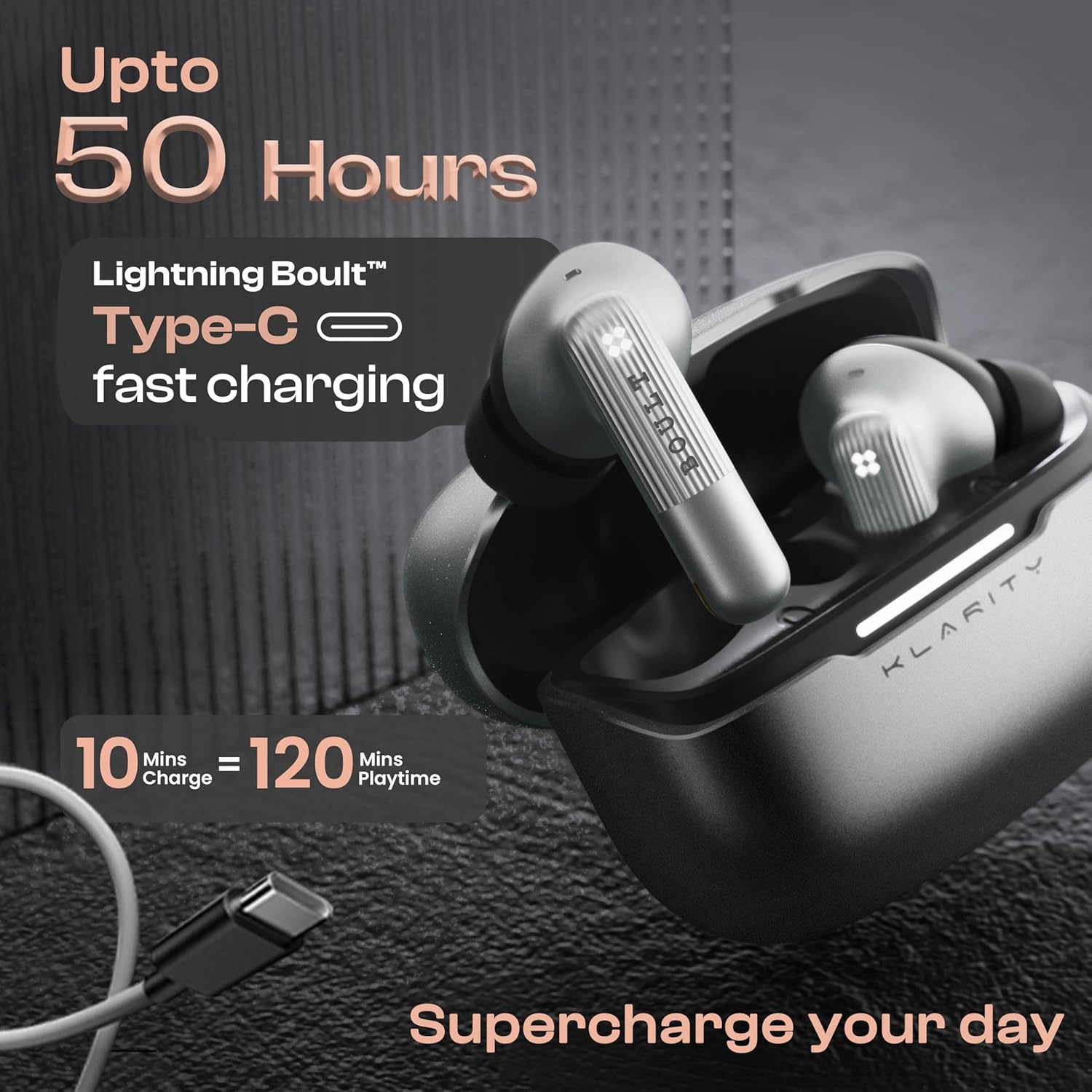
The Boult Klarity 3 offers an impressive total playtime of up to 50 hours with the charging case. It supports Type-C Fast Charging, providing 120 minutes of playtime from just a 10-minute charge, ensuring your earbuds are ready for extended use.
Hex Mic Environmental Noise Cancellation (ENC)

For crystal-clear calls, the Klarity 3 features Hex Mic Environmental Noise Cancellation (ENC). This 6-microphone array effectively filters out background noise, including wind, ensuring your voice is heard clearly by the listener, even in noisy environments.
Bluetooth 5.4 and Dual Device Connectivity

Equipped with Bluetooth 5.4, the Klarity 3 provides a stable and fast wireless connection. The Dual Device Pairing feature allows you to connect to two devices simultaneously, enabling seamless switching between your phone and laptop without needing to disconnect and reconnect.
13mm Bass Drivers and Low Latency Gaming Mode

The Klarity 3 delivers powerful audio with its large 13mm BoomX™ Bass Drivers, providing deep, punchy bass and a rich sound profile. For gamers, the dedicated Combat™ Gaming Mode ensures ultra-low latency of 45ms, synchronizing audio and visuals for an immersive gaming experience.
IPX5 Water Resistance and Intuitive Touch Controls

The earbuds are rated IPX5 water resistant, making them splash, sweat, and rain proof, suitable for various activities. They feature intuitive Touch Controls for easy management of music playback, calls, volume adjustment, and mode switching. Voice assistant support (Google Assistant, Siri, Amazon Alexa) is also integrated.
Setup Guide
1. Charging the Earbuds and Case
Before first use, fully charge the earbuds and the charging case. Connect the provided Type-C charging cable to the charging port on the case and a USB power source. The charging case takes approximately 100 minutes to fully charge, and the earbuds take about 60 minutes when placed inside the charging case.
- Charging Case: Connect the Type-C cable. The indicator light on the case will show charging status.
- Earbuds: Place the earbuds into the charging case. Ensure they are properly seated. The earbuds will begin charging automatically.
2. Initial Pairing (Blink and Pair™)
- Open the charging case. The earbuds will automatically enter pairing mode, indicated by a blinking LED light on the earbuds.
- On your device (smartphone, tablet, laptop), go to Bluetooth settings.
- Search for "Boult Klarity 3" in the list of available devices.
- Select "Boult Klarity 3" to connect. Once connected, a voice prompt will confirm the successful pairing, and the LED light on the earbuds will turn off or change.
3. Dual Device Pairing (Multipoint Pairing)
The Boult Klarity 3 supports connecting to two devices simultaneously, allowing seamless switching between them.
- First, pair the earbuds with your primary device (e.g., smartphone) as described above.
- Disable Bluetooth on your primary device. The earbuds will re-enter pairing mode.
- Pair the earbuds with your secondary device (e.g., laptop) following the initial pairing steps.
- Once connected to the secondary device, re-enable Bluetooth on your primary device. The earbuds should automatically connect to both devices.
- You can now switch audio output between the two connected devices without manually disconnecting and reconnecting.
Operating Instructions
Touch Controls
The Boult Klarity 3 earbuds feature intuitive touch controls on the stem of each earbud. Refer to the following table for common functions:
| Action | Function |
|---|---|
| 1 Tap (L/R) | Music Play/Pause |
| 1 Tap (L/R) | Call Receive |
| 2 Taps (L) | Previous Track |
| 2 Taps (R) | Next Track |
| 2 Taps (L/R) | Hung up / Reject Call |
| 3 Taps (R) | Volume + |
| 3 Taps (L) | Volume - |
| 4 Taps (L) | Game Mode On/Off |
| 4 Taps (R) | Spatial / High Fidelity Mode On/Off |
| Long Press (L) | Activate Voice Assistant |
| Long Press (R) | Noise Cancellation Mode Cycle (ANC On/Off/Transparency) |
Active Noise Cancellation (ANC) and Transparency Mode
The Klarity 3 offers powerful ANC to block out ambient noise. A long press on the Right earbud will cycle through ANC On, ANC Off, and Transparency Mode. Transparency Mode allows you to hear your surroundings while still enjoying your audio.
Spatial Audio
Activate Spatial Audio by 4 taps on the Right earbud to experience immersive, 360-degree sound. This mode enhances the depth and directionality of audio, making content feel more lifelike.
Gaming Mode (Low Latency)
For an optimized gaming experience, activate Combat™ Gaming Mode by 4 taps on the Left earbud. This mode reduces audio latency to 45ms, ensuring synchronized sound during fast-paced gameplay.
Using the Boult AMP App
Download the Boult AMP App from your device's app store to access advanced features and customization options:
- EQ Modes: Customize your audio profile with various equalizer presets or create your own.
- Custom Touch Controls: Reassign touch functions to suit your preferences.
- Firmware Updates: Keep your earbuds updated with the latest features and improvements.
- Earbud Cleaning Feature: Utilize the innovative feature within the app for maintaining your earbuds.
Maintenance and Care
- Cleaning: Regularly clean the earbuds and charging case with a soft, dry, lint-free cloth. For the ear tips, remove them and clean with a damp cloth, ensuring they are completely dry before reattaching. Avoid using harsh chemicals or abrasive materials.
- Water Resistance: The earbuds are IPX5 water resistant, meaning they are protected against splashes, sweat, and light rain. Do not submerge the earbuds in water or expose them to strong jets of water. The charging case is not water resistant.
- Storage: When not in use, store the earbuds in their charging case to protect them and keep them charged. Store in a cool, dry place away from extreme temperatures.
- Battery Care: To prolong battery life, avoid fully draining the battery frequently. Charge the earbuds and case regularly, even if not in constant use.
Troubleshooting
Earbuds Not Pairing / Connecting
- Ensure the earbuds are charged and out of the charging case.
- Turn off and on Bluetooth on your device.
- Forget "Boult Klarity 3" from your device's Bluetooth list and attempt to pair again.
- Place both earbuds back into the charging case, close the lid for 5 seconds, then open it to reset the connection.
Only One Earbud Playing Sound
- Ensure both earbuds are charged.
- Place both earbuds back into the charging case, close the lid, and then take them out again.
- Check your device's audio settings to ensure balance is centered.
- Try resetting the earbuds (refer to the app or specific reset instructions if available in the full manual).
Poor Sound Quality or Disconnections
- Ensure the earbuds are within the Bluetooth range (up to 10 meters) of your device.
- Check for interference from other wireless devices.
- Clean the ear tips and speaker mesh to remove any debris that might be affecting sound.
- Ensure the earbuds are fully charged.
Microphone Issues
- Ensure the microphone holes are not blocked by debris or your fingers.
- Check your device's privacy settings to ensure the app has microphone access.
- Test the microphone in a quiet environment to rule out excessive background noise.
Technical Specifications
| Feature | Detail |
|---|---|
| Model Name | Airbass Earbuds |
| Noise Control | Hybrid Active Noise Cancellation (up to 50dB) |
| Microphones | 6 (Hex Mic ENC for calls) |
| Connectivity Technology | Wireless, Bluetooth 5.4 |
| Bluetooth Range | 10 Metres |
| Audio Driver Size | 13mm |
| Frequency Response | 20 Hz - 20 kHz |
| Sensitivity | 116 dB |
| Impedance | 32 Ohm |
| Battery Life (Total Playtime) | Up to 50 Hours (with charging case) |
| Earbuds Charging Time | 60 Minutes |
| Case Charging Time | 100 Minutes |
| Fast Charging | 10 mins charge = 120 mins playtime |
| Water Resistance Level | IPX5 |
| Audio Latency | 45 Milliseconds (Gaming Mode) |
| Control Method | App, Touch, Voice |
| Item Weight | 48.6 Grams (total) |
| Material | Metal |
| Product Dimensions | 5.6 x 5.2 x 4.7 cm |
| Special Features | 6 Mic Hybrid ANC, Bluetooth 5.4, Spatial Audio, Dual Device Pairing, Multipoint Pairing, Touch Control, App Connectivity, 13mm Bass Drivers |
Warranty and Support
Warranty Information
Your Boult Klarity 3 Earbuds come with a manufacturer's warranty. Please refer to the included Warranty Card for detailed terms, conditions, and the duration of the warranty period. Keep your purchase receipt as proof of purchase for warranty claims.
Customer Support
For any technical assistance, troubleshooting beyond this manual, or warranty-related inquiries, please contact Boult customer support. You can typically find contact information on the official Boult website or through the Boult AMP App. Ensure you have your product model and purchase details ready when contacting support.
Manufacturer: Boult, Shenzhen Exotic Electronics Co.
Related documentsAirbass Earbuds


Ask a question about this manual
Ask about setup, troubleshooting, compatibility, parts, safety, or missing instructions. Manuals+ will review the question and use this page’s manual context to help answer it.