Introduction
This manual provides detailed instructions for the setup, operation, and maintenance of your seasonlife HQ-KZ018 Record Player Turntable. Please read this manual thoroughly before using the product to ensure proper function and longevity.
Package Contents
Verify that all items listed below are included in your package:
- Turntable Unit
- Detachable Dust Cover
- Slip Mat
- Counterweight
- Die-cast Aluminum Platter
- Durable Rubber Belt
- 45 RPM Adapter
- AT3600L Moving Magnetic Stylus
- DC12V 1500mA Power Adapter
- User Manual (this document)

Image: The seasonlife HQ-KZ018 Record Player Turntable with its clear dust cover open, showcasing the platter, tonearm, and integrated speakers.
Product Features
- Integrated Audio System: Features built-in 4 stereo speakers for direct audio playback.
- Dual Speed Playback: Supports 33 1/3 and 45 RPM speeds for various vinyl record types.
- Belt Drive System: Ensures stable platter rotation and reduces motor vibration for improved sound quality.
- Adjustable Counterweight: Allows for precise tracking force adjustment to protect records and stylus.
- Audio-Technica ATN-3600L Stylus: A diamond-tipped moving magnet (MM) cartridge designed for accurate sound reproduction.
- Wireless Connectivity: Built-in Bluetooth 5.0 for streaming audio from compatible devices.
- Multiple Output Options: Includes Phono and Line RCA outputs for connection to external audio systems.
- Aux-in Port: For wired connection of external audio sources.
- Dust Cover: Removable clear dust cover protects the turntable from dust and debris.

Image: An exploded view diagram illustrating the four built-in stereo speakers, including two 10W tweeters and two 15W mid-bass speakers, designed to provide surround sound.
Setup Instructions
- Unpacking: Carefully remove all components from the packaging. Retain packaging for future transport or storage.
- Placement: Place the turntable on a stable, level surface away from direct sunlight, heat sources, and excessive vibration.
- Platter and Belt Installation:
- Place the die-cast aluminum platter onto the spindle.
- Locate the drive belt (usually pre-installed on the underside of the platter or separate). Carefully stretch the belt around the motor pulley.
- Slip Mat Placement: Place the slip mat on top of the platter.
- Dust Cover: Attach the detachable dust cover to the hinges at the back of the turntable.
- Counterweight Adjustment:
- Slide the counterweight onto the rear of the tonearm.
- Adjust the counterweight until the tonearm is balanced and floats horizontally.
- Rotate the numbered ring on the counterweight to '0' without moving the counterweight itself.
- Rotate the entire counterweight counter-clockwise to the recommended tracking force (typically 2.5-3.5 grams for the ATN-3600L stylus, refer to stylus manufacturer specifications for exact value).
- Power Connection: Connect the DC12V 1500mA power adapter to the turntable's power input and then to a wall outlet.

Image: A composite image showing detailed views of the tonearm's adjustable counterweight, the Audio-Technica ATN-3600L stylus, and the control panel with power/mode switch and speed selection buttons.
Operating Instructions
Playing a Vinyl Record
- Power On: Turn on the turntable using the ON/OFF switch or button.
- Select Speed: Choose the appropriate speed (33 1/3 RPM or 45 RPM) for your record using the speed selection buttons. For 45 RPM records, place the 45 RPM adapter on the spindle if needed.
- Place Record: Carefully place your vinyl record on the slip mat on the platter.
- Lift Tonearm: Use the tonearm lift lever to raise the tonearm.
- Position Stylus: Gently move the tonearm over the desired starting groove of the record.
- Lower Tonearm: Slowly lower the tonearm using the lift lever. The stylus will make contact with the record, and playback will begin.
- Adjust Volume: Use the volume control knob to adjust the playback volume.
- End of Playback: At the end of the record, the tonearm will typically return to its rest position automatically (if auto-return feature is present) or you will need to manually lift and return it.

Image: The turntable with a vinyl record spinning, highlighting the belt drive mechanism and the options for 33 1/3 and 45 RPM playback speeds, suitable for 7", 10", and 12" records.
Connectivity Options
Bluetooth Wireless Input
The turntable features built-in Bluetooth 5.0, allowing you to stream audio wirelessly from your smartphone, tablet, or other Bluetooth-enabled devices through the turntable's speakers.
- Ensure the turntable is powered on.
- Switch the turntable to Bluetooth input mode (refer to the control panel image for the mode button).
- On your external device, enable Bluetooth and search for available devices.
- Select "seasonlife HQ-KZ018" (or similar name) from the list to pair.
- Once paired, you can play audio from your device through the turntable's speakers.

Image: The seasonlife turntable positioned in a room, with a smartphone nearby, visually representing its wireless Bluetooth connectivity feature for playing music from smart devices.
Aux-in Playback
Connect other audio devices such as MP3 players or CD players using an Aux-in cable (not included) to the Aux-in port on the turntable.
- Connect one end of a 3.5mm audio cable to your external device's headphone or line-out jack.
- Connect the other end to the AUX-IN port on the turntable's rear panel.
- Switch the turntable to AUX-IN mode.
- Play audio from your external device.
RCA Line Out / Phono Output
The turntable provides both Phono and Line RCA outputs for connecting to external amplifiers or powered speakers.
- PHONO/LINE OUT Switch: Use this switch on the rear panel to select between Phono output (for amplifiers with a dedicated phono input) or Line output (for standard auxiliary inputs).
- RCA LINE OUT Jack: Connect an RCA cable (not included) from these jacks to the corresponding input on your external audio system.
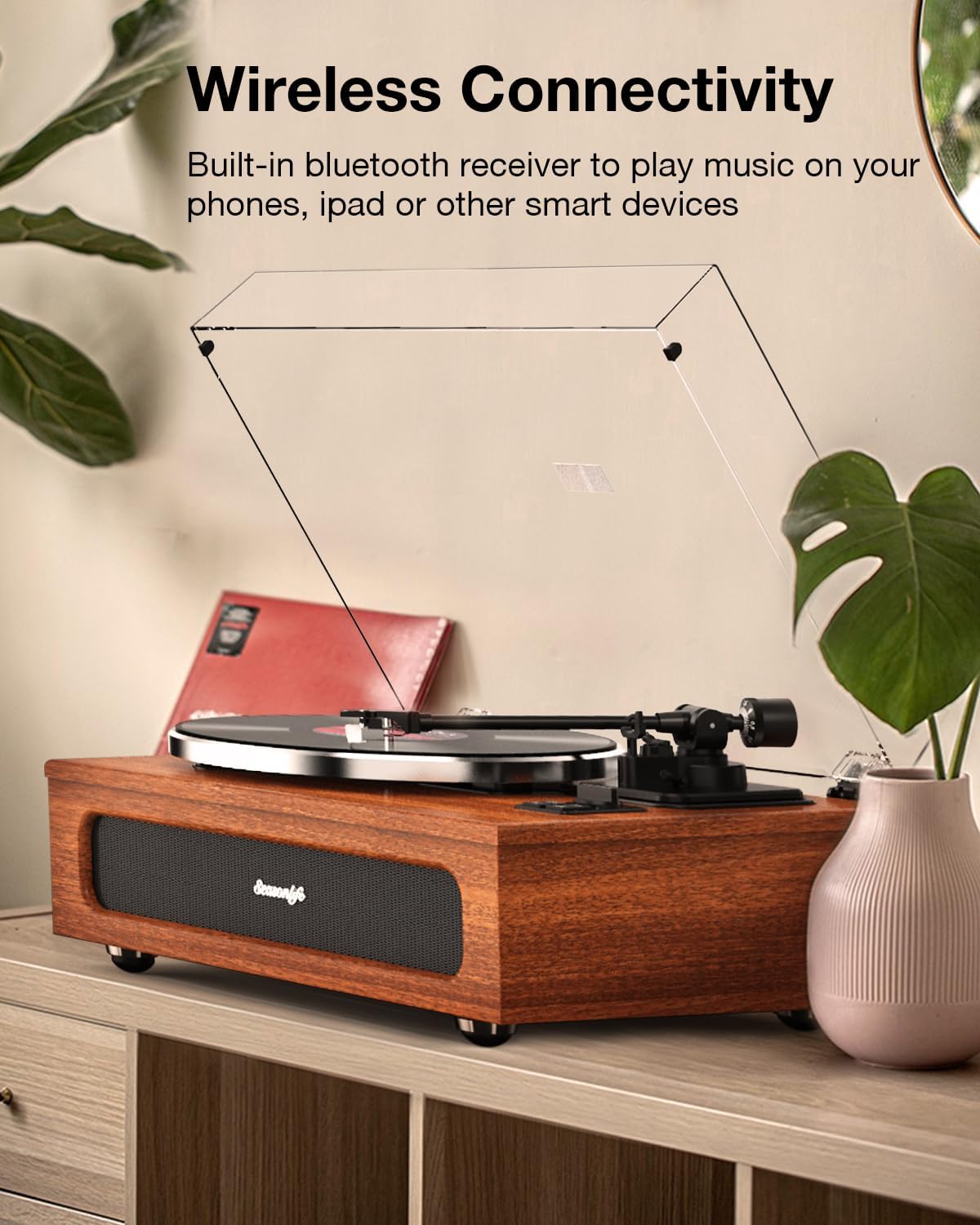
Image: A detailed view of the turntable's rear panel, clearly labeling the PHONO/LINE OUT switch, AUX-IN port, and RCA LINE OUT jacks for connecting to external audio equipment.
Maintenance
- Dust Cover: Always keep the dust cover closed when the turntable is not in use to prevent dust accumulation on the platter and stylus.
- Cleaning the Stylus: Gently clean the stylus regularly using a soft brush designed for stylus cleaning, brushing from back to front. Avoid touching the stylus with your fingers.
- Cleaning the Turntable: Wipe the turntable's surface with a soft, dry, lint-free cloth. Do not use harsh chemicals or abrasive cleaners.
- Record Care: Keep your vinyl records clean and stored properly to ensure optimal playback and extend their lifespan.
Troubleshooting
- No Power:
- Ensure the power adapter is securely connected to both the turntable and a working power outlet.
- Check if the power outlet is functional.
- No Sound:
- Verify the volume is turned up on the turntable and any connected external audio system.
- If using external speakers, check the PHONO/LINE OUT switch setting and ensure cables are correctly connected.
- Ensure the stylus is properly seated in the cartridge and not damaged.
- If using Bluetooth, ensure the turntable is in Bluetooth mode and correctly paired with your device.
- If using Aux-in, ensure the turntable is in Aux-in mode and the cable is connected.
- Skipping or Distorted Sound:
- Ensure the record is clean and free of dust or debris.
- Verify the turntable is on a stable, level surface.
- Check the counterweight adjustment; incorrect tracking force can cause skipping.
- Inspect the stylus for damage or wear; a worn stylus can cause distortion.
- Bluetooth Pairing Issues:
- Ensure no other Bluetooth devices are actively connected to the turntable.
- Move your Bluetooth device closer to the turntable.
- Try restarting both the turntable and your Bluetooth device.
Specifications
| Feature | Detail |
|---|---|
| Model Number | HQ-KZ018 |
| Brand | seasonlife |
| Rotational Speeds | 33 1/3 RPM, 45 RPM |
| Stylus Type | Audio-Technica AT3600L Moving Magnetic (MM) |
| Speakers | Built-in 4 Stereo Speakers (2x10W tweeters, 2x15W mid-bass) |
| Connectivity | Bluetooth 5.0 Input, AUX-IN, RCA Line Out, Phono Output |
| Motor Type | DC Motor (Belt Drive) |
| Material | Engineered Wood |
| Power Adapter | DC12V 1500mA |
| Dimensions | 22.17 x 17.17 x 10.91 inches (Package) |
| Weight | 17.61 pounds (Item) |
Warranty and Support
For warranty information and technical support, please contact seasonlife customer service. Refer to the product packaging or the official seasonlife website for contact details.
Manufacturer: seasonlife


