
Introduction
This manual provides detailed instructions for the installation, operation, and maintenance of your Voilamart 48V 1000W Electric Bicycle Conversion Kit, designed for 26-inch front wheels. Please read this manual thoroughly before beginning installation or operation to ensure safe and efficient use.
Product Overview
The Voilamart 48V 1000W Electric Bicycle Conversion Kit transforms a standard pedal bicycle into an electric bicycle. It features a powerful brushless gearless hub motor, a controller, throttle, brake levers, and a pedal assist system (PAS). This kit is compatible with 26-inch bicycles that have a 3.94-inch (100mm) front fork dropout spacing.

Image: All components of the Voilamart 48V 1000W Electric Bicycle Conversion Kit, including the front wheel with hub motor, controller, throttle, brake levers, and wiring.
What's in the Box
The following components are included in your Voilamart Electric Bicycle Conversion Kit:
- Hall motor wheel with tire (26-inch Front Wheel)
- Sine-wave controller
- Throttle and brake levers
- Pedal assist sensor
Note: Battery is not included and must be purchased separately.
Specifications
| Feature | Detail |
|---|---|
| Bike Type | Electric Bike (Conversion Kit) |
| Motor Type | Brushless Gearless Hub Motor |
| Power | 1000W / 48V (or 250W / 48V restricted mode) |
| Wheel Size | 26 Inches |
| Front Dropout Spacing | 100mm (3.94 inches) |
| Max Speed | 28 mph (45 km/h) (1000W mode) / 24 mph (38 km/h) (750W road-legal mode) |
| Max Load Capacity | 330 lbs (150 kg) |
| Max Torque | 42 N.m |
| Max Rotating Speed | 550 rpm |
| Certification | CE, EN15194 approved |
| Material | Aluminum (rim) |
| Model Name | EBK-26I48V1KWFN |

Image: Technical specifications and internal view of the 1000W brushless gearless motor.
Safety Information
Always wear a helmet when riding an electric bicycle. Ensure all connections are secure and waterproof. Do not operate the kit if any components are damaged. Always check local regulations regarding electric bicycle power and speed limits. Disconnect the battery before performing any maintenance or adjustments.
Setup and Installation
1. Prepare the Front Wheel
Remove your existing front wheel. Install the brake disc onto the hub motor wheel if not already pre-installed. Ensure the tire and inner tube are properly seated on the rim.

Image: Size information for the 26-inch front wheel, including front dropout spacing (100mm) and tire dimensions.
2. Install the Front Wheel
Carefully place the new hub motor front wheel into the bicycle's front fork. Ensure the motor axle is properly seated in the dropouts and secure it with the provided nuts.

Image: An example of how the various accessories, including the front wheel, controller, and throttle, are installed on a bicycle.
3. Install Throttle and Brake Levers
Remove existing grips and brake levers from the handlebars. Install the new throttle and brake levers. Connect the brake levers to your bicycle's brake cables.
4. Install Pedal Assist Sensor (PAS)
Install the PAS sensor on the pedal crank arm. Ensure it is correctly aligned to detect pedal rotation.
5. Wiring Connections
Connect all components to the controller according to the wiring diagram. Ensure all connections are secure and waterproof.
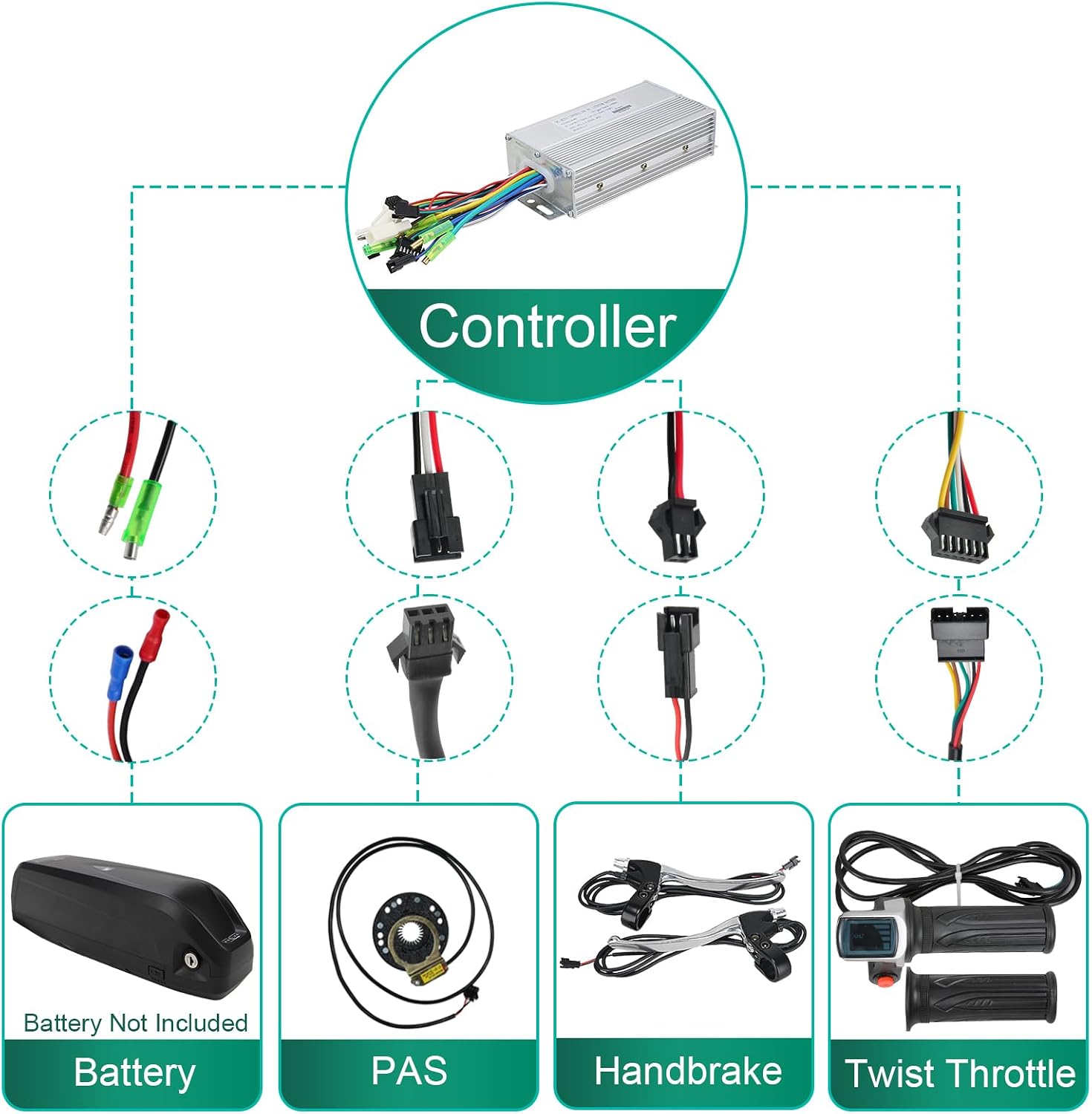
Image: A detailed wiring diagram illustrating how to connect the front wheel, battery, throttle, brake, and PAS to the controller.

Image: Close-up view of the controller and its various color-coded connectors for different components like the battery, PAS, handbrake, and twist throttle.
6. Battery Installation (Battery not included)
Securely mount your 48V battery (not included) to the bicycle frame, typically on a rear rack or within the main triangle. Connect the battery to the controller.
Installation Video
For a visual guide on the installation process, please refer to the official installation video below.
Video: Official Voilamart Ebike Conversion Kit (Front Hub Motor Type) installation guide. This video demonstrates the step-by-step process of assembling the kit onto a bicycle.
Operating Instructions
Power On/Off
Turn on the battery power switch. The display on the throttle will illuminate. To turn off, switch off the battery.
Riding Modes
- Throttle Mode: Use the twist throttle to control speed directly.
- Pedal Assist System (PAS) Mode: Pedal normally, and the motor will provide assistance based on the selected assist level.
- Manual Mode: Ride the bicycle without motor assistance, like a traditional bike.
Speed and Power Settings
The kit is restricted to 750W and 24mph (38km/h) by default for road-legal use. To switch to 1000W full power output for off-road mode (28mph / 45km/h), disconnect the blue cable from the controller. Reconnect the blue cable to return to road-legal mode.
Display Functions
The integrated power display on the throttle shows current speed, battery level, and other operational data.

Image: Close-up of the twist throttle with an integrated power display, indicating battery charge and current speed.
Maintenance
- Regular Checks: Periodically inspect all electrical connections for tightness and corrosion.
- Tire Pressure: Maintain correct tire pressure as specified on the tire sidewall.
- Brakes: Regularly check brake function and adjust or replace brake pads as needed.
- Cleaning: Clean the motor and controller with a damp cloth. Avoid high-pressure washing directly on electrical components.
- Battery Care: Follow the battery manufacturer's instructions for charging and storage.
For detailed maintenance procedures, consult a professional bicycle mechanic.
Troubleshooting
| Problem | Possible Cause | Solution |
|---|---|---|
| Motor not engaging | Loose electrical connection, low battery, PAS sensor misalignment | Check all wiring, charge battery, adjust PAS sensor |
| Loss of power | Low battery, motor overheating, controller issue | Charge battery, allow motor to cool, contact support if persistent |
| Brakes not working effectively | Worn brake pads, loose brake cables | Inspect and replace brake pads, adjust brake cable tension |
| Display not working | Loose connection to display, damaged display cable | Check display cable connection, contact support for replacement |
If you encounter issues not listed here or if solutions do not resolve the problem, please contact Voilamart customer service.
Warranty and Support
This Voilamart Electric Bicycle Conversion Kit comes with a 6-month warranty from Voilamart. For technical support, warranty claims, or further assistance, please contact Voilamart customer service. Refer to the contact information provided with your purchase or visit the official Voilamart website.