VIVOSUN Digital pH, TDS/EC/Temperature, and Soil Tester Combo
Instruction Manual - Model: COMBO-02J
1. Overview
The VIVOSUN Digital pH, TDS/EC/Temperature, and Soil Tester Combo provides essential tools for monitoring various parameters crucial for plant health in home, garden, and hydroponic environments. This comprehensive kit includes a high-accuracy digital pH meter, a 3-in-1 TDS/EC/Temperature meter, and a 3-in-1 soil moisture/pH/light tester.
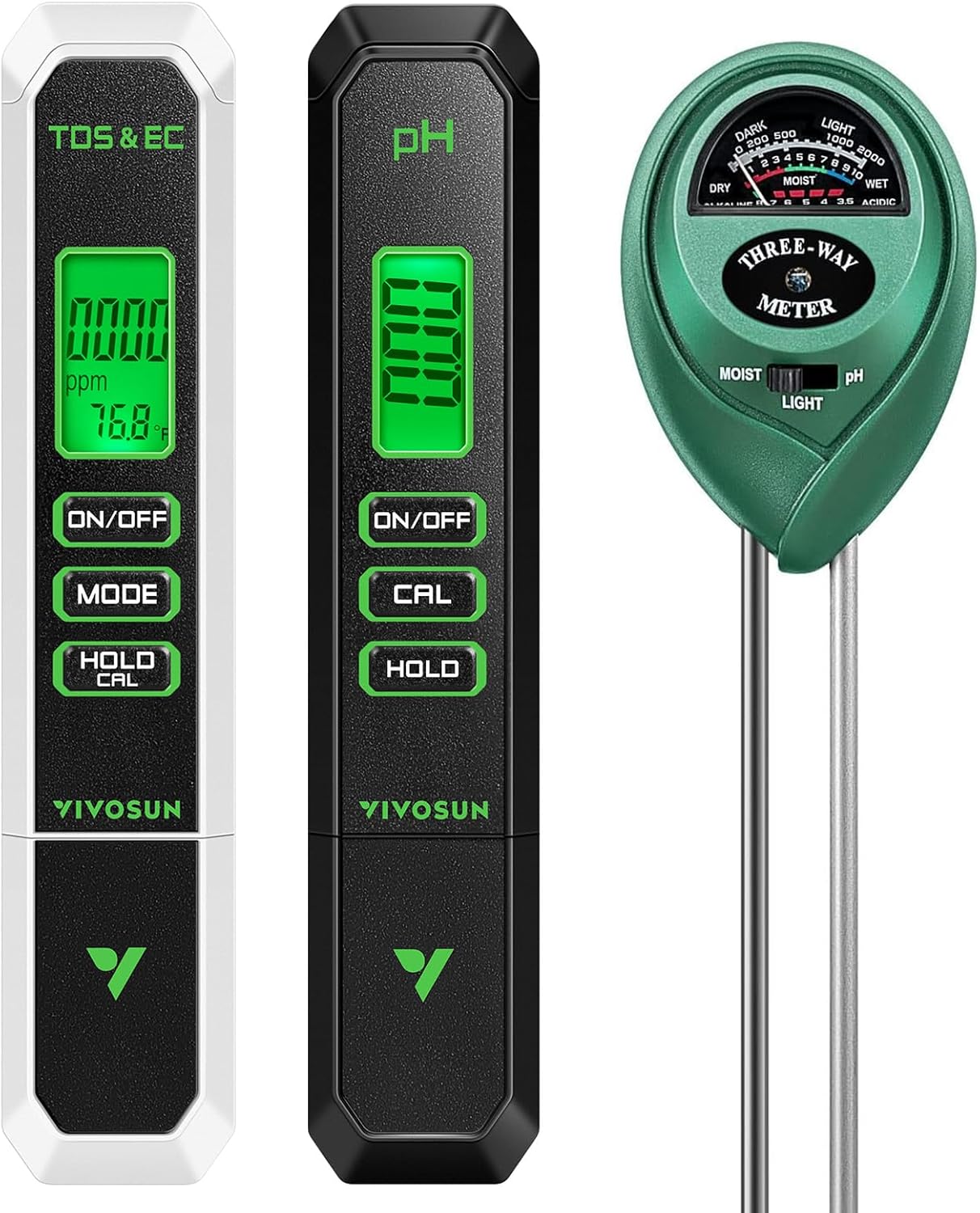
Image: The VIVOSUN Digital pH, TDS, and Soil Tester Combo.
2. Product Components
The VIVOSUN Tester Combo includes the following items:
- 1 x Digital pH Meter
- 1 x 3-in-1 TDS/EC/Temperature Meter
- 1 x 3-in-1 Soil Moisture/pH/Light Tester
- pH Buffer Powder Packs (for pH meter calibration)

Image: Key features of the VIVOSUN Digital pH Meter, including Backlit LCD, Memory Function, Hold Function, and ATC Function.

Image: Key features of the VIVOSUN 3-in-1 TDS Meter, including Backlit LCD, Memory Function, Hold Function, and ATC Function.

Image: Key features of the VIVOSUN 3-in-1 Soil Tester, highlighting its clear design, battery-free operation, and double-sensor.
3. Setup
3.1. Digital pH Meter Calibration
Calibrate the pH meter before first use or after extended inactivity for accurate readings.
- Preparation: Ensure the pH meter is clean. Prepare pH 4.00, pH 6.86, and pH 9.18 buffer solutions using the provided powder packs and distilled water.
- Power On: Remove the protective cap and press the "ON/OFF" button.
- First Point Calibration (pH 6.86): Immerse the electrode into the pH 6.86 buffer solution. Press and hold the "CAL" button until the display shows "CAL" and then "6.86". Release the button. The meter will automatically calibrate.
- Second Point Calibration (pH 4.00 - Optional but Recommended): Rinse the electrode with distilled water. Immerse it into the pH 4.00 buffer solution. Press and hold "CAL" until "CAL" and "4.00" appear.
- Third Point Calibration (pH 9.18 - Optional): Repeat the process for pH 9.18 solution if higher accuracy is desired for alkaline measurements.
- Completion: After calibration, rinse the electrode with distilled water and replace the protective cap.

Image: Step-by-step guide for calibrating the VIVOSUN Digital pH Meter.
3.2. 3-in-1 TDS/EC/Temperature Meter Setup
This meter is factory calibrated for most uses. Recalibration may be needed after extended use.
- Power On: Remove the protective cap and press the "ON/OFF" button.
- Mode Selection: Press the "MODE" button to cycle through TDS (ppm), EC (µS/cm), and Temperature (°C/°F) readings.
- Temperature Unit: To switch between Celsius and Fahrenheit, press and hold the "MODE" button.

Image: Steps for using the VIVOSUN 3-in-1 TDS Meter, including immersion and mode switching.
3.3. 3-in-1 Soil Moisture/pH/Light Tester Setup
This device operates without batteries.
- No Batteries Required: The soil tester is a mechanical device and does not require any batteries for operation.
- Mode Selection: Use the slider switch on the front to select between "MOIST", "LIGHT", or "pH" modes before inserting into soil.
4. Operating Instructions
4.1. Digital pH Meter Operation
- Power On: Remove the protective cap and press "ON/OFF".
- Immerse: Dip the electrode into the solution to be tested, ensuring the liquid level is below the maximum immersion line.
- Read: Gently stir and wait for the reading to stabilize (usually a few seconds).
- Hold Function: Press the "HOLD" button to lock the current reading for easy viewing and recording. Press again to release.
- Power Off: Press "ON/OFF" to turn off the meter.
- Clean: Always rinse the electrode with distilled water after use and replace the protective cap.
4.2. 3-in-1 TDS/EC/Temperature Meter Operation
- Power On: Remove the protective cap and press "ON/OFF".
- Immerse: Dip the electrode into the solution to be tested, ensuring the liquid level is below the maximum immersion line.
- Select Mode: Press "MODE" to choose between TDS (ppm), EC (µS/cm), or Temperature (°C/°F).
- Read: Gently stir and wait for the reading to stabilize.
- Hold Function: Press the "HOLD/CAL" button briefly to lock the reading. Press again to release.
- Power Off: Press "ON/OFF" to turn off the meter.
- Clean: Always rinse the electrode with distilled water after use and replace the protective cap.
4.3. 3-in-1 Soil Moisture/pH/Light Tester Operation
- Select Mode: Use the slider switch to choose "MOIST", "LIGHT", or "pH".
- Insert Probe: Insert the probes into the soil approximately 2-4 inches deep, ensuring full contact with the soil. Avoid touching stones or hard objects.
- Adjust: Gently adjust the probe until the pointer on the dial moves slightly.
- Read: Wait for about 10 minutes for the reading to stabilize.
- Moisture: Read the "MOIST" scale (1-3 Dry, 4-7 Normal, 8-10 Wet).
- Light: Read the "LIGHT" scale (0-200 Dark, 200-500 Low-, 500-1000 Normal, 1000-2000 High).
- pH: Read the "pH" scale (3.5-6.5 Acidic, 7 Neutral, 7.5-8.0 Alkaline).
- Remove & Clean: Remove the probes from the soil and wipe them clean after each use.

Image: Step-by-step guide for using the VIVOSUN 3-in-1 Soil Tester.
Video: Demonstration of the VIVOSUN Digital pH Meter, TDS Meter, and Soil Moisture Tester in use.
5. Maintenance
- Cleaning Probes: After each use, rinse the electrodes of the digital pH and TDS meters with distilled water. Wipe the probes of the soil tester clean with a soft cloth.
- Storage: Store all meters in a cool, dry place. For the digital pH meter, ensure the protective cap is on.
- Battery Replacement: The digital pH and TDS meters use replaceable button-style batteries (1x3V CR2032). Replace when the display dims or readings become unstable. The soil tester does not require batteries.
- Recalibration: Recalibrate the digital pH meter regularly (e.g., monthly or before critical measurements) and after extended periods of inactivity. The TDS meter may also require occasional recalibration if accuracy drifts.
6. Troubleshooting
- Inaccurate Readings (Digital Meters):
- Ensure proper calibration (especially for pH meter).
- Clean electrodes thoroughly.
- Check battery levels.
- Ensure sufficient immersion depth.
- Allow readings to stabilize.
- No Display/Dim Display (Digital Meters):
- Replace batteries.
- Check battery orientation.
- Soil Tester Not Responding:
- Ensure probes are fully inserted into moist soil. Dry soil may not provide a reading.
- Ensure probes are clean and free of debris.
- Avoid inserting into very hard soil or hitting rocks.
- Inconsistent Soil pH Readings:
- Ensure the soil is adequately moist for accurate pH measurement.
- Test in multiple spots for a representative sample.
7. Specifications
| Feature | Digital pH Meter | 3-in-1 TDS/EC/Temperature Meter | 3-in-1 Soil Tester |
|---|---|---|---|
| Measuring Range | 0.00-14.00 pH | TDS: 0-9999 ppm, EC: 0-9999 µS/cm, Temp: 0.1-80°C (32-176°F) | Moisture: 1-10 (Dry to Moist), Light: 0-2000 lux, pH: 3.5-8.0 (Acidic to Basic) |
| Resolution | 0.01 pH | TDS: 1 ppm, EC: 1 µS/cm, Temp: 0.1 | N/A (Analog) |
| Accuracy | ±0.1 pH | TDS: ±5%, EC: ±5%, Temp: ±1 | N/A (Analog) |
| Operating Temp | 0.1-80°C (32-176°F) | 0.1-80°C (32-176°F) | N/A (Environmental) |
| Power Supply | 1x3V (CR2032 Button Cell) | 1x3V (CR2032 Button Cell) | No batteries required |
| Calibration | One-Point, Two-Point, or Three-Point Automatic | Factory Calibrated (Recalibration possible) | N/A |
| Dimensions (Approx.) | 6.23" x 1.22" x 0.65" | 6.23" x 1.22" x 0.65" | 1.8" x 10.8" |
| Total Item Weight | 10.8 ounces (for the entire combo package) | ||
Images: Detailed specifications for the pH, TDS, and Soil Testers are available in the product images.

Image: Specifications for the VIVOSUN Digital pH Meter.

Image: Specifications for the VIVOSUN 3-in-1 TDS Meter.

Image: Specifications for the VIVOSUN 3-in-1 Soil Tester.
8. Warranty and Support
For warranty information and customer support, please refer to the official VIVOSUN website or contact their customer service directly. Keep your purchase receipt as proof of purchase.


