
1. Introduction
This manual provides detailed instructions for the installation, operation, and maintenance of your Acouto SM625AIS 6.25-inch Car Display Touchscreen with AI Blind Spot Warning Function. Please read this manual thoroughly before using the product to ensure proper function and safety.
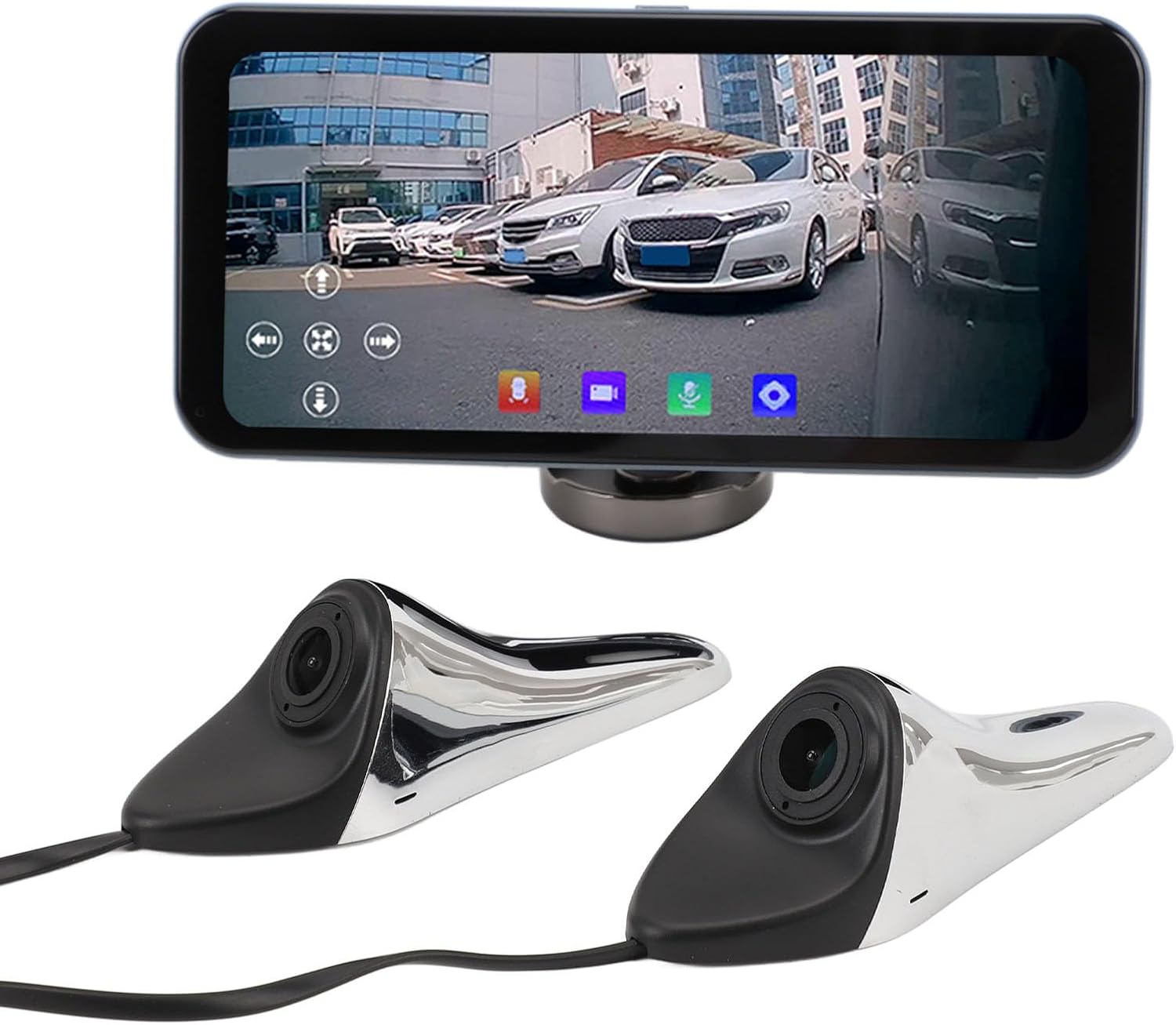
Figure 1: Acouto SM625AIS Car Display Touchscreen and Cameras.
2. Package Contents
Verify that all items listed below are included in your package. If any items are missing or damaged, please contact customer support.
- 1 x 6.25-inch Display
- 2 x Camera Units
- 3 x User Manuals (This document is one of them)
- 1 x Pack of Wiring Harness Accessories (9PCS)
- 2 x Packs of Camera Accessories (18PCS)

Figure 2: Contents of the Acouto SM625AIS package.
3. Product Specifications
| Component | Specification |
|---|---|
| Screen Size | 6.25 inch |
| Screen Resolution | 1560x720P |
| Brightness | 650cd/m2 |
| Power Input | DC12V-24V (via car cigar lighter) |
| Camera Chip | GC2053 |
| Camera Resolution | 1920x1080P |
| Camera Angle | Horizontal 120°, Vertical 90° |
| Camera Rating | IP67 (Water-resistant) |
| Display Housing Material | Aluminum Alloy |
| OSD Language | English, Simplified Chinese, Japanese |
| Memory Card Support | Up to 128GB (not included) |
| Item Weight | 2.2 pounds |
| Model Number | SM625AIS |

Figure 3: Product Dimensions.
4. Installation Instructions (Setup)
Follow these steps for proper installation of the Acouto SM625AIS system:
- Prepare the Installation Area: Clean the surface of the rearview mirror or the desired camera mounting location thoroughly to ensure proper adhesion.
- Mount the Cameras: Stick the rearview mirror cameras in place. The cameras are designed for left and right side view blind spot imaging. Ensure the lens angle is adjusted for optimal view. The camera mounting type uses body stickers for secure attachment.
- Connect Camera Power: Connect the power cords for both cameras.
- Mount the Display: The 6.25-inch display can be installed on your dashboard using Type 1 bracket or on an air vent using Type 2 bracket. Choose the location that provides the best visibility without obstructing your driving view.
- Connect Display Power: Connect the display screen to the car's cigar lighter for power (DC12V-24V).
- Adjust Display Angle: The display supports horizontal and vertical movement. Adjust the viewing angle as needed. The camera can also rotate at different angles using tools to solve screen tilt issues.

Figure 4: Camera and Display Installation Examples.
5. Operating Instructions
Once installed and powered on, the Acouto SM625AIS system provides several functions to enhance driving safety:
- Real-time Blind Spot View: The cameras provide a clear, real-time view of your vehicle's left and right blind spots on the 6.25-inch touchscreen.
- Split Screen Function: The display supports a split-screen function, allowing you to view images from both cameras simultaneously.
- Single and Dual Screen Switching: Easily switch between single camera view and dual split-screen view using the slide screen function on the touchscreen.
- AI Blind Spot Warning: The integrated AI technology detects cars or pedestrians approaching your vehicle from the blind spots and provides timely alerts to the driver, reducing accident risk.
- Built-in DVR Function: The system includes a built-in Digital Video Recorder (DVR) function. Insert a memory card (up to 128GB, not included) into the designated slot to record footage.

Figure 5: AI Blind Spot Warning in action.

Figure 6: DVR Function and Memory Card Slot.
6. Features Overview
The Acouto SM625AIS system is designed with several key features to enhance your driving experience and safety:
- Enhanced Driving Safety: Features like split-screen display, built-in DVR, and AI blind spot warning contribute to a safer driving environment.
- Crisp Viewing Experience: A 6.25-inch TFT LCD panel touchscreen with 1560x720P resolution and 1920x1080P cameras provide clear, real-time views.
- Timely Alert System: AI blind spot warning alerts you to potential hazards on both sides of your vehicle.
- Easy Installation: Quick stick-on camera installation and flexible display mounting options.
- Flexible Adjustment: Support for horizontal and vertical movement of the display and adjustable camera angles for personalized viewing.
- Durable Design: IP67 water-resistant cameras ensure performance in various weather conditions.
7. Maintenance
To ensure the longevity and optimal performance of your Acouto SM625AIS system, follow these maintenance guidelines:
- Cleaning the Display: Use a soft, lint-free cloth to gently wipe the touchscreen. Avoid abrasive cleaners or solvents that could damage the screen.
- Cleaning the Cameras: Periodically clean the camera lenses to ensure a clear view. Use a soft cloth and, if necessary, a mild glass cleaner.
- Cable Inspection: Regularly check all wiring harnesses and connections for any signs of wear, damage, or loose connections.
- Software Updates: Check the manufacturer's website for any available firmware or software updates to ensure your system has the latest features and bug fixes.
- Memory Card Management: If using the DVR function, periodically back up important footage and format the memory card to maintain optimal recording performance.
8. Troubleshooting
If you encounter issues with your Acouto SM625AIS system, refer to the following common problems and solutions:
- No Power to Display:
- Ensure the cigar lighter power adapter is securely plugged into the car's power outlet and the display.
- Check the car's cigar lighter fuse.
- No Camera Image on Display:
- Verify that the camera cables are securely connected to both the cameras and the display unit.
- Ensure the cameras are receiving power.
- Try switching between single and dual-screen modes to see if one camera is working.
- Unclear or Distorted Image:
- Clean the camera lenses.
- Check for any obstructions in the camera's field of view.
- Ensure the camera is securely mounted and not vibrating.
- AI Warning Not Functioning:
- Ensure the cameras are properly positioned and have a clear view of the blind spot areas.
- Check the system settings on the display to ensure the AI warning function is enabled.
- DVR Not Recording:
- Ensure a compatible memory card (up to 128GB) is inserted correctly into the slot.
- Check if the memory card is full; format it if necessary (this will erase all data).
- Verify the DVR recording function is enabled in the display settings.
If these steps do not resolve the issue, please contact Acouto customer support for further assistance.
9. Warranty and Support
Acouto products are manufactured to high-quality standards. For warranty information, technical support, or service inquiries, please refer to the warranty card included in your package or visit the official Acouto website. Please have your model number (SM625AIS) and purchase details ready when contacting support.