1. Introduction
This manual provides essential information for the safe and effective use of your ANCHEER Treadmill with Desk Workstation and Adjustable Height, Model tr5972. Please read all instructions carefully before assembly and operation to ensure proper function and user safety. Keep this manual for future reference.
2. Safety Instructions
Always follow basic safety precautions when using electrical appliances to reduce the risk of fire, electric shock, and personal injury. This includes:
- Read all instructions in this manual before using the treadmill.
- Keep children and pets away from the treadmill during operation.
- Place the treadmill on a flat, stable surface with adequate clearance around it.
- Wear appropriate athletic footwear and clothing.
- Use the safety key at all times. Attach the clip to your clothing.
- Do not operate the treadmill if it has a damaged cord or plug, or if it is not working properly.
- Consult a physician before starting any exercise program.
- Do not exceed the maximum weight capacity of 300 lbs.
- Ensure the treadmill is unplugged before cleaning or performing maintenance.
3. Package Contents
Verify that all components are present before beginning assembly:
- 1 x ANCHEER Treadmill Main Unit
- 1 x Removable Tabletop
- 2 x Tabletop Bracket Accessories
- 1 x Safety Key
- 1 x Lubricant
- 1 x User Manual (this document)
- 1 x Tool Kit
4. Setup and Assembly
The ANCHEER treadmill arrives mostly pre-assembled. Follow these steps to complete the setup:
- Unpacking: Carefully remove all components from the packaging. Place the main treadmill unit on a flat, stable surface.
- Unfolding the Treadmill:
Locate the hydraulic lever system. Gently lower the running deck until it is fully flat. Ensure all locking mechanisms are securely engaged.
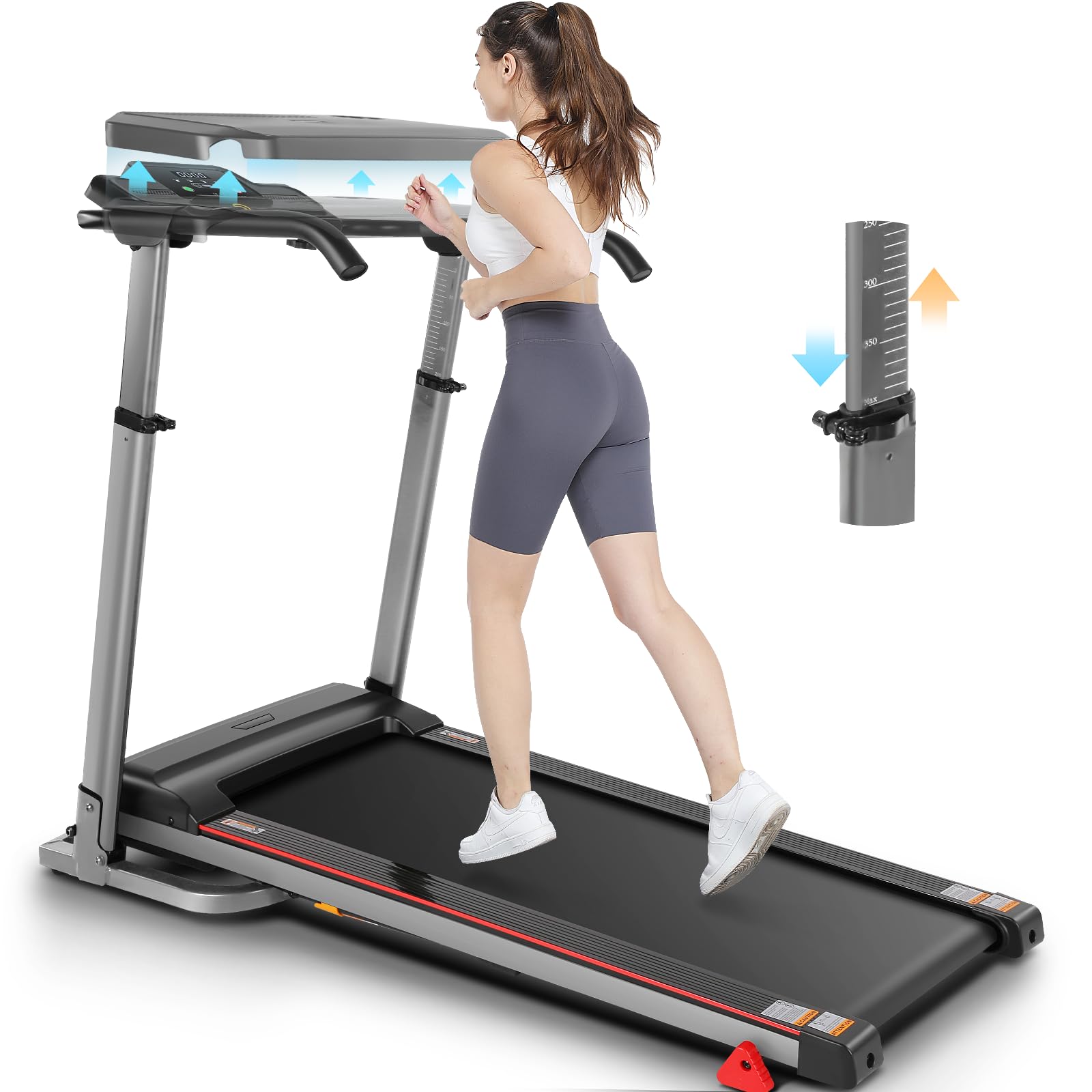
Image: The ANCHEER treadmill in its folded and unfolded states, highlighting the hydraulic lever for easy setup and the transport wheels for mobility.
- Attaching the Handlebars and Console:
Raise the console mast to the upright position. Secure it using the provided bolts and tools from the tool kit. Ensure the console is firmly attached.
- Installing the Desk Workstation:
Attach the tabletop bracket accessories to the designated slots on the treadmill's frame. Place the removable tabletop onto the brackets, ensuring it is stable and level.

Image: Close-up of the removable desktop workstation, featuring a ventilated design for devices and a convenient water bottle holder.
- Power Connection: Plug the power cord into a grounded electrical outlet.
5. Operating Instructions
Familiarize yourself with the control panel and functions before starting your workout.
5.1 Control Panel Overview
The LED display shows key workout metrics such as Speed, Time, Distance, and Calories Burned. Buttons are typically available for Start, Stop, Speed Adjustment (+/-), and Program Selection.
5.2 Starting a Workout
- Ensure the safety key is properly inserted into the console and the clip is attached to your clothing.
- Step onto the treadmill belt, holding the handrails for balance.
- Press the START button. The treadmill will begin at a low speed.
- Adjust the speed using the SPEED + or SPEED - buttons to your desired pace (0.6-7.5 MPH).
- To stop, press the STOP button or pull the safety key.
5.3 Using Preset Programs
Your treadmill includes 12 preset workout programs. Consult the console instructions for specific program selection and details.
5.4 Heart Rate Monitoring
Grip the heart rate sensors on the handlebars to display your current heart rate on the console. This feature helps monitor exertion levels.
6. Adjustable Features
6.1 Adjustable Height
The treadmill features adjustable height for the console and handlebars, accommodating users of various heights. Adjust the height by loosening the adjustment knobs, setting to the desired level (e.g., 33-50 inches), and re-tightening the knobs securely.

Image: The treadmill's adjustable height feature, demonstrating how it can be set for both shorter and taller users, ranging from approximately 33 to 50 inches.
6.2 Removable Desk Workstation
The integrated desk workstation can be easily attached or removed as needed. It provides a stable surface for laptops, tablets, or other items, enhancing productivity during workouts. The desk also includes a water bottle holder.
6.3 Three-Level Manual Incline
To increase workout intensity, the treadmill offers a three-level manual incline. To adjust the incline:
- Stop the treadmill and unplug it from the power source.
- Locate the incline adjustment mechanism at the rear of the treadmill deck.
- Manually lift or lower the deck and secure it at one of the three available incline levels. Ensure it is firmly locked in place before use.
- Plug the treadmill back in before resuming your workout.

Image: Visual representation of the three manual incline levels, demonstrating how each level can be used for different exercise intensities, from walking to running.
7. Folding and Storage
The ANCHEER treadmill features an effortless folding design for convenient storage, especially in smaller spaces.
- Ensure the treadmill is stopped and unplugged.
- Lift the running deck upwards until it locks into the vertical position. The hydraulic lever soft-drop system assists in this process.
- Once folded, use the integrated transport wheels to easily move the treadmill to your desired storage location.
Image: The treadmill in its folded state, illustrating the compact design and the use of transport wheels for easy relocation and storage.
8. Maintenance
Regular maintenance ensures the longevity and optimal performance of your treadmill.
8.1 Cleaning
- Always unplug the treadmill before cleaning.
- Wipe down the console and exterior surfaces with a damp cloth. Avoid harsh chemicals.
- Periodically vacuum underneath the treadmill to prevent dust buildup.
8.2 Belt Lubrication
The running belt requires periodic lubrication to reduce friction and extend its lifespan. Use the provided lubricant or a silicone-based treadmill lubricant.
- Unplug the treadmill.
- Loosen the rear roller bolts slightly to lift the belt.
- Apply a thin line of lubricant evenly under the center of the running belt.
- Tighten the rear roller bolts.
- Plug in the treadmill and run it at a low speed for a few minutes to distribute the lubricant.
8.3 Belt Tension and Alignment
If the running belt slips or drifts to one side, it may need adjustment. Refer to the detailed instructions in the included user manual for specific belt tensioning and alignment procedures using the provided tool kit.
9. Troubleshooting
If you encounter issues with your treadmill, refer to the following common problems and solutions:
| Problem | Possible Cause | Solution |
|---|---|---|
| Treadmill does not power on. | Power cord not plugged in; circuit breaker tripped; safety key not inserted. | Check power connection; reset circuit breaker; ensure safety key is fully inserted. |
| Running belt slips or stops. | Belt too loose; insufficient lubrication; motor overload. | Adjust belt tension; lubricate the belt; reduce user weight or speed. |
| Unusual noise during operation. | Loose parts; belt misalignment; motor issue. | Inspect for loose bolts and tighten; adjust belt alignment; contact customer support if motor noise persists. |
| Display not working correctly. | Loose cable connection; console malfunction. | Check all cable connections to the console; power cycle the treadmill. |
10. Specifications
- Model: tr5972
- Brand: ANCHEER
- Motor: 2.5 HP (Brushless Quiet Motor)
- Speed Range: 0.6 - 7.5 MPH
- Incline: 3-Level Manual
- Weight Capacity: 300+ LBS
- Running Belt Dimensions: 42" x 16"
- Product Dimensions (Unfolded): 135.89 cm (L) x 65.79 cm (W) x 99.06 cm (H)
- Item Weight: 42 kg
- Noise Level: Less than 55 dB
- Display Type: 2.8 Inches LED (Calories Burned, Distance, Speed, Time)
- Number of Programs: 12
- Frame Material: Alloy Steel
- Special Features: Adjustable Height, Foldable, Water Bottle Holder, Wheeled, Removable Desk Workstation

Image: The ANCHEER treadmill with its desk workstation, showcasing its compact design and adjustable features.

Image: Internal view of the treadmill's motor, highlighting its powerful and quiet 2.5 HP operation.

Image: Cross-section view of the running deck, illustrating the 7-layer high-tech running belt and 6 silicone shock absorbers designed for intelligent shock absorption.
11. Customer Support
For any questions, assistance, or to report issues, please contact ANCHEER customer support. Refer to your purchase documentation or the ANCHEER official website for contact details.


