1. Product Overview
The TIDEWE Heated Jacket is designed to provide warmth and comfort in cold outdoor conditions. It features integrated heating elements powered by a portable battery pack, adjustable heat settings, and a versatile design suitable for various activities.

Image 1.1: TIDEWE Heated Jacket, battery pack, and safety vest.
2. Setup and Initial Use
2.1 Charging the Battery Pack
Before first use, fully charge the included 10000mAh 5V battery pack. A full charge typically takes 3-4 hours, or approximately 2 hours with a quick charge compatible adapter (not included).
- Connect the charging cable to the battery pack and a suitable USB power source.
- The battery pack's indicator will show charging progress.
- Ensure the battery pack is fully charged before connecting it to the jacket.

Image 2.1: Battery pack being inserted into the jacket's designated pocket.
2.2 Battery Installation and Connection
- Locate the battery pocket inside the jacket, typically on the left side.
- Insert the fully charged battery pack into the pocket.
- Connect the jacket's internal USB cable to the battery pack.
- Close the battery pocket zipper securely.
2.3 Safety Certifications
The included battery pack is certified with UL, FCC, RoHS, PSE, and CE standards to ensure safe operation.

Image 2.2: Battery safety certifications and features.
3. Operating Instructions
3.1 Powering On and Adjusting Heat Settings
To activate the heating system:
- Press and hold the power button located on the jacket's chest for 3-5 seconds until the indicator light illuminates.
- The jacket will typically start on the highest heat setting (Red LED).
- Press the power button briefly to cycle through the heat settings:
- Red LED: High heat (approx. 131°F / 55°C) - up to 3 hours of warmth.
- White LED: Medium heat (approx. 113°F / 45°C) - up to 5.5 hours of warmth.
- Blue LED: Low heat (approx. 100°F / 38°C) - up to 10 hours of warmth.
- For hunting discretion, the indicator light is designed to turn off after 8 seconds while the heating continues.

Image 3.1: Heating levels and approximate durations.
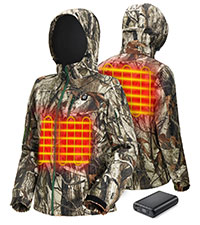
Image 3.2: Location of heating elements in the chest and back.
3.2 Powering Off
To turn off the heating system, press and hold the power button on the jacket's chest for 3-5 seconds until the indicator light turns off.
3.3 Using the Heated Seat/Backrest
The jacket features a zippered pocket on the lower back that contains a heated seat function. This can also be used as a heated backrest.
- To use as a heated seat: Unzip the pocket at the lower back, unfold the cushion, and sit down to utilize the heating element.
- To use as a heated backrest: The heating element within the pocket can provide warmth to the waist area without unfolding.

Image 3.3: Deployment of the heated seat feature.
4. Maintenance
4.1 Washing Instructions
Proper care is essential to maintain the jacket's functionality and longevity.
- Disconnect and Remove Battery: Always ensure the battery pack is disconnected and removed from the jacket before washing.
- Close Zippers: Close all zippers and fasteners on the jacket.
- Hand Wash Recommended: For best results, hand wash the jacket in cold water with a mild detergent.
- Machine Wash (Gentle Cycle): If machine washing, use a gentle cycle with cold water. Place the jacket in a mesh laundry bag to protect it.
- Do Not Bleach or Iron: Avoid using bleach or ironing the jacket, as this can damage the heating elements and fabric.
- Air Dry: Hang the jacket to air dry completely. Do not tumble dry. Ensure it is fully dry before reconnecting the battery or storing.
4.2 Battery Pack Care
- Store the battery pack in a cool, dry place when not in use.
- Avoid exposing the battery to extreme temperatures or direct sunlight.
- Charge the battery pack at least once every three months to maintain its health if stored for extended periods.
5. Troubleshooting
- Jacket not heating:
- Ensure the battery pack is fully charged.
- Verify the battery pack is securely connected to the jacket's internal cable.
- Confirm the power button has been pressed and held for 3-5 seconds to activate.
- Heating stops unexpectedly:
- The jacket is equipped with a safety feature that pauses heating if the internal temperature exceeds 65°C (149°F). Heating will automatically resume once the temperature drops.
- If the temperature reaches 75°C (167°F), the system will shut off completely for safety. Allow the jacket to cool down before attempting to restart.
- Check the battery level; it may be depleted.
- Battery pack not charging:
- Ensure the charging cable is properly connected to both the battery pack and the power source.
- Try a different charging cable or power adapter to rule out a faulty accessory.
- If the issue persists, contact TIDEWE customer support.
6. Specifications
| Feature | Detail |
|---|---|
| Material | 100% Polyester & Insulation |
| Insulation | 120g |
| Waterproof & Breathable | Yes |
| Temperature Rating | Down to -5°C (23°F) |
| Battery Pack | 10000mAh, 5V |
| Battery Certifications | UL, FCC, RoHS, PSE, CE |
| Heat Settings | Low (100°F), Medium (113°F), High (131°F) |
| Heat Duration (approx.) | Low: 10 hrs, Medium: 5.5 hrs, High: 3 hrs |
| Sizes Available | S-3XL |
| Color/Pattern | Next Camo G2 |

Image 6.1: Waterproof and breathable fabric feature.

Image 6.2: Silent fabric and waterproof zipper details.
6.1 Size Chart
Refer to the following size chart for accurate measurements. It is recommended to choose one size larger if you plan to wear thick clothes underneath.

Image 6.3: TIDEWE Heated Jacket size chart.
7. Warranty and Support
For warranty information, product support, or to report any issues, please contact TIDEWE customer service. Refer to the product packaging or the official TIDEWE website for the most current contact details.
- Online Support: Visit the official TIDEWE website for FAQs and support resources.
- Contact Information: Check your product's packaging or the TIDEWE website for customer service email or phone number.