
1. Product Overview
The Sunster TB10PRO is an 8KW portable diesel air heater designed to provide efficient and reliable heating for various applications, including cars, RVs, trucks, motor-homes, campers, and tents. This unit features multiple control options, including an LCD panel, a wireless temperature sensing switch with CO monitoring, a remote control, and a smartphone application. It supports both 12V/24V DC and 110-240V AC power inputs, offering versatile usage.

Figure 1.1: The Sunster TB10PRO portable diesel air heater kit, including the main heater unit, the A2422 wireless temperature sensing switch, the LCD control panel, a remote control, and the AC power adapter.
2. Safety Information
Read all safety warnings and instructions carefully before using this product. Failure to follow these instructions may result in fire, explosion, electric shock, carbon monoxide poisoning, or other serious injury.
- Carbon Monoxide (CO) Alarm: The included A2422 Wireless Temperature Sensing Switch features a CO alarm. If unsafe levels of carbon monoxide are detected, the alarm will trigger, and the heater will automatically shut down. Do not disable this feature.
- Ventilation: Always ensure adequate ventilation when operating the heater, especially in enclosed spaces like tents or RVs. Exhaust fumes contain carbon monoxide, which is odorless and deadly.
- Overheating Protection: The heater is equipped with overheating protection (≥518°F/270°C) to ensure safe operation. Do not block air inlets or outlets.
- Fuel: Use only diesel fuel. Do not use gasoline or other volatile fuels.
- Exhaust System: Ensure the exhaust pipe is properly installed and vented to the outside, away from any flammable materials or living spaces. Regularly inspect for blockages or damage.
- Electrical Connections: Ensure all electrical connections are secure and match the specified voltage (12V, 24V, or 110-240V). Avoid overloading circuits.
- Placement: Place the heater on a stable, non-flammable surface. Maintain a safe distance from walls, furniture, and other combustible materials.

Figure 2.1: This graphic explains the three-stage carbon monoxide monitoring system, showing how different CO concentration levels (0-299 PPM, ≥300 PPM, ≥500 PPM) trigger distinct alerts, from no alarm to sound alarms and automatic shutdown.
3. Package Contents
Verify that all items listed below are included in your package:
- 1 x Air Diesel Heater Unit
- 1 x A2422 Wireless Temperature Sensing Controller (with CO Alarm)
- 1 x Remote Control
- 1 x AC110-240V Power Adapter
- 1 x Silencer
- 1 x Exhaust Pipe
- 1 x Flexible and Stretchable Air Outlet Pipe
- 1 x Set Screw Accessory Kit
- 1 x User Manual (this document)
- 1 x DC Battery Power Cable
- 1 x Heat Protection Sleeve
- 1 x Oil Filter
- 1 x 4m Switch Extension Cable
4. Product Specifications
| Specification | Detail |
|---|---|
| Brand | Sunster |
| Model Name | TB10-pro |
| Wattage | 8 KW |
| Power Source | Battery Powered (12V/24V DC) / AC (110-240V) |
| Material | Aluminum, Plastic |
| Item Weight | 22 pounds |
| Package Dimensions | 18 x 14.5 x 12.25 inches |
| Special Features | Automatic Start & Stop (constant temperature), CO monitoring System, Turbo Heat Mode, Ventilation Mode, Wireless temperature sensing Switch, Adaptive Plateau Mode |
| Fuel Consumption | 0.16L - 0.45L per hour (approx. 1 GAL per night) |
| Noise Level | ≤35dB |

Figure 4.1: This diagram provides precise measurements of the heater from various angles and labels key components such as the hot air outlet, exhaust pipe, air filter, and control panel placement box.
5. Setup and Installation
5.1 Initial Inspection
Upon unboxing, inspect all components for any signs of damage. Ensure all parts listed in Section 3 are present.
5.2 Fueling the Unit
- Locate the fuel tank cap on the top of the heater.
- Carefully fill the tank with clean diesel fuel. Do not overfill.
- Securely close the fuel tank cap.
5.3 Exhaust Pipe Installation
The exhaust pipe should be installed on the side of the unit to prevent blockages. Use the provided heat protection sleeve and screw accessory kit to secure the exhaust pipe and silencer. Ensure the exhaust is directed away from the heated area and any flammable materials.

Figure 5.1: This image details the recommended exhaust pipe setup, showing how it connects to the side of the unit to prevent blockages and includes a protective cover for safety.
5.4 Air Intake and Outlet
The heater features a fixed air filter at the bottom for intake. Ensure this area is clear of obstructions. Attach the flexible and stretchable air outlet pipe to the hot air outlet for directing heat.
5.5 Power Connection
The TB10PRO supports two main wiring methods:
- 12V/24V DC (Vehicle Battery Compatible): Use the provided DC battery power cable to connect the heater directly to a 12V or 24V vehicle battery.
- 110-240V AC (Standard Outlet): Use the included AC110-240V power adapter to plug the heater into a standard wall outlet.

Figure 5.2: This image illustrates the dual power input options for the heater, allowing it to be powered by a 12V/24V vehicle battery or a standard 110-240V AC power outlet using the included adapter.
5.6 Placement
Place the heater on a flat, stable surface. Ensure there is sufficient clearance around the unit for proper airflow and to prevent fire hazards. The 4-meter switch extension cable allows for mounting the control panel indoors for easier access while the main unit is placed outside or in a well-ventilated area.
6. Operating Instructions
The Sunster TB10PRO offers multiple control methods for convenience.

Figure 6.1: This image demonstrates the four convenient ways to operate the heater: via the A2409 LCD switch, the A2422 wireless temperature switch with CO monitoring, a smartphone Bluetooth application, and a dedicated remote control.
6.1 Using the A2422 Wireless Temperature Sensing Switch
The A2422 switch provides wireless control and critical safety monitoring.
- Power On/Off: Press and hold the ON/OFF button to power the heater on or off.
- Temperature Display: Shows the current ambient temperature.
- CO Concentration Display: Displays real-time carbon monoxide levels.
- CO Alarm: Triggers an audible alarm and automatic shutdown if CO levels reach dangerous thresholds.
- Temperature Adjustment: Use the UP/DOWN buttons to set the desired temperature.
- Remote Learning: The switch can be paired with the main unit. Refer to the specific pairing instructions in the separate A2422 manual for details.
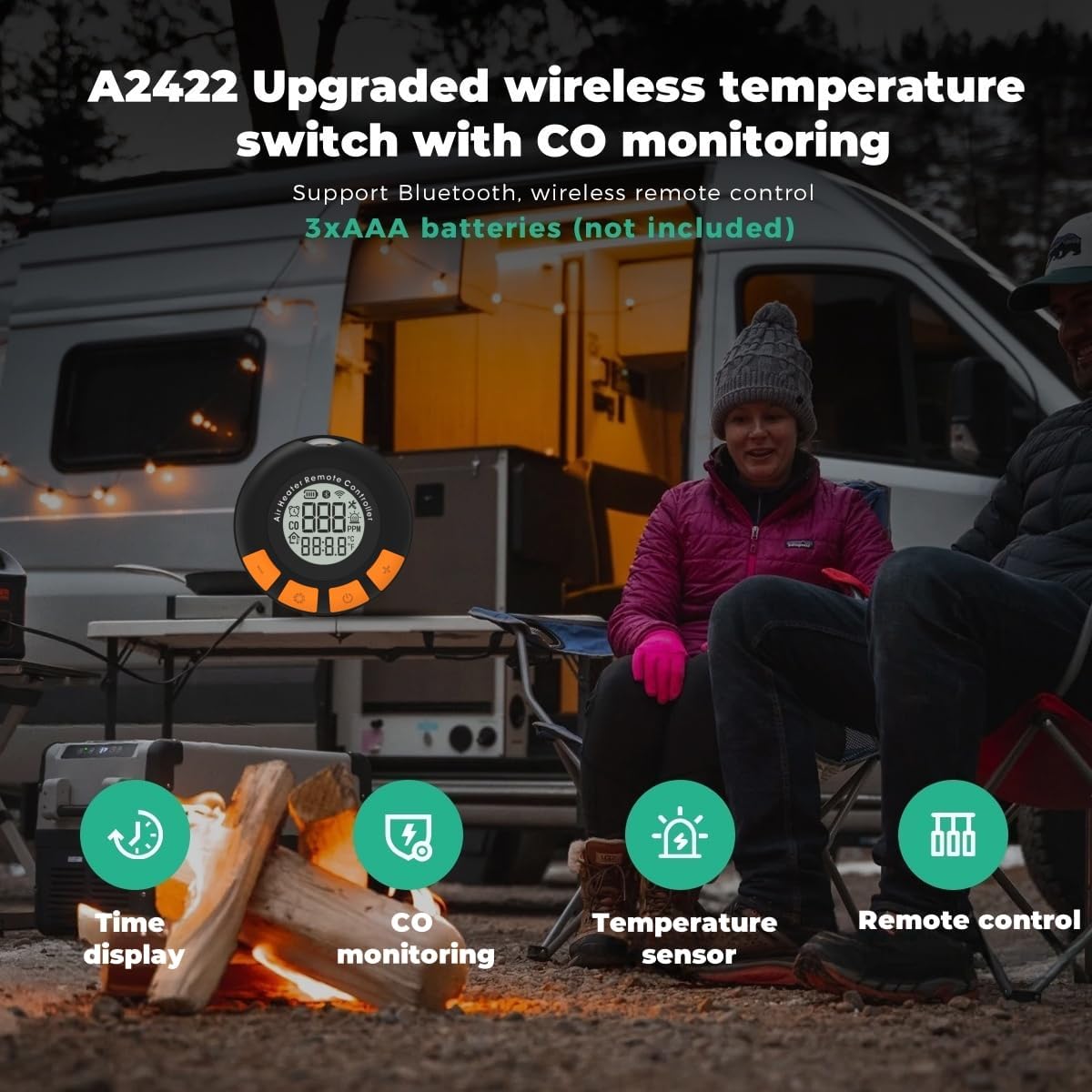
Figure 6.2: A detailed view of the A2422 wireless temperature switch, which features a digital display for time, carbon monoxide concentration, ambient temperature, and integrated remote control capabilities.
6.2 Using the LCD Control Panel (A2409)
The integrated LCD control panel provides direct access to various settings.
- Operation Method: Navigate using the 6 buttons.
- Language Settings: Select from German, English, Russian.
- Temperature/Gear Regulation: Adjust heating power and temperature.
- Timing Function: Set operational timers.
- Automatic Start & Stop (Constant Temperature): Enables the heater to maintain a set temperature by cycling on and off.
- Ventilation Mode: Operates the fan without heating, useful for air circulation.
- Turbo Heat Mode: Provides maximum heating output.
- Adaptive Plateau Mode: Automatically adjusts fuel output based on altitude (up to 4,500 meters) for optimal combustion.

Figure 6.3: This image highlights the capabilities of the upgraded LCD switch, detailing its 6-button operation, multi-language support, pump oil volume settings, remote control code pairing, and advanced modes like Turbo Heat, Ventilation, and Adaptive Plateau.
6.3 Remote Control
The included remote control allows for basic power on/off and temperature adjustments from a distance.
7. App Control
The Sunster TB10PRO can be controlled via a dedicated smartphone application, offering enhanced functionality and convenience.
7.1 Downloading the App
- Android: Search for 'Sunster' in the Google Play Store.
- iOS: Search for 'Sunster' in the Apple App Store.
7.2 Pairing with the Heater
Follow the in-app instructions to pair your smartphone with the heater via Bluetooth. Ensure Bluetooth is enabled on your device.
7.3 App Functions
Once connected, the app provides comprehensive control:
- Temperature Control: Precisely set and monitor the desired temperature.
- Timers: Schedule heating cycles.
- Power Levels: Adjust the heating output.
- Altitude Mode: Manage altitude-specific settings.
- Constant Temperature: Enable automatic temperature maintenance.
- Ventilation Mode: Activate fan-only operation.

Figure 7.1: This image shows the user interface of the Sunster mobile application, which enables smart control over the heater's functions, including setting timers, adjusting language, managing power levels, enabling automatic operation, and selecting fan modes.
8. Maintenance
Regular maintenance ensures optimal performance and longevity of your diesel heater.
- Exhaust System Inspection: Periodically check the exhaust pipe and silencer for carbon buildup or blockages. Clean as necessary to prevent reduced efficiency and potential hazards.
- Air Filter: Inspect the air filter at the bottom of the unit regularly. Clean or replace if it appears dirty or clogged to ensure proper airflow.
- Fuel Filter: Check the oil filter for contaminants and replace it if necessary.
- General Cleaning: Keep the exterior of the heater clean and free of dust and debris. Use a soft, dry cloth.
- Storage: When storing the heater for extended periods, ensure the fuel tank is empty and the unit is clean and dry. Store in a cool, dry place.
9. Troubleshooting
If you encounter issues with your Sunster TB10PRO heater, refer to the following common problems and solutions:
| Problem | Possible Cause | Solution |
|---|---|---|
| Heater does not start | No power, low fuel, clogged fuel line, faulty ignition. | Check power connection and source. Ensure sufficient fuel. Inspect fuel line for crimps or blockages. Contact support if ignition issue persists. |
| No heat output | Low fuel, air intake/outlet blocked, incorrect settings, carbon buildup. | Check fuel level. Ensure clear air paths. Verify operating mode and temperature settings. Perform maintenance on exhaust. |
| Error Code E05 (Overheating) | Blocked air intake/outlet, operating at too high power for extended periods. | Ensure clear air paths. Reduce power setting or allow the unit to cool down. |
| Unusual odor or smoke | Improper combustion, carbon buildup, exhaust leak. | Ensure proper ventilation. Inspect exhaust system for leaks or blockages. Clean the combustion chamber if necessary (professional service recommended). |
| Power supply failure (110V adapter) | Defective adapter. | Test with another compatible 12V power supply or contact support for a replacement adapter. |
If the problem persists after attempting these solutions, please contact Sunster customer support.
10. Warranty and Support
10.1 Warranty Information
The Sunster TB10PRO Portable Diesel Air Heater comes with a 1-year warranty from the date of purchase. This warranty covers manufacturing defects and malfunctions under normal use. It does not cover damage caused by misuse, accident, unauthorized modification, or improper installation.
10.2 Customer Support
For technical assistance, warranty claims, or any questions regarding your Sunster TB10PRO heater, please contact Sunster customer support through the retailer where you purchased the product or visit the official Sunster website for contact information.
When contacting support, please have your model number (TB10-pro) and proof of purchase readily available.

