
1. Introduction
Thank you for choosing the OffiGo Electric Height Adjustable Desk. This manual provides essential information for the safe assembly, operation, and maintenance of your new desk. Please read these instructions thoroughly before use and retain them for future reference.
This electric height adjustable desk is designed to provide a versatile workspace, allowing you to switch between sitting and standing positions. It features integrated storage, a keyboard tray, power outlets, and LED lighting for enhanced functionality.
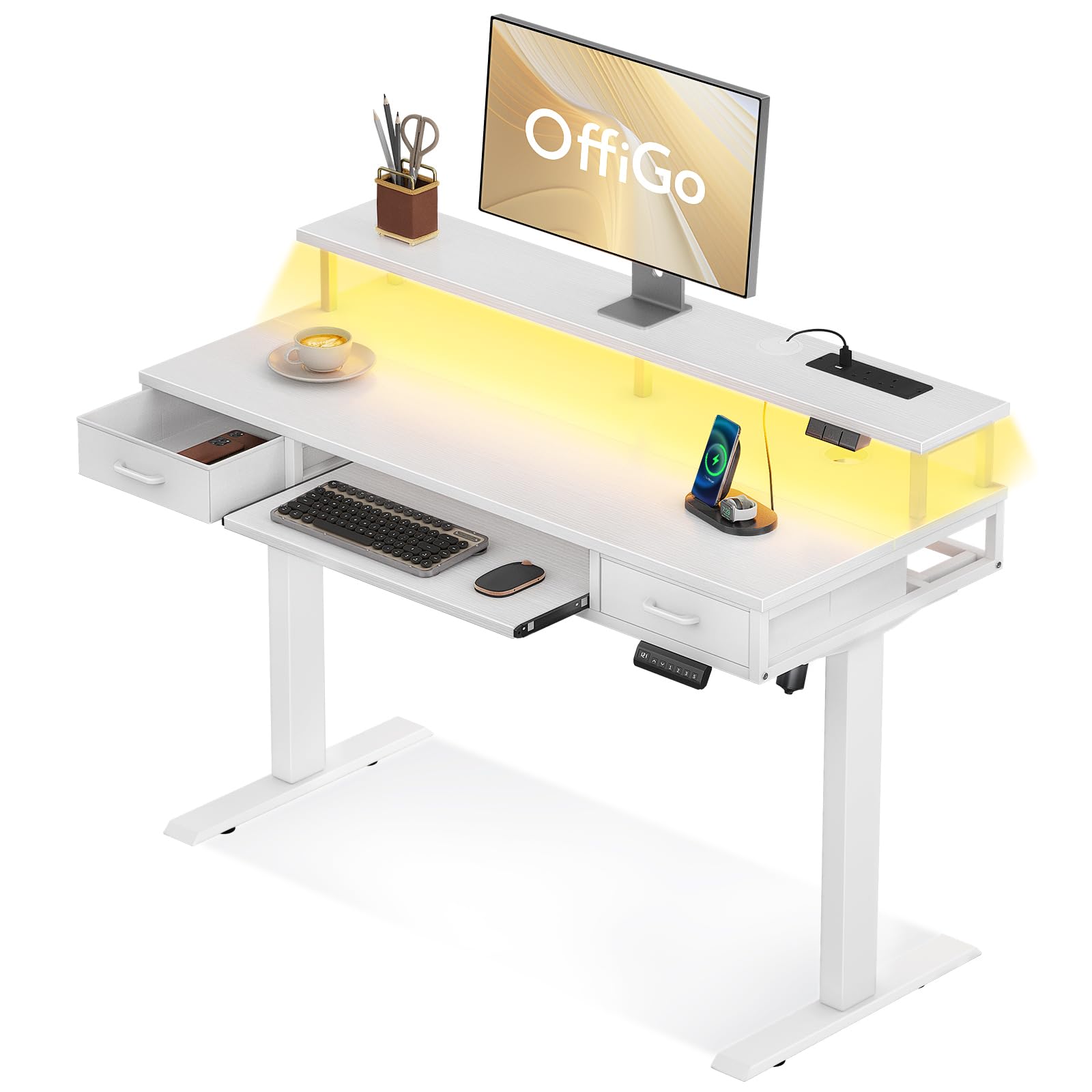
Figure 1: OffiGo Electric Height Adjustable Desk in use.
2. Safety Instructions
WARNING: This product is an electric height adjustable desk with a maximum load capacity of 60 kilograms. Assembly is required and may present potential risks. Please read all assembly and safety instructions carefully before use.
- Ensure all components are present and undamaged before assembly. Do not proceed with assembly if any parts are missing or damaged.
- Follow the assembly instructions precisely. Incorrect assembly can lead to instability and potential injury.
- Keep children and pets away from the desk during operation, especially when adjusting height.
- Do not overload the desk. The maximum recommended load is 60 kg.
- Ensure the power cord is not pinched or damaged. Use only the provided power cord.
- Do not place liquids directly on the desk surface, especially near electrical components.
- Disconnect the power supply before cleaning or performing any maintenance.
- If the desk malfunctions or makes unusual noises, discontinue use immediately and contact customer support.
3. Package Contents
Verify that all the following components are included in your package. If any parts are missing, please contact OffiGo customer service.
- Desk tabletop (main surface)
- Monitor stand/shelf
- Desk legs (2 units)
- Foot pads/bases (2 units)
- Electric motor and control box
- Control panel for height adjustment
- Power strip with 2 sockets and 2 USB ports
- LED light strip
- Keyboard tray and rails
- Fabric drawers (2 units)
- Power cable (200cm)
- Assembly hardware (screws, bolts, washers)
- Assembly tools (Allen keys, screwdriver)
- User Manual
4. Setup and Assembly Instructions
Assembly is required. All necessary tools are included. It is recommended to assemble the desk with two people to ensure safety and ease of installation. Clear a spacious area for assembly.
Step-by-Step Assembly:
- Unpack and Identify Parts: Carefully unpack all components and lay them out. Refer to the package contents list to ensure all parts are present.
- Attach Desk Legs to Tabletop: Securely attach the desk legs to the underside of the main tabletop using the provided screws. Ensure the motor and control box are correctly oriented.
- Install Foot Pads: Attach the foot pads to the bottom of the desk legs.
- Mount Monitor Stand: Secure the monitor stand/shelf to the main tabletop using the designated hardware.
- Install Keyboard Tray: Attach the rails for the keyboard tray to the underside of the tabletop, then slide the keyboard tray into place.
- Insert Drawers: Place the fabric drawers into their designated compartments.
- Connect Electrical Components: Connect the motor, control panel, power strip, and LED light strip to the control box according to the wiring diagram in the detailed manual. Ensure all connections are secure.
- Cable Management: Utilize the integrated cable management features to organize and secure all power and data cables, keeping the desktop tidy.
- Connect to Power: Plug the main power cable into a wall outlet.

Figure 2: Product dimensions and components for assembly.

Figure 3: Integrated cable management system.
5. Operating Instructions
Height Adjustment:
The desk features an electric motor for smooth height adjustment. Use the control panel located on the front edge of the desk to raise or lower the desktop.
- Up Button: Press and hold to raise the desk.
- Down Button: Press and hold to lower the desk.
- Memory Presets: Your desk may include memory buttons (M1, M2, M3) to save preferred sitting and standing heights. To set a height, adjust the desk to your desired level, then press 'M' followed by the desired number button (e.g., M1). The desk will beep to confirm the setting. To recall a saved height, simply press the corresponding number button.

Figure 4: Height adjustment range (78cm to 121cm).
Integrated Power Outlets:
The desk is equipped with a built-in power strip for convenient charging and power supply.
- AC Sockets: Two 110-240V/15A sockets are available for powering devices such as monitors, laptops, or lamps.
- USB Ports: Two 5V/2A USB ports are provided for charging smartphones, tablets, and other USB-powered devices.

Figure 5: Integrated power outlets (2 USB, 2 Sockets).
LED Lighting:
The integrated LED light strip provides ambient lighting. Use the dedicated button on the control panel or the desk surface to cycle through different lighting modes and dynamic effects.
- Lighting Models: The LED strip offers 10 static lighting colors.
- Dynamic Models: Additionally, there are 20 dynamic lighting effects available.

Figure 6: LED lighting with multiple color and dynamic modes.
Storage and Keyboard Tray:
The desk includes two fabric drawers and a sliding keyboard tray for organized storage.
- Drawers: Use the two fabric drawers for storing office supplies, documents, or personal items.
- Keyboard Tray: The sliding keyboard tray provides an ergonomic position for your keyboard and mouse, freeing up space on the main desktop.

Figure 7: Storage features including drawers and keyboard tray.
6. Maintenance
Proper maintenance ensures the longevity and optimal performance of your OffiGo desk.
- Cleaning: Wipe the desk surfaces with a soft, damp cloth. Avoid abrasive cleaners or harsh chemicals that could damage the finish. For electrical components, use a dry cloth only.
- Motor Care: The electric motor is maintenance-free. Do not attempt to open or lubricate it.
- Cable Inspection: Periodically check all cables for signs of wear or damage. Replace any damaged cables immediately.
- Fastener Check: Occasionally check and tighten any loose screws or bolts to maintain stability.
7. Troubleshooting
If you encounter any issues with your OffiGo Electric Height Adjustable Desk, refer to the following common problems and solutions.
- Desk Not Moving:
- Ensure the power cable is securely plugged into both the desk and the wall outlet.
- Check if the wall outlet is functional by plugging in another device.
- Verify all connections between the motor, control box, and control panel are firm.
- Uneven Height Adjustment:
- Perform a reset: Lower the desk to its lowest position and hold the 'down' button for 5-10 seconds until it slightly retracts or beeps. This recalibrates the motor.
- Ensure the desk is not overloaded or unevenly weighted.
- LED Lights Not Working:
- Check the connection of the LED strip to the control box.
- Ensure the desk has power.
- Parts Not Fitting During Assembly:
- Double-check the orientation of the parts. Some components may appear similar but have specific alignments.
- Refer to the detailed assembly diagrams. If a part genuinely does not fit, contact customer support for assistance or replacement parts.
If these steps do not resolve the issue, please contact OffiGo customer support for further assistance.
8. Specifications
| Feature | Specification |
|---|---|
| Model | OffiGo Electric Height Adjustable Desk |
| Dimensions (L x W x H) | 120 cm x 54 cm x 78.5 cm |
| Height Adjustment Range | 78 cm (min) to 121 cm (max) |
| Maximum Load Capacity | 60 kg |
| Power Outlets | 2 x AC (110-240V/15A), 2 x USB (5V/2A) |
| LED Lighting | 10 static colors, 20 dynamic modes |
| Storage | 2 fabric drawers, 1 keyboard tray |
| Assembly Required | Yes (tools included) |
| Color | White |
| ASIN | B0DF7G38H |
| UPC/GTIN | 850066549018 |
9. Warranty and Support
OffiGo products are manufactured to high-quality standards. For information regarding warranty coverage, please refer to the warranty card included with your purchase or visit the official OffiGo website.
For technical support, replacement parts, or any questions not covered in this manual, please contact OffiGo customer service through the retailer where you purchased the product or via the contact information provided on the OffiGo website.