
GetD Clear Lens

GetD AI Smart Glasses User Manual
Model: Clear Lens (B0DF7G1HKL)
1. Introduction
Welcome to the GetD AI Smart Glasses user manual. These innovative glasses combine advanced audio technology, AI-powered translation, and eye protection in a sleek, comfortable design. This manual provides essential information for setup, operation, maintenance, and troubleshooting to ensure optimal performance and user experience.
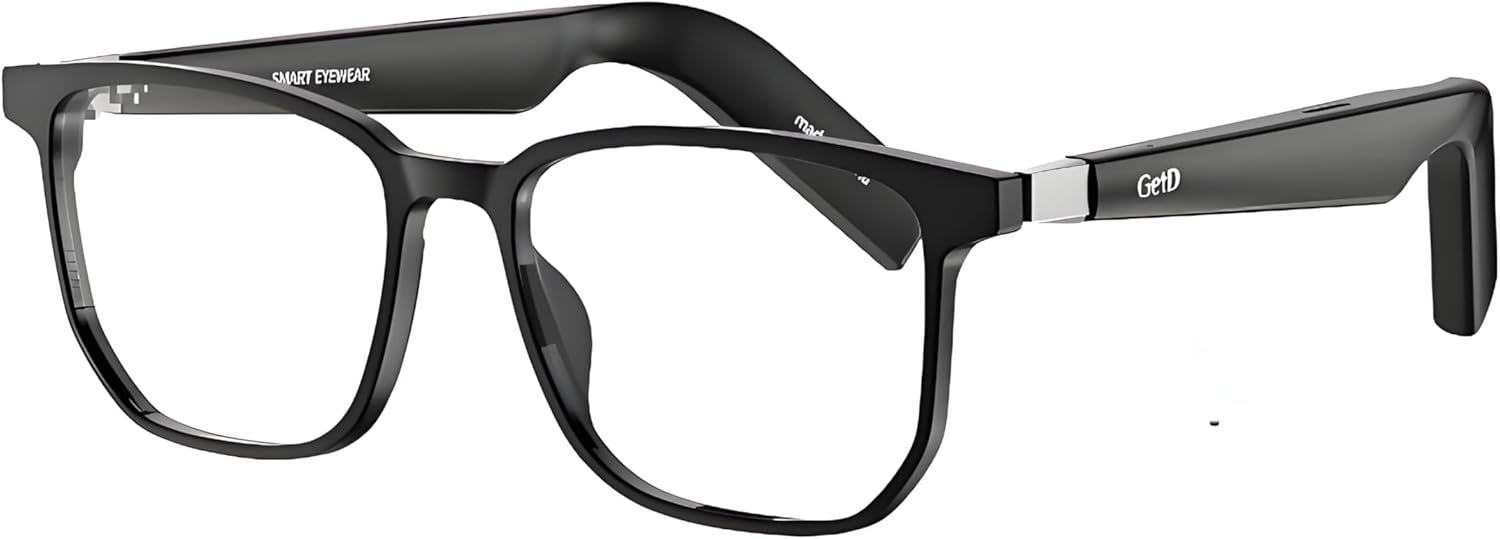
Figure 1: GetD AI Smart Glasses (Clear Lens model).
Key Features:
- Open-Ear Audio: Enjoy music and calls while remaining aware of your surroundings.
- AI Voice Control & Translation: Hands-free access to navigation, calls, media, and real-time translation across 147 languages.
- HI-FI Stereo Sound: Advanced chip technology and high-quality speakers for clear audio.
- Long Battery Life: Up to 9 hours of continuous use or 15 days standby on a single charge.
- Built-in Microphone and Speaker: Crystal clear hands-free communication.
- Eye Protection: Anti-Blue Light and UV Protection lenses.
- Bluetooth 5.4: Fast and stable connection with iOS and Android devices.
- Magnetic Charging: Convenient and durable charging solution.
- Detachable Temples: Switch between smart and regular temples for versatile use.

Figure 2: Overview of Smart 3-in-1 Glasses capabilities.
2. What's Included
Upon unboxing your GetD AI Smart Glasses, please verify that all components are present:
- GetD Smart Glasses (with Smart Temples attached)
- Detachable Regular Glasses Temples
- Magnetic Charging Cable
- Cleaning Cloth
- User Manual
- Carrying Case
- Packaging Box

Figure 3: Package contents of GetD AI Smart Glasses.
3. Setup
3.1 Charging the Glasses
Before first use, fully charge your GetD AI Smart Glasses. Use the provided magnetic charging cable. The magnetic connector ensures a secure and efficient charge, reducing wear on the charging port.
- Connect the magnetic end of the cable to the charging port on the glasses.
- Connect the USB end of the cable to a compatible USB power adapter (not included) or a computer USB port.
- A full charge typically takes approximately 2 hours.
- The glasses offer up to 9 hours of continuous use or 15 days of standby time on a single charge.

Figure 4: Magnetic charging and battery life overview.
3.2 Attaching/Detaching Temples
Your GetD AI Smart Glasses come with two sets of temples: Smart Temples (pre-attached) and Regular Temples. You can easily switch them to suit your preference.
- To detach: Gently pull the temple away from the frame at the hinge point.
- To attach: Align the temple connector with the frame's hinge and push firmly until it clicks into place.

Figure 5: Detachable glasses temples for customization.
The glasses feature a spring hinge design that allows for approximately 15° expansion, providing a more comfortable fit for various face shapes.

Figure 6: Spring hinge mechanism for enhanced comfort.
3.3 Bluetooth Pairing
The GetD AI Smart Glasses utilize Bluetooth 5.4 for a fast and stable connection with your smartphone or other Bluetooth-enabled devices.
- Ensure the glasses are charged and powered on.
- Enable Bluetooth on your smartphone (iOS or Android).
- Search for available devices in your phone's Bluetooth settings.
- Select "GetD Smart Glasses" (or similar name) from the list to pair.
- Once paired, the glasses will automatically connect to your device when in range and powered on.
4. Operation
4.1 Audio Features
Experience high-quality audio with the open-ear design, allowing you to enjoy music and calls without blocking ambient sounds.
- Open-Ear Audio: Sound is directed towards your ears, providing a personal audio experience while keeping you aware of your surroundings.
- HI-FI Stereo Sound: Advanced chip technology and high-quality speakers deliver clear and rich audio.
- Built-in Microphone and Speaker: The discreet omni-directional microphone and integrated speakers enable hands-free calls with superior clarity.
Video 1: Demonstration of GetD Smart Glasses features, including open-ear audio and call clarity.

Figure 7: 360° Stereo Sound and Bluetooth 5.4 capabilities.
4.2 AI Features and Voice Control
Leverage the integrated AI capabilities for enhanced functionality and convenience.
- AI Voice Control: Access navigation, make calls, and control media hands-free.
- Real-time Translation: Supports 147 languages for real-time, bidirectional simultaneous translation. Ideal for travel and international communication.
- AI Voice Assistant: Use the GetD AI assistant for various tasks.
- AI Voice Recording: Record and transcribe conversations.
- Supported AI Models: Integrates with Deepseek, ChatGPT-4o, and Gemini 3 for advanced AI interactions.

Figure 8: GetD Next-Generation Smart Glasses AI features.

Figure 9: Your AI Interpreter for global communication.
4.3 Haptic Controls
Interact with your glasses using sophisticated touch and gesture controls built into the frame. This allows for seamless operation without interrupting your activities.
- Play/pause music.
- Answer/end calls.
- Activate voice commands.

Figure 10: Haptic controls and voice assistant integration.
5. Maintenance
5.1 Lens Care and Protection
The lenses of your GetD AI Smart Glasses are designed for optimal eye protection and clarity.
- Anti-Blue Light: Blocks 90% of blue light to reduce eye strain and fatigue from digital screens.
- UV Protection: Provides UVA and UVB protection, safeguarding your eyes from harmful sunlight.
- Cleaning: Use the provided cleaning cloth to gently wipe the lenses. For stubborn smudges, use a lens cleaning spray designed for eyewear. Avoid abrasive materials or harsh chemicals.

Figure 11: UV protection and lens features.

Figure 12: Eye protection features for true color vision.

Figure 13: Multi-layer lens construction for comprehensive protection.
5.2 Water Resistance
The glasses have an IPX4 rating, meaning they are resistant to splashing water from any direction. This makes them suitable for light rain or sweat during workouts. Do not submerge the glasses in water.
6. Troubleshooting
If you encounter issues with your GetD AI Smart Glasses, refer to the following common problems and solutions:
| Problem | Possible Cause | Solution |
|---|---|---|
| Glasses do not power on. | Low battery. | Charge the glasses fully using the magnetic charging cable. |
| Cannot pair with Bluetooth device. | Bluetooth is off on the device; glasses are out of range; glasses are already paired to another device. | Ensure Bluetooth is enabled on your device. Bring glasses closer to the device. Disconnect from other devices or reset Bluetooth connection on glasses. |
| No audio or low volume. | Volume too low; glasses not properly positioned; connection issue. | Adjust volume on your connected device. Ensure glasses are worn correctly with speakers aligned with ears. Re-pair the Bluetooth connection. |
| Audio only from one side. | Potential hardware issue or connection problem. | Try re-pairing the glasses. If the issue persists, contact customer support for assistance. |
| Glasses automatically shut off. | Power-saving feature activated due to inactivity. | This is normal behavior to conserve battery. Power them back on when needed. |
| AI translation not working or inaccurate. | Internet connection required; language settings incorrect; background noise. | Ensure a stable internet connection. Verify language settings in the associated app. Reduce background noise for clearer voice input. |
7. Specifications
Detailed technical specifications for the GetD AI Smart Glasses (Clear Lens model):
| Feature | Detail |
|---|---|
| Model Number | Clear Lens |
| Connectivity Technology | Bluetooth 5.4 |
| Operating System Compatibility | iOS & Android |
| Battery Type | Lithium Ion (2 included) |
| Battery Capacity | 260mAh (dual batteries) |
| Charging Time | Approx. 2 hours |
| Usage Time | Up to 9 hours (continuous) |
| Standby Time | Up to 15 days |
| Water Resistance Rating | IPX4 |
| Lens Type | Anti-Blue Light & UV Protection |
| Item Weight | 12 ounces |
| Dimensions (approx.) | 7.38 x 3.31 x 3.19 inches (Package) |
| AI Translation Languages | 147 languages |

Figure 14: Product dimensions and specifications.
8. Warranty and Support
GetD products are designed for quality and reliability. For information regarding product warranty, please refer to the warranty card included in your product packaging or visit the official GetD website.
For technical support, troubleshooting assistance beyond this manual, or inquiries about your GetD AI Smart Glasses, please contact GetD customer service. Contact details can typically be found on the GetD official website or within the product packaging.
Please retain your purchase receipt for warranty claims.
Related documentsClear Lens

Ask a question about this manual
Ask about setup, troubleshooting, compatibility, parts, safety, or missing instructions. Manuals+ will review the question and use this page’s manual context to help answer it.