1. Introduction
This manual provides comprehensive instructions for the VINABTY N2QBYA000051 replacement remote control. This remote is designed to function as a direct replacement for original Panasonic Smart TV remote controls, offering an ergonomic design and voice control capabilities. Please read this manual thoroughly before using the remote control to ensure proper operation and to maximize its features.
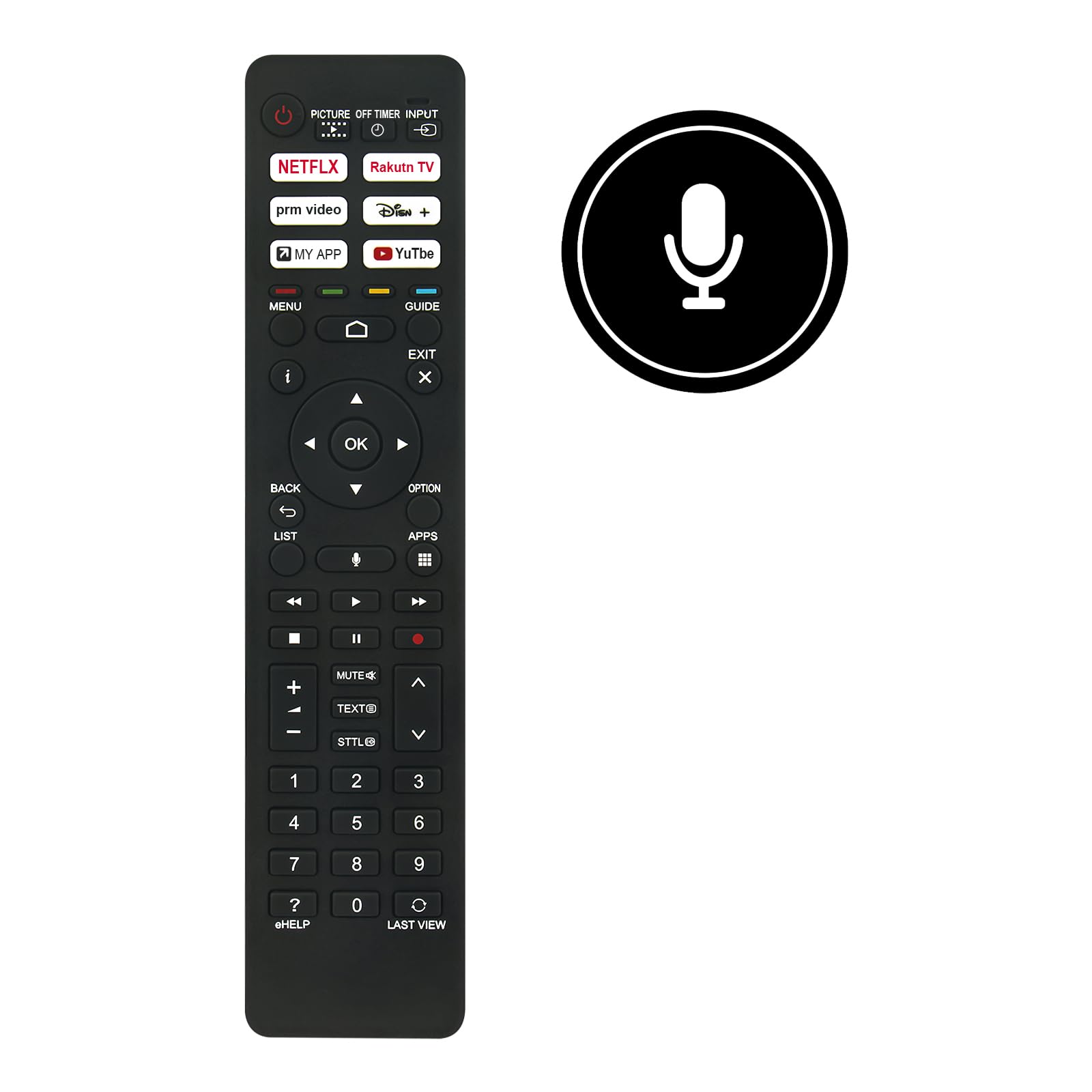
Figure 1: Front view of the VINABTY N2QBYA000051 remote control with approximate dimensions.
2. Setup
2.1 Battery Installation
The remote control requires two (2) AAA batteries for operation. Follow these steps to install the batteries:
- Locate the battery compartment cover on the back of the remote control.
- Gently slide the cover downwards or press the latch (if present) to open the compartment.
- Insert two AAA batteries, ensuring the positive (+) and negative (-) terminals align correctly with the markings inside the compartment.
- Replace the battery compartment cover by sliding it back into place until it clicks securely.

Figure 2: Battery compartment with AAA battery slots.
2.2 Pairing Instructions
This remote control utilizes Bluetooth connectivity for advanced features like voice control. It needs to be paired with your Panasonic Smart TV after initial power-on. The exact pairing procedure may vary slightly depending on your specific Panasonic TV model. Refer to your TV's user manual for detailed pairing instructions. A general pairing process is as follows:
- Ensure your Panasonic Smart TV is powered on.
- On your TV, navigate to the Settings menu.
- Look for options such as Remotes & Accessories, Bluetooth Settings, or System Settings.
- Select the option to Add Device or Pair Remote Control.
- Follow the on-screen prompts. You may need to press and hold specific buttons on the VINABTY remote (e.g., the OK button and Back button simultaneously, or a dedicated pairing button if available) until an indicator light on the remote flashes, signifying it is in pairing mode.
- Once the remote appears in the list of available devices on your TV screen, select it to complete the pairing process.
- A confirmation message should appear on your TV screen once pairing is successful.
If the remote does not respond after battery installation, ensure the batteries are fresh and correctly inserted, and attempt the pairing process.
3. Operating Instructions
3.1 Button Functions Overview
The VINABTY N2QBYA000051 remote control features a standard layout for intuitive navigation and control of your Panasonic Smart TV. Below is a general overview of key button groups:

Figure 3: Front view of the remote control showing button layout.
- Power Button (⏻): Turns the TV on or off.
- Input/Source: Selects the input source (HDMI, AV, etc.).
- Netflix, Rakuten TV, prm video, Disney+, MY APP, YouTube: Dedicated buttons for quick access to popular streaming services and custom apps.
- Navigation Pad (Up, Down, Left, Right, OK): Used to navigate menus and confirm selections.
- Back: Returns to the previous screen or menu.
- Exit: Exits the current menu or application.
- Menu: Opens the TV's main menu.
- Guide: Accesses the electronic program guide.
- Volume Up/Down (+/-): Adjusts the TV volume.
- Mute: Mutes or unmutes the TV audio.
- Channel Up/Down (∧/∨): Changes TV channels.
- Number Pad (0-9): Directly enters channel numbers or other numerical inputs.
- Media Control Buttons (Play, Pause, Stop, Rewind, Fast Forward): Controls media playback.
- Voice Control Button (Microphone icon): Activates the voice assistant feature.
- eHELP: Accesses the TV's electronic help guide.
3.2 Voice Control
The remote control supports voice control functionality, allowing you to issue commands to your TV using your voice. To use voice control:
- Ensure the remote control is successfully paired with your Panasonic Smart TV via Bluetooth.
- Press and hold the Voice Control Button (microphone icon) on the remote control.
- Speak clearly into the microphone located on the remote control.
- Release the button once you have finished speaking your command.
- Your TV will process the command and respond accordingly.
Note: Voice control functionality requires an active internet connection on your TV and may depend on specific TV model features and regional availability.
4. Maintenance
4.1 Cleaning
To maintain the remote control's appearance and functionality:
- Wipe the surface with a soft, dry cloth.
- For stubborn dirt, slightly dampen the cloth with water or a mild, non-abrasive cleaner.
- Avoid using harsh chemicals, solvents, or abrasive materials, as these can damage the remote's finish or internal components.
4.2 Storage
When not in use for extended periods, it is recommended to:
- Remove the batteries to prevent leakage, which can damage the remote control.
- Store the remote control in a cool, dry place away from direct sunlight and extreme temperatures.
5. Troubleshooting
If you encounter issues with your VINABTY N2QBYA000051 remote control, refer to the following common problems and solutions:
- Remote Not Responding:
- Check if the batteries are correctly inserted with the proper polarity (+/-).
- Replace old or depleted batteries with new AAA batteries.
- Ensure there are no obstructions between the remote control and the TV's sensor (if using IR, though this is primarily Bluetooth).
- Re-attempt the pairing process as described in Section 2.2.
- Voice Control Not Working:
- Confirm the remote is successfully paired via Bluetooth. Voice control requires Bluetooth connectivity.
- Ensure your TV has an active internet connection.
- Speak clearly and directly into the remote's microphone.
- Check your TV's settings for voice control activation or microphone permissions.
- Specific Buttons Not Functioning:
- Some advanced functions or app buttons may require specific TV software versions or configurations.
- Ensure the remote is fully paired and recognized by the TV.
- Clean the remote control to ensure no debris is obstructing button presses.
6. Specifications
| Feature | Detail |
|---|---|
| Model Number | N2QBYA000051 |
| Brand | VINABTY |
| Compatible Brand | Panasonic |
| Material | ABS |
| Color | Black |
| Connectivity Technology | Bluetooth |
| Control Type | Button Control, Voice Control |
| Maximum Range | Approximately 10 meters (33 feet) |
| Power Source | 2 x AAA Batteries (not included) |
| Special Features | Ergonomic Design, Voice Search |
| Compatible TV Models | TX-75LXX889, TX-50LXF887, TX-43LXN888, TX-65LXX889, TX-55LX810E, TX-65LXN888, TX-50LXT886, TX-65LXW834, TX-75LXN888, TX-43LX810E, TX-43LX, TX-50LX, TX-65LX, TX-43LX800E, TX-43LX810, TX-43LX810E, TX-43LXF887, TX-43LXN888, TX-50LX800E, TX-50LX810, TX-50LX810E, TX-55LX810, TX-55LX800E, TX-65LX800E, TX-65LX810E, TX-75LX800E, TZZ00003864A, N2QBYA000051/R3PA265 |
7. Warranty and Support
7.1 Warranty Information
Specific warranty details for this product are not provided in the available information. Please refer to your purchase documentation or contact the retailer for warranty terms and conditions.
7.2 Customer Support
Should you encounter any issues or require assistance with your VINABTY N2QBYA000051 remote control, please contact the seller or manufacturer's customer service. The manufacturer states: "If there is a problem with our product or service, please let us know and we will provide a satisfactory response within 24 hours."
For further assistance, you may also refer to the support section of your Panasonic Smart TV's official website or user manual.
