Introduction
This manual provides instructions for the Lumote replacement remote control, designed to function as a direct substitute for the original JVC RM-C3090, LT50VF30K, LT49V4200, and LT40VF43A remote controls. This remote comes pre-programmed and requires no setup codes. Simply insert batteries, and it is ready for use.
Package Contents
- 1 x Lumote Replacement Remote Control
Note: 2 x AAA batteries are not included and must be purchased separately.
Setup: Battery Installation
To begin using your remote control, you must first install the batteries.
- Locate the battery compartment on the back of the remote control.
- Press down on the latch and slide the battery cover downwards to open it.
- Insert two (2) AAA batteries, ensuring the positive (+) and negative (-) terminals align correctly with the markings inside the compartment.
- Slide the battery cover back into place until it clicks securely.
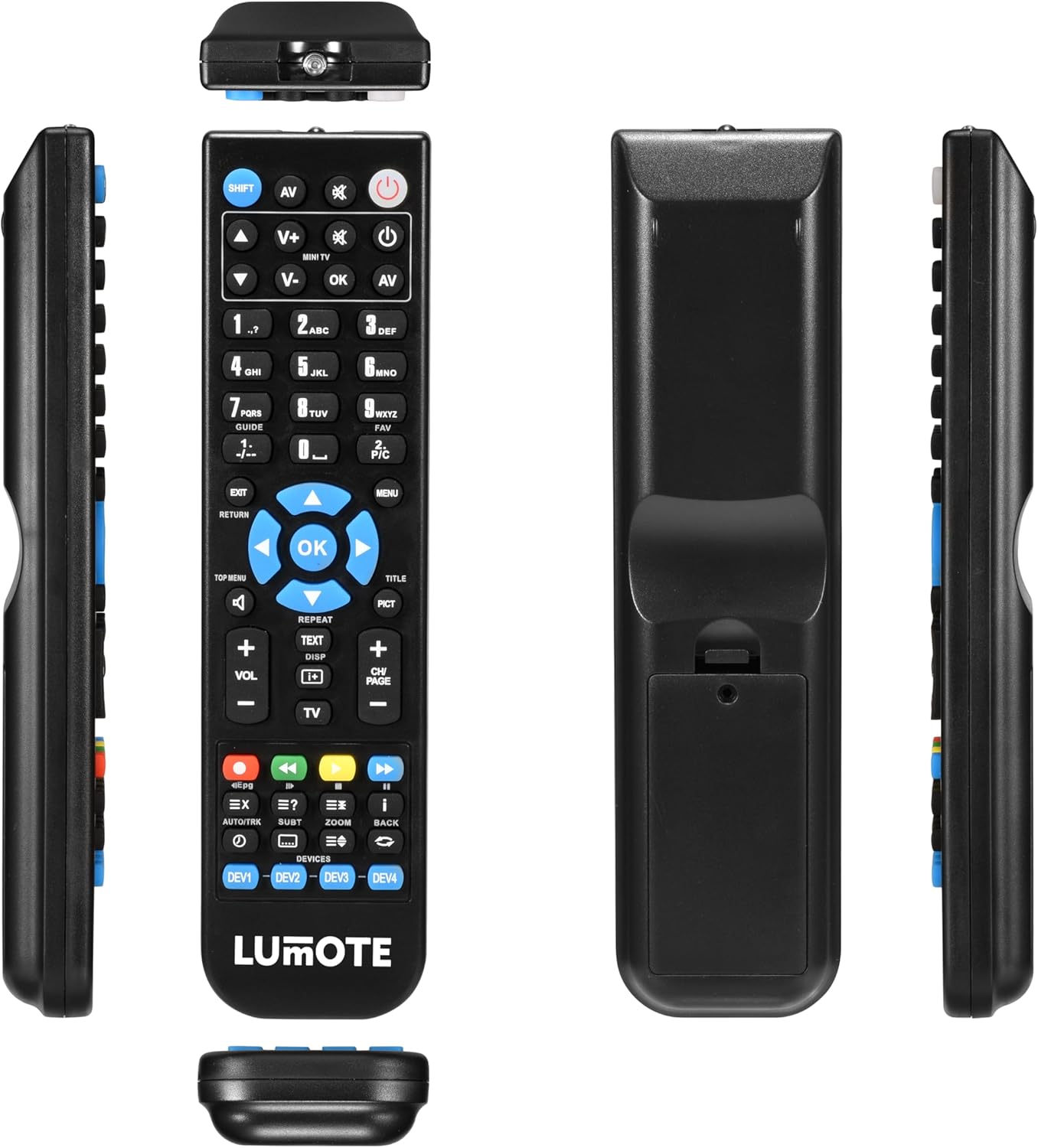
Image: Back of the remote control showing the battery compartment. The cover is designed to slide open for battery insertion.
Once batteries are installed, the remote is ready for immediate use with your compatible JVC television.
Operating Instructions
The Lumote replacement remote control replicates all functions of your original JVC remote. Point the remote directly at your television's infrared receiver for optimal performance.

Image: Multiple views of the remote control, highlighting the button layout on the front face.
Key Functions Overview:
- Power Button (●): Turns the television on or off.
- Input/Source (AV): Switches between video input sources (e.g., HDMI, AV).
- Number Buttons (0-9): Direct channel selection.
- Channel Up/Down (CH+/-): Navigates through channels.
- Volume Up/Down (VOL+/-): Adjusts the audio volume.
- Mute: Silences the television audio.
- Navigation Pad (Up, Down, Left, Right, OK): Used for menu navigation and selection.
- Menu: Accesses the television's main menu.
- Exit/Return: Exits menus or returns to the previous screen.
- Playback Controls (Play, Pause, Stop, Rewind, Fast Forward): For media playback functions.
- Color Buttons (Red, Green, Yellow, Blue): Access specific functions within menus or applications, as indicated on your TV screen.
- DEV1, DEV2, DEV3, DEV4: These buttons are typically for controlling multiple devices. For this replacement remote, they are pre-programmed for the specified JVC TV models.
For detailed information on specific functions, refer to your JVC television's original user manual.
Maintenance and Care
- Cleaning: Wipe the remote control with a soft, dry cloth. Do not use liquid cleaners or abrasive materials.
- Battery Replacement: Replace batteries when the remote's response becomes sluggish or stops working. Always replace both batteries at the same time with new AAA batteries.
- Storage: If the remote will not be used for an extended period, remove the batteries to prevent leakage and potential damage.
- Environment: Avoid exposing the remote to extreme temperatures, direct sunlight, moisture, or dust.
Troubleshooting
- Remote not responding:
- Ensure batteries are inserted correctly with the correct polarity.
- Replace old batteries with new AAA batteries.
- Check for any obstructions between the remote and the TV's infrared receiver.
- Ensure you are within the effective range and pointing the remote directly at the TV.
- Some buttons not working:
- This remote is pre-programmed for the listed JVC models. Verify your TV model is compatible.
- Clean the remote's surface, especially around the non-working buttons, to ensure no debris is interfering.
Specifications
| Brand | Lumote |
| Compatible Devices | JVC RM-C3090, LT50VF30K, LT49V4200, LT40VF43A |
| Power Source | 2 x AAA Batteries (not included) |
| Special Feature | Universal (pre-programmed for specified models) |
| Item Weight | 6 ounces (approximately 170 grams) |
| Dimensions | 9 x 3 x 2 inches (Package Dimensions) |
Warranty and Support
This Lumote replacement remote control comes with a 12-month guarantee from the date of purchase. This warranty covers manufacturing defects under normal use.
For technical support or warranty claims, please contact your retailer or the manufacturer directly. Please have your purchase information readily available.