Introduction
This manual provides comprehensive instructions for the setup, operation, maintenance, and troubleshooting of your Lumote Replacement Remote Control, model Standard v1. This remote is designed as a direct replacement for the original DENON AVR-2311CI remote control, offering full functionality without the need for complex programming.
Product Overview

Figure 1: Front and side views of the Lumote Replacement Remote Control. This image displays the full layout of the remote, including all buttons and its ergonomic design.
The Lumote Replacement Remote Control is engineered to replicate all functions of the original DENON AVR-2311CI remote. It features a standard button layout for intuitive use.
Setup
1. Battery Installation
- Locate the battery compartment on the back of the remote control.
- Slide the battery compartment cover downwards or press the latch and lift to open.
- Insert two (2) AAA batteries, ensuring the positive (+) and negative (-) terminals align correctly with the markings inside the compartment.
- Replace the battery compartment cover, sliding it back into place until it clicks securely.
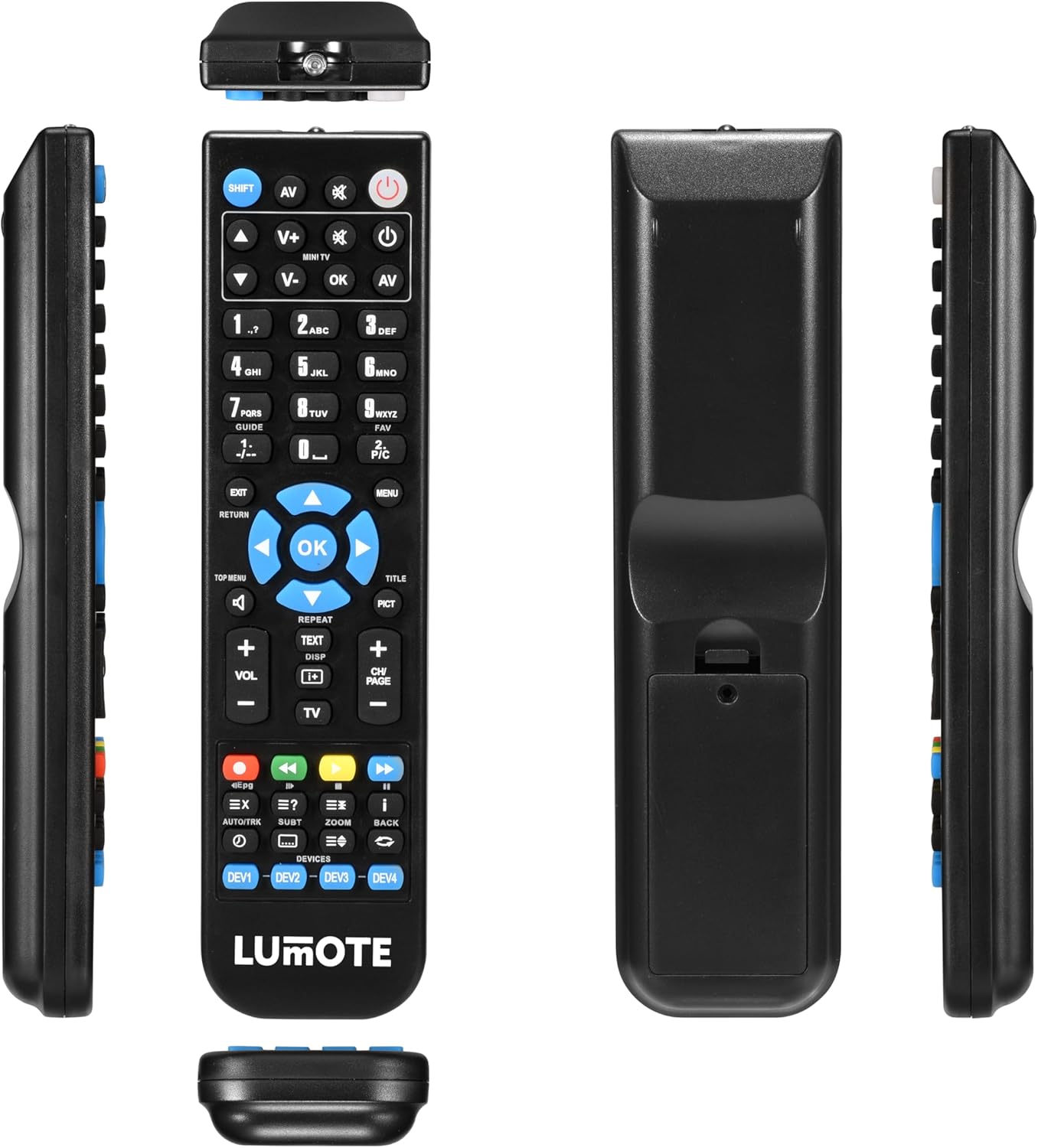
Figure 2: Back view of the remote control, highlighting the battery compartment. This shows where to insert the AAA batteries.
2. Initial Use
Your Lumote Replacement Remote Control is pre-programmed for the DENON AVR-2311CI. No setup codes or programming are required. Simply install the batteries, and the remote is ready for immediate use.
Operating Instructions
This section details the functions of the buttons on your Lumote Replacement Remote Control.
- Power Button (⑁): Turns the DENON AVR-2311CI receiver on or off.
- AV: Selects audio/video input sources.
- V+ / V-: Adjusts the volume up or down.
- CH/PAGE + / -: Changes channels or navigates pages.
- OK / Navigation Arrows: Confirms selections and navigates menus.
- Number Buttons (0-9): Direct input for channels or menu options.
- SHIFT: Activates secondary functions of certain buttons (if applicable).
- EXIT: Exits the current menu or function.
- RETURN: Returns to the previous screen or menu.
- MENU: Accesses the main menu of the connected device.
- TOP MENU / TITLE: Accesses the top menu or title menu of a disc.
- PICT: Picture mode selection.
- REPEAT: Repeats playback.
- TEXT / DISP: Displays text information or on-screen display.
- TV: Switches control to the television.
- Media Control Buttons (Play, Pause, Stop, Fast Forward, Rewind, Skip): Controls media playback.
- Color Buttons (Red, Green, Yellow, Blue): Access specific functions within menus or applications.
- DEVICES (DEV1, DEV2, DEV3, DEV4): Selects which device the remote is controlling (if programmed for multiple devices, though this remote is a direct replacement for one specific model).
- Other Buttons (e.g., EPG, EX, AUTO/TRK, SUBT, ZOOM, BACK): Perform specific functions as labeled, typically related to program guides, extra features, audio tracks, subtitles, zoom, and navigating back.
For detailed functionality of specific buttons, refer to the user manual of your DENON AVR-2311CI receiver.
Maintenance
Battery Replacement
Replace batteries when the remote control's response becomes sluggish or stops functioning. Always replace both batteries simultaneously with new AAA alkaline batteries. Do not mix old and new batteries, or different types of batteries.
Cleaning
Wipe the remote control with a soft, dry cloth. Do not use abrasive cleaners, solvents, or chemical wipes, as these can damage the remote's surface or internal components.
Storage
Store the remote control in a cool, dry place away from direct sunlight and extreme temperatures. If the remote will not be used for an extended period, remove the batteries to prevent leakage.
Troubleshooting
- Remote not responding:
- Check if the batteries are inserted correctly with the correct polarity.
- Replace the batteries with fresh AAA batteries.
- Ensure there are no obstructions between the remote control and the DENON AVR-2311CI receiver.
- Make sure you are within the effective operating range and pointing the remote directly at the receiver's IR sensor.
- Certain buttons not working:
- Verify that the remote is pointed correctly at the receiver.
- Ensure the batteries have sufficient power.
- Some functions may be specific to the original DENON AVR-2311CI receiver's capabilities. Refer to your receiver's manual for specific button functions.
Specifications
| Model | Standard v1 |
| Brand | Lumote |
| Compatible Devices | DENON AVR-2311CI |
| Batteries Required | 2 x AAA (not included) |
| Package Dimensions | 9 x 3 x 2 inches |
| Item Weight | 6 ounces |
Warranty and Support
This Lumote Replacement Remote Control comes with a 12-month guarantee from the date of purchase. For any issues or support inquiries, please refer to your purchase documentation or contact the retailer.


