
Introduction
This manual provides essential information for the safe and effective use, maintenance, and troubleshooting of your Dyson V15 Detect SV47 cordless vacuum cleaner. Please read all instructions carefully before initial use and retain this manual for future reference.

The Dyson V15 Detect SV47 cordless vacuum cleaner, featuring its illuminated cleaner head.
Product Overview
The Dyson V15 Detect SV47 is engineered for powerful and intelligent whole-home deep cleaning. It features advanced technology to reveal invisible dust and adapt suction power based on debris detected.
Key Features:
- Illumination Technology: Reveals invisible dust on hard floors.
- Piezo Sensor: Intelligently optimizes power and run time based on debris picked up.
- LCD Screen: Displays total picked-up particles, power mode, maintenance alerts, and remaining run time.
- Digital Motorbar™ Cleaner Head: Deep cleans carpets and hard floors, adapting suction power to floor type and preventing hair tangling.
- Versatile Cordless Format: Easily transforms into a handheld vacuum for cleaning various surfaces.
- HEPA Filtration: Captures microscopic particles and allergens.
- Energy Efficiency: Power trigger helps maximize energy efficiency by activating suction only when needed.
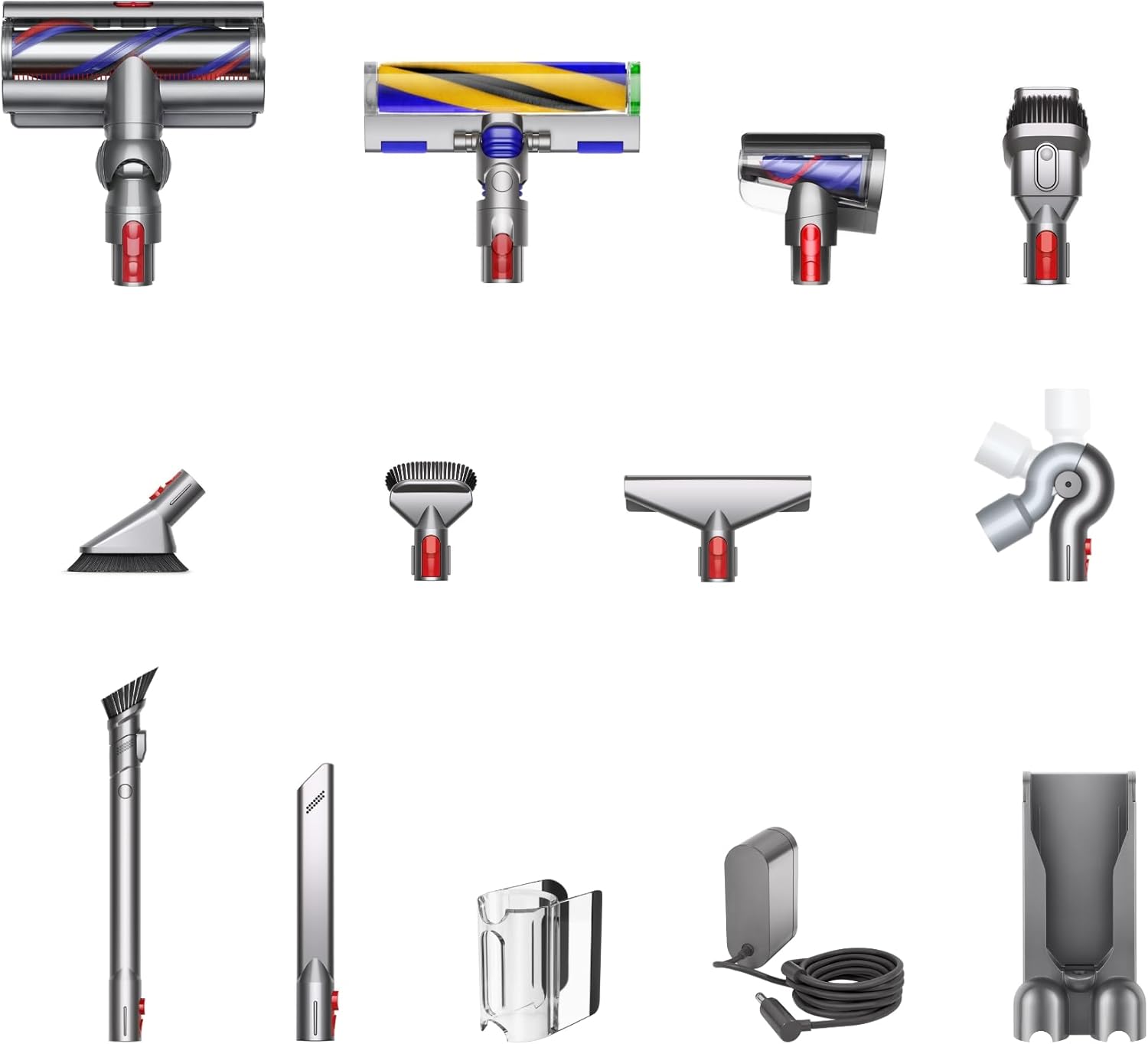
Included Components:
- Fluffy Optic cleaner head
- Digital Motorbar Cleaner head
- Hair screw tool
- Combination tool
- Mini soft dusting brush
- Mattress tool
- Stubborn dirt brush
- Crevice tool
- Flexi crevice tool
- Docking station
- Charger

The Fluffy Optic cleaner head highlights microscopic dust particles on hard floors.

A comprehensive view of all the specialized tools and accessories included with your Dyson V15 Detect SV47.
Setup
- Unpacking: Carefully remove all components from the packaging.
- Assembly: Connect the wand to the main body of the vacuum and then attach your desired cleaner head. Ensure all connections click securely into place.
- Charging: Install the docking station in a convenient location near a power outlet. Mount the vacuum onto the docking station to charge. A full charge is recommended prior to first use. The LCD screen will indicate charging status.
The Dyson V15 Detect SV47 conveniently charges on its wall-mounted docking station.
Operating Instructions
- Power On/Off: Press the power trigger to start and stop the vacuum.
- Mode Selection: Use the button on the LCD screen to cycle through Eco, Auto, and Boost power modes. Auto mode intelligently adjusts suction based on debris and floor type.
- Cleaning Hard Floors: For hard floors, utilize the Fluffy Optic cleaner head. Its integrated laser illuminates microscopic dust, making it visible for thorough cleaning.
- Cleaning Carpets and Pet Hair: The Digital Motorbar cleaner head is designed for deep cleaning carpets and effectively picking up pet hair without tangling.
- Handheld Use: Detach the wand and cleaner head to use the main body with smaller attachments for handheld cleaning of furniture, stairs, or car interiors.

The Dyson V15 Detect SV47 offers versatile cleaning for various areas of your home.

The LCD screen provides real-time data on particle sizes and quantities collected during cleaning.

The Digital Motorbar cleaner head is highly effective at removing pet hair from carpets.
Maintenance
Emptying the Dustbin:
To maintain optimal suction, empty the dustbin when debris reaches the MAX line. Hold the vacuum over a trash receptacle, then push the red lever down to release the bin contents. Close the bin securely after emptying.
Cleaning the Filter:
The HEPA filter should be washed regularly (approximately once a month, or as indicated by the vacuum's alerts) with cold water. Allow the filter to air dry completely for at least 24 hours before reinserting it into the vacuum. Do not use detergents or place in a dishwasher.
Cleaning the Cleaner Heads:
Periodically inspect the cleaner heads for any tangled hair or debris. The Digital Motorbar cleaner head is designed to be de-tangling, but occasional checks are recommended. Remove any obstructions to ensure proper function.
Troubleshooting
If your Dyson V15 Detect SV47 is not performing as expected, consider the following common issues:
- No Power: Ensure the battery is fully charged. Check that the charger is properly connected to both the vacuum and the power outlet.
- Reduced Suction: Empty the dustbin. Check and clean the filter as described in the Maintenance section. Inspect cleaner heads and wand for blockages.
- Cleaner Head Not Spinning: Ensure the cleaner head is correctly attached. Check for obstructions in the brush bar.
- Error Messages: Refer to the LCD screen for specific error codes or alerts and consult the Dyson support website for detailed solutions.
For further assistance, please contact Dyson customer support.
Specifications
| Feature | Detail |
|---|---|
| Brand | Dyson |
| Model Name | Dyson V15 Detect Total Clean Extra |
| Item Model Number | 448182-02 |
| Special Feature | Cordless |
| Filter Type | HEPA Filter |
| Is Cordless? | Yes |
| Capacity | 0.2 Gallons |
| Recommended Uses | Car, Furniture, Hard Floor |
| Color | Yellow/Nickel |
| Product Dimensions | 10.4"L x 9.84"W x 49.6"H |
| Battery Life | 60 minutes |
| Item Weight | 6.8 pounds |
| Batteries | 1 Lithium Ion batteries required (included) |
Warranty and Support
Your Dyson V15 Detect SV47 comes with a 6-month warranty. For any product inquiries, technical support, or warranty claims, please contact Dyson customer support. Lifetime Dyson support is available for your product.


