
VEVOR Sliding Gate Opener AC1400
Contents
VEVOR Sliding Gate Opener AC1400
User Manual
Product Overview
The VEVOR AC1400 Automatic Sliding Gate Opener is designed for heavy-duty sliding gates, capable of handling gates weighing up to 3100 lbs. This system provides enhanced security and convenient access for residential, commercial, and industrial properties. It features a powerful motor, remote control operation, and advanced safety mechanisms.
Key features include:
- Powerful Pure Copper Motor: A silent 500W motor capable of moving gates at 43 ft/min, designed for high efficiency and durability.
- Remote Control Operation: Includes two wireless remote controls for opening, closing, stopping, or activating pedestrian mode from up to 100 ft away.
- Secure & Smart Design: Features a temperature protector, adjustable motor thrust, and obstruction detection technology that stops and reverses the gate upon encountering an obstacle.
- Auto-Close Function: Customizable auto-close settings (12, 24, or 36 seconds) with an option to disable.
- Pedestrian Mode: Allows the gate to open partially (1-5 ft) for pedestrian access.
- Durable Construction: Sturdy, waterproof shell and a 9-inch high base to prevent submersion during heavy rain.
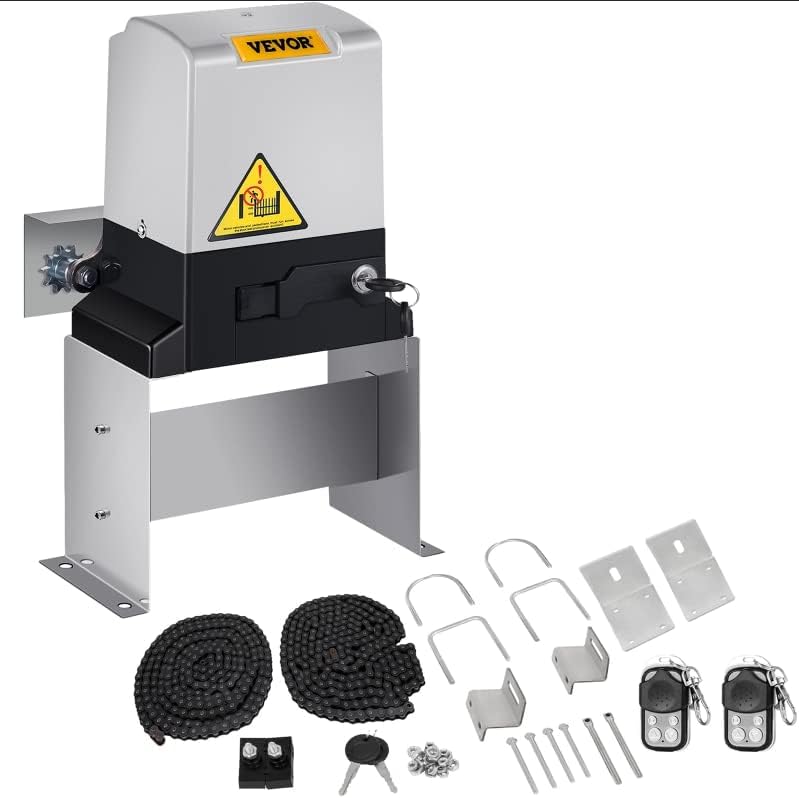
Figure 1: VEVOR AC1400 Sliding Gate Opener unit with all included accessories, including the main motor unit, two chains, two remote controls, manual release keys, and mounting hardware.
Safety Information
Read and understand all instructions before installation and operation. Failure to follow these instructions could result in serious injury or property damage.
- Ensure the installation area is clear of obstructions and potential hazards.
- Keep children and pets away from the gate area during operation.
- Do not allow children to operate the gate opener or play with remote controls.
- Always disconnect power before performing any maintenance or service.
- Ensure all safety devices (e.g., photo-electric sensors, safety edges) are properly installed and functioning.
- In case of power failure, use the manual release keys to operate the gate.
- Regularly inspect the gate and opener for signs of wear, damage, or misalignment.
Included Components
Verify that all components listed below are present in your package:
- 1 x Sliding Gate Opener Unit
- 1 x 20ft. of Chain (Can be split into 2 x 10ft. Chains)
- 2 x Remote Controls (Batteries not included)
- 2 x Manual Release Keys
- 1 x Mounting Hardware Set
- 1 x Set of Installation Parts
- 1 x Owners Manual (This document)
Setup and Installation
The VEVOR AC1400 gate opener is designed for straightforward installation. A detailed installation manual is included with the product, providing step-by-step instructions. The following outlines the general process:
- Site Preparation: Ensure the gate moves freely and is properly aligned. Clear the area where the opener will be mounted.
- Mounting the Opener: Securely mount the gate opener unit on a stable, level surface next to the gate. The 9-inch high base helps protect the unit from water.
- Chain Installation: Attach the provided 20 ft chain (or two 10 ft chains) to the gate and route it through the opener's sprocket. Ensure proper tension.
- Electrical Connection: Connect the opener to a 110V AC, 60Hz power supply. It is recommended to have this done by a qualified electrician.
- Limit Switch Adjustment: Adjust the magnetic limit switches to define the open and close positions of the gate.
- Remote Control Pairing: Pair the remote controls with the opener unit according to the detailed instructions in the included manual.
- Safety Feature Testing: Test the obstruction detection system and other safety features to ensure they function correctly.

Figure 2: Typical installation diagram illustrating the placement of the gate operator, chain, and limit blocks relative to the sliding gate and power source.

Figure 3: The VEVOR AC1400 Sliding Gate Opener installed alongside a gate, demonstrating the chain connection and overall setup.
Operating Instructions
The VEVOR AC1400 gate opener offers various modes of operation for convenience and security.
Remote Control Operation
Use the 4-button remote controls to manage your gate:
- Open Button: Press to open the gate.
- Close Button: Press to close the gate.
- Stop Button: Press to stop the gate at any point during its travel.
- Pedestrian Mode Button: Press to open the gate partially (adjustable from 1-5 ft) for pedestrian access.

Figure 4: Remote control functionality, illustrating how to open, close, stop, and activate pedestrian mode for the gate.
Auto-Close Feature
The gate can be set to automatically close after a specified delay. This feature can be configured for 12, 24, or 36 seconds, or it can be disabled entirely. Refer to the detailed manual for instructions on setting the auto-close timer.
Safety Features
- Obstruction Detection: If the gate encounters an obstruction during opening or closing, it will automatically stop and reverse direction to prevent damage or injury.
- Temperature Protector: The motor is equipped with a temperature protector to prevent overheating.
- Adjustable Thrust: The motor's thrust can be adjusted to prevent overloading and ensure smooth operation.

Figure 5: Internal components of the VEVOR gate opener, showcasing the powerful 500W motor and integrated protection features.
Maintenance
Regular maintenance ensures the longevity and optimal performance of your VEVOR Sliding Gate Opener. Always disconnect power before performing any maintenance.
- Monthly Inspection: Check the gate for smooth movement, ensuring no binding or excessive friction. Inspect the chain for proper tension and lubrication.
- Cleanliness: Keep the gate opener unit clean and free from debris, especially around the sprocket and limit switches. The weatherproof shell and 9-inch base help protect internal components.
- Lubrication: Periodically lubricate the gate hinges, rollers, and the drive chain with appropriate lubricants to reduce wear and ensure quiet operation.
- Safety Feature Check: Regularly test the obstruction detection system and manual release mechanism to ensure they are functioning correctly.
- Hardware Check: Verify that all mounting bolts and fasteners are tight.

Figure 6: High-quality details of the gate opener, emphasizing its weather-resistant design with stainless steel gears, rainproof cover, and elevated base.
Troubleshooting
This section provides solutions to common issues you might encounter. For problems not listed here, please contact VEVOR customer support.
| Problem | Possible Cause | Solution |
|---|---|---|
| Gate does not respond to remote control. |
|
|
| Gate stops or reverses unexpectedly. |
|
|
| Gate moves slowly or struggles. |
|
|
| Manual release key does not work. |
|
|
Specifications
| Attribute | Detail |
|---|---|
| Model Number | Sliding Gate Opener AC1400 (SL1400AC(L)) |
| Max. Gate Weight Capacity | 3100 lbs (1400 kg) |
| Power Supply | 110V AC, 60Hz |
| Motor Power | 500W |
| Gate Move Speed | 43 ft/min (15 m/min) |
| Motor Speed | 66 rpm |
| Output Torque | 18 N.m |
| Remote Control Range | 100 ft (Frequency: 433.92mHz) |
| Max # of Remotes | 25 |
| Operating Temperature | -4°F to +122°F (-20°C to +50°C) |
| Noise Level | Max <56 dB |
| Limit Switch Type | Magnetic Limit Switch |
| Duty Cycle | S2, 15 Minutes |
| Product Dimensions (L x W x H) | 14 x 13 x 19 inches (35.5 x 33 x 48 cm approx.) |
| Item Weight | 19.75 pounds (8.96 kg) |
| Included Chain Length | 20 ft (6.1 m) |

Figure 7: Product dimensions and compatibility with various sliding gate designs.
Warranty and Support
For warranty information, technical support, or replacement parts, please contact VEVOR customer service. Refer to the contact details provided in your product packaging or visit the official VEVOR website.
Manufacturer: VEVOR
Model: Sliding Gate Opener AC1400
ASIN: B0DF33ZH8C
Ask a question about this manual
Ask about setup, troubleshooting, compatibility, parts, safety, or missing instructions. Manuals+ will review the question and use this page’s manual context to help answer it.