
1. Product Overview
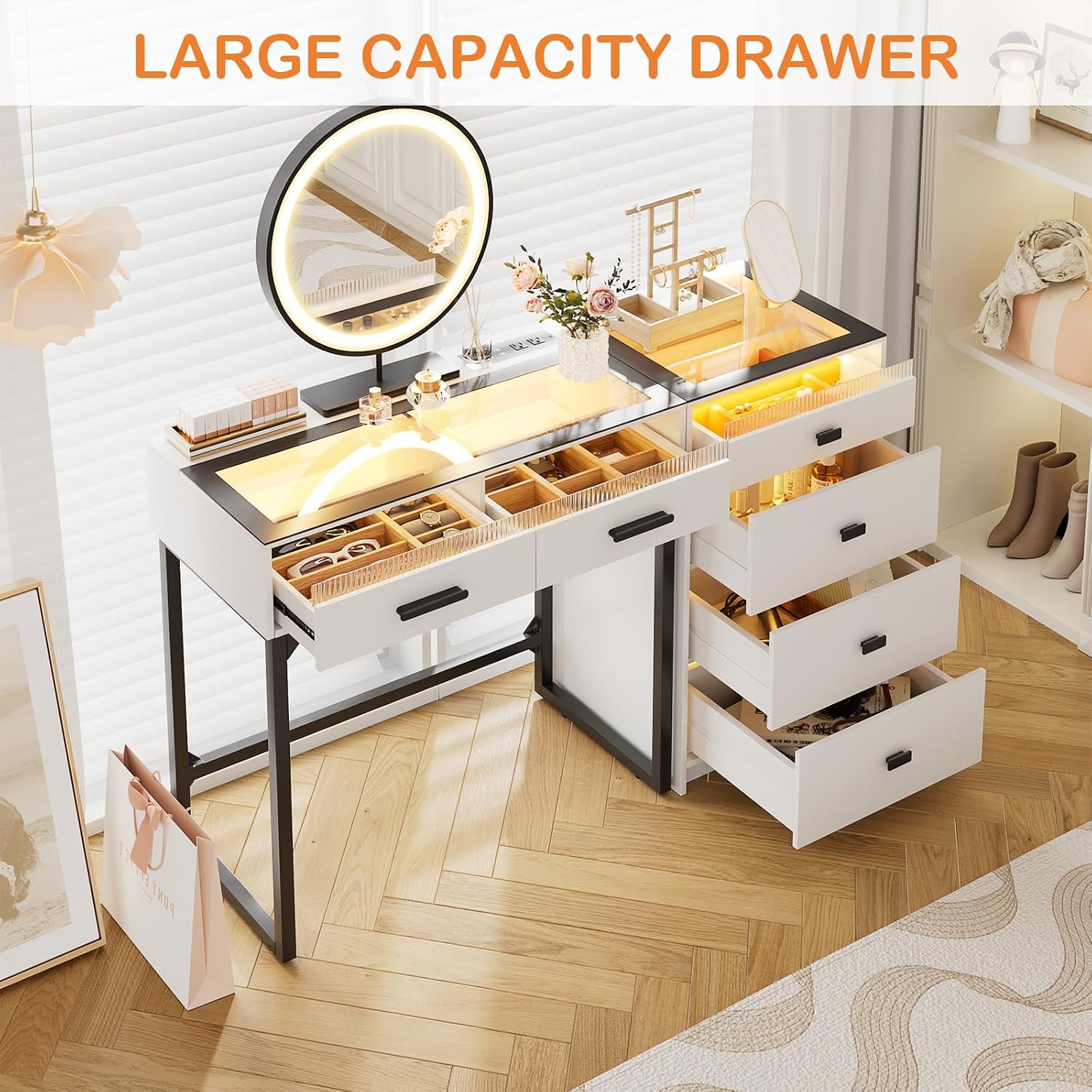
The BROTTAR 49" Modern Makeup Vanity is designed to enhance your daily routine with its elegant design and practical features. It includes a mirror with adjustable lighting, a convenient charging station, six spacious drawers with divided organizers, and a transparent glass top. This versatile piece of furniture is suitable for various home styles and can be configured with the storage cabinet on either the left or right side.
Key Features:
- Transparent Glass Tabletop: Offers an elegant design and allows for easy organization and visibility of cosmetics and jewelry.
- Convenient Charging Station: Equipped with 2 standard AC outlets, 1 USB port, and 1 Type-C port for charging devices.
- Sufficient Storage Capacity: Features 6 drawers, including divided organizers, and a dedicated rack for a hair dryer and cosmetic brushes.
- 3 Lighting Modes & Brightness Adjustable: The mirror provides warm, natural, and cool light settings to suit different makeup needs.
- Flexible Configuration: The storage cabinet can be placed on either the left or right side of the desk.

2. Setup and Assembly
This vanity desk requires assembly. All parts and accessories are labeled for a straightforward setup process. It is recommended to sort and count all components before beginning assembly.
2.1 Component Identification
Refer to the included assembly guide for a complete list of parts and hardware. Ensure all items are present before proceeding.
2.2 Assembly Steps
- Unpack all components and lay them out on a clean, soft surface to prevent scratches.
- Follow the step-by-step instructions provided in the separate assembly manual.
- Attach the desk frame and the storage cabinet according to the diagrams. The storage cabinet can be positioned on either the left or right side to best suit your space.
- Install the drawers and their organizers.
- Secure the mirror to the designated area on the tabletop.
- Connect the power strip for the charging station and mirror lights.
- Attach the hair dryer rack and cosmetic brush holder to the side of the cabinet.
2.3 Placement Considerations
Choose a stable, level surface for the vanity. Ensure adequate space for opening drawers and comfortable use. An anti-tipping tape is provided for wall mounting to enhance stability and safety, especially in households with children.


3. Operating Instructions
3.1 Mirror Lighting
The vanity mirror features integrated LED lights with three adjustable color modes and brightness levels. To operate:
- Power On/Off: Touch the power button on the mirror to turn the lights on or off.
- Change Color Mode: Briefly touch the mode button to cycle through warm, natural, and cool light settings.
- Adjust Brightness: Press and hold the power button to increase or decrease the brightness. Release when the desired brightness is reached.

3.2 Charging Station
The built-in power strip provides convenient access to power for your electronic devices.
- AC Outlets: Two standard 120V/12A AC outlets are available for hair dryers, curling irons, or other small appliances.
- USB & Type-C Ports: One USB port and one Type-C port (both 120V/12A) are provided for charging smartphones, tablets, and other compatible devices.


3.3 Drawers and Organizers
The vanity features 6 drawers, including a top drawer with divided organizers, to keep your items neatly stored and easily accessible.
- Glass Top Drawers: The transparent glass top allows you to view and quickly locate items stored in the top drawers.
- Divided Organizers: Utilize the provided dividers to categorize and separate jewelry, cosmetics, and accessories.
- Hair Dryer Rack: A dedicated rack on the side of the cabinet provides convenient storage for your hair dryer and brushes.


3.4 Human Sensor Lighting
The vanity desk features human sensor lighting that automatically illuminates when you approach it.
- Activation: Turn on the body button for the sensor. The lights will activate automatically when motion is detected within 2-3 meters.
- Deactivation: The lights will turn off automatically after a period of inactivity.

4. Maintenance
Proper care and maintenance will ensure the longevity and appearance of your vanity desk.
- Glass Top: Clean the glass top with a glass cleaner and a soft cloth. Avoid using abrasive materials that could scratch the surface.
- Mirror: Do not use harsh chemicals on the mirror. Use a soft, damp cloth for cleaning.
- Lights: Always unplug the vanity lights before cleaning. Allow the product to dry completely before using it again after cleaning.
- General Cleaning: Wipe down wood and iron surfaces with a soft, dry or slightly damp cloth. Avoid excessive moisture.
5. Troubleshooting
If you encounter any issues with your vanity desk, please refer to the following common troubleshooting tips:
- Lights Not Working: Ensure the power cord is securely plugged into a working outlet. Check the power switch on the vanity. If the mirror lights are unresponsive, try unplugging and replugging the vanity after a few minutes.
- Drawers Sticking: Verify that the drawer slides are properly aligned and free of obstructions. Ensure the drawers are not overloaded.
- Stability Issues: Confirm that all assembly hardware is tightened. If the vanity feels unstable, ensure it is placed on a level surface. Consider using the provided anti-tipping tape for added security.
- Charging Station Not Functioning: Check that the vanity is plugged into a live power source. Ensure devices are properly connected to the USB, Type-C, or AC outlets.
For issues not covered here, please contact customer support.
6. Specifications
| Feature | Detail |
|---|---|
| Brand | BROTTAR |
| Model Number | B0DF2WLQH4 |
| Color | White |
| Material | Wood, Iron |
| Product Dimensions (D x W x H) | 15.75" x 49.21" x 31.89" |
| Item Weight | 86.86 Pounds |
| Style | Modern |
| Number of Drawers | 6 |
| Required Assembly | Yes |
| Charging Station | 2 AC Outlets, USB Port, Type-C Port |
| Mirror Lighting | 3 Color Modes (Warm, Natural, Cool), Brightness Adjustable |
7. Warranty and Support
7.1 Manufacturer's Warranty
This BROTTAR vanity desk is covered by a standard manufacturer's warranty. Please retain your proof of purchase for any warranty claims. For specific details regarding coverage and duration, refer to the warranty information included with your product packaging or contact BROTTAR customer service.
7.2 Customer Support
Should you require assistance with assembly, operation, or encounter any issues not resolved by the troubleshooting section, please contact BROTTAR customer support. Contact information can typically be found on the product packaging or the official BROTTAR website.
8. Product Videos
8.1 Modern Makeup Vanity Overview
Video: An official overview of the BROTTAR Modern Makeup Vanity, showcasing its features and design.