
1. Product Overview
The Silonn Ice Maker Countertop Machine is designed to provide convenient and rapid ice production for your home, kitchen, camping trips, or RV. This compact and portable unit can produce up to 26 lbs of bullet-shaped ice cubes in 24 hours, with the first batch ready in as little as 6 minutes. It features a user-friendly control panel, two ice cube size options (small and large), and an automatic self-cleaning function for easy maintenance.
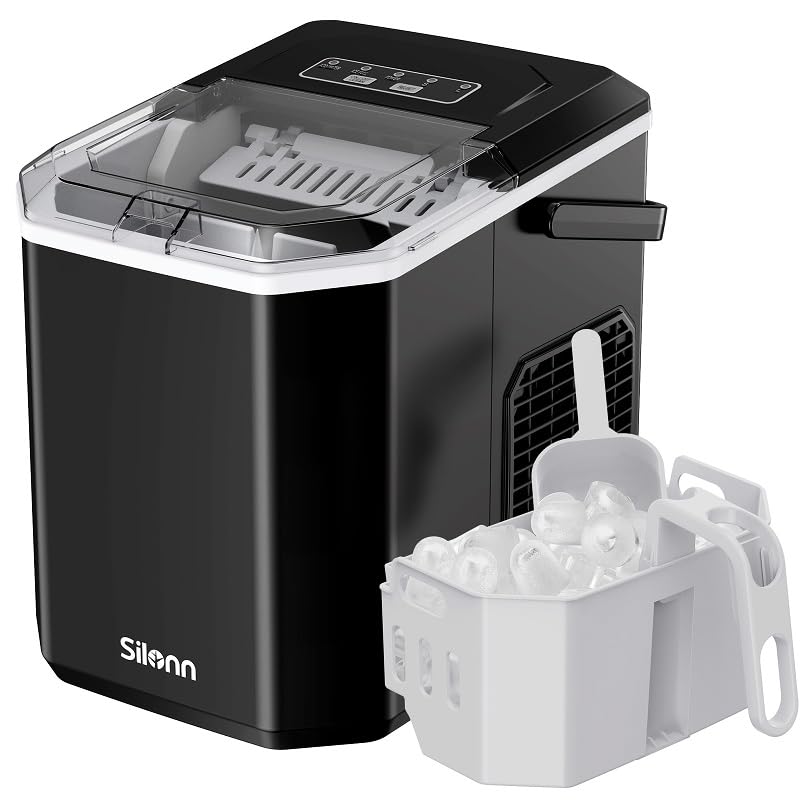
Image 1.1: The Silonn Ice Maker, showcasing its compact design, ice basket, and scoop.
2. Important Safety Instructions
Please read all instructions carefully before operating the ice maker to ensure safe and efficient use. Keep this manual for future reference.
- Ensure the ice maker is placed on a stable, level surface away from direct sunlight and heat sources.
- Do not immerse the appliance, power cord, or plug in water or other liquids.
- Supervise children when the appliance is in use.
- Unplug the ice maker from the power outlet before cleaning or when not in use.
- Do not operate the appliance with a damaged cord or plug. Contact customer support for assistance.
- Use only potable water in the water reservoir.
- Do not block ventilation openings. Ensure adequate air circulation around the unit.
- This appliance is for household use only.
3. Package Contents
Verify that all items are present in the package:
- Silonn Ice Maker Unit
- Ice Basket
- Ice Scoop
- User Manual (this document)
4. Product Components
Familiarize yourself with the different parts of your Silonn Ice Maker:

Image 4.1: Detailed view of the Simple Operation Panel, showing 'ADD WATER', 'ICE FULL', 'POWER', and ice size 'S' and 'L' indicators, along with 'ON/OFF CLEAN' and 'SELECT' buttons.
- Control Panel: Features indicator lights for 'ADD WATER', 'ICE FULL', 'POWER', and ice size selection ('S' for Small, 'L' for Large). Buttons include 'ON/OFF CLEAN' and 'SELECT'.
- Ice Basket: Removable basket for collecting produced ice cubes.
- Ice Scoop: Used for convenient ice removal from the basket.
- Water Reservoir: Located beneath the ice basket, where water is added for ice production.
- Ice Generator: Internal components responsible for freezing water into ice cubes.
- Handle: Integrated handle for easy portability.
5. Initial Setup
Follow these steps to set up your ice maker for the first time:
- Unpack: Carefully remove the ice maker from its packaging. Remove all packing materials, tape, and labels.
- Clean: Before first use, clean the interior of the ice maker. Refer to the 'Care and Maintenance' section for detailed cleaning instructions.
- Placement: Place the ice maker on a flat, stable, and level surface. Ensure there is at least 4 inches (10 cm) of space around the unit for proper ventilation. Avoid placing it near heat sources or in direct sunlight.
- Power Connection: Plug the power cord into a grounded electrical outlet.
- First Use Recommendation: For the first three cycles of ice production, it is recommended to discard the ice cubes to ensure optimal taste and hygiene.

Image 5.1: The Silonn Ice Maker in a kitchen setting, demonstrating its countertop suitability and ease of use for making beverages.
6. Operating Instructions
Follow these steps to produce ice with your Silonn Ice Maker:
- Add Water: Open the lid and remove the ice basket. Fill the water reservoir with potable water up to the MAX fill line. Do not overfill.
- Replace Basket: Place the ice basket back into position and close the lid.
- Power On: Press the 'ON/OFF CLEAN' button to turn on the ice maker. The 'POWER' indicator light will illuminate.
- Select Ice Size: Press the 'SELECT' button to choose your desired ice cube size. The 'S' light indicates small cubes, and the 'L' light indicates large cubes. The default setting is usually large.
- Ice Production: The ice maker will begin the ice-making cycle. The first batch of ice will be ready in approximately 6-13 minutes, depending on the selected size and ambient temperature.
- Ice Full Indicator: When the ice basket is full, the 'ICE FULL' indicator light will illuminate, and the ice maker will automatically stop production. Remove ice from the basket to resume production.
- Add Water Indicator: If the water level in the reservoir is too low, the 'ADD WATER' indicator light will illuminate, and the ice maker will stop production. Add more water to resume.
- Turn Off: To stop ice production, press the 'ON/OFF CLEAN' button again.
Ice Cube Sizes
The Silonn Ice Maker offers two sizes of bullet-shaped ice cubes:
- Small (S): Approximately 27x20x20mm
- Large (L): Approximately 28x22x27mm

Image 6.1: Visual representation of the two available ice cube sizes: Small and Large.

Image 6.2: Demonstrating convenient ice removal from the ice basket using the provided scoop.
7. Care and Maintenance
Regular cleaning and maintenance will ensure the longevity and optimal performance of your ice maker.
Cleaning the Ice Maker
The Silonn Ice Maker features an automatic self-cleaning function:
- Empty Water: Ensure the water reservoir is empty. If there is water, drain it by unplugging the unit and carefully tilting it over a sink.
- Add Water for Cleaning: Fill the water reservoir with clean, potable water up to the MAX fill line.
- Initiate Self-Clean: Press and hold the 'ON/OFF CLEAN' button for 5 seconds. The 'POWER' indicator light will flash, indicating the self-cleaning cycle has started.
- Cycle Completion: The self-cleaning cycle will run for approximately 30 minutes. Once complete, the unit will automatically turn off.
- Drain Water: After the cleaning cycle, unplug the ice maker and drain all water from the reservoir.
- Wipe Down: Wipe the interior and exterior surfaces with a soft, damp cloth.

Image 7.1: Visual representation of the efficient 30-minute self-cleaning process.
Storage
When storing the ice maker for an extended period:
- Perform a self-cleaning cycle and drain all water.
- Ensure the unit is completely dry before storing.
- Store in a cool, dry place, away from direct sunlight.
8. Troubleshooting Guide
If you encounter issues with your ice maker, refer to the table below for common problems and solutions:
| Problem | Possible Cause | Solution |
|---|---|---|
| Ice maker not turning on. | No power; unit not plugged in. | Ensure the power cord is securely plugged into a working electrical outlet. |
| "ADD WATER" indicator light is on. | Water reservoir is empty or low. | Add potable water to the reservoir up to the MAX fill line. |
| "ICE FULL" indicator light is on. | Ice basket is full. | Remove ice from the basket. The unit will resume production. |
| Ice cubes are small or clumpy. | Water temperature too high; ambient temperature too high. | Use colder water. Ensure the unit is in a cool, well-ventilated area. |
| Ice has an unusual taste or odor. | First use; unit needs cleaning; stale water. | Discard first few batches of ice. Perform a self-cleaning cycle. Use fresh, potable water. |
| Ice production is slow. | High ambient temperature; poor ventilation. | Ensure adequate space around the unit for ventilation. Operate in a cooler environment. |
9. Technical Specifications
| Specification | Value |
|---|---|
| Model Name | SLIM21B-US |
| Product Dimensions (D x W x H) | 8.73" x 11.41" x 11.56" |
| Weight | 15.1 Pounds |
| Ice Production Capacity | Up to 26 lbs per 24 hours |
| Ice Storage Capacity | 1.3 lbs |
| First Ice Ready In | 6 minutes |
| Wattage | 160 watts |
| Manufacturer | Silonn |
10. Warranty and Customer Support
Silonn products are manufactured to high-quality standards and are backed by a limited warranty. For specific warranty details, including coverage period and terms, please refer to the warranty card included with your product or contact Silonn customer support.
If you have any questions, require technical assistance, or need to report an issue with your ice maker, please contact Silonn Customer Support through the official website or the contact information provided in your product packaging. Please have your model number (SLIM21B-US) and purchase information ready when contacting support.


