
1. Product Overview
The EZVALO Under Cabinet Lighting System provides versatile illumination with rechargeable puck lights. These lights feature multiple color temperatures, RGB color options, motion sensing capabilities, and remote control for convenient operation. They are designed for various indoor applications such as under cabinets, shelves, closets, and hallways.

Image: EZVALO Puck Light dimensions. The light has a diameter of 3.3 inches and a thickness of 1 inch, featuring a round, slim design.
2. Package Contents
Verify that all components are present in the package:
- 6x Motion Sensor Lights
- 1x Remote Control
- 6x Adhesive Metal Plates
- 1x 3-in-1 Charging Cord
- 1x Instruction Manual
3. Setup and Installation
The EZVALO puck lights offer multiple tool-free installation methods:
- Magnetic Attachment: The lights can snap directly onto metal surfaces.
- Adhesive Mounting: For non-metal surfaces, use the included adhesive metal plates. Remove the double-sided tape protective film from the metal plate, place it on the desired position, and then attach the light magnetically to the plate.
- Hanging: Utilize the built-in hook on the back of the light to hang it in desired locations.

Image: Visual guide for the three installation methods: directly attaching to metal, using an adhesive metal plate, or hanging with the built-in hook.
4. Operating Instructions
The lights can be controlled via the built-in button or the included remote control.
4.1. Modes of Operation
The puck lights feature three primary operating modes:
- Day Mode: Lights activate automatically when motion is detected, regardless of ambient light levels.
- Night Mode: Functions as a motion-sensor night light, activating only in dark environments. Lights will automatically turn off after 20 seconds of no motion.
- Always-On Mode: The motion sensor is disabled, providing continuous illumination. Lights can be manually turned on/off using the remote or the built-in button.

Image: Explanation of the three work modes: Always-On for continuous light, Day Mode for motion detection anytime, and Night Mode for motion detection in dark environments.
4.2. Motion Sensing
The motion sensor detects movement within a 120° wide angle and up to 10 feet. This feature is active in Day and Night modes.
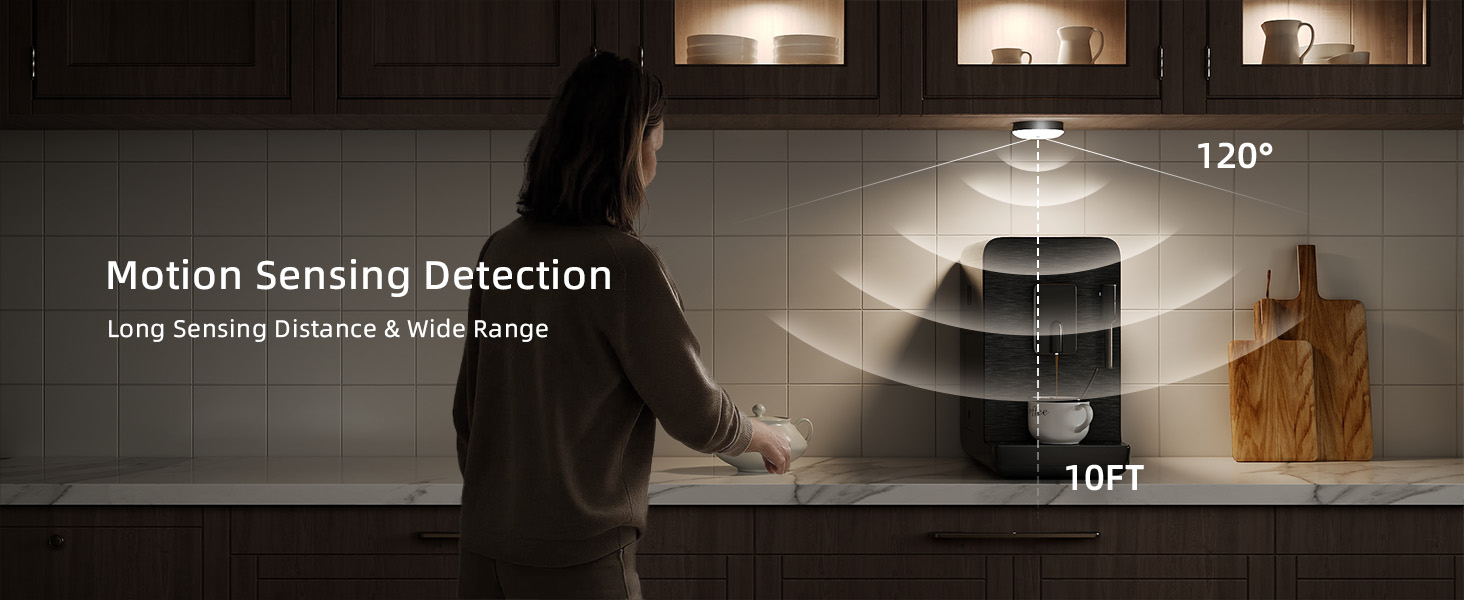
Image: Motion sensing detection in a kitchen, highlighting the 120-degree wide angle and 10-foot long sensing distance of the lights.
4.3. Light Control
Control the lights using the built-in button or the remote control:
- Built-in Button: A short press changes light colors. A long press provides smooth, stepless dimming to adjust brightness.
- Remote Control: Adjust 15 colors (including 12 RGB colors and 3 white color temperatures: 3000K Warm, 4200K Natural, 6500K Cool), 10 brightness levels, and set timers (15/30/45/60/120 minutes). The remote also features Flash and Fade dynamic modes.
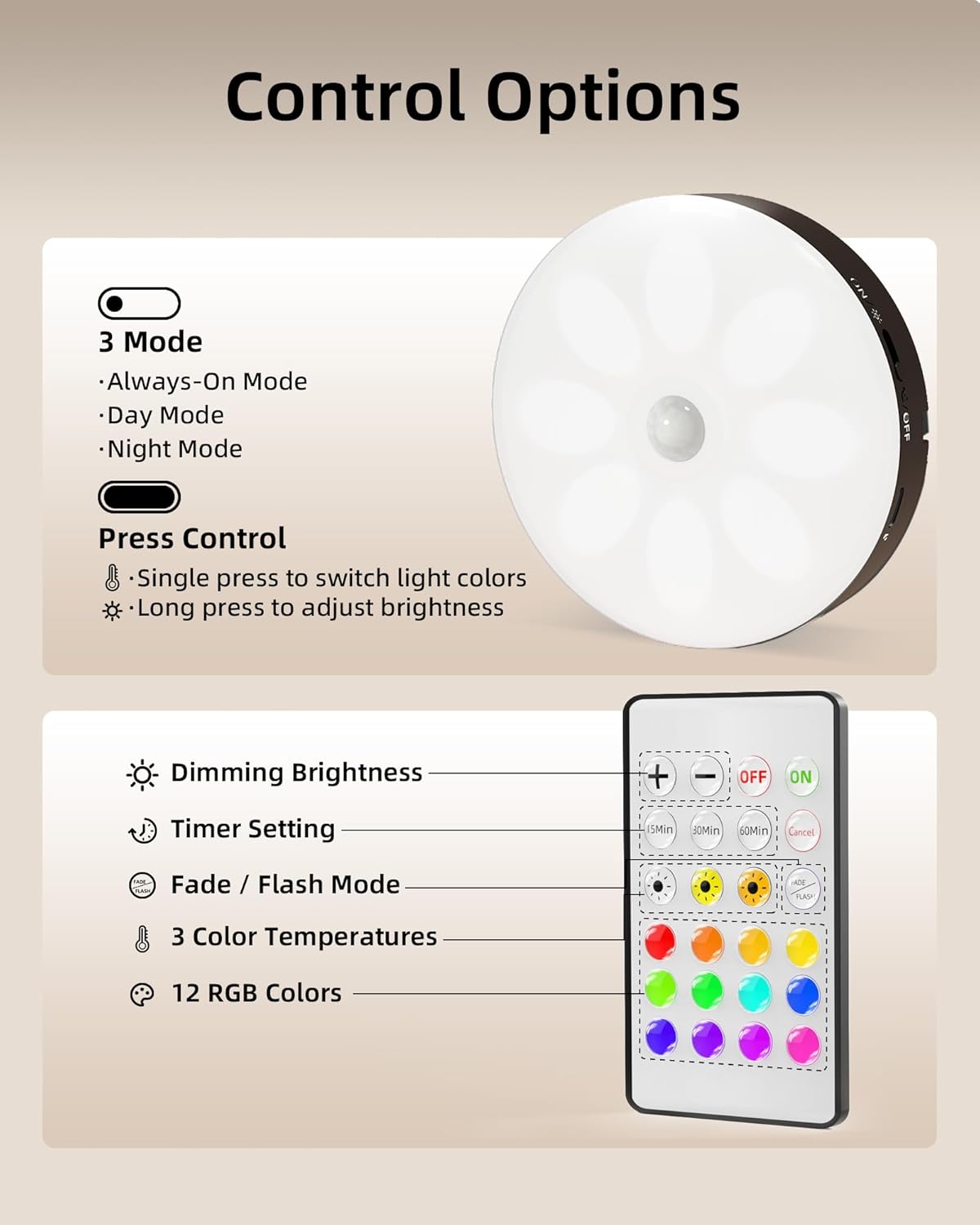
Image: Control options for the puck light, including button functions for mode and color changes, and remote functions for dimming, timer, dynamic modes, color temperatures, and RGB colors.

Image: Wireless and stepless dimming feature, showing 10 brightness settings from 20 lumens to 50 lumens in a kitchen setting.

Image: 15 Color RGB Lighting illuminating display shelves with vibrant colors, controlled by a remote.
4.4. Video Demonstrations
Video: This video demonstrates the EZVALO Under Cabinet Lighting with motion sensor and remote control features, showcasing its ease of use and versatility.
Video: This video highlights the EZVALO Rechargeable Puck Lights, demonstrating the 3 color temperatures, RGB options, and magnetic installation.
Video: This video showcases the RGB Under Cabinet Lights by EZVALO, illustrating the range of colors and their application in various settings.
5. Charging and Battery Maintenance
Each puck light is equipped with a 1000mAh rechargeable battery. The magnetic design allows for easy removal and charging, eliminating the need for disposable batteries.
- Battery Life: Up to 11 hours in Always-On Mode or 13–40 days in Auto Mode (depending on usage frequency).
- Charging: Use the provided 3-in-1 charging cord. The light will indicate red while charging and turn green when fully charged.

Image: Rechargeable puck lights, emphasizing energy saving by replacing approximately 100 batteries per year. Shows 1000mAh battery capacity, 13-40 days in Auto Mode, and 11 hours in Always-On Mode.

Image: Built-in 1000mAh capacity battery, showing three puck lights being charged simultaneously with a 3-in-1 charging cable. Tip: fully charge before first use.
6. Specifications
| Feature | Detail |
|---|---|
| Brand | EZVALO |
| Model Number | EZL2415A |
| Color | Black |
| Material | Acrylonitrile Butadiene Styrene |
| Light Fixture Form | Puck |
| Room Type | Bedroom, Home, Kitchen, Laundry Room, Storage Room |
| Specific Uses | Cabinet, Closet, Home, Pantry, Stairs, Hallway |
| Indoor/Outdoor Usage | Indoor |
| Power Source | Battery Powered |
| Special Features | Adjustable Color Temperature, Color Changing, Dimmable, Motion Sensor, Timer |
| Control Method | Remote |
| Light Source | LED |
| Number of Light Sources | 16 |
| Voltage | 5 Volts |
| Light Color | 3 color Temps (Warm, White, Warm White), Green, Red, Blue, Yellow, Purple |
| Brightness | 50 Lumen |
| Item Dimensions L x W x H | 3.3"L x 3.3"W x 1"H |
| Item Weight | 62 Grams |
7. Troubleshooting
If you encounter any issues with your EZVALO Under Cabinet Lighting System, please refer to the following common troubleshooting steps:
- Lights not turning on: Ensure the lights are fully charged. Check the mode switch (ON/OFF, Day, Night) to ensure it is set correctly for your environment.
- Motion sensor not working: Verify the light is in Day Mode or Night Mode. Ensure there are no obstructions blocking the sensor. Test the sensor range (up to 10 ft).
- Remote control not responding: Check the battery in the remote control. Ensure there is a clear line of sight between the remote and the lights.
- Lights not holding a charge: Ensure the charging cable is securely connected and the power source is active. If issues persist, contact customer support.
8. Warranty and Support
This EZVALO product comes with a Limited Warranty. For detailed information regarding warranty coverage, terms, and conditions, please refer to the full warranty statement provided in the included Instruction Manual.
For further assistance, technical support, or to report any issues not covered in this manual, please consult the contact information provided in your Instruction Manual or visit the official EZVALO website.


