1. Safety Information
Please read all safety instructions carefully before using the device. Keep this manual for future reference.
- Avoid use on broken or inflamed skin.
- Keep out of reach of children.
- Do not immerse the main body of the device in water. The detachable head is waterproof and can be rinsed.
- Ensure the device is fully charged before first use to optimize battery life.
2. Product Overview
The bikurpia Facial Hair Remover is a portable, painless, and rechargeable device designed for gentle and effective hair removal on various facial areas. Its compact design makes it ideal for travel and on-the-go touch-ups.
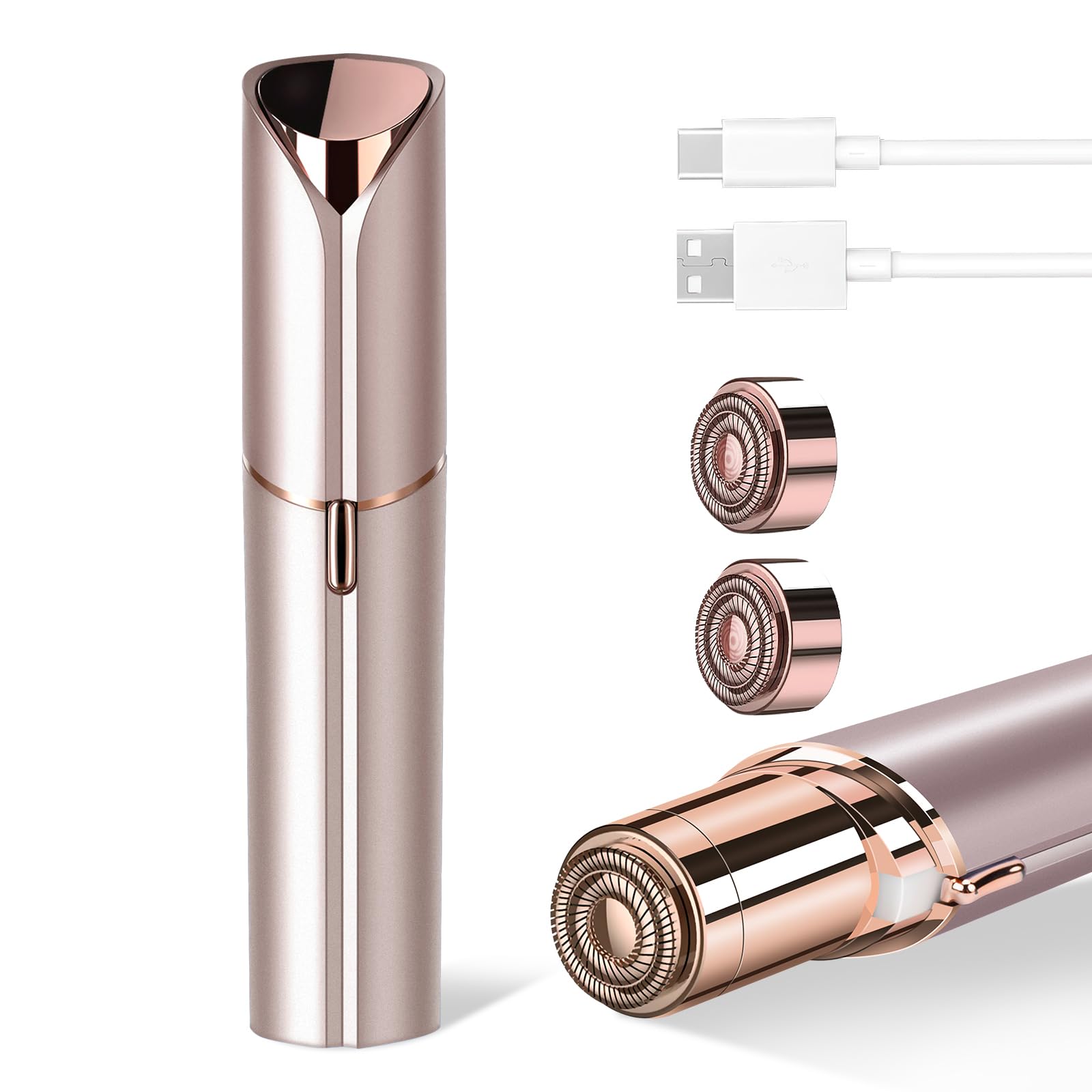
Image 2.1: The bikurpia Facial Hair Remover in Champagne Gold, a sleek and portable device.
Key Features:
- Horizontal Cutting Head: Features dual rotating blades for expanded contact area and efficient trimming.
- Rechargeable Model: Equipped with a TYPE-C charging port for faster charging and extended battery life.
- Exquisite and Compact: Small size allows for easy storage in a purse, backpack, or beauty bag.
- Painless Operation: Designed with a round, low-friction protective head to prevent skin damage and ensure a comfortable experience.
- Waterproof Design: Detachable head can be rinsed directly with water for easy cleaning.
- Built-in LED Light: Illuminates fine hairs for thorough removal.
- Includes 2 Replacement Heads: Ensures long-term usability.

Image 2.2: Close-up view of the device's cutting head, highlighting the precision design.
3. Setup
3.1 Charging the Device
Before first use, fully charge your bikurpia Facial Hair Remover. The device features a TYPE-C charging port for convenience.
- Locate the TYPE-C charging port on the device.
- Connect the provided charging cable to the device and a suitable USB power source (e.g., power bank, USB outlet, laptop, power adapter).
- The indicator light will show the charging status. Once fully charged, the light may change or turn off.

Image 3.1: The device connected to a USB-C charging cable, illustrating various compatible power sources like power banks, USB outlets, laptops, and power adapters.
3.2 Initial Inspection
After unpacking, ensure all components are present and undamaged. The package should include the main device, two replacement heads, a cleaning brush, and a charging cable.
4. Operating Instructions
Follow these steps for effective and comfortable hair removal:
- Ensure your skin is clean and dry before use.
- Remove the protective cap from the device.
- Slide the power switch to the 'ON' position. The built-in LED light will illuminate, helping you see fine hairs.
- Gently press the device's head against your skin. Move the device in small, circular motions, or rotate it in the opposite direction of your hair's natural growth.
- Apply to desired areas such as cheeks, chin, upper lip, and arms. The horizontal cutting head with dual rotating blades will quickly and painlessly trim unwanted hair.
- After use, slide the power switch to the 'OFF' position and replace the protective cap.
Video 4.1: An official demonstration of the bikurpia Facial Hair Remover in use, showing its gentle and effective operation on facial areas.

Image 4.1: A woman demonstrating the use of the facial hair remover on her face, highlighting its application for smooth skin.
5. Maintenance
5.1 Cleaning the Device
Regular cleaning ensures optimal performance and hygiene.
- Turn off the device and remove the protective cap.
- Gently twist the cutting head counter-clockwise to detach it from the main body.
- Use the included cleaning brush to remove any accumulated hair from the blades and inside the head.
- The detachable head can be rinsed directly under running water. Ensure it is completely dry before reattaching. Do not rinse the main body of the device.
- Align the cutting head with the main body and twist clockwise to secure it.

Image 5.1: A visual guide demonstrating the four steps to clean the device: turning the head counter-clockwise, brushing the blades, rinsing under water, and twisting clockwise to lock.
5.2 Replacing the Heads
The device comes with two replacement heads. Replace the cutting head when you notice a decrease in performance or if the blades become dull.
- Follow steps 1 and 2 from the cleaning instructions to detach the old cutting head.
- Take a new replacement head and align it with the main body of the device.
- Twist the new head clockwise until it clicks securely into place.
6. Troubleshooting
If you encounter any issues with your bikurpia Facial Hair Remover, please refer to the following common solutions:
- Device not turning on: Ensure the device is fully charged. Connect it to the charger and check if the indicator light appears.
- Reduced hair removal effectiveness: The cutting head may be clogged with hair or the blades might be dull. Clean the cutting head thoroughly as per maintenance instructions. If the issue persists, replace the cutting head with a new one.
- Skin irritation: Ensure your skin is clean and dry before use. Avoid pressing too hard on the skin. If irritation continues, discontinue use.
7. Specifications
| Brand | bikurpia |
| Model Name | bikurpia (B0DF2KPR5Q) |
| Power Source | Battery Powered (Rechargeable via TYPE-C) |
| Recommended Uses | Face (cheeks, chin, upper lip), Arms |
| Special Feature | Travel Size, Built-in LED Light, Waterproof Detachable Head |
| Package Dimensions | 5.39 x 2.56 x 1.26 inches |
| Item Weight | 2.12 ounces |
| Manufacturer | HongTian |
| Date First Available | August 23, 2024 |
8. Warranty and Support
For warranty information, please refer to the product packaging or contact the manufacturer directly. Keep your proof of purchase for any warranty claims.
For further assistance or support, please consult the manufacturer's official website or the contact information provided on the product packaging.