
LWOHSI A103S-EU-E+T53A
LWOHSI A103S-EU-E+T53A Wi-Fi GSM Alarm System User Manual
Model: A103S-EU-E+T53A | Brand: LWOHSI
1. Introduction
This manual provides detailed instructions for the installation, operation, and maintenance of your LWOHSI A103S-EU-E+T53A Wi-Fi GSM Alarm System. Please read this manual thoroughly before using the product to ensure proper functionality and safety. This system is designed to provide comprehensive security for your home or office with easy setup and app control.
2. Product Overview
The LWOHSI A103S-EU-E+T53A is a versatile security system featuring both Wi-Fi and GSM connectivity, allowing for remote monitoring and control. It includes a main control panel, various sensors, and a camera for enhanced surveillance.
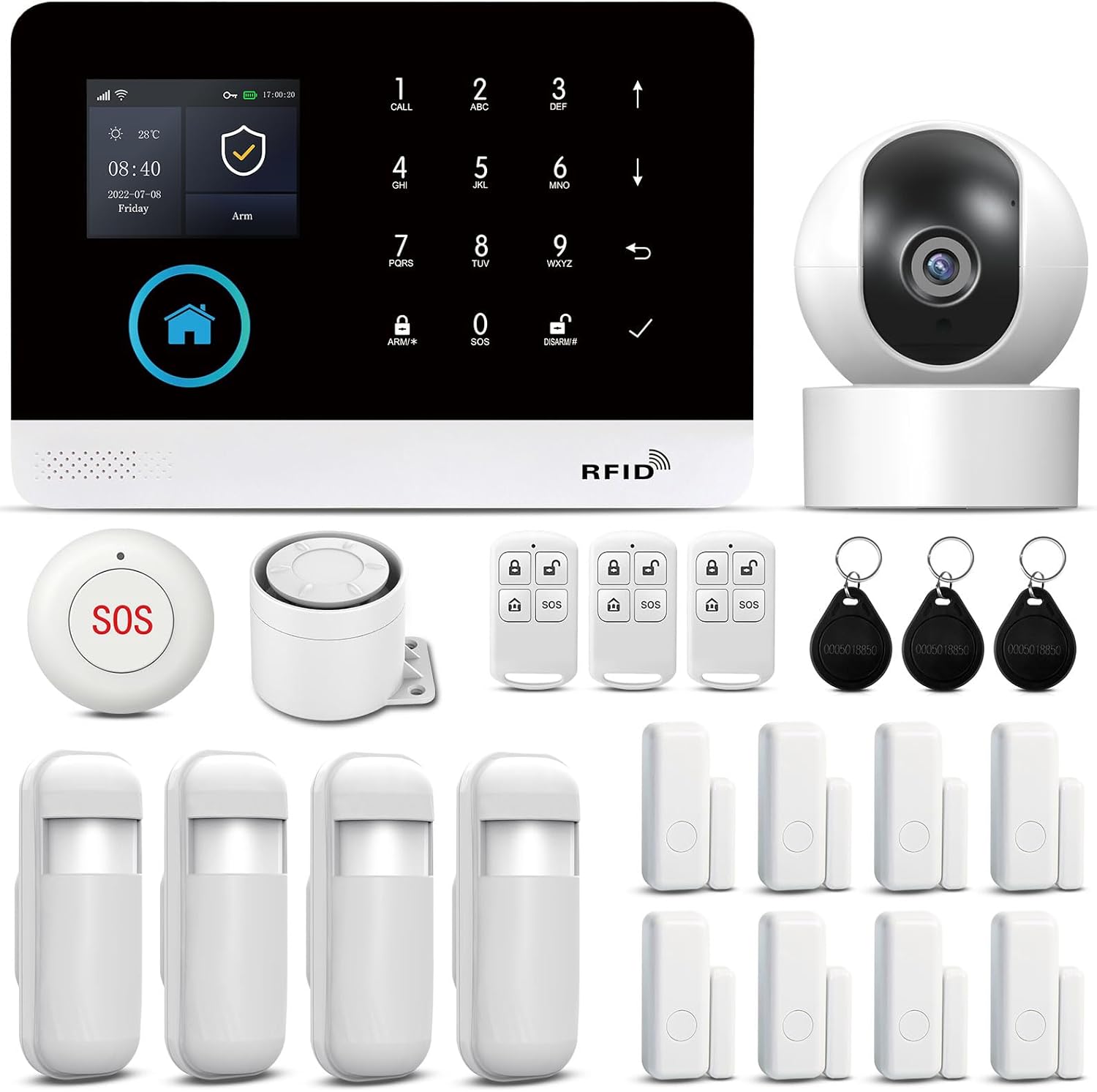
Figure 1: The complete LWOHSI A103S-EU-E+T53A alarm system kit, showcasing the main control panel, door/window sensors, remote controls, and RFID tags, ready for deployment.
2.1 Key Features
- Dual Network Connectivity: Supports both Wi-Fi and GSM for reliable communication.
- App Control: Full system management via the Smart Life app, including arming, disarming, notifications, and mode settings.
- Instant Alerts: Receive push notifications, calls, or SMS alerts to your phone upon detection of intrusion.
- 120dB Siren: Integrated siren provides a loud deterrent during alarm events.
- Easy Installation: Wireless components and simple setup, ideal for renters or frequent movers. No drilling required.
- Emergency SOS Function: Panic button on the control panel for immediate assistance.
- 2MP HD Wi-Fi Camera: Provides 1080p video capture, motion detection, 24/7 recording, two-way audio, app control, and advanced night vision.
- Anti-Tamper Protection: The main unit features an anti-demolition alarm function, notifying you if the device is removed.
- Expandable System: Compatible with additional sensors and accessories.
2.2 System Components
The system typically includes the following components:
- Main Control Panel (Hub)
- Door/Window Sensors
- PIR Motion Sensors
- Remote Controls
- RFID Tags
- 2MP HD Wi-Fi Camera
- Power Adapter

Figure 2: Overview of the LWOHSI A103S-EU-E+T53A alarm system components, including the main control panel, door/window sensors, remote controls, and RFID tags. The panel features a 2.4-inch TFT screen, Wi-Fi and 2G connectivity, app remote control, timing arm/disarm, 9 languages, one-touch help for the elderly, and APP/Call/SMS notifications.

Figure 3: The included 2MP HD Wi-Fi Home Security Camera, offering 2MP HD resolution, motion detection, 24/7 recording, two-way audio, app control, and advanced night vision capabilities.
3. Setup Instructions
Follow these steps to set up your LWOHSI alarm system.
3.1 Initial Power-Up and Network Connection
- Power On: Connect the main control panel to a power source using the provided adapter.
- Download App: Download the "Smart Life" app from your smartphone's app store (iOS or Android).
- Register/Login: Open the Smart Life app and register a new account or log in if you already have one.
- Add Device: In the app, follow the instructions to add a new device. Select "Security & Video Surveillance" then "Alarm (Wi-Fi)".
- Connect to Wi-Fi: Ensure your smartphone is connected to a 2.4GHz Wi-Fi network. The alarm system requires a 2.4GHz Wi-Fi connection for initial setup and app control. If your router uses both 2.4GHz and 5GHz, you may need to temporarily separate them or ensure your phone is connected to the 2.4GHz band.
- Pairing: Follow the in-app prompts to pair the main control panel with your Wi-Fi network. This usually involves putting the panel into pairing mode and confirming the Wi-Fi password in the app.
- GSM Setup (Optional): If you wish to use GSM functionality for calls and SMS alerts, insert a valid SIM card into the designated slot on the main control panel. Ensure the SIM card has an active plan for calls and SMS.
3.2 Sensor Installation and Pairing
All sensors are typically pre-configured and ready for use. If manual pairing is required, refer to the specific sensor's mini-manual or the app's instructions.
- Door/Window Sensors: Mount the two parts of the sensor (magnet and main unit) on a door or window frame so they are aligned and within 1 cm of each other when closed. Use the included adhesive pads.
- PIR Motion Sensors: Install motion sensors in areas where intruders are likely to pass. Position them at a height of approximately 2-2.5 meters for optimal detection. Avoid placing them directly facing heat sources or windows where direct sunlight or strong drafts might cause false alarms. The PIR sensor has a wide detection range of 110° horizontal and 15° vertical, covering 8-12 meters.
- Remote Controls & RFID Tags: These are usually pre-paired. Test their functionality by arming and disarming the system.
- Wi-Fi Camera: Follow the camera's specific instructions to connect it to your Wi-Fi network and add it to the Smart Life app.

Figure 4: Diagram illustrating the full coverage capability of the LWOHSI alarm system. The control unit can transmit signals up to 50-80 meters (164-262 feet) in obstructed areas and up to 100 meters (328 feet) in open areas, ensuring comprehensive protection for your property.
4. Operating Instructions
Learn how to effectively use your LWOHSI alarm system.
4.1 Arming and Disarming the System
The system offers three main modes:
- Arm (Full Arm): Activates all sensors (internal and external). Use when leaving the premises.
- Home Arm (Stay Arm): Activates external sensors while allowing free movement within the property. Ideal for when you are home.
- Disarm: Deactivates all sensors, allowing free entry and exit.
You can arm/disarm the system using:
- Control Panel: Enter your PIN and select the desired mode.
- Remote Control: Press the corresponding button (Arm, Disarm, Home Arm).
- Smart Life App: Select the desired mode from the app interface.
- RFID Tag: Swipe the RFID tag over the designated area on the control panel to disarm.

Figure 5: Visual representation of the three security modes: Arm (full lock), Disarm (unlocked), and Home Arm (house with lock), allowing flexible security management.
4.2 App Control and Notifications
The Smart Life app provides comprehensive control and real-time alerts.
- Real-time Alerts: When a sensor is triggered, you will receive an instant push notification on your smartphone. If GSM is configured, you may also receive a call or SMS.
- Remote Management: Arm, disarm, and change alarm modes from anywhere using the app.
- Device Synchronization: All alarm devices are synchronized and monitored through the app.
- Customization: Set entry/exit delays, siren duration, and rename sensors for easier identification (e.g., "Front Door," "Living Room Motion").
- Device Sharing: Share access to the alarm system with family members by adding their phone numbers or email addresses in the app.

Figure 6: Example of real-time alarm notifications received on a smartphone via the Smart Life app, indicating a triggered sensor (e.g., "Sistema di allarme: Allarme sensore porta" - Alarm system: Door sensor alarm).

Figure 7: Screenshot showing the option to rename door or motion sensors within the Smart Life app, allowing for personalized and clear identification of each protected zone.
4.3 Anti-Tamper Function
The main control panel is equipped with an anti-tamper switch. If the panel is forcibly removed from its mounting location, an alarm will be triggered, and you will receive a notification (call/SMS) to your registered phone number.

Figure 8: Illustration of the anti-tamper alarm function. If the main unit is detached from its mounting, a built-in switch triggers an alarm and sends a call or text message notification to the owner.
5. Maintenance
Regular maintenance ensures the optimal performance of your alarm system.
- Battery Replacement: Sensors are battery-powered. Replace batteries promptly when the low battery indicator appears on the control panel or in the app. Use alkaline batteries as specified.
- Cleaning: Wipe the control panel and sensors with a soft, dry cloth. Avoid using abrasive cleaners or solvents.
- System Checks: Periodically test your alarm system by triggering a sensor to ensure it functions correctly and sends notifications.
- Firmware Updates: Check the Smart Life app for any available firmware updates for the main control panel or camera to ensure you have the latest features and security enhancements.
6. Troubleshooting
Here are solutions to common issues you might encounter.
| Problem | Possible Cause | Solution |
|---|---|---|
| System does not connect to Wi-Fi. | Incorrect Wi-Fi password, 5GHz network, or weak signal. | Ensure you are connecting to a 2.4GHz Wi-Fi network. Verify the Wi-Fi password. Move the control panel closer to the router. Restart the router and the alarm panel. |
| No notifications on phone. | App permissions, phone settings, or no internet/GSM signal. | Check if the Smart Life app has notification permissions enabled on your phone. Ensure your phone has an active internet connection (Wi-Fi or mobile data). If using GSM, verify SIM card is active and has credit. |
| Sensors not triggering alarm. | Low battery, incorrect placement, or not paired. | Replace sensor batteries. Ensure door/window sensors are aligned correctly. Check app to confirm sensors are paired and active in the current arming mode. |
| False alarms from PIR motion sensors. | Heat sources, pets, or direct sunlight. | Reposition the sensor away from heat vents, direct sunlight, or areas where pets might trigger it. Adjust sensitivity settings in the app if available. |
| SIM card not detected or not working. | SIM card not inserted correctly, inactive, or incompatible. | Ensure the SIM card is inserted correctly. Verify the SIM card is active and has credit/data. Test the SIM card in another device to confirm functionality. |
If you continue to experience issues, please contact customer support.
7. Specifications
| Brand | LWOHSI |
| Model Number | A103S-EU-E/T53W2 (Note: Product title uses A103S-EU-E+T53A, which may be a kit designation) |
| Power Source | Battery powered (sensors), Main unit requires power adapter. |
| Compatible Devices | Smartphone (via Smart Life App) |
| Connectivity Technology | Wireless (Wi-Fi, GSM) |
| Alarm Type | Audio and Motion |
| Control Method | App, Control Panel, Remote Control, RFID Tag |
| Main Unit Dimensions (LxWxH) | 18.5 x 12.7 x 1.5 cm (7.3 x 5 x 0.6 inches) |
| Item Weight | 1.32 Kilograms (2.91 lbs) |
| Battery Composition | Alkaline (for sensors) |
| Video Capture Resolution | 1080p (for camera) |
| PIR Detection Range | 8-12 meters (26-39 feet) with 110° horizontal and 15° vertical angle |
| Wireless Transmission Range | 50-80 meters (164-262 feet) indoors, up to 100 meters (328 feet) in open areas |
| Included Components | 1 X 10³ Alarm System (kit contents may vary) |
8. Warranty and Support
Warranty Information: The product comes with a standard manufacturer's warranty. Please refer to the packaging or contact your retailer for specific warranty terms and duration. The EU spare parts availability duration is 10 years.
Customer Support: For technical assistance, troubleshooting not covered in this manual, or warranty claims, please contact LWOHSI customer support through the retailer's platform or the contact information provided with your product. You can also visit the LWOHSI Store on Amazon for more information.
Ask a question about this manual
Ask about setup, troubleshooting, compatibility, parts, safety, or missing instructions. Manuals+ will review the question and use this page’s manual context to help answer it.