Introduction
Welcome to the user manual for your Saiyin TV Soundbar with Subwoofer. This manual provides detailed instructions for setting up, operating, and maintaining your new audio system. Please read this manual thoroughly before using the product to ensure proper function and safety.
Safety Information
Important Safety Instructions
- Read these instructions.
- Keep these instructions.
- Heed all warnings.
- Follow all instructions.
- Do not use this apparatus near water.
- Clean only with a dry cloth.
- Do not block any ventilation openings. Install in accordance with the manufacturer's instructions.
- Do not install near any heat sources such as radiators, heat registers, stoves, or other apparatus (including amplifiers) that produce heat.
- Protect the power cord from being walked on or pinched, particularly at plugs, convenience receptacles, and the point where they exit from the apparatus.
- Only use attachments/accessories specified by the manufacturer.
- Unplug this apparatus during lightning storms or when unused for long periods of time.
Package Contents
Verify that all items listed below are present in your package:
- Soundbar
- Subwoofer
- Remote Control
- Power Adapter
- Optical Cable
- 3.5mm to 3.5mm AUX Cable
- Wall Mounting Kit
- User Manual
- Quick Start Guide

Product Overview
Familiarize yourself with the main parts of your soundbar and subwoofer.

Soundbar Front Panel
The front panel features integrated controls for power, volume, and input selection, along with an LED indicator light that changes color based on the selected input mode.
Subwoofer
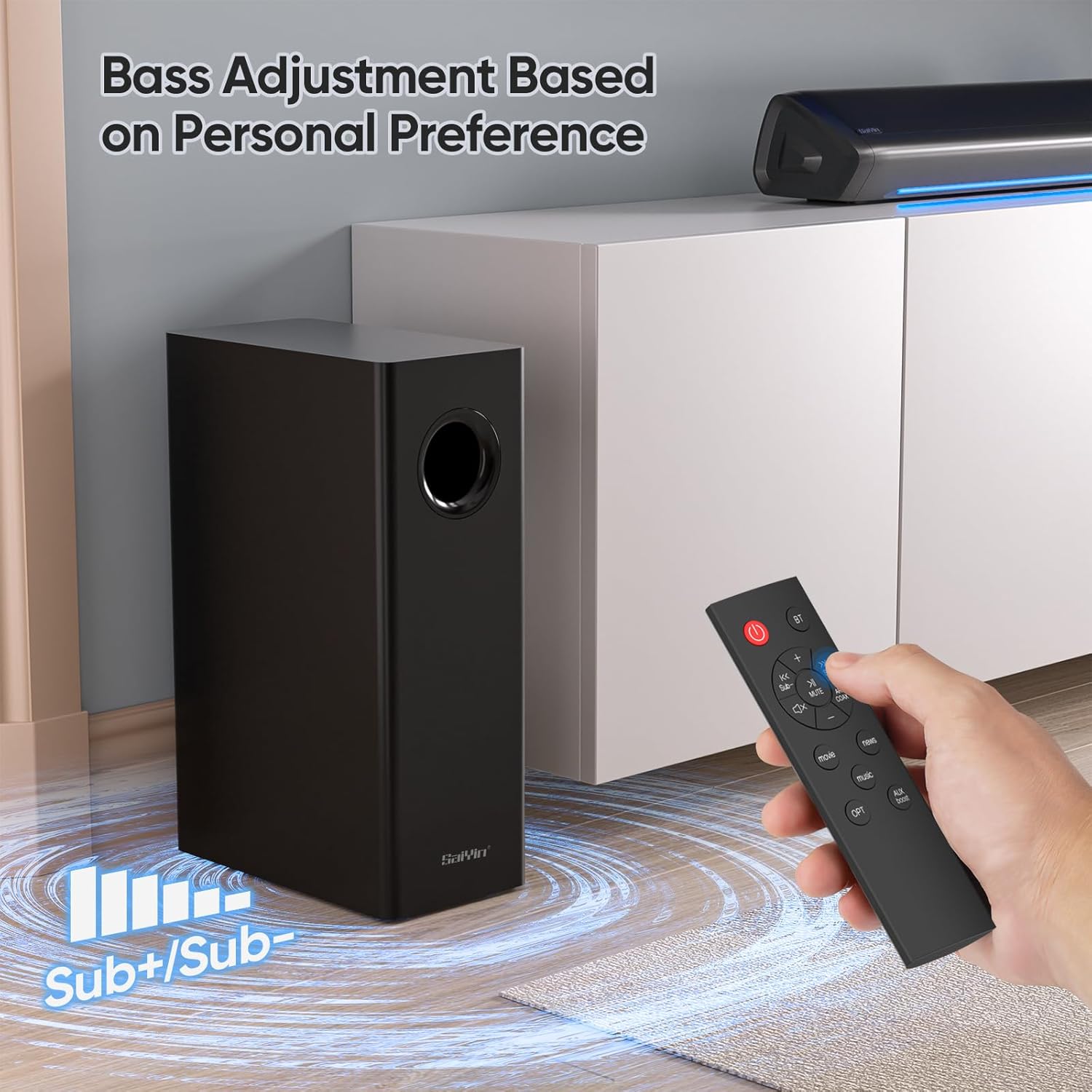
The external subwoofer provides deep, rich bass to enhance your audio experience. It connects wirelessly to the soundbar for flexible placement.
Remote Control
The remote control allows you to manage power, volume, input modes, and sound equalization settings conveniently from a distance.
Setup
Connecting the Soundbar and Subwoofer
The soundbar and subwoofer are designed to connect automatically when both are powered on. Ensure both units are plugged into a power source.
Connecting to Your TV
The Saiyin soundbar offers multiple connection options to suit your TV and preferences.
Optical Connection (Recommended for best audio quality)
- Connect one end of the optical cable to the OPTICAL OUT port on your TV.
- Connect the other end to the OPTICAL IN port on the soundbar.
- Select "Optical" input on the soundbar using the remote or soundbar controls. The indicator light will turn purple.
AUX Connection
- Connect one end of the 3.5mm AUX cable to the AUX OUT port on your TV or audio source.
- Connect the other end to the AUX IN port on the soundbar.
- Select "AUX" input on the soundbar. The indicator light will turn green.
Bluetooth Connection
- Power on the soundbar.
- Press the Bluetooth button on the remote or soundbar. The indicator light will turn blue and flash, indicating pairing mode.
- On your device (smartphone, tablet, PC), enable Bluetooth and search for "Saiyin Soundbar".
- Select the soundbar from the list to pair. Once connected, the blue light will stop flashing.

Powering On
Connect the power adapter to the soundbar and then to a wall outlet. Press the power button on the soundbar or remote to turn the unit on.
Operating
Input Mode Selection
The soundbar features different indicator light colors for each input mode, allowing for quick identification:
- Optical: Purple light
- Bluetooth: Blue light
- AUX: Green light

Volume Control
Adjust the master volume using the Volume Up/Down buttons on the remote control or the integrated controls on the soundbar.
Bass Adjustment
Use the dedicated bass control buttons on the remote to increase or decrease the subwoofer's output, allowing you to customize the bass level to your personal preference.
Sound Modes (EQ)
The soundbar offers three equalizer modes optimized for different content types:
- Movie Mode: Enhances cinematic sound effects and dialogue for an immersive viewing experience.
- Music Mode: Provides balanced audio for music playback, ensuring clear highs and rich lows.
- News Mode: Optimizes voice clarity, making dialogue in news broadcasts and talk shows easier to understand.

Fire TV Compatibility
The Saiyin soundbar is compatible with Fire TV remote controls, allowing you to control both your TV and soundbar with a single remote for simplified operation.

Maintenance
Care and Cleaning
- Disconnect the power cord before cleaning.
- Use a soft, dry cloth to clean the surfaces of the soundbar and subwoofer.
- Do not use liquid cleaners or aerosol cleaners, as they may damage the finish or internal components.
- Keep the ventilation openings clear of dust and debris to ensure proper airflow.
Troubleshooting
Common Issues and Solutions
| Problem | Possible Cause | Solution |
|---|---|---|
| No Power | Power cord not connected or outlet not working. | Ensure power cord is securely plugged into the soundbar and a working electrical outlet. Try a different outlet. |
| No Sound | Incorrect input mode selected. | Select the correct input mode (Optical, Bluetooth, AUX) matching your connection using the remote or soundbar controls. |
| No Sound | TV audio output settings incorrect. | Check your TV's audio settings to ensure external speakers are selected and the correct audio output format (e.g., PCM for optical) is chosen. |
| Bluetooth Pairing Fails | Soundbar not in pairing mode or device too far. | Ensure the soundbar is in Bluetooth pairing mode (blue light flashing). Move your device closer to the soundbar (within 10 meters). |
| Distorted Sound | Volume too high or audio source issue. | Lower the volume on both the soundbar and the audio source. Test with a different audio source to rule out source issues. |
Specifications
Technical Specifications
- Model Name: Sound bar DS6345S
- Model Number: Sound bar DS6345H
- Dimensions (Soundbar): Approximately 17 inches (43.2 cm)
- Dimensions (Subwoofer): Approximately 7.8 x 4.7 x 16 inches (19.8 x 11.9 x 40.6 cm)
- Connectivity Technology: Auxiliary, Bluetooth
- Audio Output Mode: Surround
- Special Features: Bluetooth
- Compatible Devices: TVs, PCs, Projectors, Smartphones, Tablets, MP3 Players, Fire TV, and similar streaming devices
- Controller Type: Remote Control
- Color: Black
- Manufacturer: Saiyin Electronic Co., Ltd
Warranty and Support
Warranty Information
Saiyin products are designed for reliability and performance. For specific warranty details and terms, please refer to the warranty card included with your product or visit the official Saiyin website for the most up-to-date information.
Customer Support
If you encounter any issues or have questions not covered in this manual, please contact Saiyin customer support for assistance. Our team is ready to help you.
- Website: Please refer to product packaging or official Saiyin website.
- Email: Please refer to product packaging or official Saiyin website.
- Phone: Please refer to product packaging or official Saiyin website.


