
1. Introduction
This manual provides detailed instructions for the assembly, operation, and maintenance of your Lufeiya LFY-JC3D55 White Computer Desk. Please read this manual thoroughly before beginning assembly or use to ensure proper setup and to maximize the lifespan of your product. Keep this manual for future reference.
2. Safety Information
WARNING: Failure to follow these safety instructions may result in injury or damage to the product.
- This desk is designed for home office use and has a weight limit of 14 kg (30.9 pounds). It is not intended for heavy-duty or industrial use.
- Always ensure that the desk is properly assembled and stable before use.
- Do not place objects on the desk that exceed its weight limit.
- Keep small parts and packaging materials away from children to prevent choking hazards.
- Use the desk on a level surface to prevent tipping.
3. Package Contents
Before assembly, verify that all components are present and undamaged. If any parts are missing or damaged, please contact customer support.
- Desktop panels
- Metal frame components
- 3 Fabric File Drawers
- Hardware pack (screws, bolts, adjustable leg pads)
- Instruction manual

Figure 3.1: Product Dimensions. This diagram illustrates the overall dimensions of the desk and its components, including the desktop length (54.6 inches), width (19.7 inches), and height (29.5 inches), as well as the dimensions of the integrated storage unit and fabric drawers.
4. Setup and Assembly
Assembly of the Lufeiya Computer Desk is designed to be straightforward. A detailed instruction manual and all necessary tools are provided. No additional tools are required.
- Unpack all components and lay them out on a clean, soft surface to prevent scratches.
- Follow the step-by-step instructions in the included assembly guide. Ensure all screws and bolts are tightened securely.
- The storage unit can be installed on either the left or right side of the desk to suit your preference and room layout.
- Attach the adjustable leg pads to the bottom of the desk legs. These pads help ensure stability on uneven floors and protect your flooring from scratches.

Figure 4.1: Reversible Storage Shelf. This image demonstrates how the integrated storage unit can be configured on either the left or right side of the desk during assembly, offering flexibility in layout.

Figure 4.2: Assembled Desk with Fabric Drawers. A top-down view of the assembled Lufeiya computer desk, showcasing the spacious white desktop, the integrated storage unit with three fabric drawers, and ample space for computer equipment and accessories.
5. Operating and Usage
The Lufeiya Computer Desk is designed for efficient and comfortable use in a home office or bedroom setting.
- Spacious Workstation: The 55-inch desktop provides ample space for a computer, monitor, keyboard, and other office essentials.
- Fabric File Drawers: The three fabric drawers offer versatile storage. The bottom drawer is adjustable to accommodate legal size or letter size files. The two smaller drawers are suitable for office supplies, notebooks, and personal items.
- Reversible Design: The integrated storage cabinet can be positioned on either side of the desk, allowing for flexible placement within your room.
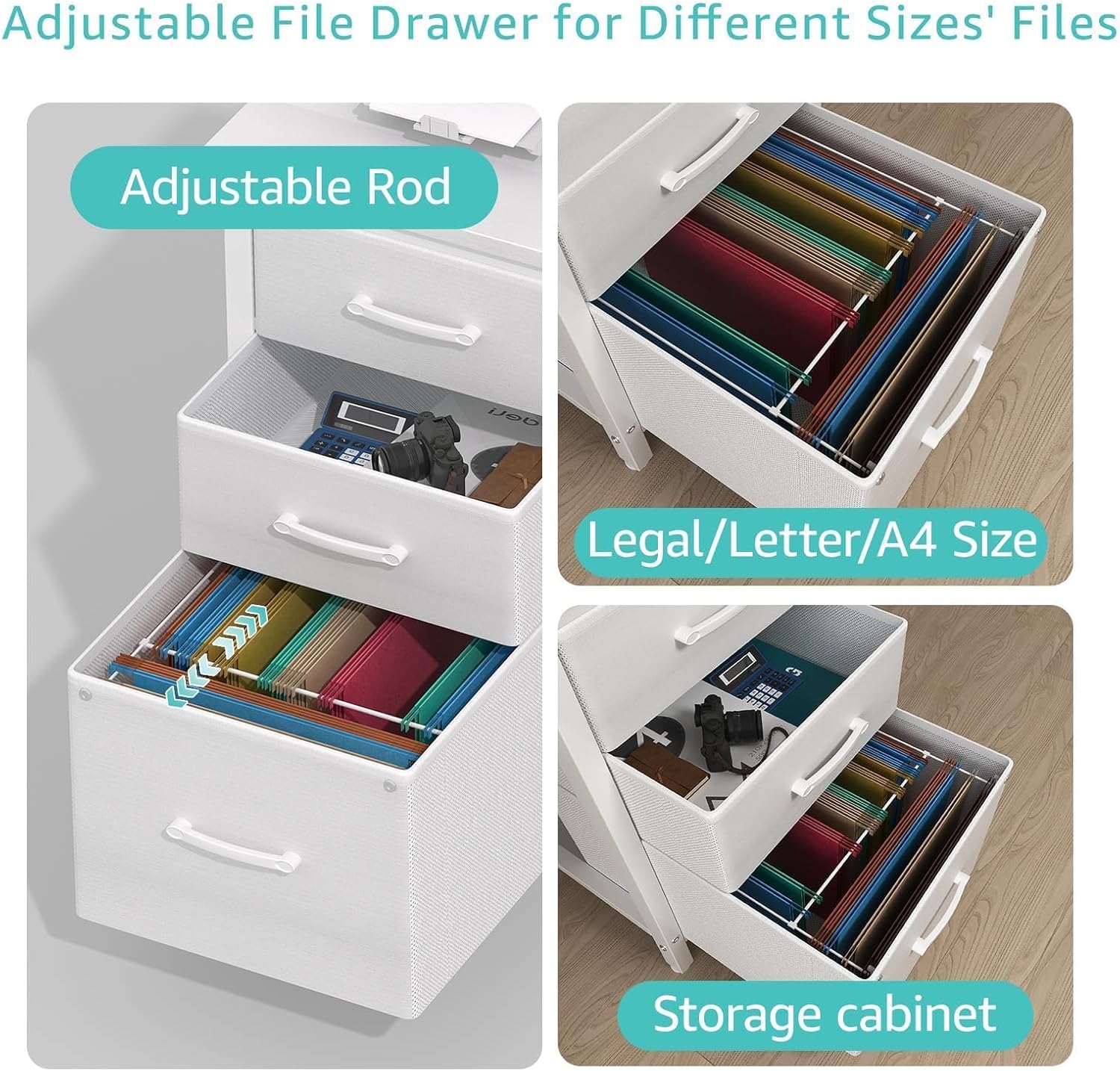
Figure 5.1: Adjustable File Drawer. This close-up image highlights the adjustable rod within the bottom fabric drawer, demonstrating its capability to hold legal, letter, or A4 size files, ensuring organized document storage.

Figure 5.2: 3-Tier Fabric Drawers. An illustration showing the three fabric drawers, emphasizing their spacious design for organizing various items such as books, wallets, files, and laptops, contributing to a tidy workspace.
6. Maintenance
Proper care will help maintain the appearance and functionality of your desk.
- Cleaning: Wipe the desk surface with a soft, damp cloth. Avoid harsh chemicals or abrasive cleaners that could damage the finish.
- Waterproof Surface: The desk features a scratch-resistant, anti-collision, and waterproof P2 Particle wood board surface. While resistant to spills, it is recommended to wipe up liquids promptly.
- Stability Check: Periodically check all screws and connections to ensure they remain tight. Retighten if necessary.
- Fabric Drawers: The fabric drawers can be spot cleaned with a mild detergent and damp cloth. Allow to air dry completely.

Figure 6.1: Desk Features. This image highlights key features: the waterproof desktop surface for easy cleaning, the heavy-duty metal design for enhanced structural integrity, and the adjustable leg pads for stability on uneven floors.
7. Troubleshooting
If you encounter any issues with your desk, please refer to the following common solutions:
- Desk is wobbly: Ensure all screws are securely tightened. Check that the desk is on a level surface and adjust the leg pads as needed.
- Parts missing during assembly: Double-check the package contents against the provided list. If parts are genuinely missing, contact customer support.
- Drawers do not slide smoothly: Ensure the drawer fabric is properly aligned within the frame. Check for any obstructions.
8. Specifications
| Feature | Specification |
|---|---|
| Brand | Lufeiya |
| Model Number | LFY-JC3D55-White |
| Color | White |
| Product Dimensions (L x W x H) | 138.43 x 50.04 x 74.93 cm (54.6 x 19.7 x 29.5 inches) |
| Item Weight | 14.02 kg (30.9 lbs) |
| Material | Engineered Wood, Metal |
| Desk Design | Computer Desk with Storage |
| Special Features | Compact, Reversible Storage, Fabric File Drawers, Adjustable Leg Pads, Waterproof Surface |
| Assembly Required | Yes (approx. 20 minutes) |
9. Warranty and Support
Lufeiya provides professional customer support and efficient replacement services for its products.
- Quality Issues: If you experience any quality issues with your desk, please contact our customer service team promptly.
- Contact Information: Refer to the product packaging or the retailer's website for specific customer support contact details.


