
1. Introduction
Thank you for choosing the Sunforce 90007 Outdoor Solar Color Changing LED String Lights. This product is designed to provide versatile and energy-efficient outdoor lighting. Powered by solar energy, these lights feature color-changing modes and are controlled via a remote, making them suitable for various outdoor settings. This manual provides essential information for the safe and effective installation, operation, and maintenance of your lighting set.
2. Safety Information
Please read all instructions carefully before installation and use. Retain this manual for future reference.
- Outdoor Use Only: This product is designed for outdoor use and is weather-resistant.
- Solar Panel Placement: Ensure the solar panel is placed in an area that receives direct sunlight for at least 6-8 hours daily to ensure optimal charging.
- Battery Safety: The product contains lithium-ion rechargeable batteries. Do not attempt to replace batteries with non-approved types. Do not expose batteries to extreme heat or fire.
- Installation: Mount the solar panel and string lights securely to prevent damage from wind or other environmental factors.
- Cleaning: Use a soft, damp cloth to clean the solar panel and light bulbs. Avoid abrasive cleaners.
- Children and Pets: Keep packaging materials and small components away from children and pets.
3. Package Contents
Verify that all components are present in your package:
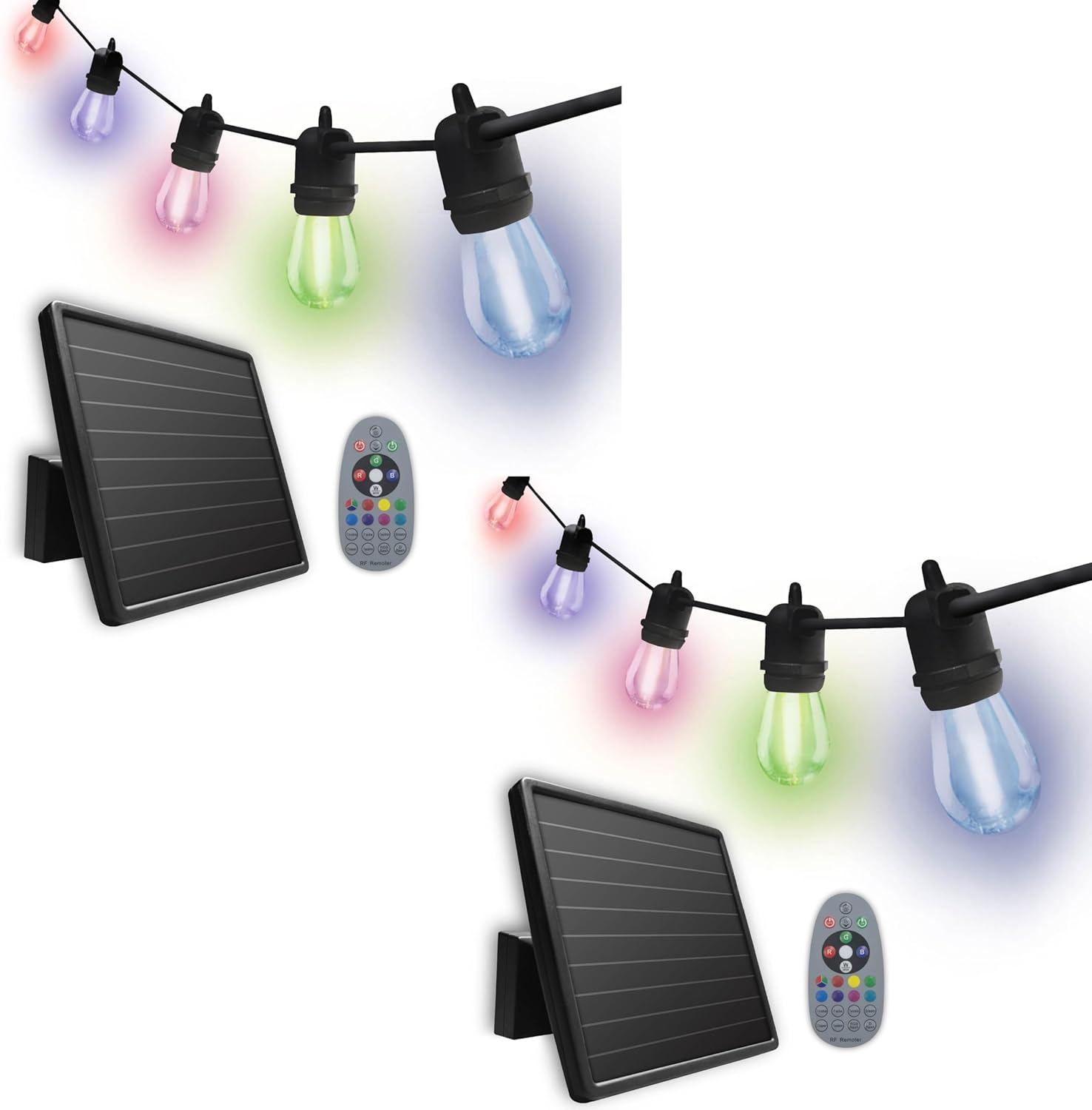
- 2 x 12 LED Color Changing Solar String Lights (each with 12 LED bulbs)
- 2 x Amorphous Solar Panels (one per light string)
- 4 x Lithium-ion Rechargeable Batteries (3.7 V, 2000 mAh, two per light string, pre-installed)
- 2 x Mounting Brackets (one per solar panel)
- 2 x Ground Stakes (one per solar panel)
- 2 x Control Remotes (one per light string)
- Mounting Hardware (screws, anchors)

4. Setup and Installation
Follow these steps to install your solar string lights:
- Choose a Location: Select an outdoor area for the solar panel that receives at least 6-8 hours of direct sunlight daily. Avoid shaded areas.
- Mount the Solar Panel:
- Ground Stake Installation: Attach the ground stake to the mounting bracket and firmly insert it into the ground in your chosen sunny location.
- Wall Mount Installation: Use the provided mounting hardware (screws and anchors) to secure the mounting bracket to a wall or fence. Adjust the angle of the solar panel to maximize sun exposure.
- Position the String Lights: Drape the string lights in your desired location, such as along a patio, deck, pergola, or gazebo. Ensure the cable length of 30ft (9.14m) is sufficient and the bulb spacing of 2ft (60.9cm) is appropriate for your aesthetic.
- Connect the Solar Panel: Ensure the string lights are securely connected to the solar panel.
- Initial Charge: Allow the solar panel to charge the batteries for a full day (6-8 hours) in direct sunlight before first use. The lights will automatically activate at dusk once sufficiently charged.


5. Operating Instructions
Your Sunforce solar string lights offer both automatic dusk-to-dawn activation and remote control functionality.
5.1 Automatic Dusk-to-Dawn Operation
Once the solar panel has charged sufficiently, the lights will automatically turn on at dusk and turn off at dawn. Ensure the solar panel is clean and unobstructed for optimal performance.

5.2 Remote Control Functions
Use the provided remote control to manually operate the lights and select various color-changing modes and effects.
- Power Button: Turns the lights ON or OFF.
- Color Selection: Choose from a variety of static colors.
- Mode Selection: Cycle through different light effects (e.g., fade, jump, flash).
- Brightness Adjustment: Increase or decrease the light intensity.
6. Maintenance
Regular maintenance ensures optimal performance and longevity of your solar string lights.
- Solar Panel Cleaning: Periodically wipe the solar panel with a soft, damp cloth to remove dust, dirt, and debris. A clean panel ensures efficient charging.
- Bulb Replacement: The 12 LED bulbs are replaceable. If a bulb fails, carefully unscrew it and replace it with a compatible LED bulb.
- Battery Care: The lithium-ion batteries are designed for long life. If the lights' performance significantly degrades over time, the batteries may need replacement. Contact Sunforce customer support for compatible replacement batteries.
- General Inspection: Regularly check the wiring and connections for any signs of wear or damage. Ensure all mounting hardware remains secure.
7. Troubleshooting
If you experience issues with your solar string lights, refer to the following common problems and solutions:
| Problem | Possible Cause | Solution |
|---|---|---|
| Lights do not turn on at night. |
|
|
| Lights are dim or only stay on for a short period. |
|
|
| Remote control is not working. |
|
|
8. Specifications
| Feature | Detail |
|---|---|
| Model Number | 90007 |
| Light Source | 12 LED Color Changing Bulbs per string |
| Power Source | Solar Powered |
| Solar Panel Type | Amorphous |
| Battery Type | Lithium-ion (3.7 V, 2000 mAh) |
| Cable Length | 30 ft. (9.14 m) |
| Bulb Spacing | 2 ft. (60.9 cm) |
| Special Features | Color Changing, Water Resistant, Dusk-to-Dawn, Remote Control |
| Indoor/Outdoor Usage | Outdoor |
| Material | Plastic |
| Voltage | 3.7 Volts |
| Wattage | 2 watts |
| Item Weight | 10.63 pounds (total package) |
| Product Dimensions | 11 x 13 x 17 inches (package) |
9. Warranty and Support
Warranty: This Sunforce product comes with a 1-year limited warranty from the date of purchase. This warranty covers defects in materials and workmanship under normal use. It does not cover damage caused by misuse, accident, unauthorized modification, or improper installation.
Customer Support: For technical assistance, warranty claims, or to inquire about replacement parts, please contact Sunforce customer support. Refer to the product packaging or the official Sunforce website for the most current contact information.
Please have your model number (90007) and proof of purchase ready when contacting support.