
Sogledwow LT-GL-C-012WL
Sogledwow GLEDOPTO ESP32 WLED Controller Instruction Manual
Model: LT-GL-C-012WL
Introduction
This manual provides detailed instructions for the installation, operation, and maintenance of your Sogledwow GLEDOPTO ESP32 WLED Controller. This device is designed for controlling dynamic RGB IC lighting, offering versatile control options via WiFi and the WLED app. Its IP65 waterproof rating makes it suitable for both indoor and outdoor applications.
Package Contents
Verify that all items are present in the package:
- 1 x IP65 Waterproof WLED Controller
- 1 x User Manual
- 1 x Packaging Box

Image: Contents of the product package.
Setup
1. Wiring Instructions
Proper wiring is crucial for safe and effective operation. Refer to the diagram below for correct input and output connections.
- Input: Connect the power supply (DC 5V-24V) to the input wires. Typically, red is V+ and black is V-.
- Output: Connect the digital addressable LED strip to the output wires. Typically, brown is V+, yellow/green is Data, and blue is GND.
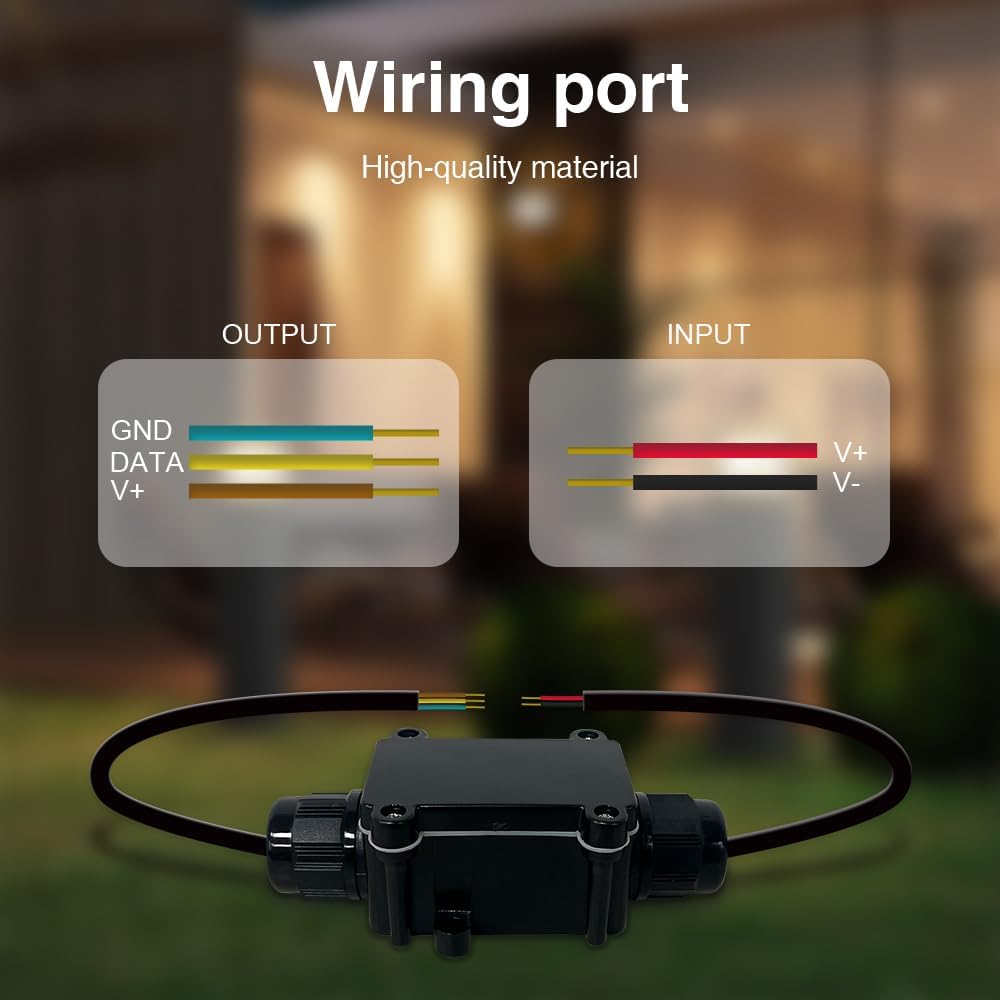
Image: Detailed wiring port diagram for input and output connections.
Note: Ensure the power supply voltage matches the requirements of your LED strip and the controller (DC 5V-24V). Incorrect wiring can damage the device or LED strip.
2. Initial App Connection (WLED App)
The controller uses the WLED app for configuration and control. Follow these steps to connect your device:
- Power on the GLEDOPTO ESP32 WLED Controller.
- On your mobile device, open your Wi-Fi settings.
- Search for and connect to the Wi-Fi hotspot named "WLED-AP".
- Open the WLED app on your mobile device.
- In the WLED app, navigate to "Config" then "WiFi Setup".
- Select your home Wi-Fi network (SSID) from the list and enter its password.
- Click "Save & Connect". The controller will restart and connect to your home Wi-Fi network.
- Ensure your mobile device is also connected to the same home Wi-Fi network.
- Open the WLED app again. Click the "+" icon to discover and add your controller.
For a visual guide on the app connection process, please refer to the official product video below:
Video: Detailed guide on connecting the ESP32 WLED Controller to the WLED app and setting up Wi-Fi.
Operating Instructions
1. WLED App Control
The WLED app provides comprehensive control over your LED lighting. Key features include:
- Color Adjustment: Use the color wheel to select static colors.
- Dynamic Effects: Choose from over 100 pre-programmed special effects to create various lighting moods.
- Segmented Control: Adjust the color and effects of individual segments of your LED strip independently.
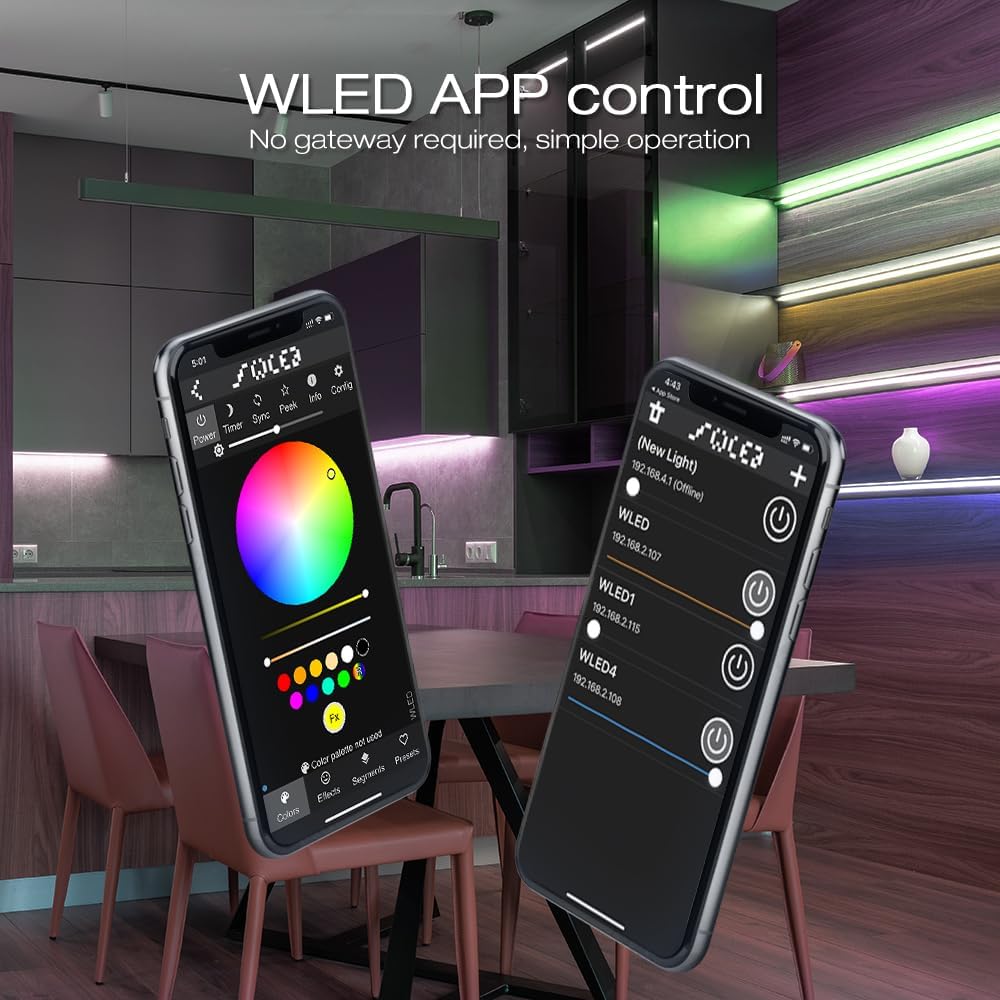
Image: WLED app interface demonstrating color selection.

Image: WLED app interface displaying various lighting effects.

Image: Illustration of segmented color control on an LED strip.
2. Button Functions
The controller features a physical button for basic operations:
- Short press: Power on/off.
- Long press for 1 second: Switch colors.
- Long press for 10 seconds: Reset the WLED controller and activate the WLED-AP hotspot for initial setup or re-configuration.

Image: Button functions and location on the controller.
Maintenance
The GLEDOPTO ESP32 WLED Controller has an IP65 waterproof rating, ensuring stable operation in various environmental conditions, including outdoor use. This rating protects against dust ingress and low-pressure water jets from any direction. However, it is important to note that the device is not designed for submersion in water.

Image: The controller demonstrating its IP65 waterproof capability under simulated rain.
Troubleshooting
- Incorrect Colors: If the colors displayed on your LED strip do not match the app's selection (e.g., red appears green), you may need to adjust the color order in the WLED app.
- Go to "Config" > "LED Preferences".
- Under "Hardware setup", locate "Color Order".
- Experiment with different color orders (e.g., GRB, RGB, BRG) until the colors match correctly.
- Ensure the "Length" setting matches the number of ICs (lamp beads) on your LED strip.
- Click "Save".
- Connection Issues: If the controller fails to connect to your Wi-Fi or the app, try the following:
- Ensure your mobile device is connected to the same Wi-Fi network as the controller.
- Verify the Wi-Fi password entered during setup is correct.
- Perform a factory reset by long-pressing the physical button for 10 seconds. This will reactivate the "WLED-AP" hotspot, allowing you to re-configure the Wi-Fi settings.
- Check that the controller is within range of your Wi-Fi router.
- LED Strip Not Lighting Up:
- Verify all wiring connections are secure and correct (V+, Data, GND).
- Ensure the power supply is providing the correct voltage (5V-24V) and sufficient current for your LED strip.
- Check the LED Preferences in the WLED app to ensure the correct LED type and length are configured.
Specifications
Detailed technical specifications for the GLEDOPTO ESP32 WLED Controller:
| Feature | Specification |
|---|---|
| Model No. | GL-C-012WL |
| Input Voltage | DC 5V-24V |
| Wireless Communication | WiFi |
| Input Current | 10A Max |
| Waterproof Rating | IP65 |
| Wire Size | 300mm |
| Net Weight (N.W.) | 132.3g |
| Gross Weight (G.W.) | 176.5g |
| Working Temperature | -20~45°C |
| Controller Size | 16x38x151mm |
| Brand | Sogledwow |
| Indoor/Outdoor Usage | Indoor, Outdoor |
| Special Feature | Adjustable, Color Changing, Waterproof |
| Light Source Type | LED |
| Power Source | Power Supply |
| Light Color | Multicolor |
| Material | Plastic |
| Control Method | App |

Image: Product parameter table.
Warranty and Support
For warranty information and technical support, please contact the manufacturer, Sogledwow, directly through their official channels or the retailer where the product was purchased. Keep your purchase receipt as proof of purchase.
Manufacturer: Sogledwow
For additional resources and community support related to WLED, visit the official WLED project website.
Ask a question about this manual
Ask about setup, troubleshooting, compatibility, parts, safety, or missing instructions. Manuals+ will review the question and use this page’s manual context to help answer it.