
1. Introduction
Thank you for purchasing the GRV E26 A60 9W Smart LED Light Bulb. This manual provides essential information for the safe and efficient use of your new smart bulb and its 2.4GHz remote control. Please read these instructions carefully before installation and operation, and retain them for future reference.
2. Product Overview
Key Features:
- Smart LED Bulb with Remote: Equipped with a high-sensitivity 2.4GHz remote control for easy operation.
- Dimmable and Adjustable Color Temperature: Brightness adjustable from 1% to 100%. Color temperature adjustable from 3000K (warm white) to 6500K (cool white).
- Light Memory Function: Remembers the last lighting setting.
- 1-Hour Timed Shutdown: Convenient timer function.
- High CRI 80+: Ensures vivid and natural color rendering.
- Energy Saving: 9W LED equivalent to 60W-80W incandescent lamp, providing 800 lumens.
- Flicker-Free: Designed to reduce eye fatigue.
What's in the Box:
- GRV E26 A60 9W Smart LED Light Bulb
- 2.4GHz Remote Control (2 AAA batteries not included)

Image: The GRV E26 A60 9W Smart LED Light Bulb, a standalone view.

Image: The GRV A60 LED Light Bulb showing its dimensions (2.36in width, 4.42in height) and key features like dimmable, 9 Watts, 30000H long life, 3000K-6500K color temperature, 830 lumens, 100-245V wide voltage, APP control, and remote control.
3. Safety Information
- Ensure power is OFF before installing or removing the bulb.
- Do not use with standard dimmers; use only the provided remote control or compatible app for dimming.
- Suitable for indoor use only.
- Do not disassemble the bulb.
- Keep the remote control away from water and extreme temperatures.
4. Setup and Installation
Bulb Installation:
- Ensure the power to the light fixture is turned off at the switch.
- Carefully screw the GRV Smart LED Light Bulb into a standard E26 socket. Do not overtighten.
- Turn on the power to the light fixture. The bulb should light up.

Image: A hand carefully screwing the GRV smart light bulb into a light fixture, demonstrating easy installation.
Remote Control Setup:
- Open the battery compartment on the back of the remote control.
- Insert two AAA batteries, ensuring correct polarity (+/-).
- Close the battery compartment. The remote is now ready for use.
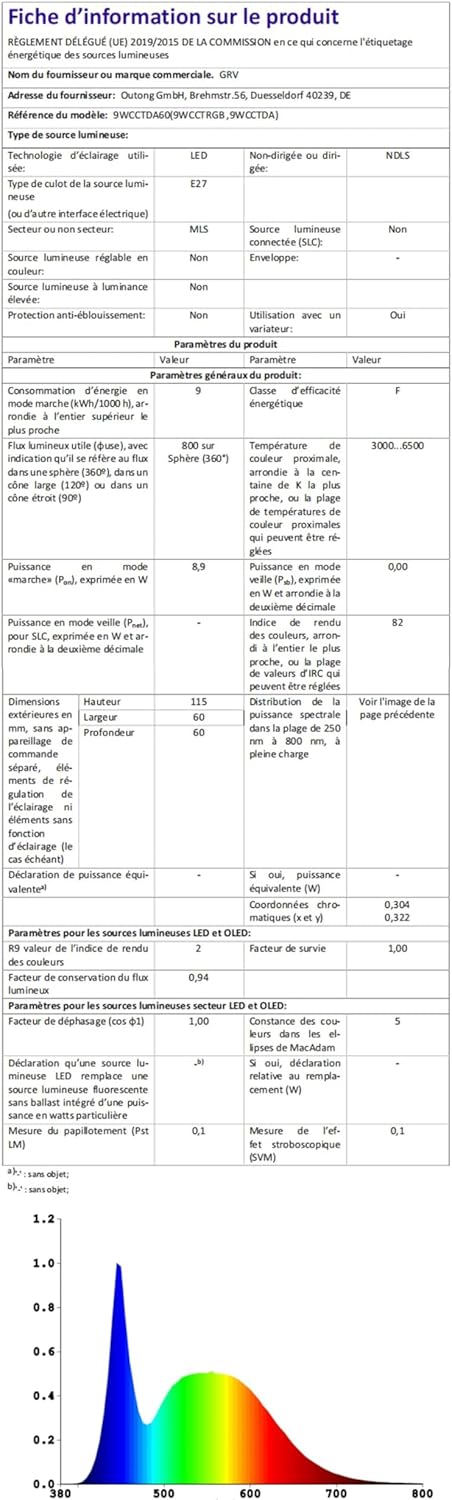
Image: The GRV 2.4GHz remote control, displaying its battery compartment for AAA batteries.
Video: This video demonstrates the easy installation of the GRV smart bulb and various lighting scenarios, showcasing its dimmable and color-changing capabilities in different home settings.
5. Operating Instructions
Remote Control Functions:
The 2.4GHz remote control allows you to manage your GRV Smart LED Light Bulb from up to 20 meters away. Familiarize yourself with the buttons:

Image: Detailed layout of the portable remote control, indicating functions for each button: Indicator Light, 1 Hour Timing, On/Off, Brightness Increase/Decrease, Decrease to 3000K, Increase to 6000K, Natural Light Mode (4500K 100% brightness), 3 CCT Switch (3000K/4500K/6000K), Night Light Mode (50% brightness 3000K), Working Mode (50% brightness 6000K), and Reading Mode (50% brightness 4000K).
- On/Off Button: Press to turn the bulb on or off.
- Brightness Adjustment (+/-): Increase or decrease brightness from 1% to 100%.
- Color Temperature Adjustment (K buttons): Adjust color temperature between 3000K (warm white) and 6500K (cool white). Specific buttons for 3000K, 4500K, and 6000K are available.
- 1H Timer Button: Activates a 1-hour countdown, after which the light will automatically turn off.
- Pre-set Modes: Buttons for Natural Light Mode (4500K, 100% brightness), Night Light Mode (50% brightness, 3000K), Working Mode (50% brightness, 6000K), and Reading Mode (50% brightness, 4000K).

Image: Illustration showing the bulb's 1%-100% brightness dimmable range and tunable white color temperature from 3000K to 6500K.

Image: A bedroom scene demonstrating the 1-hour timer function, where the light automatically turns off after one hour.
Light Memory Function:
The bulb will automatically remember the last brightness and color temperature setting when turned off and on again, whether via the remote or a wall switch.
6. Maintenance
- Ensure the bulb is cool and power is off before cleaning.
- Wipe the bulb with a soft, dry cloth. Do not use liquid cleaners or abrasive materials.
- Replace remote control batteries when needed (use AAA batteries).
7. Troubleshooting
| Problem | Possible Cause | Solution |
|---|---|---|
| Bulb does not light up. | No power to the fixture; bulb not screwed in properly; bulb is faulty. | Check power supply and wall switch. Ensure bulb is securely screwed into the socket. Test bulb in another working fixture. |
| Remote control not working. | Batteries are dead or incorrectly inserted; remote is out of range; interference. | Replace AAA batteries, ensuring correct polarity. Move closer to the bulb (within 20 meters). Reduce potential interference from other 2.4GHz devices. |
| Bulb flickers or changes color unexpectedly. | Incompatible dimmer switch; electrical interference. | Ensure the bulb is not connected to a standard dimmer switch. If using a standard switch, ensure it is fully on. Check for other electrical devices causing interference. |
8. Specifications
| Specification | Detail |
|---|---|
| Brand | GRV |
| Model Name | E26-9WCCT001 |
| Light Type | LED |
| Wattage | 9 Watts |
| Incandescent Equivalent | 60-80 Watts |
| Brightness | 800 Lumens (White Brightness: 830 Lumens) |
| Color Temperature | 3000K - 6500K |
| Bulb Base | E26 |
| Bulb Shape Size | A19 |
| Voltage | 100-240 Volts AC (50-60 Hz) |
| Control Method | Remote (2.4GHz), App (if applicable, though not explicitly detailed in product info for this model) |
| Color Rendering Index (CRI) | 80+ |
| Beam Angle | 270 Degrees |
| Light Source Operating Life | 30000 Hours |
| Material Type | Plastic |
| Item Weight | 0.14 Kilograms |
| Item Dimensions (W x H) | 2.36"W x 4.42"H |
| Certifications | CE, FCC |
| Specific Uses | Indoor use only |

Image: An illustration demonstrating the impact of Color Rendering Index (CRI) on perceived color, emphasizing the GRV bulb's CRI 80+ for vivid and distinguishable colors.

Image: A visual comparison illustrating the GRV bulb's flicker-free performance versus other bulbs that exhibit frequent flicker, promoting eye comfort.
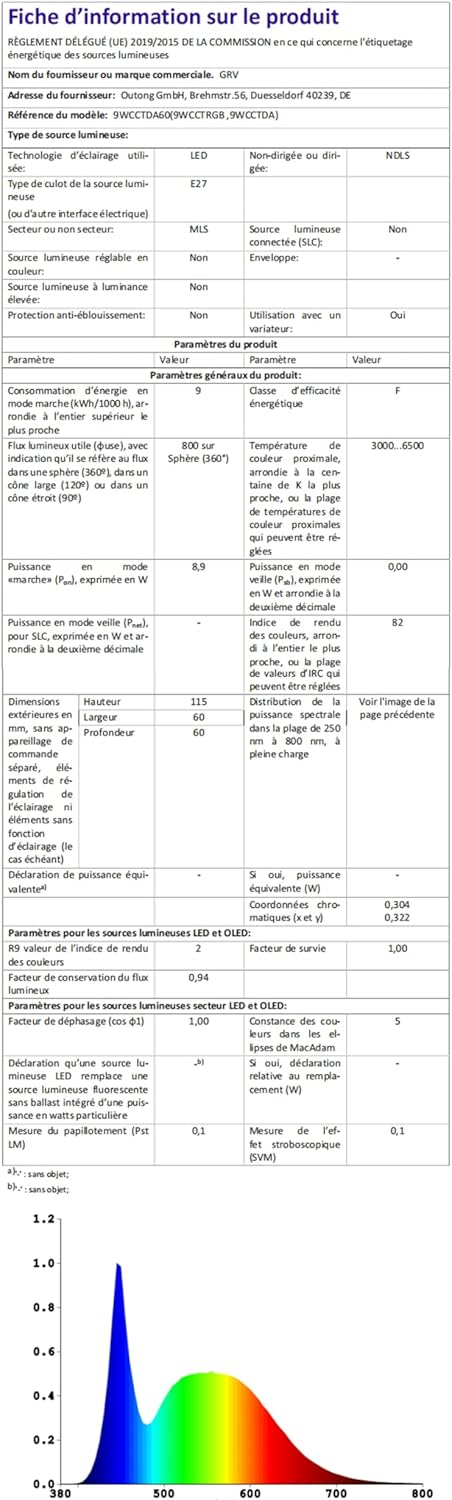
Image: An exterior view of a house illuminated by GRV color-changing bulbs, showcasing the dimmable warm to cool white capabilities for various ambiance settings.
9. Warranty and Support
For warranty information or technical support, please refer to the product packaging or contact GRV customer service directly. Contact details can typically be found on the manufacturer's website or through your retailer.
Online Resources:
- For more information about GRV products, visit the GRV Store on Amazon.
- For EU energy label information, refer to EPREL Database (QR/2121953).

