
1. Introduction
This manual provides detailed instructions for the assembly, operation, and maintenance of your Anman Racing Simulator Cockpit Monitor Stand. This product is designed to enhance your racing simulation experience by providing a stable and adjustable platform for multiple monitors. Please read this manual thoroughly before installation and use.
Important Note: This monitor stand is designed exclusively for use with Anman aluminum professional racing cockpits. It does not include the racing cockpit, wheel, or pedals.

Image 1.1: The Anman Racing Simulator Cockpit Monitor Stand shown integrated with a racing cockpit and a single monitor. This image illustrates the product's intended use as a display stand for simulator cockpits.
2. Package Contents
Please verify that all components are present before beginning assembly. If any parts are missing or damaged, contact Anman customer support.
- Main aluminum profile uprights
- Horizontal monitor mounting bars
- VESA mounting plates
- Connection brackets and fasteners
- Assembly tools (if included)
3. Setup and Assembly
Follow these steps carefully to assemble your monitor stand. It is recommended to have a second person assist with the installation of monitors.
3.1 Compatibility Check
Ensure your monitors are compatible with the VESA mounting patterns and size range supported by this stand.
- Supported Monitor Sizes: 27-32 inches
- Supported VESA Patterns: 300x200mm, 300x100mm, 200x200mm, 200x150mm, 200x100mm, 150x150mm, 100x100mm, 75x75mm, 50x50mm

Image 3.1: A diagram illustrating the wide compatibility of the monitor stand, detailing supported VESA mounting patterns and indicating support for screen sizes ranging from 24 to 32 inches.
3.2 Attaching to Anman Racing Cockpit
The monitor stand is designed to mount directly onto your Anman aluminum professional racing cockpit. Secure the main uprights of the monitor stand to the designated attachment points on your cockpit using the provided fasteners. Ensure all connections are tight and stable.

Image 3.2: The Anman Racing Simulator Cockpit Monitor Stand shown without monitors, highlighting its structural components and how it integrates with the racing cockpit frame.
3.3 Monitor Installation
- Attach the VESA mounting plates to the back of each monitor using the appropriate screws for your monitor's VESA pattern.
- Slide the VESA mounting plates with attached monitors onto the horizontal monitor mounting bars.
- Secure the monitors in place using the locking mechanisms or screws provided. Ensure monitors are centered and level.

Image 3.3: Detailed views of the monitor stand's components, including flexible adjustment points and secure fastening mechanisms, crucial for monitor installation.
4. Operating and Adjustments
The Anman Monitor Stand offers various adjustment options to optimize your viewing experience.
4.1 Height Adjustment
The main uprights allow for vertical adjustment of the entire monitor array. Loosen the securing bolts on the uprights, adjust to the desired height, and then firmly retighten the bolts to ensure stability.
4.2 Monitor Angle Adjustment
Each monitor can be individually adjusted for tilt and swivel. Loosen the bolts on the VESA mounting plates to adjust the angle, then retighten to secure. The horizontal bars also allow for angle adjustment of the side monitors to create a curved setup for immersive triple-screen viewing.
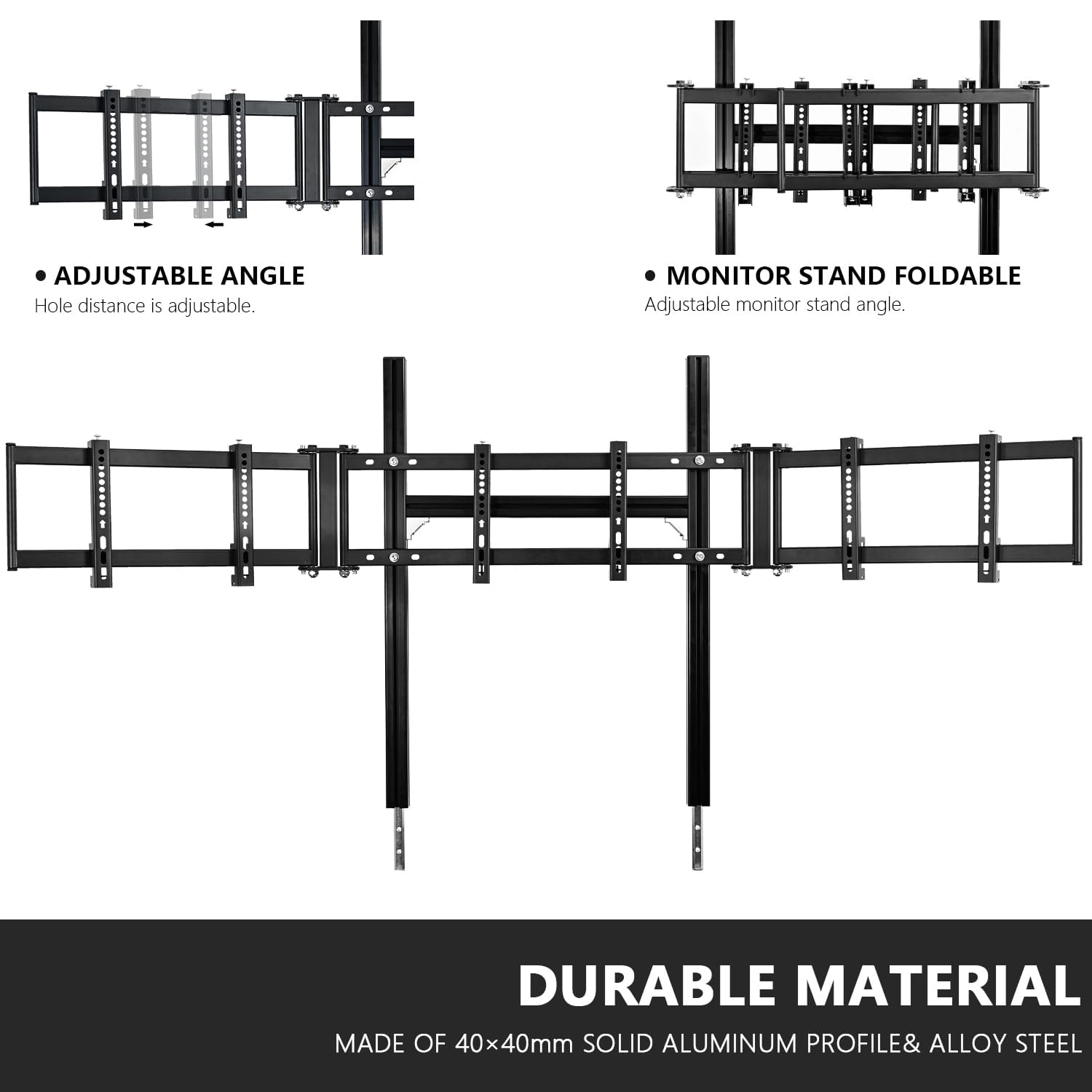
Image 4.1: This image highlights the adjustable angle feature, allowing for customization of monitor positioning, and also illustrates the foldable design of the monitor stand for potential storage or transport.
5. Maintenance
Regular maintenance ensures the longevity and optimal performance of your monitor stand.
- Cleaning: Wipe down the aluminum profiles with a soft, damp cloth. Avoid abrasive cleaners or solvents.
- Fastener Check: Periodically check all bolts and screws to ensure they remain tight. Loose fasteners can affect stability.
- Inspection: Inspect the aluminum profiles for any signs of damage or wear.
6. Troubleshooting
If you encounter issues with your monitor stand, refer to the following common solutions:
- Stand is unstable: Ensure all connection bolts, especially those attaching the stand to the cockpit and the monitor mounting bars, are securely tightened. Verify the cockpit itself is stable on a level surface.
- Monitors are not level: Loosen the VESA plate bolts slightly, adjust the monitor until level, and retighten. For triple monitor setups, ensure the horizontal bars are aligned.
- Monitor does not fit: Double-check your monitor's VESA pattern and size against the specifications in Section 3.1. Ensure you are using the correct screws for your monitor.
7. Specifications
| Feature | Detail |
|---|---|
| Model Number | tvstand |
| Product Dimensions (Overall) | 13.3 x 67 x 31.5 inches (L x W x H) |
| Item Weight | 28 pounds |
| Material | 40x40mm Solid Aluminum Profile & Alloy Steel |
| Supported Monitor Size | 27-32 inches |
| Supported VESA Patterns | 300x200mm, 300x100mm, 200x200mm, 200x150mm, 200x100mm, 150x150mm, 100x100mm, 75x75mm, 50x50mm |
| Monitor Capacity | Up to three screens |
| Compatibility | Only with Anman aluminum professional racing cockpits |

Image 7.1: A detailed diagram illustrating the product dimensions of the Anman Racing Simulator Cockpit Monitor Stand, including width and height measurements for the main and side monitor sections.
8. Warranty and Support
For warranty information or technical support, please refer to the documentation provided with your Anman Racing Simulator Cockpit or contact Anman customer service directly. Keep your purchase receipt for warranty claims.