
OFFSIR BT065
OFFSIR Sound Bar User Manual
Model: BT065
Introduction
Thank you for purchasing the OFFSIR Sound Bar. This manual provides important information regarding the setup, operation, and maintenance of your new sound bar. Please read this manual thoroughly before using the product to ensure proper functionality and to maximize your audio experience.
The OFFSIR Sound Bar (Model: BT065) is designed to enhance your audio experience for smart TVs, PCs, gaming consoles, projectors, and other devices. It features powerful sound output, multiple connectivity options, and various sound modes to suit your preferences.
What's in the Box
Please check the contents of your package. If any items are missing or damaged, please contact customer support.
- Sound Bar (1 unit)
- Remote Control (1 unit)
- Optical Audio Cable (1 unit)
- 3.5mm AUX Cable (1 unit)
- COAX Audio Cable (1 unit)
- Power Adapter (1 unit)
- User Manual (1 unit)
- Wall Mounting Kits (screws included)

Figure 1: Package Contents. All included accessories are shown.
Product Features
- Unmatched Audio Surround Sound: Features powerful 80W output, 2 high-power speakers, and 2 bass reflex ports for crisp treble, punchy bass, and clear vocals.
- Multiple Connectivity Options: Supports Bluetooth 5.0, COAX, HDMI (ARC), Optical, AUX, and USB Inputs for versatile connection to various devices.
- Different Sound Modes: Three EQ modes (Movie, Music, Dialog) are available via remote control to optimize audio for different content types.
- Ultra-Compact Size: 16-inch slim design allows for easy placement in front of your TV or wall mounting.
- Easy Setup: Simple installation for desktop placement or wall mounting with included kits.

Figure 2: OFFSIR Sound Bar and Remote Control.
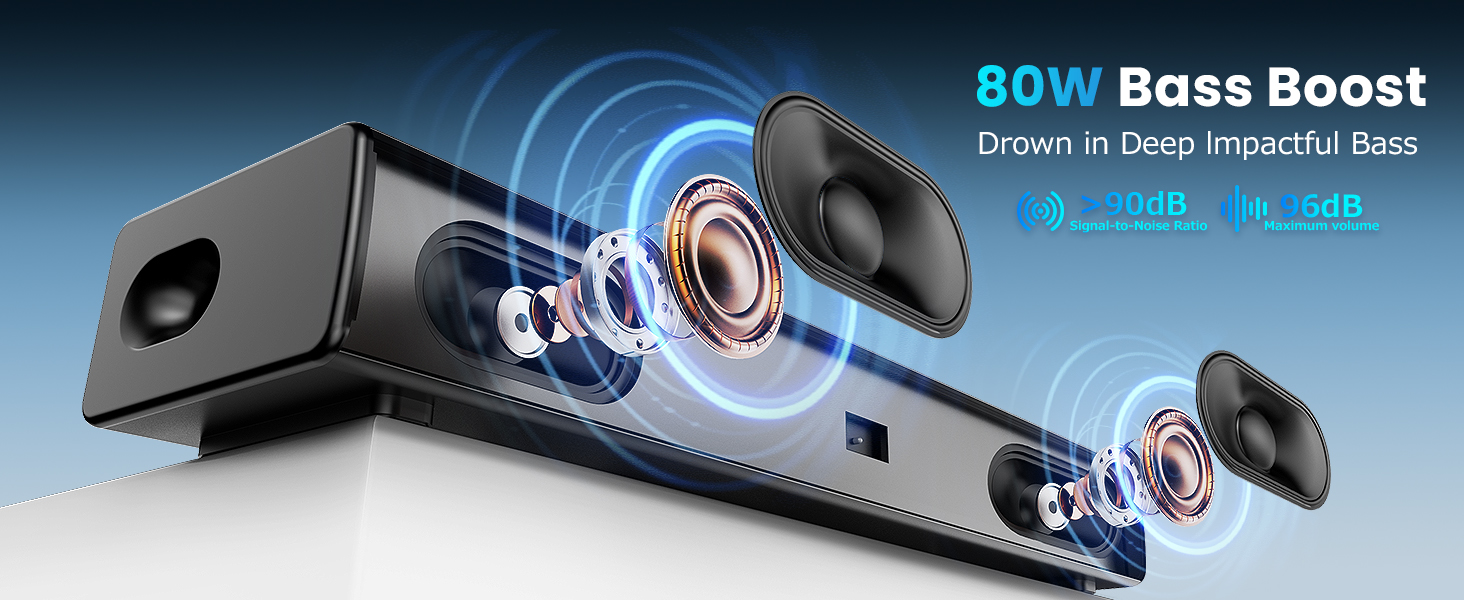
Figure 3: Internal Speaker Components and Bass Boost Design.
Setup
Placement Options
The sound bar offers flexible placement options to integrate seamlessly into your home entertainment setup.
- Desktop Placement: Place the sound bar directly on a flat surface in front of your TV. The anti-vibration feet prevent movement.
- Wall Mount: Use the included wall mounting kit for easy installation on a wall below your TV.

Figure 4: Desktop Placement.

Figure 5: Wall Mount Installation.
Connecting Your Sound Bar
The sound bar offers multiple ways to connect to your devices. Choose the connection method that best suits your equipment.
- HDMI ARC: For optimal audio quality and control, connect an HDMI cable from the sound bar's HDMI ARC port to your TV's HDMI ARC port.
- Optical: Connect an Optical audio cable from the sound bar's OPT port to your TV's Optical Digital Audio Out port.
- COAX: Connect a COAX audio cable from the sound bar's COAX port to your TV's Coaxial Digital Audio Out port.
- AUX: Use the 3.5mm AUX cable to connect the sound bar's AUX port to the headphone jack or audio output of your device.
- USB: Insert a USB drive into the USB port to play audio files directly from the drive.
- Bluetooth 5.0: For wireless connection, enable Bluetooth on your device and pair with "SOUNDBAR S2" (or similar name).

Figure 6: Sound Bar Rear Panel with Connectivity Options.

Figure 7: Wired and Wireless Connection Methods.
Operating Your Sound Bar
Controls
The sound bar can be controlled using either the buttons on the unit or the included remote control.
- On-Unit Buttons: Located on the top of the sound bar for basic functions like power, volume, and input mode selection.
- Remote Control: Provides full control over power, volume, input modes, and sound equalization modes.

Figure 8: Control Options (Buttons and Remote).
Sound Modes
Optimize your listening experience with the three available equalizer modes:
- Movie Mode: Enhances cinematic sound effects, making explosions and dialogue clearer.
- Music Mode: Provides a balanced audio profile for music playback, emphasizing clarity and bass.
- Dialog Mode: Boosts vocal frequencies for clearer speech, ideal for news or talk shows.
These modes can be selected using the remote control.

Figure 9: Equalizer Modes for Optimized Audio.
Video 1: Demonstrating the OFFSIR Sound Bar's features, including easy controls, immersive sound, and various connectivity options.
Maintenance
To ensure the longevity and optimal performance of your OFFSIR Sound Bar, please follow these maintenance guidelines:
- Cleaning: Use a soft, dry cloth to clean the surface of the sound bar. Do not use liquid cleaners or abrasive materials, as they may damage the finish.
- Placement: Avoid placing the sound bar in direct sunlight, near heat sources, or in areas with high humidity. Ensure adequate ventilation around the unit.
- Handling: Handle the sound bar with care. Avoid dropping it or subjecting it to strong impacts.
- Power: Disconnect the power adapter from the wall outlet if the sound bar will not be used for an extended period.
Troubleshooting
If you encounter any issues with your sound bar, please refer to the following common problems and solutions before contacting customer support.
| Problem | Possible Cause | Solution |
|---|---|---|
| No Sound |
|
|
| Bluetooth Pairing Issues |
|
|
| Remote Control Not Working |
|
|
Specifications
| Feature | Detail |
|---|---|
| Brand | OFFSIR |
| Model Name | soundbar (BT065) |
| Speaker Type | Soundbar |
| Mounting Type | Wall Mount, Desktop |
| Material | Metal |
| Color | Black |
| Product Dimensions | 4.5"D x 16"W x 2.5"H |
| Item Weight | 3.52 pounds |
| Speaker Maximum Output Power | 50 Watts (80W peak output mentioned in features) |
| Connectivity Technology | Bluetooth, Auxiliary, Optical, HDMI, Coaxial |
| Wireless Communication Technology | Bluetooth 5.0 |
| Audio Output Mode | Surround |
| Surround Sound Channel Configuration | 2.0 |
| Controller Type | Remote Control |
| Recommended Uses | For Surround Sound Systems, Televisions, Computers, Smartphones or Tablets |
| Compatible Devices | Projector, Laptop, Desktop, Television, Smartphone |
| Indoor/Outdoor Usage | Indoor |
Warranty and Support
The OFFSIR Sound Bar comes with a Lifetime Warranty, ensuring peace of mind regarding your purchase. For any warranty claims, technical support, or inquiries, please contact OFFSIR customer service through the retailer where you purchased the product or refer to the contact information provided in the product packaging.
Please retain your proof of purchase for warranty purposes.
Related documentsBT065


Ask a question about this manual
Ask about setup, troubleshooting, compatibility, parts, safety, or missing instructions. Manuals+ will review the question and use this page’s manual context to help answer it.