
Introduction
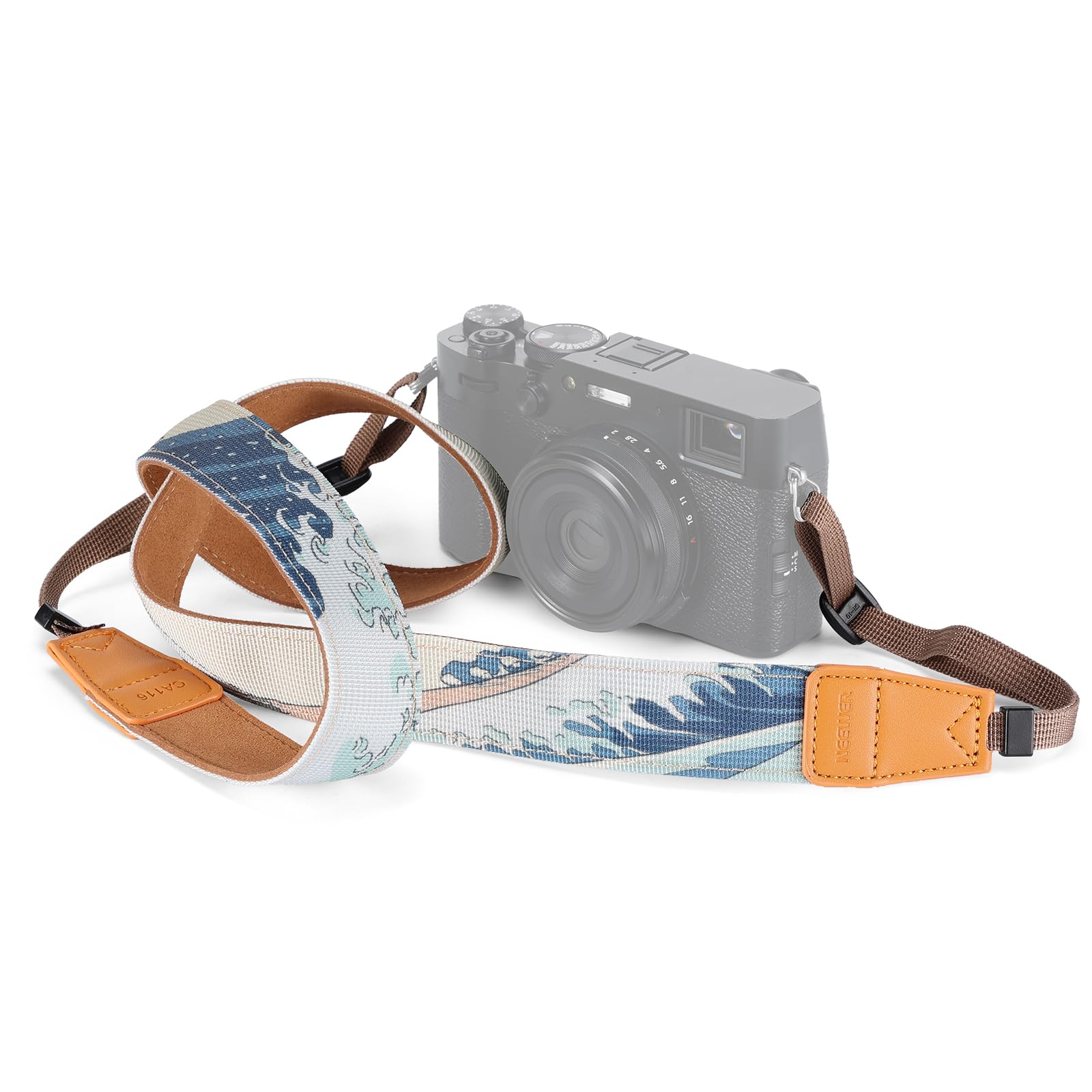
This manual provides essential information for the proper use and care of your NEEWER CA116 Camera Neck Strap. Designed for comfort and security, this adjustable strap features a durable woven fabric and a distinctive Japanese art pattern, suitable for various DSLR and mirrorless cameras.
Product Features
- Comfortable Design: The broad strap ensures comfort during extended photography sessions, reducing neck and shoulder strain.
- Universal Compatibility: Compatible with a wide range of DSLR and mirrorless cameras, including Fujifilm X100V/VI and Nikon Zf/Zfc, using handy fasteners for a secure fit.
- Durable Construction: Made from sturdy woven fabric to withstand daily use and provide long-lasting reliability.
- Adjustable Length: Easily customize the strap length (up to 57 inches / 146 cm) to suit your preference and ensure optimal camera positioning.
- Unique Aesthetic: Adorned with the iconic "The Great Wave off Kanagawa" art by Hokusai, adding a touch of elegance to your camera gear.
What's in the Box
- 1 x NEEWER CA116 Camera Shoulder Strap
Setup and Installation
Follow these steps to securely attach the camera neck strap to your camera.
- Locate the strap lugs or attachment points on your camera body. These are typically small metal loops on either side of the camera.
- Thread the thin end of the strap through one of the camera's strap lugs.
- Pass the thin strap end through the plastic buckle on the main strap, then loop it back through the buckle to secure it. Ensure the strap is threaded correctly to prevent slippage. Repeat for the other side of the camera.
- Pull firmly on both ends of the strap to ensure it is securely fastened and cannot easily detach from the camera.


Video Guide: Strap Attachment and Usage
Video: This official NEEWER video demonstrates the unboxing, attachment process, and various ways to wear the camera neck strap for optimal comfort and security.
Operating Instructions
The NEEWER CA116 strap offers versatile carrying options:
- Neck Strap: Wear the strap around your neck for hands-free carrying and quick access to your camera. Adjust the length so the camera rests comfortably at your chest or waist level.
- Shoulder Strap: Drape the strap over one shoulder, allowing the camera to hang at your side. This method provides easy access and can be comfortable for lighter cameras.
- Wrist Strap: For added security when actively shooting, you can wrap the strap around your wrist. This prevents accidental drops while maintaining flexibility.

Adjusting Strap Length
To adjust the strap length, manipulate the plastic buckles located on the thin ends of the strap. Slide the buckles to shorten or lengthen the strap until it reaches your desired fit. Ensure both sides are adjusted evenly for balanced weight distribution.

Maintenance
To ensure the longevity and appearance of your NEEWER CA116 Camera Neck Strap:
- Cleaning: Wipe the strap with a damp cloth and mild soap if it becomes dirty. Avoid harsh chemicals or abrasive cleaners.
- Drying: Allow the strap to air dry completely before reattaching it to your camera or storing it. Do not use direct heat.
- Storage: Store the strap in a cool, dry place away from direct sunlight when not in use.
- Inspection: Periodically inspect the strap, especially the attachment points and buckles, for any signs of wear, fraying, or damage. Replace the strap if any significant damage is observed to prevent accidental drops of your camera.
Troubleshooting
| Issue | Possible Cause | Solution |
|---|---|---|
| Strap feels uncomfortable or digs into neck/shoulder. | Incorrect length adjustment. | Adjust the strap length to ensure the camera rests at a comfortable height and the strap distributes weight evenly. |
| Strap feels loose or insecure. | Improper attachment to camera lugs or buckles not fully tightened. | Re-thread the strap through the camera lugs and buckles, ensuring they are securely fastened and tightened. Refer to the 'Setup and Installation' section. |
| Strap shows signs of wear or fraying. | Normal wear and tear or exposure to harsh conditions. | Discontinue use if significant damage is present. Consider replacing the strap to prevent camera damage. |
Specifications
| Feature | Detail |
|---|---|
| Item Type | Camera Shoulder Strap |
| Model | CA116 |
| Main Features | Japanese Art Pattern (The Great Wave off Kanagawa) |
| Main Material | Woven Fabric |
| Compatibility | DSLR/Mirrorless Cameras (e.g., Fujifilm X100V/VI, Nikon Zf/Zfc) |
| Application | Photography/Video Recording |
| Dimensions | 57 inches / 146 cm (Length) |
| Weight | 1.4 oz / 39 g |
| Color | Blue |
| Fastener Type | Hook |
| UPC | 191073104297 |
| Manufacturer Part Number | 10104774 |

Warranty and Support
This NEEWER product is covered by a 1-Year Manufacturer Warranty from the date of purchase. For warranty claims, technical support, or further inquiries, please contact NEEWER customer service or visit the official NEEWER website.
You can find more information and products from NEEWER by visiting their official store: NEEWER Store on Amazon.